
Managing Continuation Chains
Last updated on 2026-05-19
Overview
A tagged text block in Lucanet XBRL Tagger can span multiple sections of a document.
When a single XBRL tag covers text that is distributed across different pages or chapters, the individual text sections are linked in a continuation chain. Each section in the chain is referred to as a continuation item.
The Continuation administration allows you to view, reorder, and manage all continuation items belonging to a selected tag in one place.
This article contains the following sections:
Opening the 'Continuation Administration' Dialog
You have the following options for opening the Continuation administration dialog:
- Via the context menu: Right-click a tagged text block in the Tagging area and select Continuation administration from the context menu:
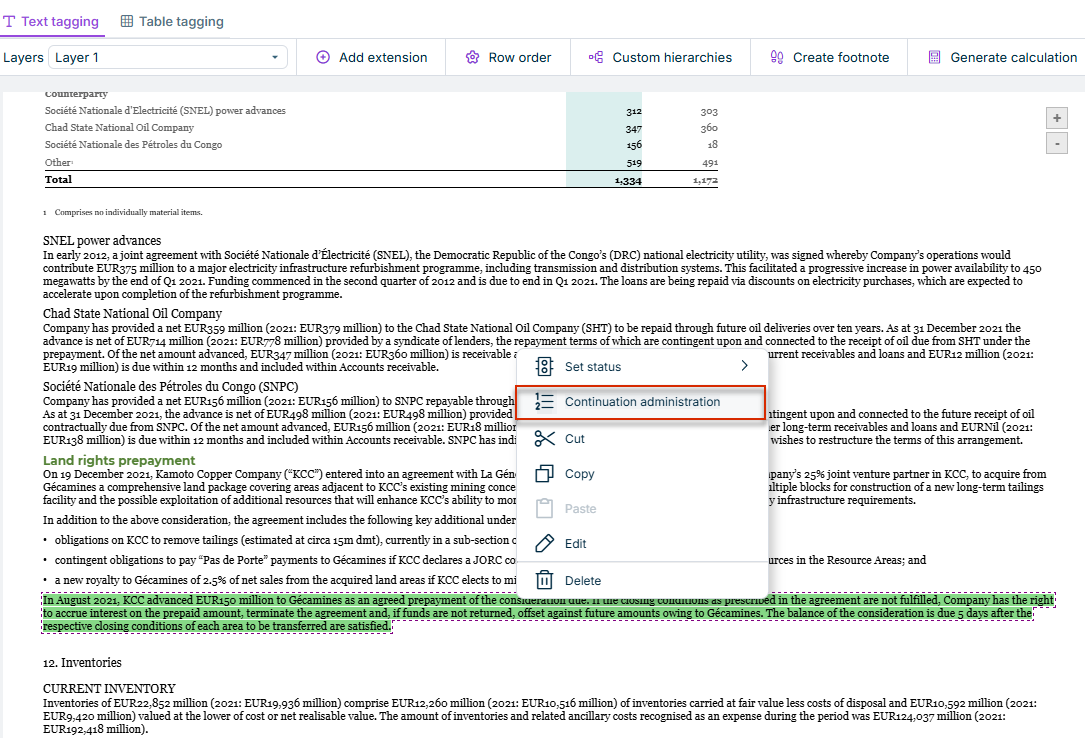
The menu item is disabled (grayed out) if the selected tag has no continuation chain, i.e., if it is a stand-alone tag without continuations.
- Via the command bar: Click the search icon in the top bar of the XBRL document workspace or press CTRL + SHIFT + P to open the command bar. Search for Continuation administration and select the command.
- Properties area: When you select a tagged text block in the Tagging area that is part of a continuation chain, the Continuation section is displayed in the Properties area:
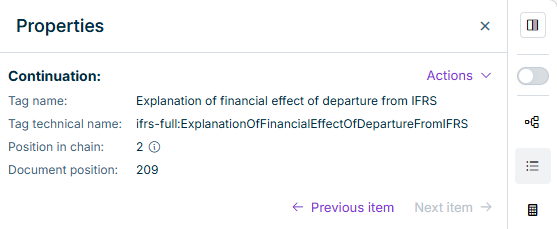
Structure of the 'Continuation Administration' Dialog
The Continuation administration dialog is displayed, for example, as follows:
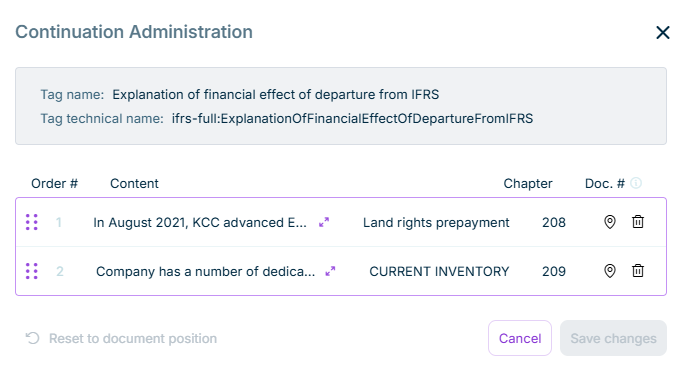
The following information is displayed in the Continuation administration dialog:
- Tag name: The human-readable name of the XBRL tag the continuation chain belongs to. All items in the chain share the same tag name.
- Tag technical name: The technical XBRL identifier of the tag (for example, ifrs-full:DisclosureOfBorrowingsExplanatory).
The table lists all continuation items in the continuation chain. The following columns are displayed for each item:
| Column | Description |
|---|---|
| Order # | The current position of the item in the continuation chain. |
| Content | A short preview of the text content (up to 120 characters). Click the double arrow to display the full text. |
| Chapter | The chapter in the source document that contains the current continuation item. |
| Doc. # | The position of the item in the source document (document position). Use this column to compare the custom order with the original document structure. |
Functions in the 'Continuation Administration' Dialog
The following functions are available in the Continuation administration dialog:
| Column | Description |
|---|---|
Change order |
Move rows by drag-and-drop to change the order. |
Show content |
Click the double arrow to display the full text. |
Navigate to item in document |
The document scrolls to the item and selects it in the Tagging area. |
Delete item |
Removes the item from the continuation chain. Note: The Delete button is disabled when only one item remains in the chain. The last remaining item contains the primary XBRL tag and cannot be deleted. |
Reset to document position
|
The position of the item in the source document (document position). Use this column to compare the custom order with the original document structure. |
| Save changes | Applies the changes. |


'Continuation' Area in the Properties
When you select a tagged text block in the Tagging area that is part of a continuation chain, the Continuation section is displayed in the Properties area. This section gives you a quick overview of the item's position in the chain, without having to open the full administration dialog.
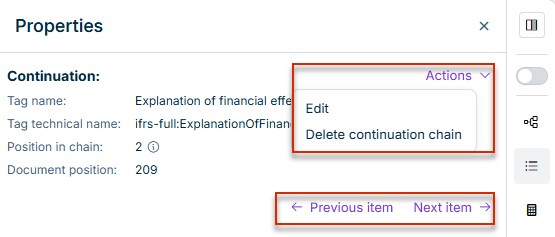
The following information is displayed for a continuation item in the Properties area:
| Property | Description |
|---|---|
| Tag name | The human-readable name of the XBRL tag. |
| Tag technical name | The technical XBRL identifier of the tag. |
| Member | The dimension member assigned to the item, if any. |
| Position in chain | The current position of the item within the continuation chain. |
| Document position | The position of the item in the source document. |
The following navigation and actions are also available in the Properties area:
- Actions menu:
- Edit: Opens the Continuation administration dialog for the entire chain.
- Delete continuation chain: Removes all continuation links in the chain after your confirm. Click Yes, delete to confirm the operation.
- Next item / Previous item: Navigates to the next or previous item of the chain in the document.