
Basic Data
Last updated on 2025-12-17
Overview
The assessment rate used (for trade tax purposes) can be selected and foreign branches assigned for corporations in the Basis data workspace. For partnership companies, this workspace also allows you to manage partners.
You can activate or deactivate all tax return forms in the Basis data workspace (see Form configuration section).
This article contains the following sections:
Navigation
The Basic data workspace is opened under Company | Basic data.
The Basis data workspace is displayed as follows, for example:
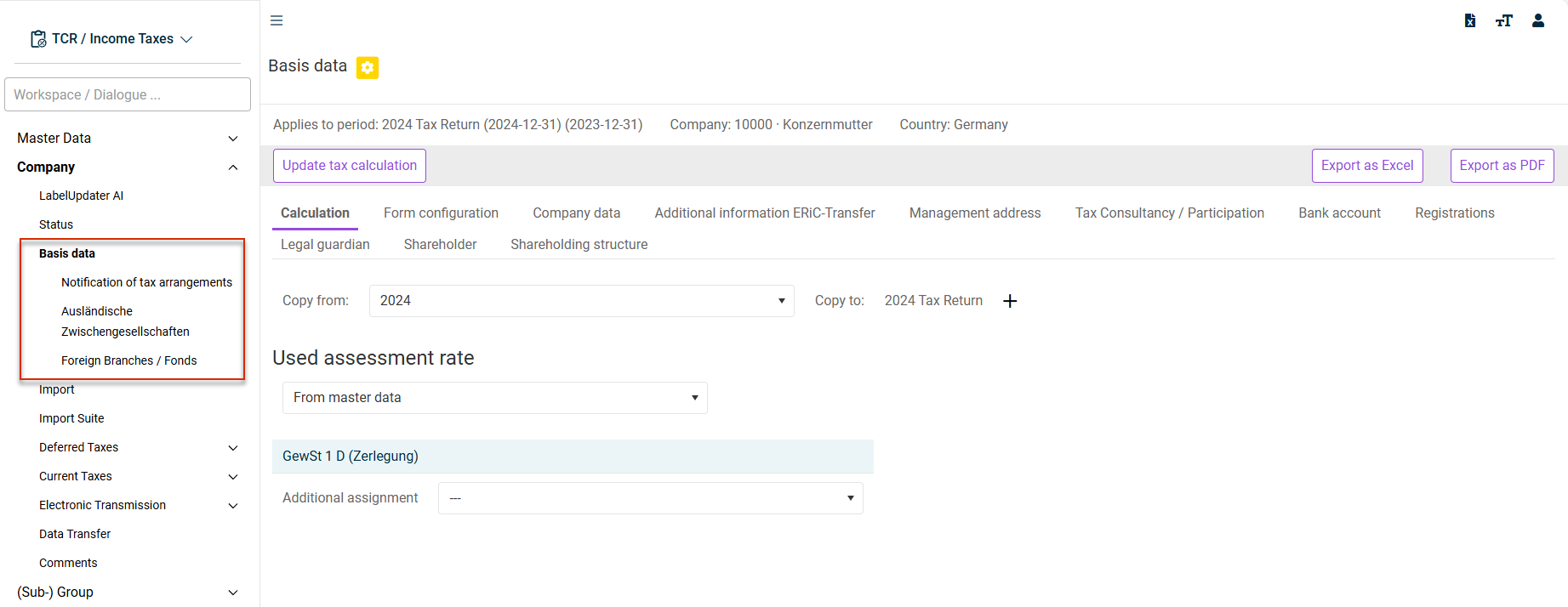
Tabs in the 'Basic Data' workspace
Various tabs are displayed in the Basis data workspace, depending on the selected company and the configured country. They are described in the following section.
The following tabs can be displayed in the Basis data workspace:
The following options are available on the Calculation tab:
Copy from: The basis data can also be copied from another period - provided the company in question was also created as a record in the source period.
Select the desired period from the Copy from drop-down list and then click + to copy the basic data from the set period.
Used assessment rate:
The following options are available:
- From master data (Company master data dialog)
- From apportionment of local tax base (GewSt 1D form dialog)
- Manual input (in the Basic data workspace)
Calculation type: The calculation type relates to the distribution of revenue. The participation deduction information (in %) is used as basis in the case of allocation by quota. Alternatively, an allocation not by quota can also be selected.
The Calculation type option is only available for partnership companies.
All tax return forms can be activated or deactivated on the Form configuration tab. The tab is displayed as soon as the workflow for processing the tax return (see Milestones & Status) has been started. The default settings of the form configuration are based on the legal form, type of tax payer, and tax liability of the company. Based on this information, the forms that typically need to be transmitted to the tax office in this configuration are preselected.
The tax return forms that are to be transmitted electronically on a regular basis for the company's income tax returns are preselected on the basis of this information.
The Form configuration tab is displayed for all periods from assessment period 2018 onwards. Exception: The unit is a special investment fund.
You can enter all master data of the company, such as the legal form key on the Company data tab. The tax rates are displayed among other things. If you want to specify different tax rates, select the Unit-specific tax rates check box and then edit the desired input fields.
Various settings and master data relating to the assessment return for partnership companies are entered on the ESt 1 B tab.
If necessary, enter additional information on the ERiC transfer here. The information is organized into the following tabs:
- Municiple trade tax
- Corporate income tax
- Local tax decomposition
- CIT decomposition
- KapEStA
- Revenue
You can enter the following information on the Management address tab:
- Management address
- Mailbox address
- Contact information
- Determination of tax residency (Place of domicile and management in the assessment period)
- Only for property communities: place of administration
- Address of the permanent establishment for the purposes of business tax return
Specify who participated in the preparation of the return on the Tax Consultancy / Participation tab.
The information is transmitted only if the Send contact details of tax consultancy option is selected under Additional information ERiC transfer.
The company's account information can be entered and edited on the Bank account tab.
The Registration drop-down list is used to specify whether a registration exists or not. If you select Yes, you can then specify the additional properties of the registration.
You must enter the entrepreneur, legal guardian, or managing director here. This information is relevant only for the purposes of the municiple trade tax return or the local tax segmentation up to and including assessment period 2020.
If necessary, enter the details of a common receiving agent appointed by all parties involved here.
You can enter and edit information about shareholders of partnership companies on the Annex FB tab. Additional information can be entered after creating a partner.
If not all partners have already been entered in the master data under Company, they can be subsequently entered in the Basis data workspace. Subsequent entries are necessary, for example, for the purposes of the electronic tax return.
For partnership companies, the parters created in the master data are displayed.
Sub-workspaces in the 'Basic data' workspace
Up to four sub-workspaces are displayed in the Basis data workspace depending on the selected company, its legal form, and the current assessment time of the period: