
Working with Duplicated ESG Reports
Last updated on 2025-12-17
Overview
When duplicating an ESG report, Lucanet ESG Reporting automatically copies key data and configurations from the source report, helping you save time and maintain consistency across reporting periods. This article explains what information is duplicated, how to work with duplicated content, and how to modify the report structure on duplicate reports.
This article contains the following sections:
Duplicating ESG Reports
As an ESG Administrator, you can duplicate a report with the pre-set configurations in the master data and ESRS or VSME questionnaire. The parameters of the duplicated report can be adjusted.
To duplicate an ESG report, proceed as follows:
Navigate to the ESG report on the Report overview tab and click the Duplicate report icon.
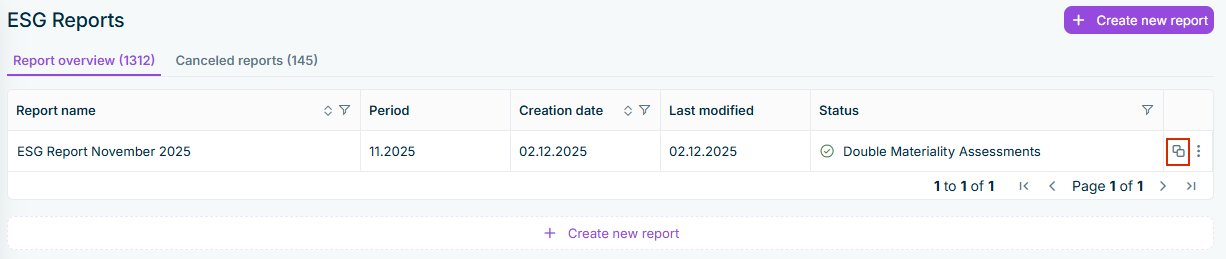
The duplicated report is automatically displayed in the Master Data step, regardless of the source report's status.
For the duplicated report:
- Enter the name and the period.
- The currency, report guideline, configurations for Double materiality assessment, EU Taxonomy, and the reporting entities assignment are automatically copied from the source report, but you can change the configurations for the duplicate as needed.
Continue configuring the duplicate report (see following sections).
Working with Duplicate Reports
Duplication Indicators
Data that has been duplicated from the source report displays a duplication indicator showing the name of the source report. These indicators appear in:
- Emissions Module: Next to duplicated footprints in each scope and category
- ESRS or VSME Questionnaire: Next to duplicated questionnaire answers
The indicator is displayed as follows, for example:
 Indicator for duplicated data
The duplication indicator is removed when:
- You modify any data in a duplicated emissions footprint
- You change any part of a duplicated questionnaire answer
- You edit values, selections, or text in duplicated content
Working with Duplicated Data
The following data are automatically copied when you duplicate a report.
Option
Description
User assignments
User assignments configured in the source report's Data Collection step are copied to the duplicate report, i.e. users assigned as editors or reviewers for specific sections and questions. The assignments are copied per reporting entity and per questionnaire element.
The duplicate report displays these assignments in edit mode by default, allowing you to:
- Review and adjust assignments as needed
- Add new users or remove existing ones
Double Materiality Assessment responses
If the source report includes a Double Materiality Assessment, the DMA responses from reporting entities are copied to the duplicate report.
Footprints in the Emissions Module
All footprints created in the source report's Emissions Module are copied to the duplicate report, including all original data, such as activity type and emission factor.
Answers in the ESRS or VSME questionnaire
Questionnaire answers from the source report are copied to the duplicate report only when both reports use the same guideline, i.e. if the original report is based on ESRS, but the duplicated report is based on the VSME guideline, the answers are not copied into the duplicated report.
If the guideline is not changed, the answers, such as text inputs or numerical values are copied into the duplicated report.
Handling Changes to Questionnaire Structure
If the questionnaire structure has changed between the source report and the duplicate report, e.g. because the template has been updated or the Questionnaire Builder has been modified, the data in the duplicated report are affected as follows:
- New questions in the source report: The questions contain no copied answers.
- Deleted questions in the source report: Deleted questions are not displayed anymore in the duplicate report. If a deleted question is added again later, the original input will reappear.
- Modified questions in the source report: Modified questions contain no copied answers if the question type or question text has changed.
Excluded Data in Duplicated Reports
When duplicating an ESG report, certain data are not copied to ensure data integrity and allow for a fresh start in the new reporting period. The following table explains what is excluded to plan your data collection process effectively:
Option
Description
Review and mark as completed statuses
- The review status of questions or sections marked as Reviewed by reviewers are reset in the duplicated report.
- The mark as completed statuses of questions marked as completed by data collectors are also reset.
EU Taxonomy data
EU Taxonomy data from the source report is not copied to the duplicate report, such as business activities and their configurations, or eligibility assessments or alignment assessments.
Notes and comments
Notes and comments created during the data collection and review process are not copied, e.g when submitting a report, or when approving or rejecting data.
Attachments
Attachments uploaded to questionnaire questions are not copied to the duplicated report.