
Connecting to a Lucanet CFP Data Source
Last updated on 2026-02-06
Overview
You can connect to a Lucanet CFP Data Source to pull in data from Lucanet Consolidation & Financial Planning into xP&A.
To connect to a Lucanet CFP Data Source, a connection between the xP&A solution and the Consolidation & Financial Planning solution needs to be established on the Lucanet CFO Solution Platform, first.
If you are a current user of Lucanet Consolidation & Financial Planning, the first administrator setting up xP&A will establish this connection on the Lucanet CFO Solution Platform.
It is not possible to establish a data connection to Consolidation & Financial Planning from within the xP&A solution. You can only create new data sources once a data connection is established. Please contact our customer support if you have any questions.
This article contains the following sections:
Connecting to a Lucanet CFP Data Source
Once a connection between xP&A and Consolidation & Financial Planning has been established by the first administrator (who is creating the connection), you can connect to a Lucanet CFP data source as follows:
- Open the Data workspace.
- Click + next to the Lucanet CFP data connection to add a new data source:
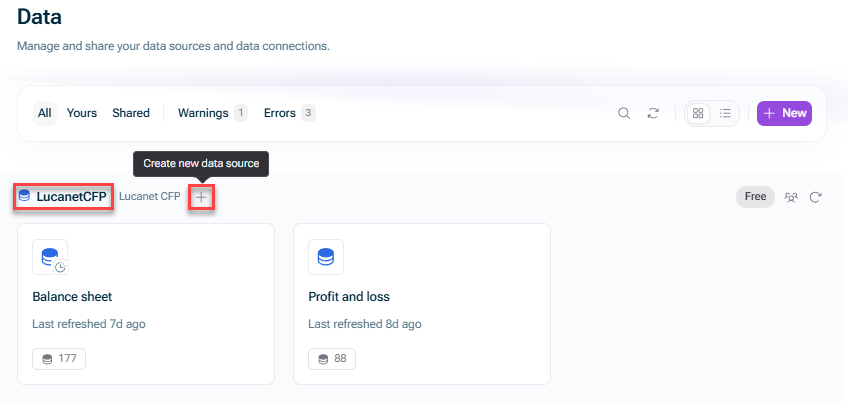
Creating a new CFP data source - In the New CFP Data Source dialog, choose the following:
- The ledger and the data level from Lucanet Consolidation & Financial Planning, from which you would like to transfer data
- The display currency and the date range for the data source:
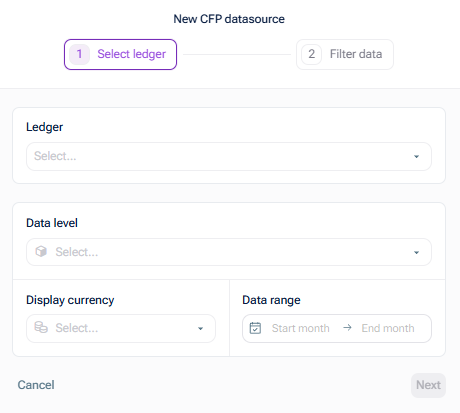
Select ledger
- Click Next. The Filter data step is displayed as follows:
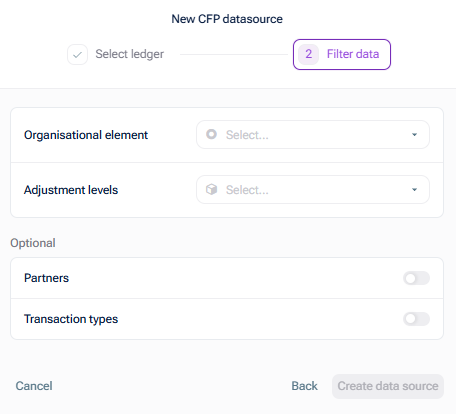
Filter data - Choose the method for importing organization elements. The following options are available:
- Single hierarchies, to import reporting entities and cost centers as a single hierarchical dimension.
This is the recommended option to import organization elements. - Multiple flat dimensions, to import reporting entities and cost centers as 2 independent flat dimensions.
This is the deprecated option to import organization elements. It still works but won't get any improvements in the future. We strongly recommend the Single hierarchies method.
- Single hierarchies, to import reporting entities and cost centers as a single hierarchical dimension.
- Choose the organization element and the adjustment level, and optionally the partner(s) and transaction type(s), which you would like to transfer with this data source from Lucanet Consolidation & Financial Planning.
- Click Create data source.