
Open Excel and go to File | Options.
Troubleshooting Guide for CFP Add-in for Excel 365
Last updated on 2026-04-17
Overview
This guide serves as a central resource for resolving issues you are facing with the CFP Add-in for Excel 365 efficiently.
Each entry includes the problem description, root cause, and the steps taken to fix it.
The page will be amended continuously to ensure fast, consistent problem-solving.
This article contains the following sections:
Lucanet Formulas Show the Prefix '_xldudf_' (e.g., "_xldudf_LN_VALUE")
Error Description
You work with the Lucanet.Excel Add-In and notice that your Lucanet formulas are displayed with the prefix _xldudf_, e.g. _xldudf_LN_VALUE instead of their expected format (LN.VALUE).
This indicates that Excel cannot recognize or resolve the custom Lucanet functions such as LN.VALUE(), LN.ATTRIBUTE(), and other LucaNet-specific formulas used to retrieve data from Consolidation & Financial Planning (CFP).
When Does the Error Occur?
The error typically occurs when two or more versions of the Lucanet.Excel-Add-In are installed and active simultaneously:
- Lucanet COM add-in - the legacy Lucanet.Excel-Add-In
- CFP Add-in for Excel 365 – the modern Office 365-compatible version
Since both add-ins use identical formula names, Excel cannot determine which version to execute, causing the function resolution to fail.
How to Fix the Error
To fix the error, you must deactivate the legacy Lucanet.Excel-Add-In while keeping the CFP Add-in for Excel 365 active. Proceed as follows:
In the Excel Options dialog, navigate to Add-ins in the left sidebar.
From the Manage dropdown list, select COM Add-ins and click Go.
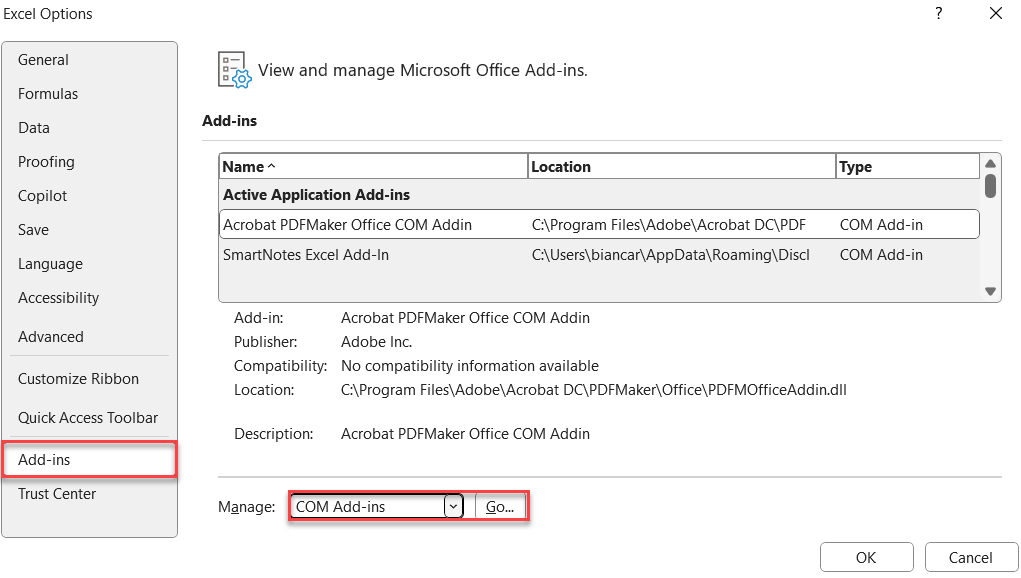
Deactivate the check box for Lucanet COM add-in.
Click OK.
Close and restart Excel.
After restart, Lucanet formulas will display correctly without the _xldudf_ prefix. The COM add-in remains on your system and can be reactivated if needed.
What Does This Mean for My Workbooks?
Deactivating the COM add-in does not delete it from your system - it simply prevents it from loading when Excel starts. You can reactivate it later if needed by following the same steps and activating the check box again.
The CFP Add-in for Excel 365 will handle all Lucanet formula calculations going forward.
Automatic Formula Calculation Disrupts the Workflow
Error Description
When multiple users edit the same Excel file simultaneously using the CFP Add-In for Excel 365, Excel recalculates the formulas very frequently. This slows down MS Excel and affects workflow.
This behavior depends heavily on the file size, the number of formulas, and the number of users editing the file.
When Does the Error Occur?
This error typically occurs when:
- Multiple users are working on the same workbook at the same time, and
- MS Excel automatically recalculates the formulas (the default behavior for automatic calculation).
How to Fix the Error
To fix the error, every user working on the file must disable automatic formula calculation in MS Excel.
To do this, open the Formulas tab in the Excel ribbon and select the Manual option under Calculation Options:
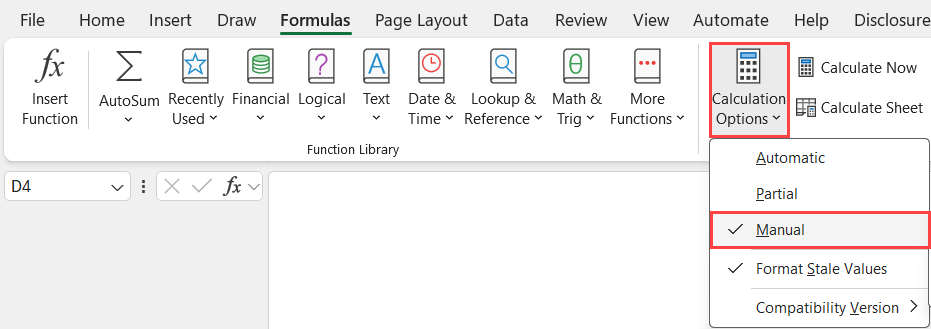
You can then manually calculate formulas using the Refresh button on the Lucanet CFP Add-in tab in the Excel ribbon.