
C1 – NMCE Safe Harbour
Last updated on 2026-04-16
Overview
The NMCE Safe Harbour workspace provides a simplified compliance option for Non-Material Constituent Entities (NMCEs). This safe harbour allows qualifying constituent entities (CEs) to be excluded from the full-scope Pillar 2 calculations (C2 – CE Calculations, C4 – Jurisdictional Blending, and C5 – Top-up Tax Allocation) while still being included in the initial safe harbour assessments.
The NMCE Safe Harbour includes three alternative tests that CEs can use to demonstrate they meet materiality thresholds:
- Simplified ETR Test
- De Minimis Test
- Routine Profits Test
If at least one of these tests is successful, the CE may elect to use the NMCE Safe Harbour through the Entity Election EE-1 in the Entity Election and General Information workspace.
Notes:
- Only CEs that have been marked as non-material in the master data can use the NMCE Safe Harbour. You can verify this setting by navigating to Master Data | Companies and selecting your CE to access the detail view. On the International Tax tab, check whether AMAE50 is activated.
- Stateless CEs are not eligible for the NMCE Safe Harbour and are excluded from these calculations. You can verify this setting by navigating to Master Data | Companies and selecting your CE to access the detail view. On the International Tax tab, check whether AMAE52 is activated.
- For the NMCE Safe Harbour, CE data is aggregated on a jurisdictional level based on the reporting dimension type selected for blending.
This article contains the following sections:
Navigation
The C1 – NMCE Safe Harbour workspace can be found at Pillar 2 | Calculation | C1 – NMCE Safe Harbour and is displayed as follows:
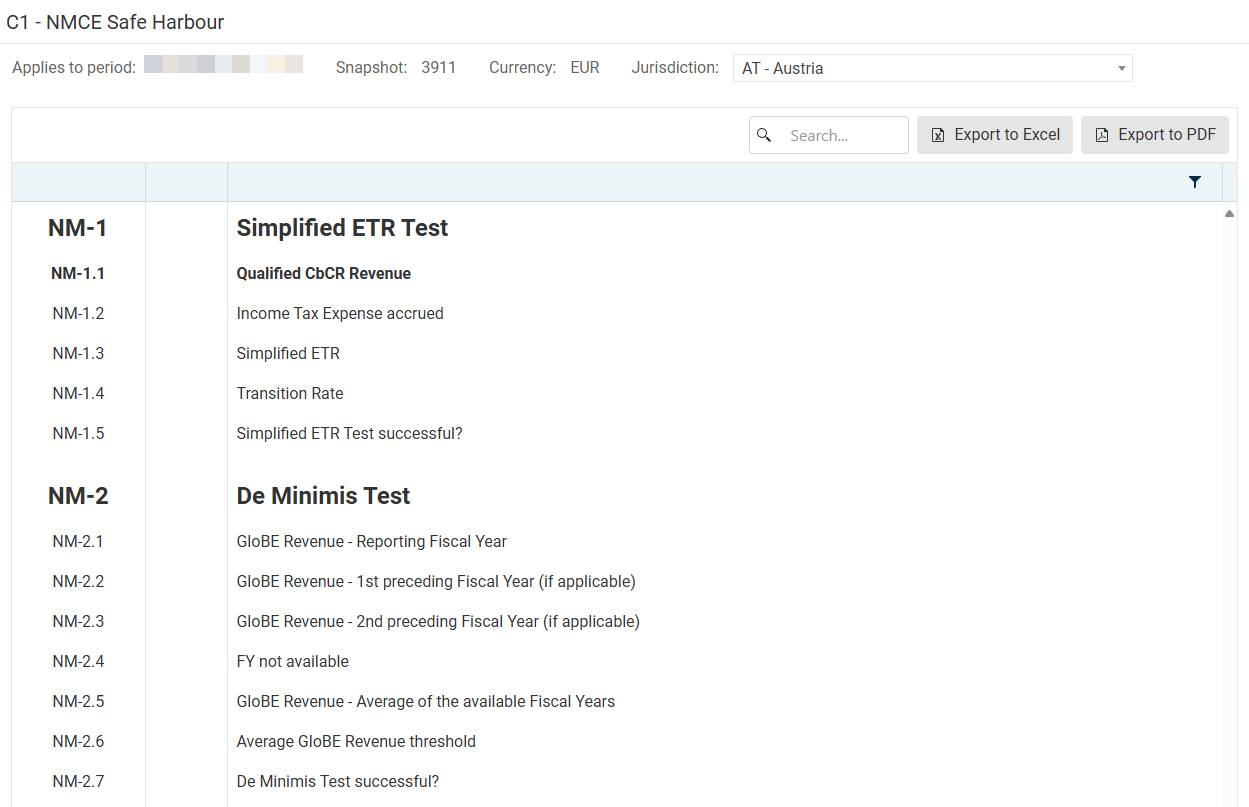 C1 - NMCE Safe Harbour workspace
To access this workspace and display the desired values:
Select a snapshot in the Home workspace.
Navigate to C1 – NMCE Safe Harbour.
Select the jurisdiction or subgroup you want to review from the Jurisdiction drop-down list.
Performing the NMCE Safe Harbour Check
The NMCE Safe Harbour check aggregates data from all constituent entities within a jurisdiction that are marked as non-material and are not stateless entities (see also Overview).
NMCE Safe Harbour displays the results of three tests. If any of the tests is successful, the NMCE Safe Harbour is available for that jurisdiction or subgroup.
The Simplified ETR Test compares the effective tax rate against the minimum rate of 15%.
Option
Description
NM-1.1 Qualified CbCR Revenue
Displays the aggregate of qualified CbCR revenue for all non-material entities in the jurisdiction or subgroup. This value is based on CbCR-1 from the CbCR Safe Harbour workspace in the Entity Data Collection.
NM-1.2 Income Tax Expense accrued
Displays the aggregate of income tax expense accrued for all non-material entities in the jurisdiction or subgroup. This value is based on CbCR-4 from the CbCR Safe Harbour workspace (see OECD-Standard).
NM-1.3 Simplified ETR
Displays the simplified effective tax rate calculated as: {NM-1.2} / {NM-1.1} × 100.
NM-1.4 Transition Rate
Displays the minimum transition rate of 15%.
NM-1.5 Simplified ETR Test successful?
Indicates whether the Simplified ETR Test is successful. The test is successful if the Simplified ETR (NM-1.3) is equal to or greater than the Transition Rate (NM-1.4).
The De Minimis Test verifies whether GloBE Revenue stays below specified thresholds across multiple fiscal years.
Option
Description
NM-2.1 GloBE Revenue - Reporting Fiscal Year
Displays the aggregate GloBE Revenue for the reporting fiscal year for all non-material entities in the jurisdiction or subgroup.
NM-2.2 GloBE Revenue - 1st preceding Fiscal Year (if applicable)
Displays the GloBE Revenue from the first preceding fiscal year, if available. This value is retrieved from the prior period snapshot.
NM-2.3 GloBE Revenue - 2nd preceding Fiscal Year (if applicable)
Displays the GloBE Revenue from the second preceding fiscal year, if available. This value is retrieved from snapshots from two periods prior.
NM-2.4 FY not available
Indicates which fiscal years are not available for the calculation (e.g., if this is the first or second year of reporting, prior fiscal year data may not exist).
NM-2.5 GloBE Revenue - Average of the available Fiscal Years
Displays the average GloBE Revenue calculated across all available fiscal years. The calculation considers only the fiscal years for which data is available.
NM-2.6 Average GloBE Revenue threshold
Displays the threshold for average GloBE Revenue. The standard threshold is € 10,000,000.
NM-2.7 De Minimis Test successful?
Indicates whether the De Minimis Test is successful. The test is successful if the average GloBE Revenue (NM-2.5) is below the threshold (NM-2.6) and the average GloBE Income is below € 1,000,000.
A checkbox is displayed if the test is successful.
Routine Profits Test
The Routine Profits Test calculates the Substance-Based Income Exclusion by evaluating payroll costs and tangible assets, applying the relevant carve-out percentages.
Option
Description
NM-3.1 Qualified CbCR Revenue
Displays the aggregate of qualified CbCR revenue for all non-material entities in the jurisdiction or subgroup. This value is based on CbCR-1 from the CbCR Safe Harbour workspace in the OECD-Standard folder.
NM-3.2 Relevant Eligible Payroll Costs of Eligible Employees performing activities in the jurisdiction
Displays the aggregate of eligible payroll costs for employees performing activities in the jurisdiction for all non-material entities. This value is based on CO-1.1 from the Substance-based Income Exclusion workspace in the OECD-Standard folder.
NM-3.3 Allocations of Eligible Payroll Costs in case of Permanent Establishments or Flow-Through Entities
Displays the aggregate of payroll cost allocations for permanent establishments or flow-through entities for all non-material entities. These allocations are made in the FTE & PE Allocations workspace.
NM-3.4 Application of relevant mark-up percentage for the Reporting Fiscal Year
Displays the relevant mark-up percentage for payroll costs for the reporting fiscal year.
NM-3.5 Payroll Carve-Out Amount
Displays the payroll carve-out amount calculated by multiplying the sum of eligible payroll costs and allocations by the relevant mark-up percentage: ({NM-3.2} + {NM-3.3}) × {NM-3.4}.
NM-3.6 Value of relevant Eligible Tangible Assets located in the jurisdiction at the beginning of the reporting year
Displays the aggregate value of eligible tangible assets at the beginning of the reporting year for all non-material entities. This value is based on CO-2.1 from the Substance-based Income Exclusion workspace in the OECD-Standard folder.
Note: This value uses the exchange rates from the prior period.
NM-3.7 Value of relevant Eligible Tangible Assets located in the jurisdiction at the end of the reporting year
Displays the aggregate value of eligible tangible assets at the end of the reporting year for all non-material entities. This value is based on CO-2.2 from the Substance-based Income Exclusion workspace in the OECD-Standard folder.
NM-3.8 Carrying value of relevant Eligible Tangible Assets located in the jurisdiction
Displays the arithmetic mean of the tangible asset values at the beginning and end of the reporting year: ({NM-3.6} + {NM-3.7}) / 2.
NM-3.9 Allocations of Eligible Tangible Assets in case of Permanent Establishments or Flow-Through Entities
Displays the aggregate of tangible asset allocations for permanent establishments or flow-through entities for all non-material entities. These allocations are made in the FTE & PE Allocations workspace.
NM-3.10 Application of relevant mark-up percentage for the Reporting Fiscal Year
Displays the relevant mark-up percentage for tangible assets for the reporting fiscal year.
NM-3.11 Tangible Assets Carve-Out Amount
Displays the tangible assets carve-out amount calculated by multiplying the sum of the carrying value of tangible assets and allocations by the relevant mark-up percentage: ({NM-3.8} + {NM-3.9}) × {NM-3.10}.
NM-3.12 Total amount of the Substance Based Income Exclusion
Displays the total substance-based income exclusion, calculated as the sum of the payroll carve-out amount and the tangible assets carve-out amount: {NM-3.5} + {NM-3.11}.
NM-3.13 Routine Profits Test successful?
Indicates whether the Routine Profits Test is successful. The test is successful based on comparing the substance-based income exclusion (NM-3.12) against the qualified CbCR revenue and relevant income thresholds.
A checkbox is displayed if the test is successful.
NM-4 displays whether at least one of the three tests (Simplified ETR, De Minimis, or Routine Profits) is successful.
If this field displays a positive result, i.e. the checkbox is activated, the constituent entities in this jurisdiction or subgroup are eligible to elect the NMCE Safe Harbour (see also EE-1 in the Entity Election and General Information workspace of the OECD-Standard folder).
Relationship to Entity Elections
The NMCE Safe Harbour check determines eligibility for the NMCE safe harbour, but it does not automatically exclude CEs from the full-scope calculations. To actually apply the NMCE Safe Harbour, do the following:
Check that at least one test in C1 – NMCE Safe Harbour is successful, i.e. NM-4 displays positive result.
Activate the EE-1 checkbox under Entity Data Collection | OECD-Standard | Entity Election and General Information workspace for each constituent entity.
Create a new snapshot to apply the following exclusion from:
- C2 – CE Calculations
- C4 – Jurisdictional Blending (for most values)
- C5 – Top-up Tax Allocation
If EE-1 is activated but none of the tests were successful in the corresponding jurisdiction or subgroup in C1 – NMCE Safe Harbour, the NMCE Safe Harbour is not applicable for the CE.