CoA Group
Last updated on 2025-07-16
Overview
The balance sheet structure stored in the CoA Group workspace provides the common, binding framework for all companies and serves as the basis for the B/S Comparison workspace in the Company functional area. An exception to this is the use of the CoA Company workspace – here, the balance sheet structure can be extended in a unit-specific manner.
Due to the balance-sheet-oriented approach to the determination of deferred taxes according to IFRS, US-GAAP, and local GAAP(the so-called temporary concept), entering a balance sheet structure is essential. Adjustments to the balance sheet structure in the CoA Group workspace only affect the selected period – other periods created in TCR are not impacted by this.
This article contains the following sections:
Navigation
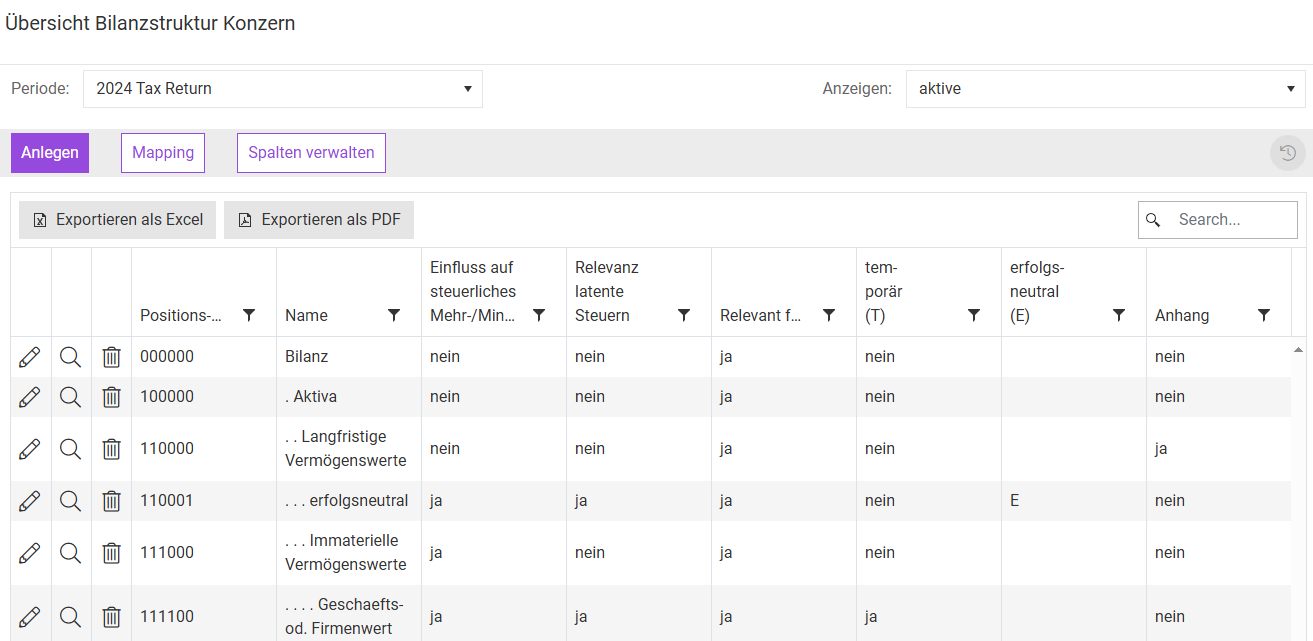
The CoA Group workspace belongs to the function area Master Data and is, for example, shown as follows:
Creating and Administrating Balance Sheet Positions
Click Create to add a new balance sheet position. The input mask is then displayed as follows:
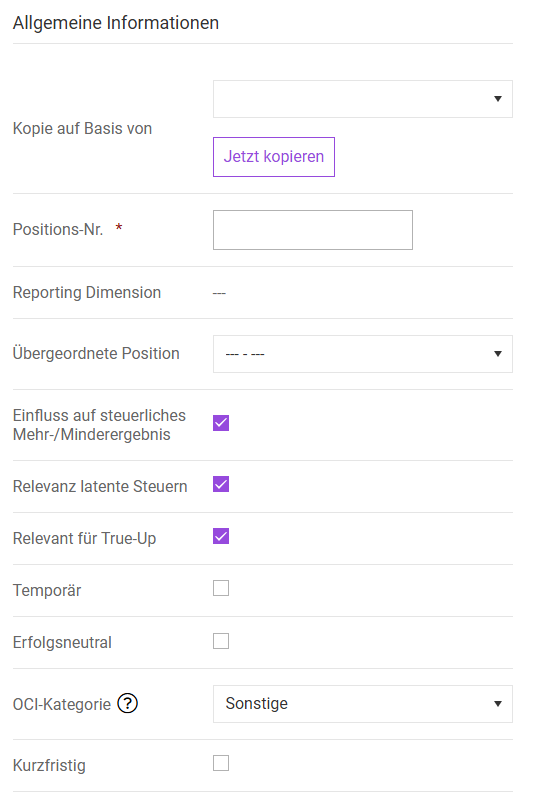
These details must be specified for each balance sheet position that represents an input position. Input positions are subordinate to superior account positions. For example, technical plants and machinery are entered as input positions under the superior account position Property plant and equipment. Specify the following:
Option
Description
Copy based on
Creates a copy based on an existing balance sheet position.
Account ID
An individual account ID must be assigned for each balance sheet position. The account ID can no longer be edited afterward and is also no longer available after deleting the balance sheet position.
The name of the balance sheet position is not entered in this field. This only takes place after creation in a subsequently displayed table area (see Names of Balance Sheet Positions in Multiple Languages).
Reporting Dimension
During administration of the group balance sheet, the standard reporting dimension [---] is always assigned and cannot be edited. This attribute can only be changed for specific companies in the CoA Company workspace.
Superior account position
The structure of the balance sheet is defined by specifying the superior account position. The superior account position is always the sum of the respective subordinate positions. In the B/S Comparison workspace, the structure is indented by leading periods and displayed below the respective superior account position:

Relevant for current taxes
This specification determines that the balance sheet position affects the tax balance profit. For German companies, this refers to balance-sheet-internal tax differences pursuant to § 60 (2) EStDV. Consequently, only deviations between the local balance (local GAAP) and the tax balance are taken into account.
The P/L-effective change in the tax balance surplus/deficit (this change represents the tax balance surplus/deficit result of the respective fiscal year) is automatically calculated by Income Taxes and displayed as a proposed value for the purpose of calculating actual taxes (for example) in the folder Current Taxes.
Account is relevant for deferred tax
Certain balance sheet positions, such as equity or tax positions, are excluded from the determination of deferred taxes. For such positions, deactivate the check box Account is relevant for deferred tax. Income Taxes does not take possible balance sheet differences into account for these items.
Positions that are relevant for the calculation of deferred taxes or for tax rate reconciliation (TRR) must be classified as temporary or permanent. Activate the check box Account is relevant for deferred tax accordingly. Activating it makes these rows of the B/S comparison editable for input regarding the allocation of the gross balance sheet differences to “thereof” columns.
“Thereof” columns provide standard allocation options for purposes related to dividing balance sheet differences. The definition of the following attributes offers the option of automatic division in the B/S Comparison dialog:
- P/L differences
- OCI differences
- Differences in permanent P/L
- Differences in permanent OCI
Permanent balance sheet differences, such as shares in affiliated companies under German tax law (§ 8b KStG), do not result in deferred taxes. Nevertheless, activate the check box Account is relevant for deferred tax, as this may result in effects for tax rate reconciliation (TRR).
Relevant for True Up
The check box Relevant for True Up is automatically activated. Deactivate the check box if a position should not be included in the calculation of proposed True Up values.
Temporary
Balance sheet positions for which the Temporary check box is activated will trigger the calculation of deferred taxes in the event of any balance sheet differences in the tool. Therefore, activate the check box for all balance sheet positions where taxable (deferred tax liabilities - DTL) or deductible (deferred tax assets - DTA) temporary differences may arise. In this case, also activate the check box Account is relevant for deferred tax.
Conversely, this means that balance sheet positions that are not classified as temporary are considered permanent. Permanent differences do not lead to the calculation of deferred taxes, but may be relevant for purposes of tax rate reconciliation (TRR).
Temporary difference affecting equity
Balance sheet positions for which the check box Temporary difference affecting equity is activated do not trigger a P/L effect when calculating deferred taxes, but are instead reflected in the OCI (other comprehensive income), which does not affect the corresponding result. Adjustments involving temporary differences affecting equity occur in the area of IFRS, such as with financial instruments (IAS 39) or pensions (IAS 19). Deferred taxes that are associated with these changes in amount must also be accounted for in a manner that does not affect the corresponding result. The OCI effect of deferred taxes is reflected in the Summary workspace.
Balance sheet positions for which the check box Temporary difference affecting equity is not activated (= affecting P&L) trigger a P/L effect when calculating deferred taxes. The P/L effect of deferred taxes is reflected in the Summary and TRR workspaces, for example.
Choose between affecting P&Land affecting OCI. The effect on taxable income of the adjustment of deferred taxes generally depends on the underlying accounting circumstances at hand. If the change in a balance position (e.g. depreciation) is accounted for via P/L, the deferred taxes attributable to this must also be considered as affecting P.L.
OCI category
Adjustments affecting OCI can be assigned to a specific OCI issue, for example, AFS securities. The individual issues are maintained in the master data under Administrationin the area Revaluation surplus.
Income statement-related presentation of OCI issues:
Preselection in B/S comparisons is controlled via the Affecting P&L setting. If differences are split automatically, the difference will be allocated to the P/L column in the “thereof” column when the Affecting P&L setting is activated. However, it may be necessary to display additional differences affecting OCI for this position in a different “thereof” column. In order for this difference to be assigned to a specific OCI issue, all OCI issues available for selection are displayed, even when the setting Affecting P&L is activated.
Short term temporary difference
This option defines the maturity of a balance sheet position. TCR makes it possible to divide deferred taxes into short-dated and long-dated positions. If the check box Short term temporary difference is activated, deferred taxes attributable to this balance sheet position will also be classified as short-dated.
Mapping the maturity structure affects the positions netted of deferred taxes within the tools: Short-dated deferred tax assets are netted with short-dated deferred tax liabilities, and long-dated deferred tax assets with long-dated deferred tax liabilities. The division of balance sheet positions into short-dated and long-dated positions is not mandatory.
Disclosed major class of deferred tax
For balance sheet positions that are to be evaluated for the disclosed major class of deferred tax, activate the Disclosed major class of deferred tax check box. These balance sheet positions are displayed aggregated in the Company folder in the Report DT workspace. Either the upper or the lower level in the disclosed major class of deferred tax can be indicated for each position. This prevents balance sheet positions from being accounted for twice.
It makes sense to have the resulting (shortened) balance sheet structure match the balance sheet structure of the company's annual report. This ensures that the notes on deferred taxes for each balance sheet position can be taken directly from Income Taxes.
Split differences automatically
The identified balance sheet differences in the B/S Comparison workspace must be split into the following columns:
- P/L differences
- OCI differences
- Permanent P/L differences
- Permanent OCI differences
If the Split differences automatically check box is activated, these differences will be split automatically. Otherwise, the gross differences must be divided across the columns manually. This can be useful, for example, when part of the gross difference is to be classified as temporary and part as permanent. The automatic splitting of differences is carried out in the B/S Comparison workspace using the separate Split differences button.
Residual position
A balance sheet should ultimately always be balanced. To have the balancing item (such as a profit position) calculated automatically, you can designate an item in the balance sheet structure as a residual position. If values are then imported or entered manually, the system will check in the balance sheet comparison during saving whether a validation difference would occur. If this is the case, the calculated difference is posted to the residual position.
The balancing item can be set separately for IFRS, HGB, and HB/StB differences.
The residual position option is an additional feature that is not included in the standard product. If you are interested, please contact your Lucanet representative or use the contact form.
Further Actions
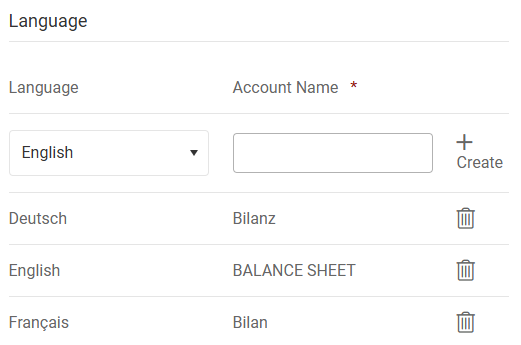
The language is generally set under My Profile. To ensure that user-created records can also be displayed in the respective local language, you must set up the language accordingly. If no text is defined for a language, the record can only be identified by the account ID after selecting the language. Proceed as follows:
- After creating a balance sheet position, navigate to the overview table and click the pencil icon next to the desired balance sheet position.
- Select the desired language from the drop-down list in the Language section in the input screen that then appears.
Examples:
Language - Account Name (= output value)
Deutsch - Bilanz
English - Balance Sheet
Francais - Bilan - Enter the designation in the selected language and click Create.
By default, the following columns are predefined in Income Taxes and are used to allocate balance sheet differences in the B/S Comparison workspace:
- P/L differences
- OCI differences
- Differences in permanent P/L
- Differences in permanent OCI
The differences are multiplied for the calculation of deferred taxes by the tax rate stored in the Countries workspace, i.e. the average tax rate for deferred taxes. This applies to all the above-mentioned standard columns, meaning also to any permanent differences that must be taken into account in tax rate reconciliation (TRR).
In the CoA Group workspace, click Maintain columns to create additional columns for B/S comparisons. The Tax Rate Maintenance dialog is displayed as follows:
This function was introduced because in some countries, deferred taxes for selected balance sheet differences must be calculated using a different tax rate. Earnings from the sale of real estate may be subject to a special tax rate. The Maintain columns function can take such deviating tax effects into account accordingly.
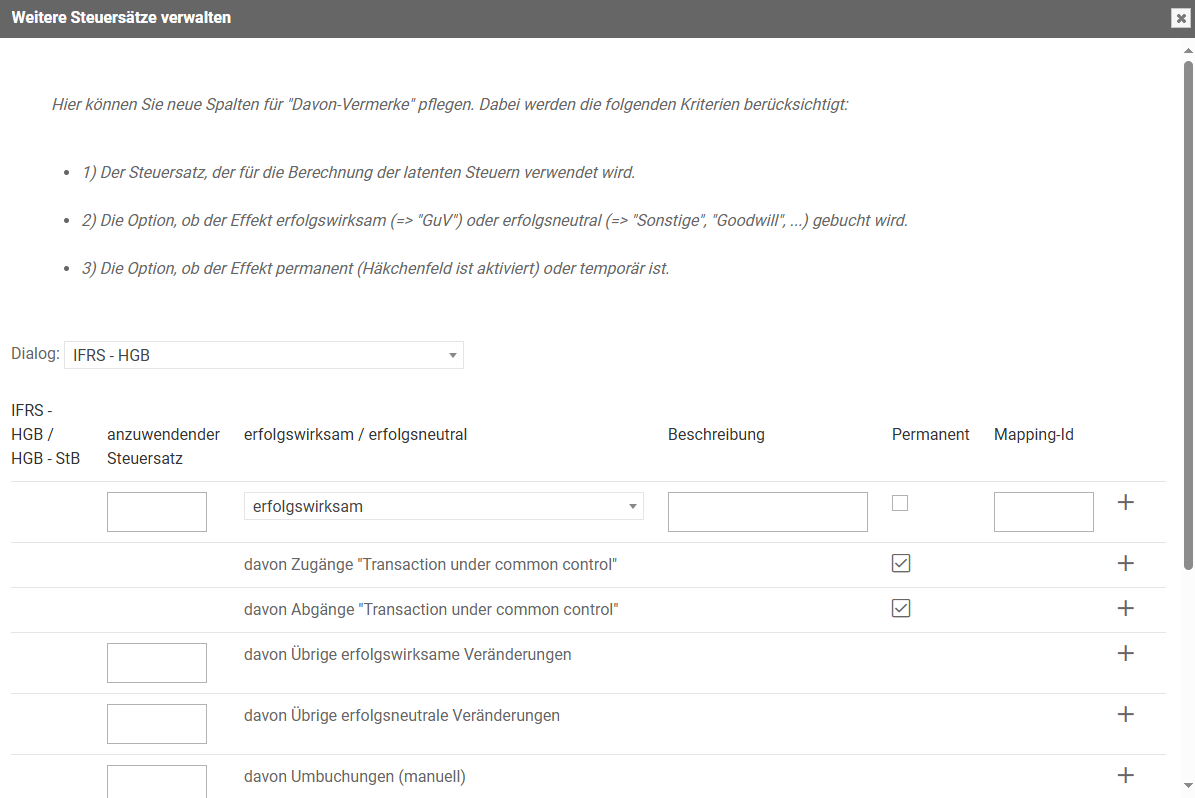
Specify the following:
Option
Description
Dialog
The columns must be assigned to either the IFRS - Local GAAP or the Local GAAP - Tax Balance workspace. The display of the inserted columns is therefore only displayed in the selected area of the B/S comparison.
Applicable tax rate
Tax rate by which the balance sheet differences recorded in this column are to be multiplied. The regulations for the purposes of deferred tax rates apply here, i.e. the future (deferred) tax rate does not necessarily have to correspond to the currently valid tax rate.
Affecting P&L / affecting OCI
For each newly added , you must specify whether the (temporary) effects should result in deferred taxes that affect P&L or affect OCI. This reporting obligation also applies when the Permanent setting is activated for the column.
Description
The description appears as a column description in the B/S Comparison workspace.
Permanent
If the balance sheet differences processed in this column are of a permanent nature, you must activate the Permanent check box. The differences do not lead to deferred taxes, but are instead appropriately taken into account in tax rate reconciliation (TRR).
In addition to creating columns manually, you can use the corresponding optional predefined columns via the plus icon. These columns include Thereof other changes affecting P&L, for example.
The division of balance sheet differences among manually created columns cannot be performed automatically. This requires manual adjustment of the B/S comparison.
Mapping ID
To import difference amounts into this “thereof” column, you must assign a unique mapping ID. The mapping ID can be any text up to 20 characters long; using special characters or spaces is not recommended.
The mapping ID is also used to export values from Income Taxes.
If balance sheet positions are deleted in the current period that were present in the prior period, you can use the Mapping function to ensure that the correct change in deferred taxes is determined for each balance sheet position for reporting purposes. To this end, non existing balance sheet positions from the previous period are assigned to a current balance sheet position.
The settings apply to all units within the group.