
Summary
Last updated on 2026-05-15
Overview
The summary summarizes the calculation of deferred taxes and can be used as a posting template. Both the balances and the value movements (P&L/OCI) are displayed. The current taxes are not shown in this dialog.
The summary is divided into the following table areas:
- Deferred taxes summary
- Comprehensive Income
- Deferred taxes (current period)/Deferred taxes (prior period)
- Change in deferred taxes (without corrections)
This article contains the following sections:
Navigation
The Summary workspace can be found under Company | Deferred Taxes | Summary.
The Summary workspace is displayed, for example, as follows:
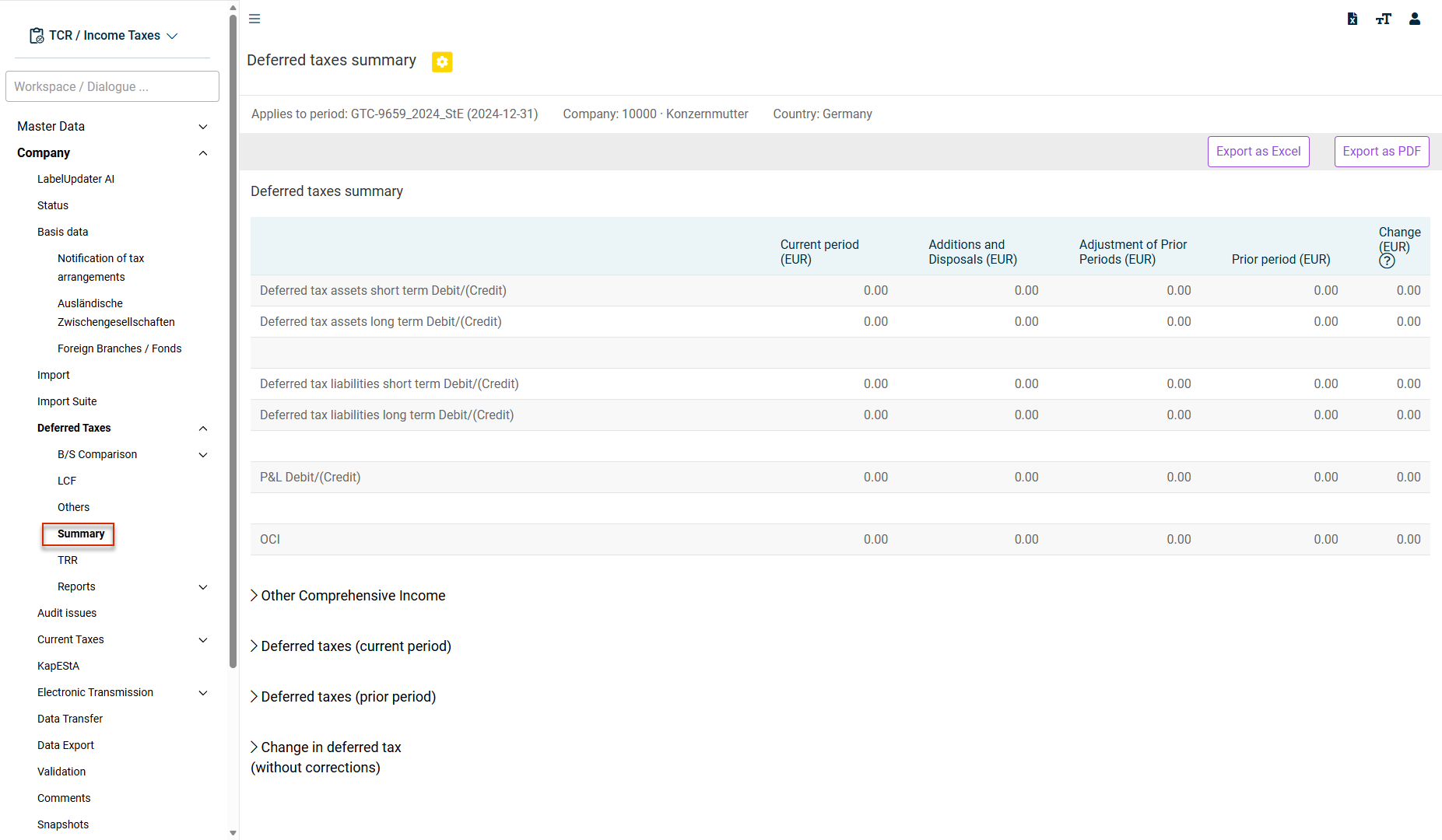
Areas in the 'Summary'
The Summary is divided into areas, which are described in the table below.
The Summary can be structured for individual companies and may display additional areas.
The following areas are displayed in the Summary:
The top table area consists of the following five columns:
Data source
Description
Current period
The data source is shown in detail in the Deferred taxes (current period) table area [bottom row: Total].
Additions and disposals
Data source: Others workspace
Adjustment of Prior Periods
Data source: Others workspace
Areas:
- Other
- Prior year adjustments – OCI
- Adjustments GTC DT opening balances
Prior period
The data source is shown in detail in the table area Deferred taxes (prior period) [bottom row: Total]
Change
Difference between Prior Period [4] and Current Period [1] – incl. corrections
The individual categories of Other Comprehensive Income are created and managed in the Administration master data workspace. Based on the assignment made in the CoA Group master data workspace, Income Taxes assigns the OCI effects to the individual categories. The result is displayed in a separate area in the Summary.
The Deferred taxes (current period) / Deferred taxes (prior period) table area shows the composition of deferred taxes based on the individual workspaces (e. g. LCF and IFRS - Local GAAP workspaces in the balance sheet comparison).
The Deferred taxes (current period) or Deferred taxes (prior period) area is displayed, for example, as follows:
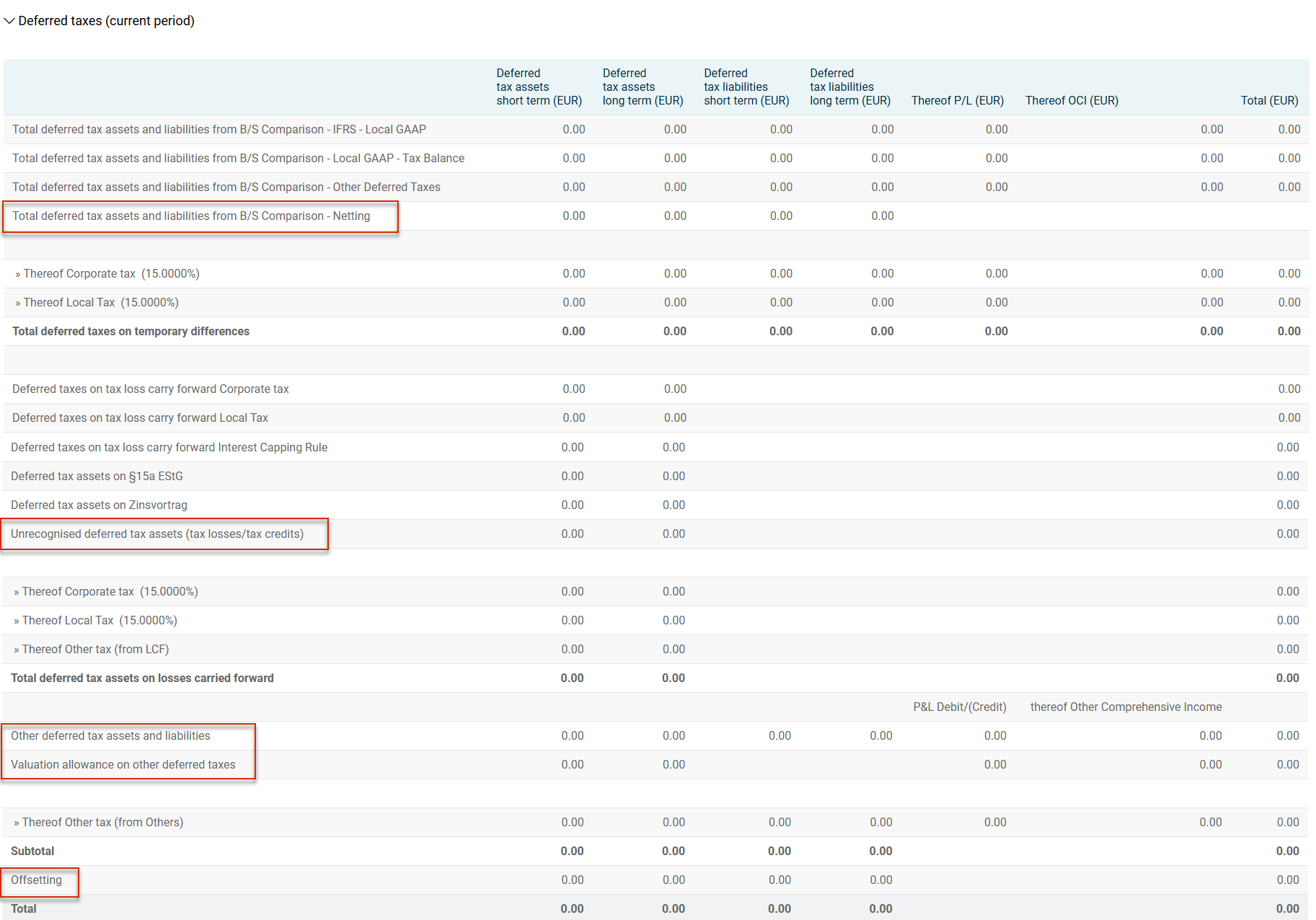
The following results are displayed, among others, in the Deferred taxes (current period) and Deferred taxes (prior period) areas:
Row
Data source/Description
Total deferred tax assets and liabilities from B/S Comparison - Netting
Netting of effects calculated in opposite directions across workspaces (e. g. IFRS - Local GAAP and Local GAAP - Tax Balance) for the same balance sheet item. Not to be confused with the cross-item netting of deferred tax assets and liabilities.
Unrecognised deferred tax assets (tax losses/tax credits)
Allowances from the LCF workspace. Not to be confused with the allowance of deferred tax assets from the balance sheet comparison.
Other deferred tax assets and liabilities
Data source: Other (Deferred Taxes) workspace
Area: Changes to the accrual area
Valuation allowance on other deferred taxes
Data source: Other (Deferred Taxes) workspace
Area: Valuation allowance on other deferred taxes
Entry of allowances for the excess of deferred tax assets from the balance sheet comparison
Offsetting
Offsetting of deferred tax assets and liabilities in consideration of the maturity. Long-term deferred tax assets are netted with long-term deferred tax liabilities.
In the Companies master data workspace, the Deliver deferred taxes option can be activated. In this case, the disposal and addition of deferred taxes will each be displayed in the Summary. This topic is relevant, among others, for local balance periods in connection with tax group members.