Companies
Last updated on 2025-07-16
Overview
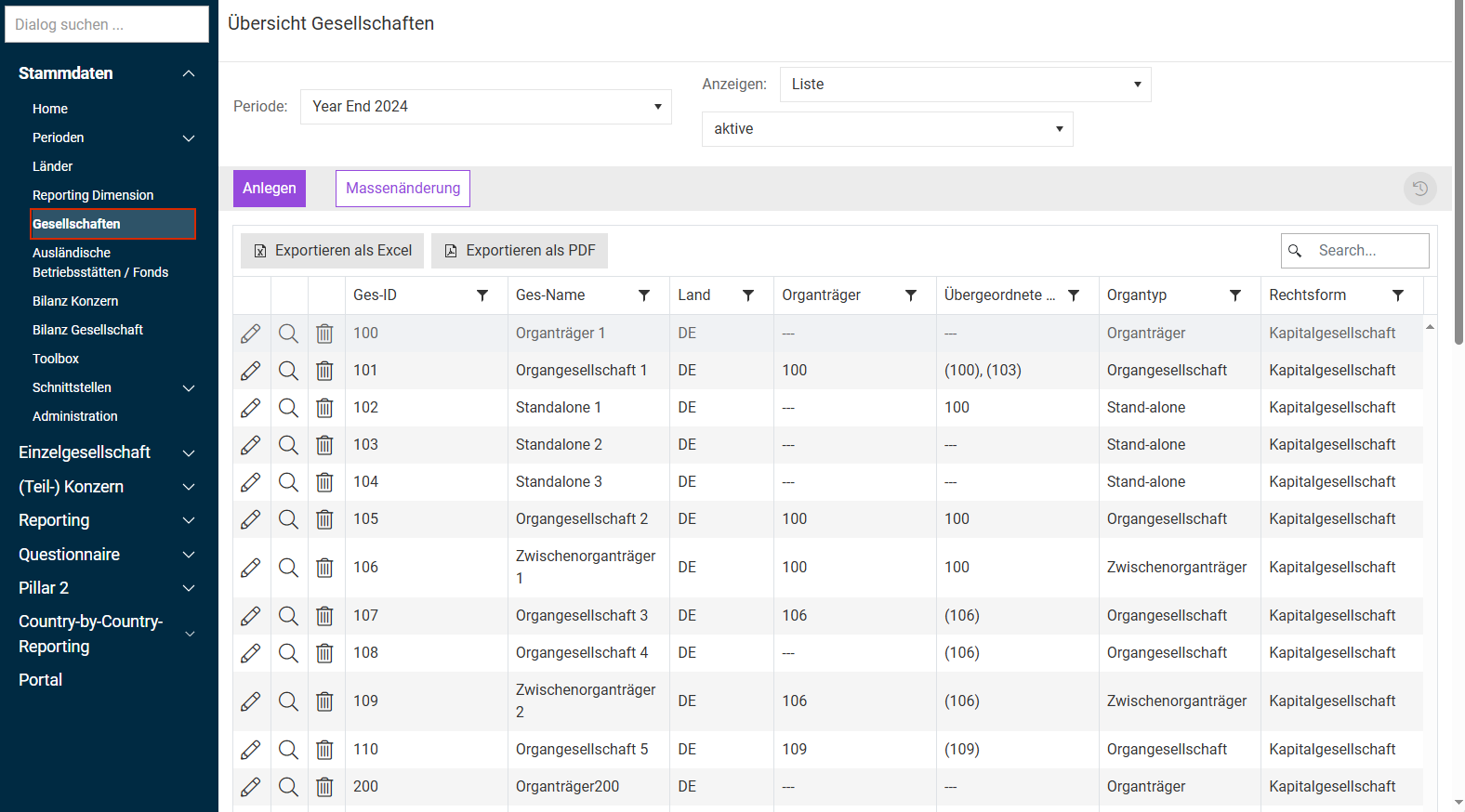
In the Companies workspace, the companies created in the selected period are displayed.
The key attributes of a company, such as the assigned country, legal owner, or legal form, are displayed directly in the company overview. If you would like to view all information about the companies, go to Reporting / Tax Reports and run the Companies report there.
This article contains the following sections:
Navigation
The Companies workspace can be opened under Master Data | Companies. The Companies workspace is displayed as follows, for example:
Creating a Company
To create a new company, click Create in the Companies workspace and configure the tabs displayed (see the following subheadings).
Please note:
Required fields are indicated by a red asterisk. Information required for tax declarations is indicated by a blue asterisk. This also applies to master data collected for the transmission of e-balance sheets. This data can be copied into the Tax Balance module via a web service interface.
Essential master data must be stored on the Company data tab. The other tabs are mainly intended for electronic tax declarations and electronic reporting to German tax authority, which is why they will not be discussed in detail below.
'Company Data' Tab
The tab is displayed as follows, for example:
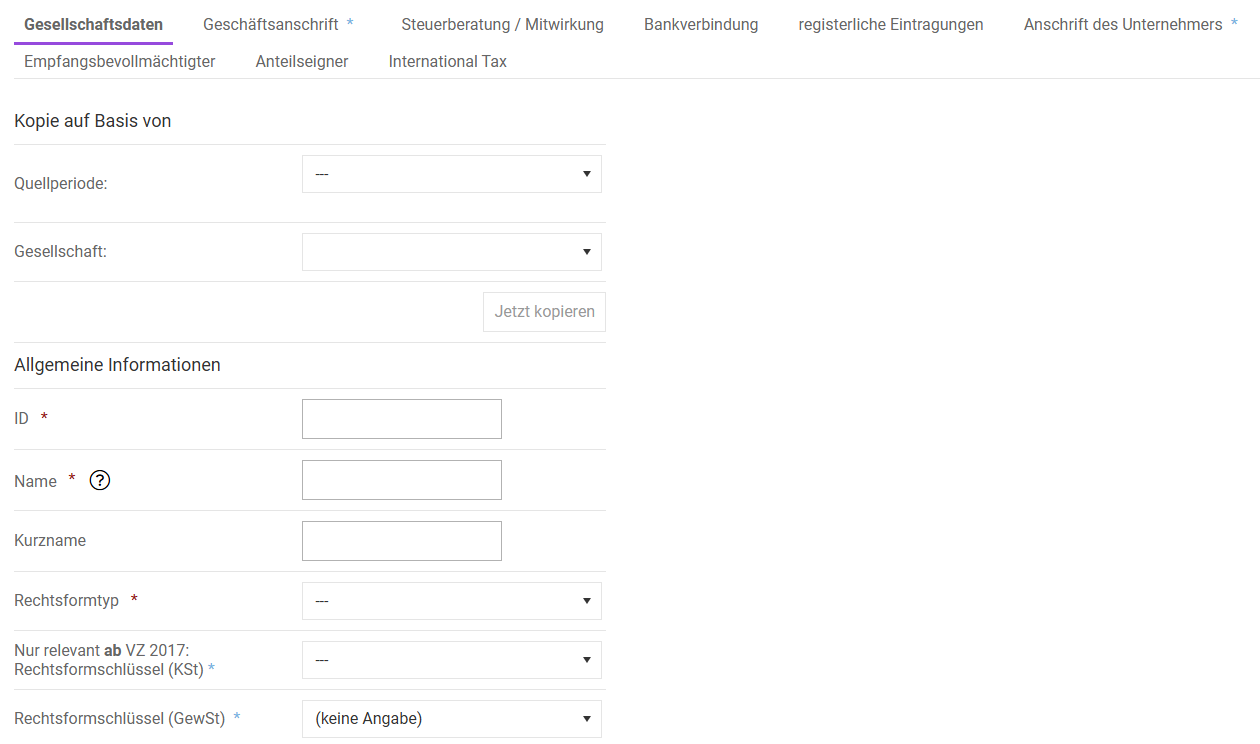
Copy based on: This field only appears when creating a new company; it supports the transfer of data from companies already entered in Income Taxes.
Select the desired source period and company from the drop-down lists and then click Copy now to transfer the master data into the new company to be created.
Please note that the following master data will not be copied, so you will need to complete it:
- Assignment ownership to parent company
- Assignment of companies to be converted
- Reporting dimensions
- Allocation of position mapping
- Allocation of the connection information
- Interfaces
Option
Description
ID *
The ID uniquely identifies a company. Up to 20 characters can be used (letters and numbers). The ID can only be assigned once and cannot be changed afterwards (applies across periods). The Unit-ID should match other relevant accounting systems (e.g. SAP) to ensure the functionality of any potential interfaces.
Name *
The name of the company should include the legal form. This is required when submitting tax declarations with Income Taxes.
Shortname
Entering a short name is optional. Keeping things consistent with other relevant accounting systems is also advisable here. The use of short names (e.g. SAP company abbreviations) can be useful for evaluation purposes or reports.
Legal form type *
The legal form can be selected from a list.
The tax calculation dialogs displayed in the Company function area are, in some cases, dependent on the selected legal form. For example, dialogs for determining tax bases are displayed only for partnerships.
Additional company codes
Additional company code IDs can be listed here if they are relevant for importing transaction data.
Country *
For “Country (Nation)”, select the country in which the company is headquartered or its management is based. Data sets from the master data dialog Countries are available for selection. The tax rates and exchange rates of the selected country are used for tax calculation and to convert the currencies of reports into the reporting currency of the company in question.
Materiality
This field indicates the materiality of the company and can, for example, affect the scope of questions in Tax Questionnaire or the degree of automation when performing bulk imports for tax calculation.
Materiality is also factored into the configuration of the workflow bot for single companies.
Tax number
A tax number is required for German companies if tax declarations are also to be sent electronically with Income Taxes.
The unified federal schema consists of:
FFFF: four-digit tax office number
0: 0 (by definition)
BBB: three-digit district number (NRW: four digits)
UUUU: four-digit distinction number (NRW: three digits)
P: single check digit
Example: FFFF0BBBUUUUP - 9198058870707
Local tax office
The specification of a local tax office is required for German companies if tax declarations are to be sent electronically with TCR.
The tax authority responsible is automatically determined based on the tax number (the first four digits).
The tax office numbers (F)FF are extended to four digits for the Elster tax number format.
- Baden-Württemberg 28F
- Bayern 9FFF
- Berlin 11FF
- Brandenburg 3FFF
- Bremen 24FF
- Hamburg 22FF
- Hessen 26FF
- Mecklenburg-Vorpommern 4FFF
- Niedersachsen 23FF
- Nordrhein-Westfalen 5FFF
- Rheinland-Pfalz 27FF
- Saarland 1FFF
- Sachsen 3FFF
- Sachsen-Anhalt 3FFF
- Schleswig-Holstein 21FF
- Thüringen 4FFF
Business tax ID number
A business tax ID number uniquely identifies your company with tax authorities and other government agencies. It facilitates communication with the authorities and can help simplify and automate tax processes in the future. Business tax ID numbers are assigned by Germany's Federal Central Tax Office.
Tax number of the Federal Central Tax Office (BZSt)
A tax number from the Federal Central Tax Office (BZSt) is required for tax declarations and the reporting of withholding tax.
Business activity / Business area
This entry is optional and serves as an extension of possible filter options within the Reports and Excel views. For example, the view in the Company workspace can also be sorted by business area. This attribute should not be confused with reporting dimensions.
In addition, the information is used in tax declarations.
Local tax/local tax rate
Here, a distinction is made between companies that are coded to the country Germany and companies that are coded to foreign countries.
This value is used solely for the calculation of current taxes and does not apply to the calculation of deferred taxes.
Germany:
In this field, the local tax rate (e.g. 250%, 400%) is entered, which, together with the state tax rate (this is entered in the Countries area), leads to the effective tax rate.
Alternatively, in the Company function area within the Basis data workspace, a different local tax rate can also be specified. By default, the tax rate from the master data is used and applied for the calculation of local tax (group tax relief).
Outside of Germany:
For foreign companies, the local income tax rate must be entered.
This value is used as the proposed value for the second foreign income tax (local tax). To account for local tax rates that vary by region, a different tax rate can also be specified under Current Taxes |Local Tax (Gewerbesteuer).
In principle, for the calculation of profit tax expenses at companies in foreign countries, the option Local tax column in Toolboxmust be activated for the respective company in the Company workspace.
Additional information
Here, you can enter further information about the company in a free text field.
This field is also displayed under Company | Basis data so that the notes are directly available to the user.
Comment (internal)
This field is for entering further information that should only be accessible to authorized users in the Master Data functional area.
These fields only need to be maintained if two fiscal years end within a calendar year (please note that this scenario cannot be accounted for properly in Income Taxes). In all other cases, no entry is necessary here.
An automatic connection to the main form ESt 1 B (as of 2024: row 41) for partnerships does not exist, as the fields are not identical in content. A non-calendric fiscal year must always be entered in form ESt 1 B if, in the case of a partnership, the fiscal year does not correspond to the calendar year.
The tax group structure stored in Income Taxes applies for both corporate income tax and business tax purposes. In addition, information regarding the tax group is also relevant for electronic tax declarations. Depending on the settings, different tax forms are enabled in some cases (e.g. the OG enclosure for members and the Tax Payer of Group enclosure for parent companies).
Option
Description
Type of tax payer *
This feature stores the current tax charge structure in the master data.
Tax payer of group *
If a company is defined as a member or intermediate parent, the tax payer of the group must be specified in this row.
The selection list contains companies for which the type of tax payer has been set as Tax payer of group or Interm. parent. For a tax payer of a group or a standalone company, the entry (---) should be selected.
Neutral recognition of the balancing item for tax group
If this function is activated, no neutralization of expense/income arising from the reversal or creation of balancing items as defined in § 14, para. 4 KStG and considered in the earnings determination will be made on the part of the tax payer of the group. This is because the tax payer of the group does not take the change in the balancing item into account in the correction (pursuant to § 60, para. 2(1) EStDV) to adjust the local balance to the tax balance. By default, this check box is not activated (recommended).
The characteristic Tax payer of group (or Interm. parent – ZOT) has the following effects (among others):
Company
Description
German company
- The values determined for the local taxes of tax group companies as part of a tax calculation are allocated to the (interim) group parent in order to calculate tax for the consolidated group. The allocated values are displayed under Actual Taxes | TB Transfer for each group member.
- If the Deliver deferred taxes function is activated for members, deferred taxes are forwarded to the tax payer of the group (the “formal approach”). The respective deferred taxes received and transferred are displayed under Deferred Taxes | Summary.
- The closing of the milestones Current Taxes and Deferred Taxes is only possible for (interim) tax payers of groups if all direct subsidiaries have completed their processing, i.e. the milestone is set to the status Completed or Audited.
Foreign company
- The values determined for tax group companies as part of a tax calculation are allocated to the tax payer of the group for the group's tax calculation. The allocated values are displayed in the Tax Group dialog for each member.
- In the actual tax calculation, additional rows are displayed to record the allocations received from tax group members from the Tax Group dialog and to determine the tax expenses for the overall tax group, or to make it possible to utilize/increase losses of the overall tax group.
- Closing the milestones Current Taxes and Deferred Taxes is only possible for the tax payer of the group if all direct members have completed their processing, i.e. the milestone is set to the status Closed or Audited.
The Tax Group workspace is only displayed for foreign tax payers of groups.
The Application parameter blocks include various settings of the company in question that directly influence the calculation of tax. Depending on the setting selected here, calculations in the area of the company will be performed differently.
Application parameter area:
Option
Description
(Sub-) Group
This check box controls whether the company is a (sub-)group in which the values of the dependent single companies (and, if applicable, further sub-groups) are aggregated. The determined values can be extended by consolidation measures.
Additionally, the company also has access to the (Sub-)Group functional area. In this area, the work progress of the dependent or subordinate companies can be monitored based on the milestones. The aggregation of company data for the purposes of TRR and other notes is also performed in this area. The characteristic (Sub-)Group is also a selection criterion for reports.
When you activate this check box, two more options will be displayed:
- including balancing (Accounting standard: IFRS)
- including balancing (Accounting standard: Commercial Law)
Local tax is deductible for corporate tax
- This field has not been relevant for German companies since 2008.
- The setting has a corresponding effect on foreign tax calculation (Toolbox).
- In Swiss tax calculations, the setting affects the calculation of row 74 in the workspace Net Profit.
The Net Profit workspace is only displayed if Swiss tax law is activated and Swiss tax law has been set in the Countries master data for the company. To activate Swiss Tax law, please get in touch with your Lucanet contact person or use the contact form.
Balance type Local/IFRS (optional)
By default, the setting (---) should be chosen here. In order for the partial workspace Local GAAP/Tax Balance to be available at the company level, the balance type Local GAAP must be selected for German companies. This master data characteristic is not relevant for foreign companies (the setting has no impact).
The dialog Local GAAP/Tax Balance can be used if the tax balance surplus/deficit is to be determined in a balance sheet structure that deviates from the regular folder B/S Comparison. The use of this functionality requires separate maintenance of the local GAAP balance sheet structure within the master data.
The setting is only available when working with the Local balance sheets function in Income Taxes.
Tax Allocation Calculation
Selection of the calculation of tax assessments (current taxes) for the calculation of tax in the current period (not late adjustments).
This option applies to both German and foreign companies. The function does not refer to deferred taxes (for this, the Deliver deferred taxes function is available). By default, tax allocation calculation is deactivated.
Tax allocation calculation must be considered in connection with the income tax group. Tax assessments are only applicable in these cases. Therefore, the following comments must be observed:
Allocations are not calculated for German companies that are subject to independent taxation. The activation has no impact on the tax calculation under Current Taxes.
For independently taxable foreign companies, activation leads to the determination of a tax assessment. This is why allocation must not be activated.
In exceptional cases, an allocation may also be necessary for independently taxed companies, e.g. if a negative external tax is to be calculated. However, a manual reclassification via the partial workspace Current Taxes must then be made to the external tax expense.
If tax allocation calculation is activated, an allocation is calculated for both the first tax type (Local Tax) and the second tax type (Corporate Income Tax), and the tax is attributed to the tax payer of the grup.
By default, both business tax and corporate income tax are deactivated (see figure above). If an allocation is to be calculated for only one tax type, Deactivated must be selected and only the check box for the tax for which no allocation should be determined should be checked.
If an allocation is activated, the tax expense/income will be displayed under the allocations in the summary of tax expenses in the partial workspace Current Taxes.
Allocations are not calculated for tax payers of groups. Activation has no effect on tax calculation in the partial workspace Current Taxes.
Tax allocation calculation must be activated for the tax payer of the group. This results in the tax payer of the group determining a negative tax in the case of a negative result. On this basis, it can be determined whether an LCF exists after the tax expense of the tax group is offset. The current tax charge is displayed as a third-party tax and not as an allocation.
Discont. Operation
This attribute should be selected if the requirements for an outgoing business segment are met (e.g. in accordance with IFRS 5). This field does not affect calculations in Income Taxes, but it can be used as a selection criterion for reporting purposes.
Deliver deferred taxes
This attribute controls whether members deliver deferred taxes to the tax payer of the group (the “formal approach”). Ensure that the company is assigned a tax payer of the group or an intermediate parent. The transfer and receipt of deferred taxes are displayed under Summary.
Partnership:
In addition, the function also serves to transfer deferred taxes from a partnership to the partners. If the attribute is set for a partnership, the portion of deferred taxes attributable to corporate income tax is passed on proportionally to the partners.
Netting of deferred taxes (Accounting standard: IFRS)
In IFRS periods, the following options for the offsetting of deferred taxes are available:
- Without Netting
- Netting (maturity)
- Netting (types of taxes without maturity)
Netting of deferred taxes (Accounting standard: Commercial Law)
According to local GAAP, companies have the option to offset for the purposes of deferred taxes.
If the check box is activated, the option to offset under commercial law is applied so that deferred taxes are netted in the Summary workspace. In addition, the exercise of the option is displayed.
This setting is only available in cases involving a commercial law period.
Application parameter – Tax calculation (Closing v3) area:
Option
Description
Edit Balance Sheet Comparison manually
Data in B/S Comparison can be specified both automatically (via interface) and manually.
If this check box is activated, the balance sheet comparison can be edited manually. This applies to both the data input and any possible reclassifications of automatically imported balance sheet values. By default, the option is activated, allowing you to edit B/S comparisons.
No local Balance
Here, foreign companies have the option to hide the columns for local GAAP balance sheets in the B/S Comparison workspace. This is useful when the local GAAP balance sheet is always identical to the IFRS balance sheet for the company in question.
This setting is only available in cases involving an IFRS period.
Additional tax
This drop-down list is available exclusively to foreign companies. This option also refers to the B/S Comparison workspace and enables the display of an additional table sheet.
This is appropriate for companies that, deviating from the average tax rate, must recognize deferred taxes based on an additional assessment base.
Asset/property management or trust company
This function is only relevant for German partnerships. The attribute makes it possible to map the tax calculation of a partnership transparently for the partner (shareholder) in question. All local tax additions and deductions are allocated directly to the partner. Calculation of the interest capping rule is also not active. Interest and depreciation are reported solely to the partner.
For non-affected companies, select Standard.
For the partner, an additional column appears in the GewSt1A showing the local tax modifications of the subordinate asset/property management company or trust company as an addition to their own value.
Please note that this function is currently only available in periods using the 2017 form set.
Column for local tax in Toolbox
This function is only relevant for foreign companies.
Activate it to display a column for local tax (or local income tax) in the Actual Taxes workspace along with the calculation of corporate income tax.
The use of this function is appropriate when the two profit tax expenses use a different assessment basis. Using the new column Local tax, the tax base can be developed starting from profit before tax in accordance with local GAAP and evaluated using the local tax rate stored in the master data.
Limited taxable
Starting from the 2016 assessment period, it is possible for corporations with limited tax liability to submit a tax declaration.
Change of currency
If a company changes its functional FX code, this can be selected with this check box. The company will then be treated as a new company without prior period values.
Current tax liabilities and assets
This check box enables use in the Tax liabilities workspace.
Application parameter – Income tax return (Closing v3) and Application parameter (commercial law) areas:
Applicability of “Konzernklausel” (§ 4h, para. 2(1)(b) EStG)
This option is only relevant for German companies for purposes related to calculation of the interest capping rule.
Applicability of “Escapeklausel” (§ 4h, para. 2(1)(c) EStG)
This option is only relevant for German companies. If it is activated, the exception clause (or “escape clause”) found in § 4h, para. 2(1)(c) of the EStG will be taken into account when determining non-deductible interest expenses in the Company functional area under Attachment A.
Option to capitalise (active deferred taxes)
This option only applies to periods for which commercial law has been selected as the accounting standard. According to § 274 of the local GAAP, there is an option to capitalize for excess deferred tax assets. The check box is used to control whether the respective company exercises the option to capitalize in such a way that deferred tax assets are recognized (when the check box is activated). If the option is activated, an active surplus is displayed in the Summary workspace and in Report DT.
The exercise of commercial law options is displayed in local GAAP periods in the upper area under Summary and Report DT.
This setting is only available in cases involving a commercial law period.
The provision of employee data is optional and serves information purposes only. No company-specific authorizations are associated with this.
This information is useful given the fact that balance sheet data (accounting) and tax data (tax department) are often edited by different individuals. In addition, this information can also be helpful to foreign companies when using Income Taxes. If employee data is to be entered, a selection list with the users created in Income Taxes is displayed. These are administered separately in the master data in the User workspace.
By default, the exchange rates from the country settings are used for currency conversion in reporting. If these rates are not to be used for a company, they can be overwritten here with unit-specific settings. This could be applied in a case involving highly seasonal business, for example.
To use this option, activate the Unit-specific currency check box. Then specify the following:
- FX rate (cut-off date, RC to LC)
- Avg FX rate (RC to LC)
The proposed values show the entries from the master data for countries. The FX code itself is also displayed here, but cannot be changed.
By default, the tax rates from the country settings are used for calculations in Income Taxes. If these tax rates are not to be used for a company, you can overwrite them here with unit-specific settings.
To use this option, activate the Unit-specific tax rates check box. You can then specify the following:
- Corporate income tax
- Local/State tax rate
- Combined current income tax rate
- Combined deferred tax rate
- thereof, deferred tax rate local tax
- Additional tax rate
Please note:
It is only possible to switch the tax rates to unit-specific in their entirety. Therefore, the tax rates that should not deviate from the country settings must also be maintained again.
Assignment Ownership to Parent Company
The assignment of ownership to a parent company is required for purposes related to preparing consolidated financial statements, but also for calculating current taxes.
In Income Taxes, the process of merging companies within a group is based on full consolidation.
Designation
Explanation
Legal owner
The legal owner is determined from a selection list. The list contains the companies maintained in Income Taxes for the selected period.
When using Income Taxes for the first time, the highest group companies must therefore be created first. These can then be assigned to the subsidiaries as the legal owner.
Civil law quota (%)
For the legal form type Partnership:
Entering the civil law quota is not relevant for the purposes of tax calculation. The civil law quota is used exclusively for selected reports.
Basis for the distribution
of taxable amounts (%)
The quota must be entered as a percentage value (a number without the percent sign). Among other things, this data is used for the graphical presentation of the group structure.
The specification of investments determines the forwarding of the assessment bases of German partnerships to the partners (or shareholders), as well as the selection menu of the partner area SupBal (supplementary tax balance sheet) in the B/S Comparison workspace.
Partner number (form sheet FB)
This information is required for the purposes of electronic tax declarations and the exporting of master data to SmartTaxBalance (number of partner from assessment declaration – form sheet FB). This information is only relevant for German partnerships.
Kind of partnership
The kind of partnership is to be indicated exclusively for German partnerships.
This specification controls the display of the partner (e.g. a limited partner) in the § 15a EStG dialog for purposes related to the tax accounting of losses.
In addition, this information is required for the purposes of electronic assessment declarations (in particular enclosure FB) and exporting master data to Tax Balance.
Specials of partnership
This information is only relevant for German partnerships.
It must be specified whether the partner subject to the assessment is a natural person, a partnership, or a corporate enterprise.
This information is required for the purposes of electronic assessment declarations (in particular enclosure FB) and exporting master data to Tax Balance.
Private assets
The investment is part of private assets (enclosure FB).
Consolidation
Activate this check box to ensure consolidation of the created/edited company within the group financial statement. The field can only be activated for a single legal owner. Companies for which the field is not activated are displayed in brackets in the graphical group view.
Other Information on the 'Company Data' Tab
- Reporting dimensions: For (optional) allocation to a reporting dimension (or dimension value), you must first create dimension values in the Reporting Dimensions workspace. After creation (within the same period), the data sets will be available in the selection list.
- Allocation of position mapping: The unit-specific mapping for interfaces can be allocated via this area.
- Allocation of connection information: Connection information of the Administration page is inserted here. This can pertain to third-party FTP servers or similar that are required for the import interface.
- Interfaces: Interface configurations that have not been defined as the default interface can be inserted here on a unit-specific basis.
Others Tabs
In addition to the company data described previously, other unit-specific master data can be stored on further tabs within the Company workspace.
- Management address
- Tax Consultancy / Participation
- Bank account
- Registrations
- Legal guardian
- Receiving agent
- Shareholder (only for corporations)
- Shareholding structure
With this information, a tax database for master data can be established. The data is only relevant for German companies. For the purposes of electronic tax declaration, some information is mandatory; these are marked with a blue asterisk.
Bulk Edit
This function allows certain data sets to be changed simultaneously for a selection of companies (e.g., the local tax rate or settings regarding tax assessment).
- The companies to be changed can be chosen from a selection list. The selection list contains all companies in the period under consideration.
- In the Change column, the attributes to be adjusted must be marked, and in the Values column, the new value to be set must be specified.
- Bulk editing is then carried out using the Execute modifications button.
Presentation Options
In the upper area of the Company workspace, you can select one of three display options:
List
By default, the companies are displayed in a tabular list format when the dialog is opened.
Group Structure
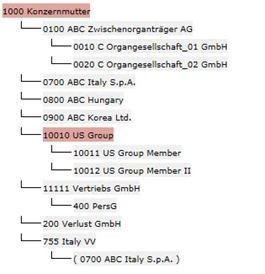
This display option presents master data based on the information in the Assignment of parent companies area. Companies for which (Sub-)Group is activated are highlighted in color. Companies are displayed in brackets when they have a holding relationship with a superior company, but are consolidated under a different legal owner.
Tax Group Structure
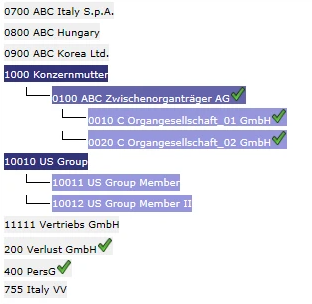
This display option presents master data based on the information in the Current Tax Charge – Group data area. Tax payers of groups, intermediate parent companies, and fiscal units are distinguished by their color. Companies that are not included in an income tax group are displayed on a gray background. A checkmark after the company name indicates that the option Deliver deferred taxes is activated for the respective company.