
Current Taxes
Last updated on 2026-05-15
Overview
In the Current Taxes functional area, you can calculate the tax for the annual financial statements and prepare the German tax returns. The tax forms are provided as workspaces. In addition, there are special form-independent workspaces, such as § 8b KStG, TB transfer, (Spezial-) Investmenterträge ((Special) Investment Income), where you can enter the corresponding issues centrally.
In addition to German companies, the tax calculation can also be displayed for foreign companies. You can configure the tax calculation for foreign companies for all countries except Switzerland in the Master Data | Toolbox functional area. Unlike German companies, with the exception of Switzerland, the income assessment is made without using tax workspaces.
A separate functional area is available for Switzerland, but with fewer workspaces.
This article contains the following sections:
Prerequisites
Before you can begin editing the tax return, the relevant company must first be created in the Master Data | Companies functional area. Then activate the Current Taxes milestone in the Company | Status functional area to start editing.
You can enter or activate all other master data required for the tax return and the forms required under Company | Basic data on the tabs displayed there.
Navigation
You can access the Current Taxes functional area under Company | Current Taxes. The Current Taxes functional area contains several workspaces (see section Workspaces in the 'Current Taxes' Area) and is displayed, for example, as follows:
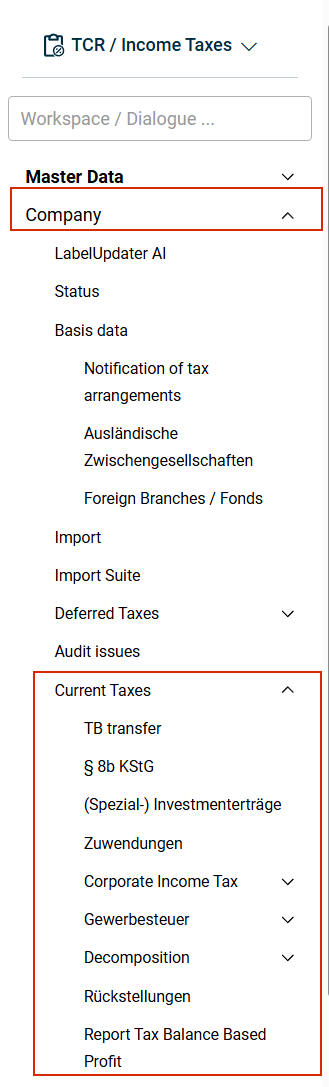
Workspaces in the 'Current Taxes' Functional Area
- Tax Liabilities
- Tax Groups
- Current Taxes
- Gewerbesteuer (Local Tax)
- Corporate Income Tax
- Reduced Tax Calculation
- Decomposition
- § 8b KStG
- TB Transfer
- Zuwendungen (Grants)
- Transfer zum OT (Transfer to Tax Group Parent)
- Report Tax Balance Based Profit
- (Spezial-) Investmenterträge ((Special) Investment Income)
- Interest Capping Rule
- Transfer zum Anteilseigner (Transfer to Shareholder)
- Revenue
- § 15a EStG
- Angaben für MU (Information for Partners)
- Feststellung (Determination)
- Rollforward LCF