
Differences Between Lucanet.Financial Client and CFO Solution Platform
Last updated on 2026-04-21
Overview
This article is intended for users who are migrating from Lucanet.Financial Client to the CFO Solution Platform. It provides an overview of the key differences, such as access and login, administration, renaming, and functional differences.
Please note that this list is not exhaustive, but contains only a selection of the most important changes.
For getting started with our CFO Solution Platform, the following courses are available in our Lucanet Learning Space:
This article contains the following sections:
Differences in Access and Login
The CFO Solution Platform is not installed locally on your computer; instead, it is accessed via a web browser.
To do this, enter the URL of the CFO Solution Platform into your browser’s address bar and log in using your credentials.
For more information, see Opening the Lucanet CFO Solution Platform.
Differences in Administration
Several administrative functions are now configured globally at the platform level, including user management, notifications, and the Task Center.
Below is an overview of the structural changes to the administration:
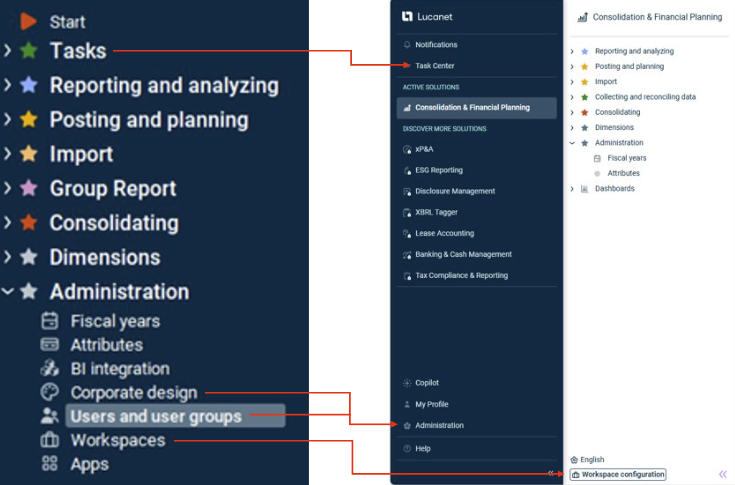
| Lucanet.Financial Client | Lucanet CFO Solution Platform |
|---|---|
| Users and user groups were displayed in the Administration folder in the overview. | Users and user groups are managed in the cross-platform Administration section of the main menu. |
| The Corporate design could be changed in the workspace of the same name in the Administration folder in the overview. | Customer-specific changes, such as the corporate design, can be made in the cross-platform Administration section under Platform Management. |
| Tasks were managed in the folder of the same name in the overview. | Tasks are managed in the Task Center. |
| The workspaces were configured in the Administration folder within the Workspaces workspace. | The workspaces are configured under Workspace Configuration at the bottom of the structure view of the Consolidation & Financial Planning solution. |
Differences on the User Interface
The user interface of Consolidation & Financial Planning has been redesigned to be more intuitive, and making it easier to navigate. For example, the following structural changes and/or renaming have been made:
| Lucanet.Financial Client | Lucanet CFO Solution Platform |
|---|---|
| Postings workspace | Journals workspace |
| Audit Trails workspace | Period locks workspace |
Function Print |
Function Export |
Planning wizard Reconiliation of the general leder |
Planning wizard Transfer from Actual Balance to Plan |
Function Configuration of the view that was located in the toolbar of the Lucanet.Financial Client |
Function is now called Display settings and can be accessed via the header of a ledger oir schedule |
| Folders in the workspaces could be formatted in the same way as ledgers. | Folders can now only be formatted using bold text and highlighting. |
Functional Differences
Lucanet is working to provide value parity for the functions on the CFO Solution Platform compared to Lucanet.Financial Client, i.e.:
- Many features that were available in Lucanet.Financial Client are already available in the Consolidation & Financial Planning solution on the CFO Solution Platform.
- Some features that were available in Lucanet.Financial Client are not yet available on the CFO Solution Platform.
- Some functions that were available in Lucanet.Financial Client will be transferred to other solutions on the CFO Solution Platform.
- Some functions that were available in Lucanet.Financial Client will not be transferred to the CFO Solution Platform.
Below is an overview of the functional differences by functional area:
Basic Functions
Most of the basic functions in Lucanet.Financial Client have been transferred unchanged to the Consolidation & Financial Planning solution or have been modified only slightly:
- Reporting enties, cost centers, and organization elements
- Adjustment levels, data levels, partners, and transaction types
- Currencies and exchange rate tables
- General ledger, subledgers, schedules, and statistical ledgers (including formulas)
- Account properties (e.g., debit/credit shift)
- Importing data into reproting entities (including assignment tables)
- Postings and historical exchange rates
- Period locks (i.e., former audit trails)
- Directory structures (note that no reports, files, or text documents can be created here)
Consolidation
During integration into the CFO Solution Platform, the consolidation functions were incorporated into the Consolidation & Financial Planning solution. As part of this process, Consolidation 2 underwent a comprehensive overhaul. The following key changes were made:
‘Consolidated Financial Statements’ Workspace
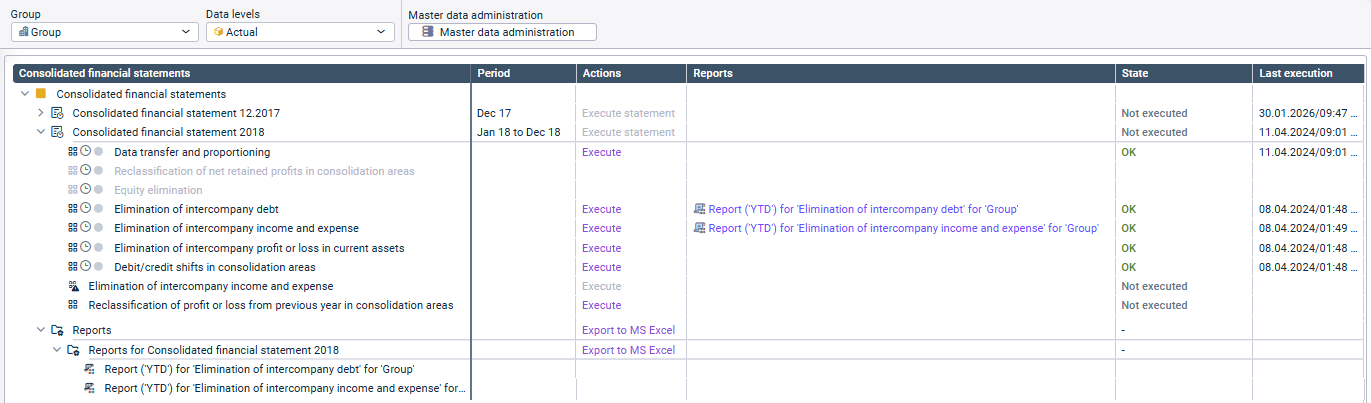
The Consolidated financial statements workspace has been redesigned to provide greater transparency in the consolidation process and simplify access to individual elements:
Master Data Administration
In the Master Data Administration, you can now create and download an organization chart for the group based on the entered ownership interests – a feature that was previously only available in Lucanet.Financial Client via a separate app.
Additionally, master data administration in the CFO Solution Platform is not provided as an app but is selected as an element in the dimension bar.
Consolidation Apps
- The legacy apps of Consolidation 2 are not supported on the CFO Solution Platform. It is therefore recommended to switch to the corresponding Next Generation apps as soon as possible
- All Consolidation 2 Next Generation apps that were available on the Lucanet.Financial Client are supported on the CFO Solution Platform.
- The app used to Adjust and reclassify values in consolidation areas is available for the first time in a Next Generation version on the CFO Solution Platform
- Also the app for equity elimination is available for the first time in a Next Generation version on the CFO Solution Platform, though currently with limited functionality (see Equity Elimination). The scope of functionality will be expanded gradually.
Recommendation: If you are using the app for equity elimination in Lucanet.Financial Client, you should postpone migrating this app to the CFO Solution Platform until all the functions you require are available. The legacy Consolidation 2 app in Lucanet.Financial Client can continue to be used until then.
Planning
During integration into the CFO Solution Platform, the planning functions were transferred to the Consolidation & Financial Planning solution.
Many of the planning functionalities were transferred unchanged from Lucanet.Financial Client to the platform, such as planning data levels, accounting rules, and planning wizards.
However, a significant change in planning is the replacement of planning forms with Sheets. This means that the following planning forms previously used in Lucanet.Financial Client and the wizards they contain can now be replicated using sheets:
- Standard
- Quantity x price
- Subject to a different figure
- Monthly residual value interest
- Tax calculation
- Balance sheet adjustment
- Forecast wizard
- Seasonality wizard
Sheets can be created on the CFO Solution Platform in the Import and Journals workspace for a combination of planning data level and reporting entity or consolidation area. For more information, see Planning Using Sheets.
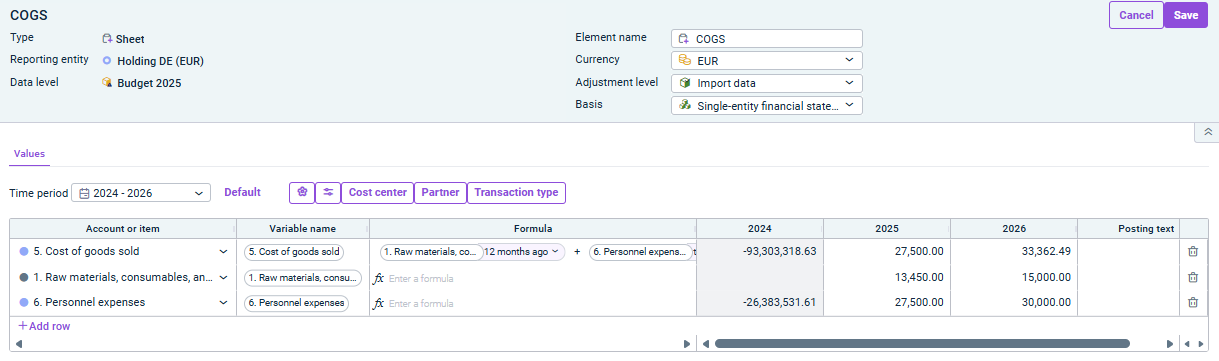
The planning forms previously created in Lucanet.Financial Client are displayed in read-only mode on the CFO Solution Platform.
Reporting
Many reporting functions from Lucanet.Financial Client have been transferred unchanged to the Consolidation & Financial Planning solution on the CFO Solution Platform, including ad-hoc exports to Excel and Lucanet.Excel Reporting.
The following functions have been incorporated into the platform with minor changes:
Lucanet.Excel Add-in
The Lucanet.Excel Add-in has been revised and adapted to the technical requirements of the CFO Solution Platform and is now available as the CFP Add-in for Excel 365. The new CFP Add-in for Excel 365 is the only tool used to retrieve data from the Consolidation & Financial Planning solution in the Lucanet CFO Solution Platform.
Access to Exports and Charts
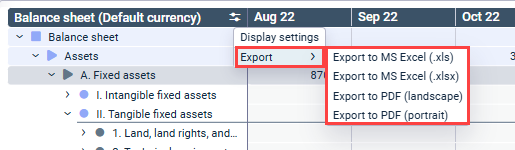
- The Print function has been renamed Export and moved from the toolbar to the header of a ledger or trial balance:
'Export' function - The Open chart function, which was previously accessed via the Show detail view icon, is now available by right-clicking on items or accounts in ledgers and schedules:
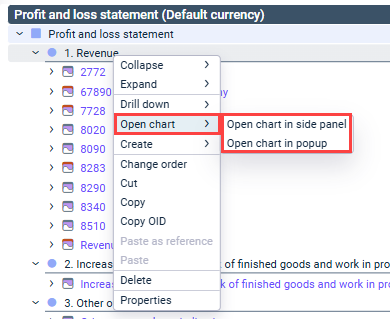
'Open chart' function
The BI integration available in Lucanet.Financial Client will not be transferred to the CFO Solution Platform.
Lucanet.Group Report
The Lucanet.Group Report module will not be migrated to the Consolidation & Financial Planning solution on the CFO Solution Platform.
Instead, separate solutions—Data Collection and IC Reconciliation—will soon be available to cover this functional area on the platform in the future.
Lucanet.E-Bilanz
The Lucanet.E-Bilanz module will not be migrated to the Consolidation & Financial Planning solution on the CFO Solution Platform.
Instead, the Tax Balance module from our Tax Compliance & Reporting solution is available for this purpose, as it covers this functional area on the platform.