
Enter the name of the directory structure.
Configuring Workspaces
Last updated on 2025-12-11
Overview
To enable the creation of Excel reporting templates in a workspace, a directory structure must exist in this workspace and it must be possible to create the object type Lucanet.Excel-Reporting in this directory structure.
This article contains the following sections:
Creating a Directory Structure
To create a directory structure:
Right-click the root folder or a folder in the Workspace configuration and select Create | Directory structure from the context menu.
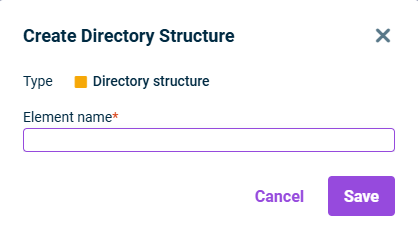
Click Save.
Adding Object Type for Excel Reporting
To add an object of type Lucanet-Excel-Reporting in a directory structure:
Click the name of the desired directory structure in the Workspace configuration.
Click Edit.
Click the Object type column and choose Lucanet.Excel-Reporting from the drop-down list.
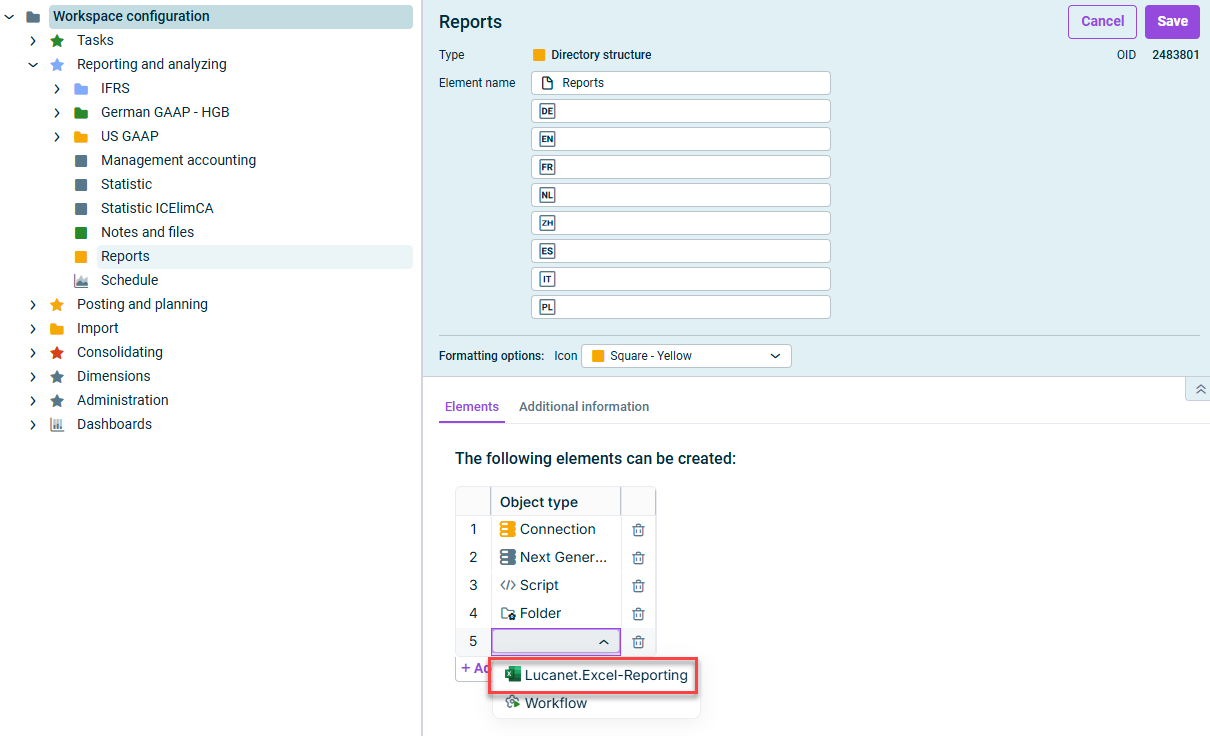 Selecting the object type 'Lucanet.Excel-Reporting'
Click Save.
The directory structure is then displayed as a workspace in the overview, and an element of type Lucanet.Excel-Reporting can be created and edited there.