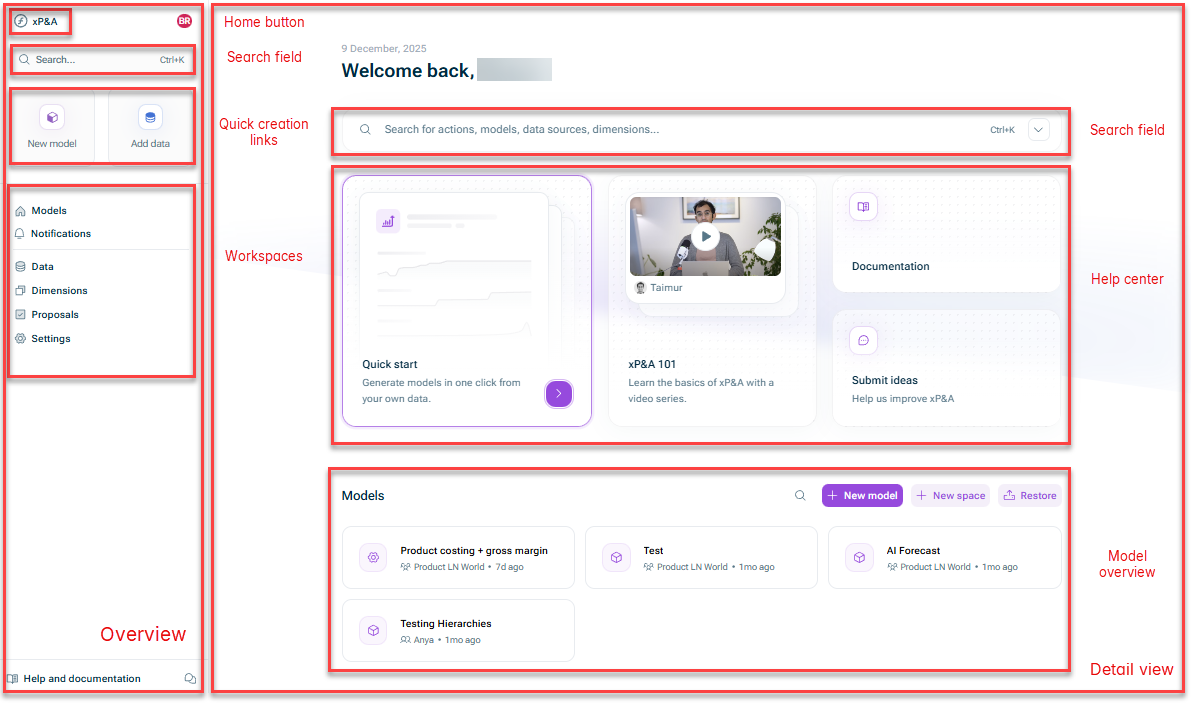
| Home button | You can use the home button to navigate back to the start page from anywhere in the xP&A solution. |
| Search field | You can use the search field to:
• Quickly create a new model or data source
• Access our product documentation
• Navigate to specific elements that are already present in xP&A |
| Quick creation links | You can use these links to quickly create a new model or data source. |
| Workspaces | You can use this area to navigate to the different workspaces of the xP&A solution:
• Models: Opens the model overview (which is shown by default on the start page)
• Notifications: Opens the notification center where you are updated on actions regarding your models, data, comments, and organization and teams.
• Data: Opens the Data workspace where you can administrate your data integrations, i.e. manage and share your data sources and data connections.
• Dimensions: Opens the Dimensions workspace where you can manage your dimensions.
• Proposals: Opens Proposals workspace where you can manage change proposals.
• Settings: Opens the Settings workspace where you can
• Adjust your notification settings
• Open the Help center to access our resources to learn xP&A and get support. |