Defining Properties of Return Values
Last updated on 2026-03-16
Overview
Placeholders and functions can be extended with text and parameters to control the display of their return values. The extension is made with an arrow (->).
The return values for the Value and Exchange rate functions can be changed using any formula.
This article contains the following sections:
Return Values for Placeholders
Placeholders in tilde formulas can be assigned a text and parameters for the properties of the return values.
To define the properties of the return value of a placeholder, an arrow ( -> ) is added to the tilde formula followed by a text and/or a parameter.
Structure of the Tilde Formula with Placeholders
The tilde formula must be structured as follows:
~Placeholder->"Text %short/%long"
It is possible to attach any desired text to a placeholder. The entered text is retained when the report is generated.
The return values of the placeholders for periods and data levels can be specified with additional parameters A detailed description will be available shortly.
Keywords in Tilde Formulas with Placeholders
The keywords %short and %long specify the return value of a placeholder as name or as full name for data level, adjustment level, and organization element.
You can only export the full name if an attribute exists in Lucanet with the long_name key and it is used in the Data level, Adjustment level, and Organization elements dimensions.
Example for Tilde Formulas with Placeholders
The Excel worksheet contains two tilde formulas with placeholders for an organization element:
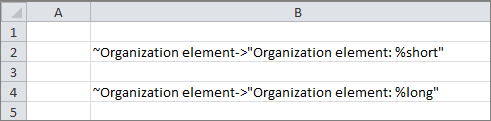
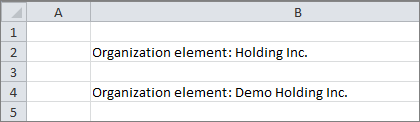
The placeholders are replaced based on the tilde formulas:
Return Values for Data Levels
The return values of the placeholders for data levels can be specified with additional parameters:
You can use the Period parameters to dynamically assign a heading to the columns of a time series. When the Period parameter is used in the tilde formula for data levels, the return value of the placeholder %short and %long depends on the selected period.
Structure of the Tilde Formula with Placeholder 'Data level' and Parameter 'Period'
The tilde formula must be structured as follows:
~Data level->"text:%short/ %long”";period
Return Values of the Actual Data Level
Specifying a period for actual data levels gives the following return values:
- If the period lies completely within the actual data level, the return value is Actual.
- If the period lies partially outside the actual data level, the return value is Partly outside of Actual.
- If the period lies outside the actual data level, the return value is Outside of Actual.
Return Values for Planning Data Levels
Specifying a period for plan data levels returns the following values:
- If the period lies completely within the plan data level, the return value is Planning.
- If the period lies before the plan data level and completely within the actual data level, the return value is Actual.
- If the period lies completely within both the actual and plan data levels and intersects both, the return value is Actual/forecast.
- If the period lies partially outside the plan data level, the return value is Partly outside of Planning.
- If the period lies outside the plan data level, the return value is Outside of Planning.
Example: Return Value Depending on the Period
The Excel worksheet contains three placeholders for data levels that are specified before generation of the Excel report in Lucanet. ~quarter is used as a placeholder for the period:
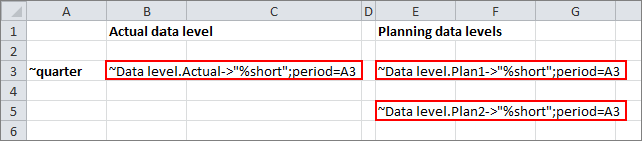 Period in tilde formulas for data levels
The first quarter of 2018 is selected as the period:
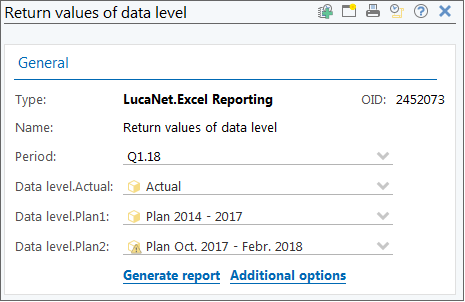
In the Excel worksheet, the data levels are displayed as follows:
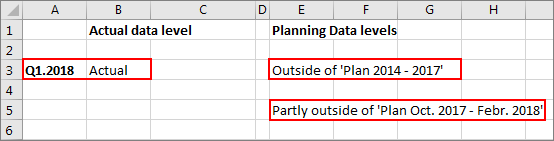 Result with period Q1 2018
The actual data level comprises all of 2018. Therefore, the period Q1.2018 falls completely within the actual data level and Actual is the return value issued.
The period Q1.2018 falls completely outside Planning DataLevel.Plan1, as this only covers the time interval until the end of the year 2017.
Planning data level.Plan2 only covers the time interval up to February 2018. The return value shows that the period falls partly outside the planning data level.
Planning DataLevel.Plan2 delivers a changed result if you choose the fourth quarter of 2017 as the period:
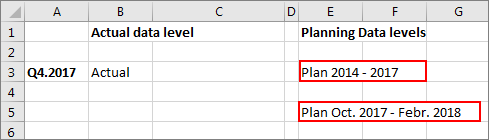
The Q4.2017 period is completely within planning data level.plan1 and within planning data level.plan2.
Return Values for Periods
The return value for periods can be influenced using the help of parameters. The case of the parameter defines whether the first or last month of the time interval is displayed in MS Excel.
Unlike for all other parameters, a distinction is made between upper case and lower case.
Structure of the Tilde Formula for a Period with Optional Parameter
The tilde formula must be structured as follows:
~Period->"Text Parameter"
First Month in the Time Interval
If the period is to refer to the first month of a time interval, the keyword for the parameter is written in lower case. The following keywords are available:
- %d: Returns the first day of the time interval (one-digit or two-digit)
- %dd: Returns the first day of the time interval (two-digit)
- %m:: Returns the first month of the period as one or two digit(s)
- %mm: Returns the first month of the period as two digits
- %mmm: Returns the abbreviation for the first month of the period range
- %mmmm: Returns the name of the first month of the period range
- %yy: Returns the year of the first month of the duration in two digits
- %yyy: Returns the year of the first month of the period range as four digits
- %q: Returns the quarter of the first month of the period range as Arabic numeral
- %qq: Returns the quarter of the first month of the period as a Roman numeral
Last Month in the Time Interval
If the period is to refer to the last month of a time interval, the keyword for the parameter is written in upper case. The following parameters are available:
- %D: Returns the last day of the time interval (one-digit or two-digit)
- %DD: Returns the last day of the time interval (two-digit)
- %M: Returns the last month of the period as one or two digits
- %MM: Returns the last month of the period range as two digits
- %MMM: Returns the abbreviation for the last month of the period range
- %MMMM: Returns the name of the last month of the period range
- %YY: Returns the year of the last month of the duration in two digits
- %YYYY: Returns the year of the last month of the period range as four digits
- %Q: Returns the quarter of the last month of the period as an Arabic numeral
- %QQ: Returns the quarter of the last month of the period range as Roman numeral
Default Display for Periods
If no parameter is specified, then periods are displayed as follows:
- Month: Jan 2017
- Quarter: Q1.2017
- Year: 2017
If the time interval comprises several periods, the time period is displayed as follows:
- Several months: Jan 2017-Feb 2017
- Several quarters: Q1.2017-Q2.2017
- Several years: 2017-2018
Examples
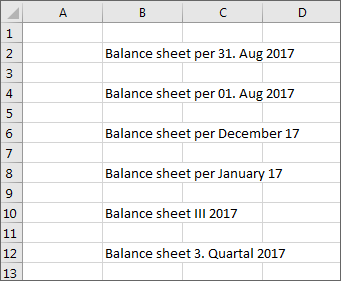
The Excel worksheet contains different tilde formulas for displaying the period:
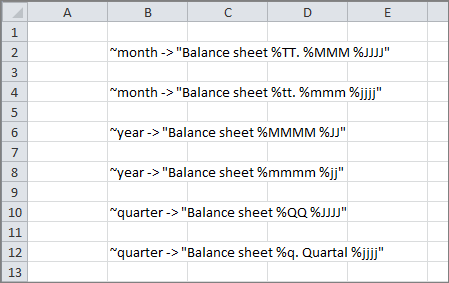
These values are displayed in MS Excel when August 2017 is displayed as the period:
Value of an Attribute
Tilde formulas with placeholders can be used to display the value of an attribute in MS Excel. The attribute key is used as a parameter for returning the attribute value.
Structure of the Tilde Formula for Returning the Value of an Attribute
The tilde formula must be structured as follows:
~Placeholder->"Text %short/%long";Attribute key
Note: Only attribute values of attributes that can be selected as display language and that are used in the corresponding dimension can be read in to MS Excel.
Example
The ~data level placeholder is used without an attribute and with the attribute keys name_eng and long_name:
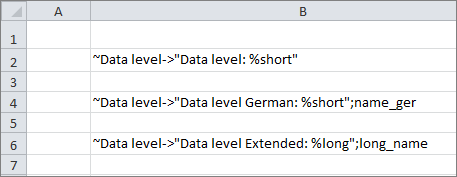
The generated report is displayed as follows:
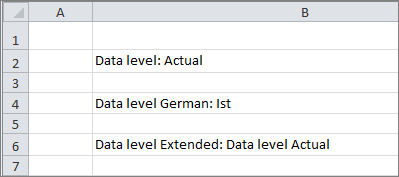
When an attribute key is specified in the formula, the parameters %long or %short are not taken into account and are overwritten by the value of the attribute.
Return Values for Functions
The return values for the Value and Exchange rate functions can be changed using any formula.
Tilde Formula Structure
The tilde formula must be structured as follows:
~Rate/~Value(Parameter_1 ... Parameter_n)->"1/x"
The letter x represents the return value of the function, while 1/x represents a possible formula.
Example
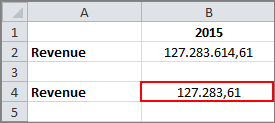
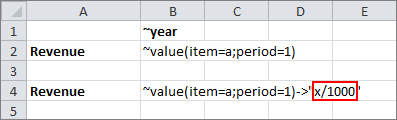
The Value function in row 2 returns the unchanged value.
In row 4, the return value is changed with x/1000:
The generated report appears as follows: