
TRR (Tax Rate Reconciliation)
Last updated on 2026-05-15
Overview
The tax rate reconciliation (TRR) is a disclosure required under IAS 12.81 [c], which is intended to explain the relationship between the expected tax expense (EBT × statutory tax rate) and the actual tax expense as reported in the P&L.
Reconciliation items are used to disclose the drivers of the effective tax rate, thereby deriving the effective tax rate. The effective tax rate is a key indicator in Income Taxes.
This article contains the following sections:
Starting Point of the Reconciliation
The starting point of the reconciliation is the product of the profit before tax and the applicable tax rate. The following tax rates may come into question in accordance with IAS 12.85:
- [1] The domestic tax rate of the country in which the parent company is situated, or
- [2] For enterprises operating in multiple tax jurisdictions, a weighted tax rate
In practice, option [1] is by far the more common option. Income Taxes supports both options in principle. If a weighted tax rate is to be used, a dummy enterprise with the average tax rate must be created as the parent company (group parent).
IAS 12 does not prescribe the structure of the tax rate reconciliation. Income Taxes uses the TRR items most commonly used in practice.
Navigation
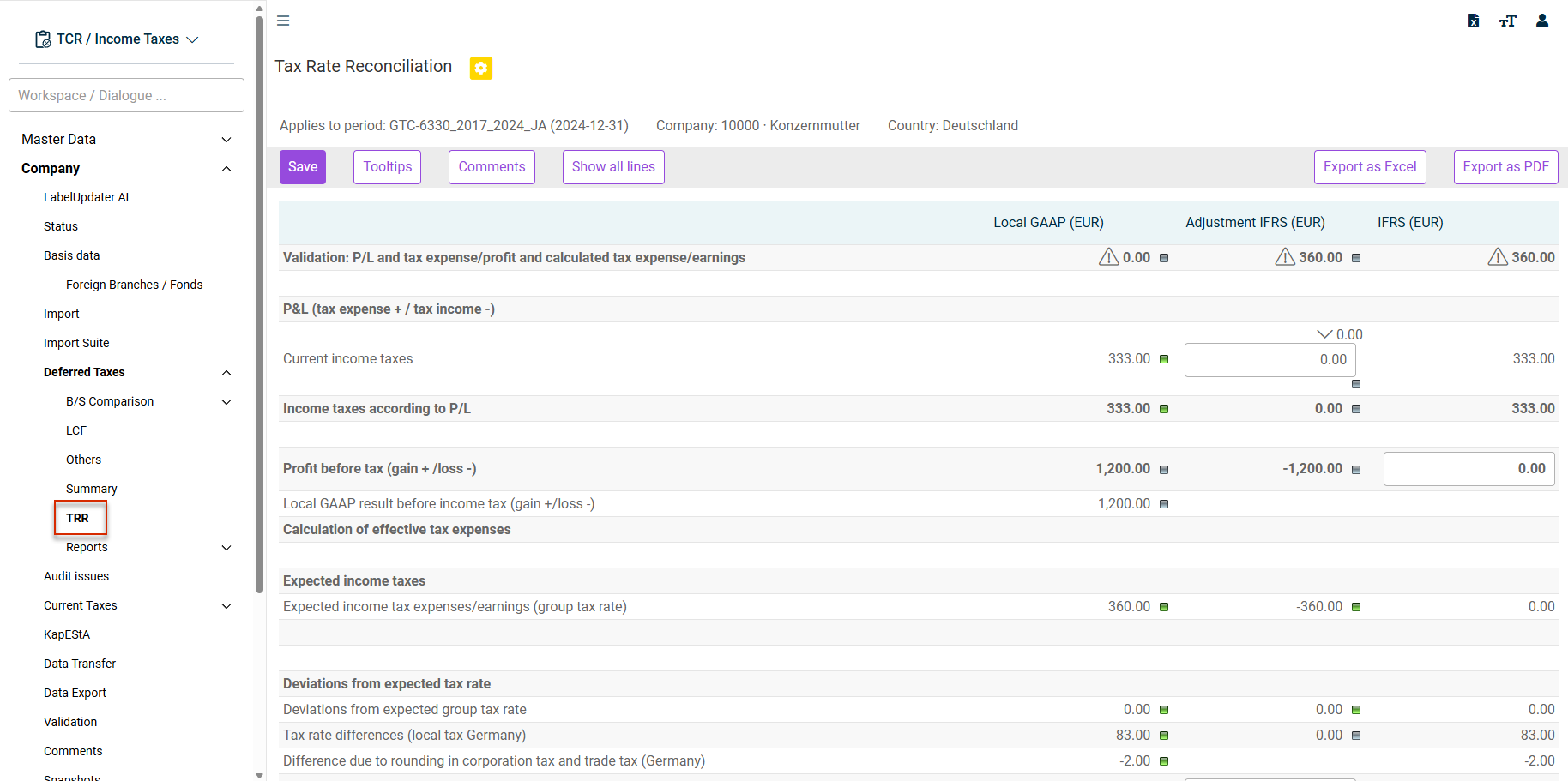
The TRR workspace is opened under Company | Deferred Taxes | TRR.
The TRR workspace is displayed, for example, as follows:
Data Source of TRR Columns
The following columns are displayed in the TRR workspace:
- Local GAAP (EUR)
- Adjustment IFRS (EUR)
- IFRS (EUR)
- Late Adjustments (optional): The Late Adjustments column is displayed only if the calculation of current taxes from late adjustments has been activated in the Toolbox master data workspace.
Late Adjustments are possible only for foreign enterprises.
The following table describes the content and data source of the columns:
Property
Description
Content
- Local GAAP:
- Determination of the expected income tax expense based on the profit before tax under Local GAAP [e. g. HGB (German Commercial Code)]
- Deferred taxes are not included in the starting value of the tax expense in accordance with the P&L, but represent a TRR item
- Late Adjustments (optional): Determination of the expected income tax expense based on the profit before tax under Local GAAP [for late adjustments of the actual taxes]
- Adjustment IFRS: Determination of the expected income tax expense based on the profit before tax [for IFRS income adjustments]
- IFRS
- Determination of the expected income tax expense based on the profit before tax in accordance with the IFRS
- Sum of the preceding columns
Data origin
- Local GAAP: Current Taxes workspace
- Late Adjustments (optional):
- Current Taxes workspace [when using Toolbox, i. e. foreign companies]
- Row 19.1-19.13
- Adjustment IFRS:
- Workspaces:
- B/S Comparison
- LCF (Loss carried forward)
- Others
- Summary
- Workspaces:
- IFRS: Sum of the preceding columns
Germany/Foreign Difference
Selected rows are either displayed or hidden, depending on whether a company is assigned to Germany (with German tax law) or a foreign country (see Master data workspace Toolbox).
TRR Tooltips
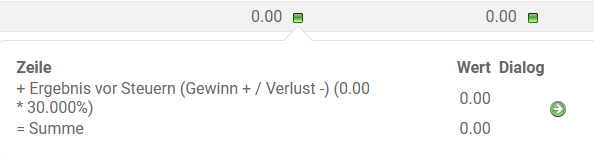
The reconciliation items displayed in the TRR workspace are documented by tooltips.
Click the  icon to display a tooltip with the explanation of the composition of the TRR item. The source workspace, the relevant row, and the assessment basis are displayed:
Displaying Tooltips in a Table
You can also display all tooltips in the table by clicking Tooltips:
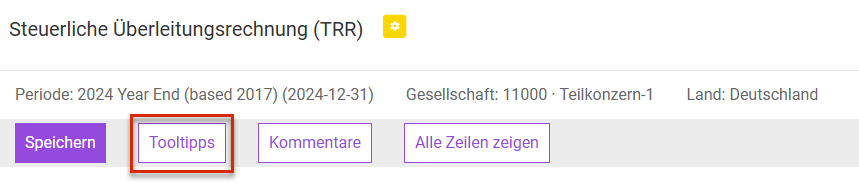
The tooltips are then displayed in an additional column of the table. The TRR view button is displayed instead of the Tooltips button. Click TRR view to return to the original view.
Validation: P/L and Tax Expense/Profit and Calculated Tax Expense/Earnings
The upper section of the workspace is used for the validation of the TRR and the specification of any unexplained difference. It is checked whether the reconciliation items explain the difference between the effective income taxes (original + deferred taxes) and the expected tax expense (EBT x tax rate of the company).
Maximum 5% of the expected income tax expense can be entered in the TRR item Other miscellaneous. If this limit is exceeded, a yellow warning triangle will appear in the row and the user must add a comment. Otherwise, the Deferred Taxes milestone will not be able to be changed into or closed with the data ok status. The 5% rule is not specified in IAS 12, but has been taken from an earlier US GAAP provision and has become established in practice.

Notes
The TRR is performed for income tax groups on a stand-alone basis. Special considerations arise only in connection with the allocation of current taxes and the submission of deferred taxes. Both parameters are defined in the Company master data dialog. The technical requirements for the allocation of current and deferred taxes are not discussed in detail here.
Tax Group Member Level
At the level of the tax group member, the TRR reconciliation items, such as non-deductible business expenses or tax-free income, are taken from the Current Taxes workspace , which applies only to subsidiaries. The determined current income taxes are corrected in the TRR row Correction of results/tax allocation and are taken into account in the exact amount at the level of the tax group parent.
The principle of tax transparency is a special feature of partnerships [PersG], which must be observed. The partnership itself is usually subject to trade tax – corporation tax is levied at the level of the partner [corporation legal form]. This results in effects at the level of the partnership and partner in the TRR.
The reclassification column can be used to reclassify the values between individual rows. The column contains manual input fields, which are included in the total calculation of the IFRS column.
The reclassification column is not displayed by default. If you need the column, please contact your Lucanet consultant.
Tips
Tips for Validation Errors
Preparing the TRR is one of the most time-consuming activities in practice. The tool therefore simplifies this process significantly. However, certain assumptions must be defined to achieve the highest possible degree of automation. The following points should be observed when validation errors occur in the TRR, i. e. when the TRR does not balance:
- Distribution of tax balance sheet corrections in the tax calculation
- Balance sheet differences between the HGB (German Commercial Code) and the tax balance sheet do not correspond to tax balance sheet corrections
- Changes in IFRS/HGB balance sheet differences do not correspond to IFRS/HGB income differences
- The losses carried forward have not been developed
IFRS/HGB Balance Sheet Differences Do Not Correspond to IFRS/HGB Income Differences
The following example is intended to illustrate this case: A difference of 100,000 between the IFRS and HGB (German Commercial Code) is entered in the balance sheet comparison. The difference is entirely temporary. At a tax rate of 20%, this results in deferred tax liabilities of 20,000. The IFRS EBT is consequently 100,000 solely due to this one balance sheet difference. The TRR balances.
If a deviating IFRS EBT is entered, the TRR will not balance by the amount of the difference multiplied by the tax rate. In this simple case, the income effect is straightforward.
In practice, however, it is not always immediately apparent whether the wealth differences between the HGB (German Commercial Code) and the IFRS documented in Income Taxes result in the correct income effect. The report Transition P&L results local GAAP / IFRS is helpful for this. The report shows whether the change in balance sheet differences corresponds to the income difference. You can generate the report by clicking the Transition P&L results local GAAP / IFRS button in the Tax Rate Reconciliation (TRR) workspace.