
TB Transfer
Last updated on 2026-01-30
Overview
The TB Transfer workspace (tax base transfer) allows you to transfer the tax bases determined at the level of the tax group members or for shareholders of partnerships (e. g. partnership companies) directly to the tax return of the tax group parent or shareholder/partner.
The workspace is visible only in the event of a tax group for (intermediate) tax group parents or partners (or shareholders of a partnership). The transferred data are displayed in separate columns for each company or partner and summarized in a total column.
This article contains the following sections:
Navigation
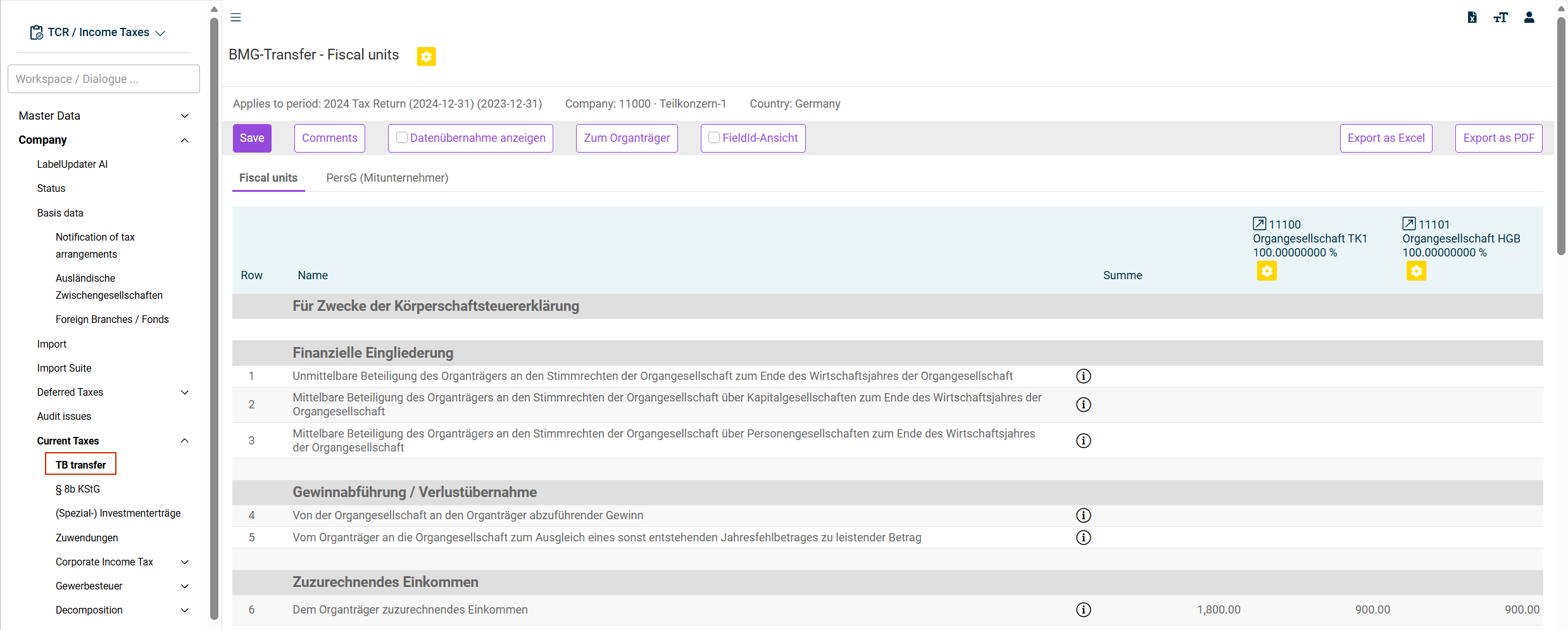
You can access the TB Transfer workspace under Company | Current Taxes | TB Transfer. The TB transfer workspace is displayed as follows, for example:
Options
The following options are available in the TB transfer workspace:
Option
Description
Save
As soon as data are available for transfer from the tax group member, they are highlighted in yellow. To accept the data values, the workspace must be saved. After saving the data, they are processed and the yellow background disappears.
Comments
Opens the Comments & Attachments dialog.
Datenübernahme anzeigen (Show transferred data)
Activate the check box to display only data that have already been transferred.
If the check box is not activated, both data not yet transferred (highlighted in yellow) and data already transferred (without color coding) are displayed.
Data origin
The TB transfer data transferred to the tax group parent or investor come directly from the data entered at the level of the partnership (e. g. partnership company) or tax group member.
The data for partnerships are taken from the Revenue workspace. The data for tax groups are obtained from the Current Taxes workspace of the tax group member or intermediate tax group parent. Tooltips display detailed information on the data origin.
Hover over the icon  to display information on the data origin.