
Creating and Configuring the Element Type Country
Last updated on 2025-07-16
Overview
This article describes how to create and configure countries and also includes an overview of the corresponding key attributes, such as tax rates and exchange rates. The creation of countries is necessary in order to create companies.
This article contains the following sections:
Creating an Element of Type 'Country'
To create a new element of type Country:
- In the Countries workspace, click Create:
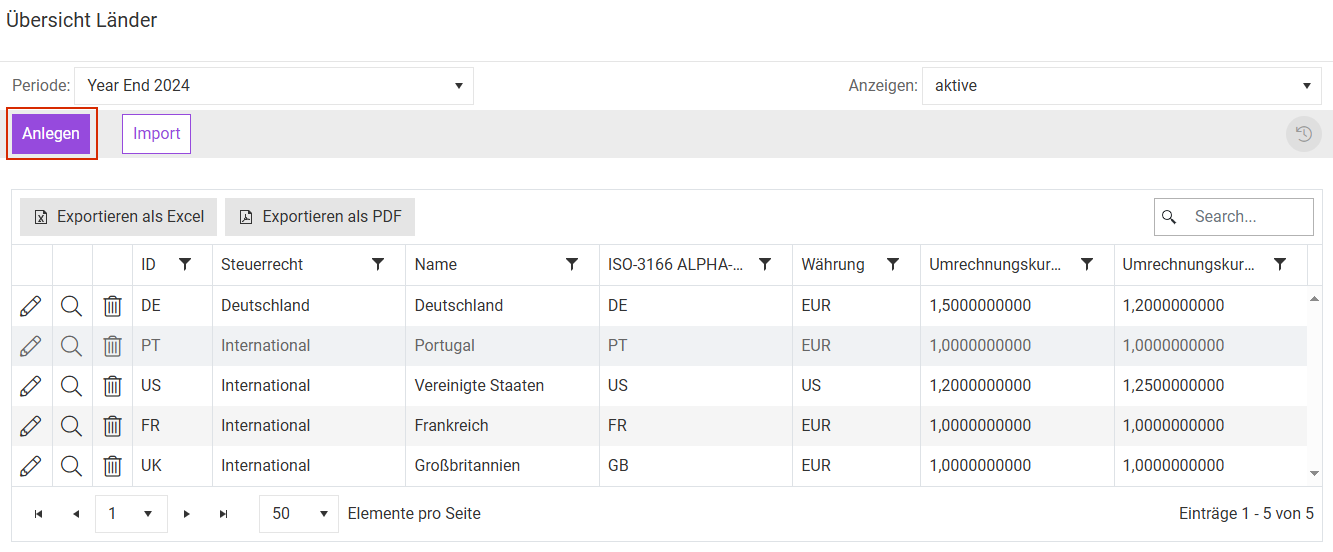
Creating country - Enter the required information (see the following subheading).
Configuring Element of Type 'Country'
To configure an element of the Country type, proceed as follows:
The General Information area is displayed as follows:
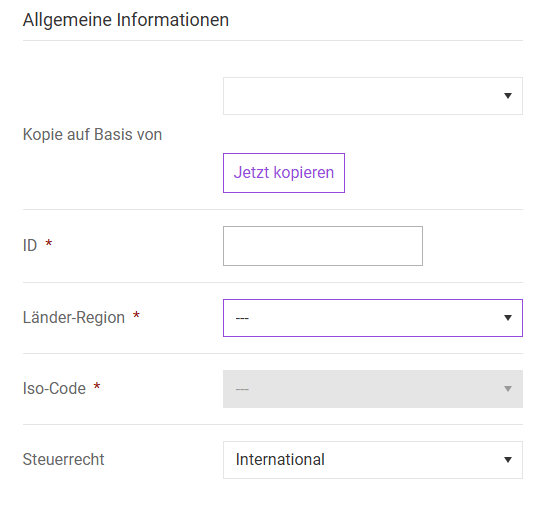
Specify the following:
Option
Description
ID
Clearly identifies a country. Up to three places can be used. The ID can only be assigned once. It is not possible to change it later on.
For country IDs, it is advisable to use abbreviations according to ISO 3166-1-ALPHA-2 (two letters, e.g. DE, GB, FR). Regions or specific requirements for tax rates can, for example, be represented by US1, US2, US3, (…).
Country region
Specifies the region to which the country belongs and restricts the selection options for the ISO code field.
Furthermore, the country region can be used for evaluations by region in Own reports.
ISO Code
Establishes a unique assignment to a country. This is particularly important because the ID of the country can be assigned freely.
The ISO code should always be set, especially when the Questionnaire or Compliance module is used. These modules use the ISO code internally and can only be used to a limited extent if no entry is provided.
Furthermore, the ISO code can be used for country-specific analyses in Own reports.
Tax Template
Defines the structure of the forms for determining current taxes in the Company function area.
If a tax calculation for a country is to be defined in the master data dialog Toolbox, select the tax template (---) (preset as standard by default). You can then access Current Taxes.
If the tax template Germany is selected, the tax detail dialogs are enabled to determine current taxes.
The Tax Rates (Enacted) area is displayed as follows:
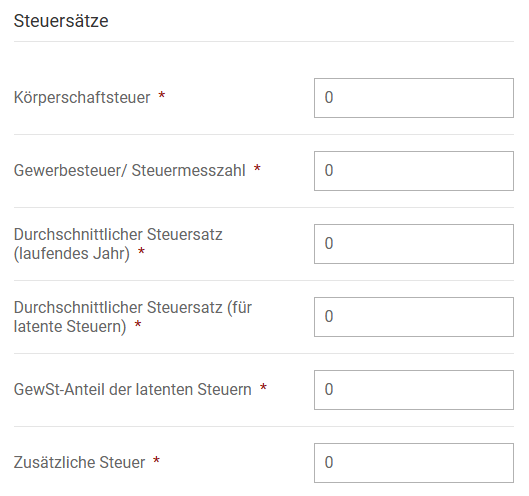
Specify the following:
Option
Description
Corporate income tax (CIT) rate
The tax rate used to determine the German corporate income tax or the initial foreign income tax (corporate tax).
- This entry is relevant for all countries set up in Income Taxes.
- The value is used only for the calculation of current taxes. It does not apply to the determination of deferred taxes.
Local/State tax rate
Indicates the local tax or basic tax rate.
For this entry, a distinction must be made between Germany and other countries. For foreign countries, the value of zero may also be entered if no local income tax is levied or if it should be disregarded in Income Taxes.
Germany
Enter the basic tax rate of 3.5% (§ 11 (2) GewStG).
The basic tax rate is used for multiplication with the taxable income calculated in Income Taxes. The resulting base tax amount is multiplied by the local tax of the commune(s) in which the company is located. The local tax is therefore administered individually for each company (in the master data dialog Company).
Foreign Countries
This amount is used for the second foreign income tax (local tax) for foreign companies. In the Current taxes dialog, it is also possible to specify a different tax rate in the Business tax (Gewerbesteuer) column (or local tax) in order to account for local tax rates that differ at the regional level.
If a local tax or local tax rate is specified in the master data dialog Company, this will be prioritized as the proposed value displayed.
Combined current income tax rate
Indicates the average real tax rate for the current year. This tax rate corresponds to the sum of the two tax types Corporate income tax and Local tax.
This tax rate is key in determining the TRR row Expected income tax expenses/earnings. The difference between the tax rate of the country of the holding company and the company tax rate, multiplied by the profit before tax, represents a TRR transition item.
Combined deferred tax rate
Indicates the tax rate used for the calculation of deferred taxes. This tax rate generally corresponds to the combined current income tax rate for the current year or the sum of the two income tax types (corporation tax and trade income tax).
A deviation between the combined current tax rate for deferred taxes and the combined current income tax rate may arise if the (future) tax rate of the country in question changes. The liability method underlying IAS 12 is based on the future tax rate.
thereof, deferred tax rate local tax
Here, you must specify the portion of the combined tax rate for deferred taxes that is attributable to local tax (or local income tax). The difference between the two tax rates is attributable to the corporate income tax (incl. solidarity surplus for the country “Germany”).
This entry is particularly relevant for German partnership companies. It ensures, for example, that the share of deferred taxes for corporate income tax that is attributable to external partners is not displayed in the group. The local tax portion of the latent tax rate is also used as the proposed value for the calculation of deferred taxes on export loss relief in the LCF workspace.
Additional tax rate
Indicates additional taxes:
- For Germany: Enter the valid solidarity surplus (group tax relief) for Germany (5.5%).
- For countries to which the tax template of Germany does not apply: entering data in this field does not trigger any calculations.
The FX Code area is displayed as follows:
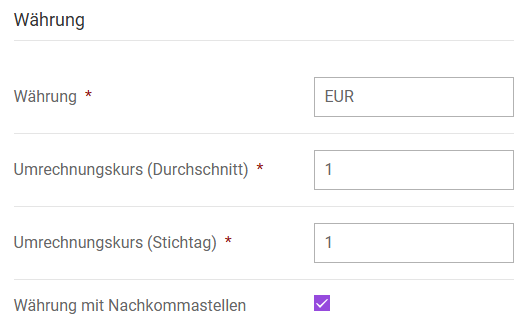
EUR is set by default as the FX code. Specify the following:
Option
Description
FX Code
Indicates the foreign currency associated with the corresponding currency code. The currency code should be three characters long (recommendation: ISO 4217, e.g. EUR, USD), but no more than 10 characters.
- Exchange rates must match the consolidation system. Otherwise, there may be differences between Income Taxes and the external system. It is therefore advisable to import the exchange rates from upstream systems (this is also possible via Excel CSV files).
- Exchange rates can be specified in the indirect quotation (e.g. for USD, entering 1.32814 indicates the price in USD for one euro).
Avg FX rate (RC to LC)
The average exchange rate is required for the conversion of the P/L effects of deferred taxes.
FX rate (cut-off date, RC to LC)
Indicates the closing exchange rate. This closing exchange rate is required for the conversion of balance sheet stocks. The difference from currency conversion is charged or credited to the currency difference of equity in the group financial statements. Exchange rates are also required for the use of reports. The difference from currency conversion is charged or credited to the currency difference of equity in the group financial statements. Exchange rates are also required for the use of reports.
Currency with decimal places
Activate if the values of the companies assigned to the country in question are to be displayed with decimal places in the different areas of Income Taxes. This option is activated by default.