
Importing Exchange Rates
Last updated on 2025-07-16
Overview
With the help of the import function in the Countries workspace, exchange rates can be automatically imported into Income Taxes.
Manual Imports
Prerequisites
Please ensure the following before performing a manual import:
- The parameter PATH_EXCHANGERATES in the customizing table is set to the value Manual:SimpleFormat.
- A CSV file is required for the import process (file name extension: .txt or .csv).
- The structure of the CSV file must be as follows:
- Each row of the CSV file represents exactly one data set.
- The delimiter within the data sets is the semicolon. For the values to be read, both a period and a comma can be used as the decimal separator. Thousands separators, on the other hand, are not permitted.
- For negative amounts, a minus sign must be placed immediately before the number, for example -56.78.
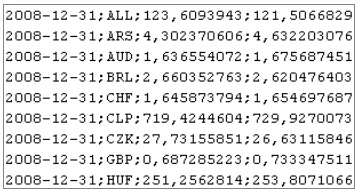 Example structure of a CSV file
- The data set must have the following structure: ULTIMO;CURRENCYID;ULTIMO-EXCHANGE-RATE;AVERAGE-EXCHANGE-RATE;
Field
Description
ULTIMO
- Type Text {YYYY-MM-DD}
- Cut-off date of the closing in the format YYYY-MM-DD (e.g. 2007-12-31)
CURRENCYID
- Type Text
- ID of the currency, as used in Income Taxes (alphanumeric)
ULTIMO-EXCHANGE-RATE
- Type Decimal
- Closing exchange rate of local currency in group currency
AVERAGE-EXCHANGE-RATE
- Type Decimal
- Average exchange rate of local currency in group currency
Importing Exchange Rates Manually
Import your exchange rates as follows:
- Click Import and select the file to import in the dialog that appears.
- Confirm the selection and click Import again.
Notes:
- The import will only be executed if the end of period date of the currently selected period matches the end of period date in the name of the import file.
- After the data is successfully imported and saved, a log is displayed. The log contains the following information (I) and warnings (W):
- The closing exchange rate must be present in the import file.
- If individual average rates are missing, the closing exchange rate will be entered in their place (warning W).
- If all average exchange rates are missing, the value 0 (warning W) will be entered into the corresponding fields.
- If data for a country maintained in the system is missing in the import file, you will receive a warning (W).
- The log is not saved permanently.
Importing via File Path
Prerequisites
Before importing via a file path, please ensure the following:
- In the customizing table, the PATH_EXCHANGERATES parameter refers to the complete path, including the filename with which the import file can be loaded, e.g. file:///C:/GlobalTaxCenter/Import/Kurse/kursdaten.csv.
- A CSV file is required for the import process (file name extension: .txt or .csv).
- The structure of the CSV file must be as follows:
- Each row of the CSV file represents exactly one data set.
- The delimiter within the data sets is the semicolon. For the values to be read, both a period and a comma can be used as the decimal separator. Thousands separators, on the other hand, are not permitted.
- For negative amounts, a minus sign must be placed immediately before the number, for example -56.78.
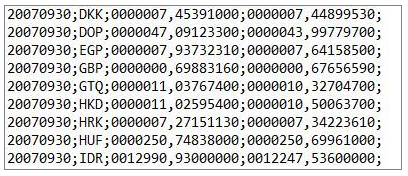 Example structure of a CSV file
 - The data record must have the following structure: ULTIMO;CURRENCYID;ULTIMO-EXCHANGE-RATE;AVERAGE-EXCHANGE-RATE
Field
Description
ULTIMO
- Type Text {YYYYMMDD}
- End of period date of the exchange rate
CURRENCYID
- Type Text
- ID of the currency, as used in Income Taxes (alphanumeric)
ULTIMO-EXCHANGE-RATE
- Type Decimal
- Closing exchange rate of local currency in group currency
AVERAGE-EXCHANGE-RATE
- Type Decimal
- Average exchange rate of local currency in group currency
Importing Exchange Rates via File Path
Click Import to import your exchange rates via a file path.
Notes:
- The import file is provided by the server. The storage location of the file is specified via customizing settings.
- The import will only be executed if the end of period date of the currently selected period matches the end of period date in the name of the import file.
- After the data is successfully imported and saved, the import file is automatically archived and a log is displayed. The log contains the following information (I) and warnings (W):
- The closing exchange rate must be present in the import file.
- If individual average rates are missing, the closing exchange rate will be entered in their place (warning W).
- If all average exchange rates are missing, the value 0 (warning W) will be entered into the corresponding fields.
- If data for a country maintained in the system is missing in the import file, you will receive a warning (W).
- If the import file cannot be renamed (archived) after the import, you will receive a warning (W).
- The log is not saved permanently.
Importing into Tax Calculations for Switzerland
If the calculation of tax for Switzerland is activated in Income Taxes, you can click Import Swiss Taxrates.
In the dialog that then appears, you can attach the tax rate file and specify the corresponding startline. You also have the option to update the commune names in the Compliance module based on this file.
Click Import. The tax rates are now available and can be used in the Basis data workspace.
Side Note: Technical Aspects of Tax Rates
The following provides examples of different (fictional) professional constellations and how they can be entered in the Countries workspace.
Example GMBH (which is also a parent company) is located in a commune with a local tax rate of 420%. The corporate income tax rate is 15%, the solidarity surplus (group tax relief) is 5.5%, and the local/state tax rate is 3.5%. These tax rates correspond to the combined group tax rate – therefore, in this example, they serve as the reference tax rates when creating the country “Germany”.
In the Company workspace, a local tax rate of 420% must be entered for Example GMBH.
When creating additional German companies, deviating local tax rates will be taken into account in the respective unit-specific data set in the Company workspace. This may result in a difference from the average tax rate corresponding to the group tax rate. This deviation automatically leads to a transition item in TRR (deviation from the group tax rate).
The corporate income tax rate for the current fiscal year (2024) is 15%. The parliament of the country in question enacts a 5% increase in the corporate income tax rate (to 20%). The corresponding law will be passed by the parliament in December 2024 and will only apply to subsequent fiscal years.
In fiscal year 2024, the current taxes must still be calculated using a tax rate of 15%. However, a different tax rate of 20% applies to deferred taxes. This takes into account the anticipatory effect of deferred taxes. In addition, the liability method underlying IAS 12 is based on the future tax rate.
For IFRS balance sheet accountants, the new tax rate must, in accordance with IAS 12.46, be enacted or substantively enacted. Different thresholds apply here in each country. In Germany, for example, the Bundesrat must pass a corresponding law – the signature of the Federal President is not required.
Any potential TRR effects resulting from a change in the tax rate for deferred taxes are automatically determined by Income Taxes.
The corporate income tax rate is 20%, and the local tax rate (identical assessment basis) is 8%. A change in future tax rates is not foreseeable.
To enable the calculation of local tax within the toolbox, the company concerned must have the Local tax in toolbox option activated in the Company workspace.