
Updating Calculation Bases and Patches
Last updated on 2025-07-16
Overview
There are various use cases for updating calculation bases and patches (for further information on calculation bases and patches, see also Creating and Configuring Periods).
If you change the entries in the Calculation base or Active patches fields, the milestones for all companies in this period will be reset to in process. In addition, a data cleansing is carried out. This process can take some time.
Data Cleansing
During data cleansing, all values that are not displayed in the new configuration are reset to 0 or NIL. This removes "ghost values" that could otherwise affect calculation and reporting.
The cleansed records are logged and can be viewed immediately after saving via the Cleaned data link.
This article contains the following sections:
Updating with Latest Calculation Base and All Available Patches
To update calculation bases and patches:
- Open the period for which you want to update the calculation base and patches.
- Click the arrow icon next to Calculation base.
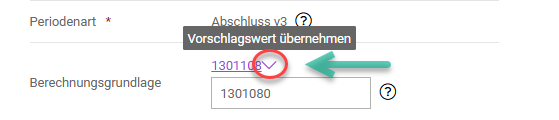
Updating calculation base - Next to Available patches, click Copy.
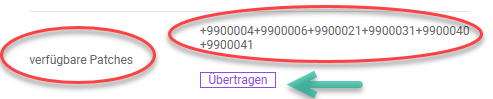
Updating patches
Subsequent Activation or Deactivation of an Individual Patch
If only one specific calculation behavior is to be changed in an existing period, individual patches can be activated or deactivated.
- To activate, enter the number of the desired patch, preceded by a plus sign, into the Active patches field.
- There is also the option to deactivate individual patches in the current period. For this purpose, a minus sign is placed in front of the patch number in the Active patches field.
Example:
+1300050+1300051-1300026