
Electronic Transmission
Last updated on 2026-05-15
Overview
In addition to its reporting functions, Income Taxes can also be used to submit the electronic tax return.
The e-balance sheet, which is submitted as an attachment to the tax return, is sent to the tax authorities from the Tax Balance module.
The Electronic Transmission workspace contains the following workspaces for the submission of the electronic tax return:
This article contains the following sections:
Tax Return Preparation Process (Example)
An example of the process used to prepare the (income) tax return is illustrated in the following figure:
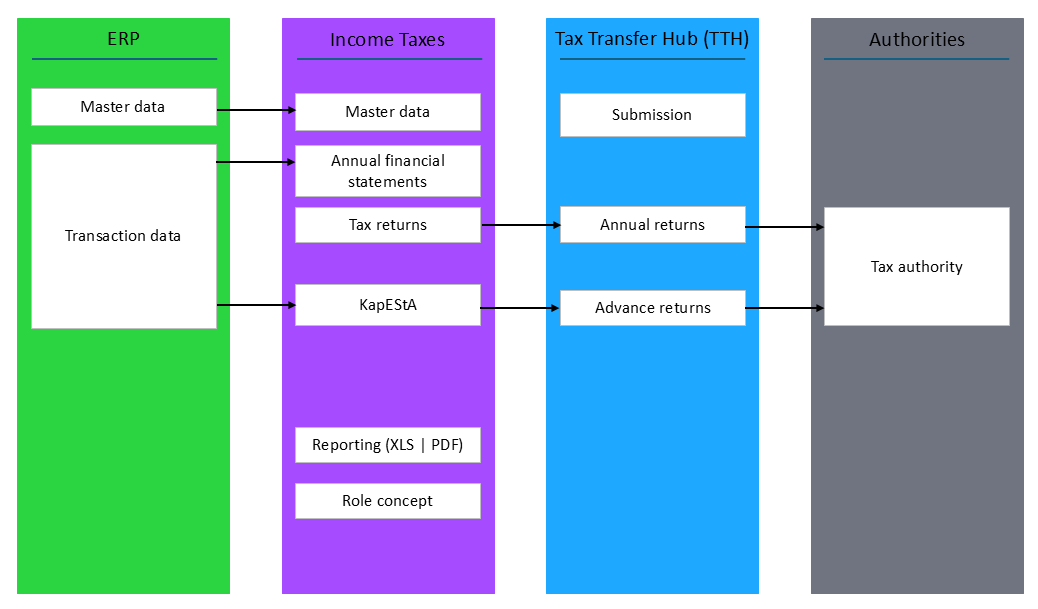
Transaction data and, if necessary, master data are imported from the ERP system into Income Taxes. In the Current Taxes workspace, you can supplement the imported data with all the information required for the annual tax return. In addition, data for the capital gains tax return can be entered in the KapEStA workspace. Once all tax-relevant information has been entered, the tax return (or pre-payment) is electronically submitted to the tax authority via the Tax Transfer Hub (TTH) in the Elektronische Übermittlung (Electronic transmission) workspace.
- The Tax Transfer Hub (TTH) is a technical component implemented in Income Taxes, which is not visible to the user.
- Within Income Taxes, it must be observed that a tax return period must be created for tax return purposes. This activity is described in the following section.
- Furthermore, a valid ELSTER certificate must be stored in the master data for the user.
Distinguishing Between Annual Financial Statement Periods and Tax Return Periods
In the annual financial statements, the tax calculation needs to be entered in Income Taxes above all for the purpose of the provisions calculation and the Tax Rate Reconciliation (TRR). The form dialogs do not have to be used for this purpose – A reduced tax calculation is available: the Current Taxes workspace (form set 2017).
The values are synchronized automatically between forms and the Current Taxes workspace. For example, non-deductible expenses entered in the reduced tax calculation are automatically transferred to Anlage GK.
A special feature of annual financial statement periods is the processing of issues in accordance with section 8b of the Corporate Income Tax Act. They are exempted already at the level of the entering tax group member, not at the level of the tax group parent (known as the net method). This also allows a "stand-alone TRR" to be created for each tax group member. However, what is referred to as the gross method applies to tax return periods. The tax exemption for section 8b corporate tax issues applies only at the level of the tax group parent, section 15 (1.2) (the same applies to partnership companies: here too the exemption only applies to the last shareholder in the ownership chain).
The gross method is implemented by the tax authority on the tax forms. The distinction between the gross method and net method is reflected in the Periods master data workspace:
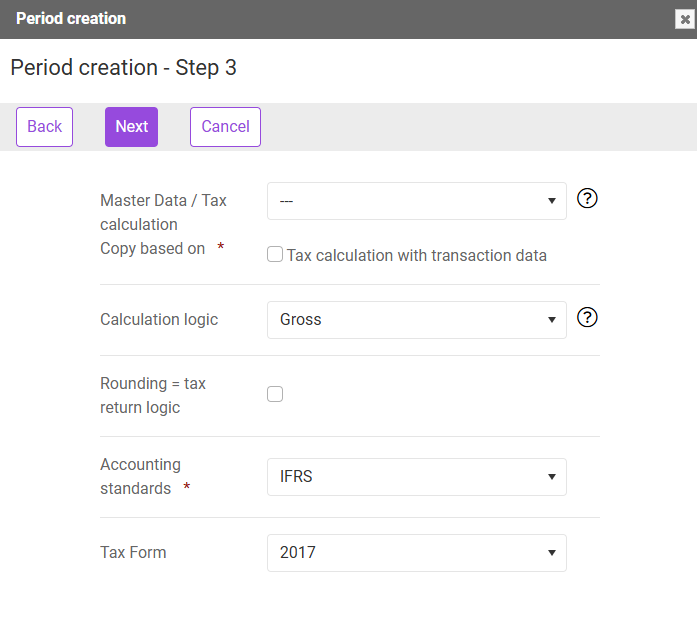
- When a period is created for tax return purposes, it is automatically created as a gross period and the Rounding option is activated.
- When the period is created as an annual financial statement period, the Calculation logic parameter can be chosen freely from the drop-down list as follows:
- Net: The tax exemption for section 8b Corporate Income Tax Act (KStG) issues applies at the level of the tax group member (net method).
- Gross: The Rounding check box can be activated.
The tax exemption for section 8b Corporate Income Tax Act (KStG) issues applies only at the level of the tax group parent (gross method).
Creating a Tax Return Period in Income Taxes
To submit the tax return electronically, a separate period must be created in Income Taxes. As a general rule, the tax return is filed during the year (usually a few months after the annual financial statements). Data that have already been entered in the annual financial statements can be reused when creating the periods and only need to be updated (referred to as true-up). The process can be illustrated as follows:
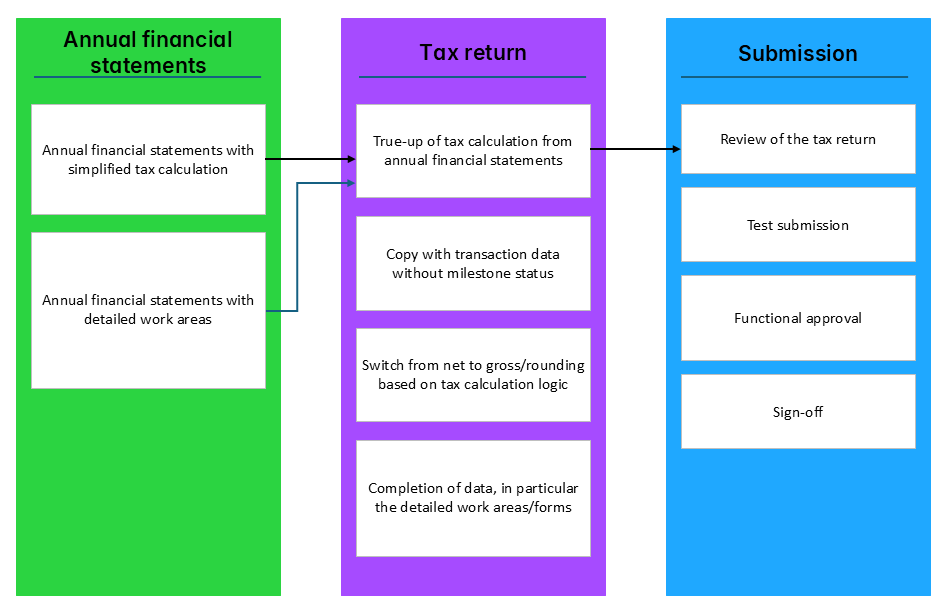
Transaction data are copied when the tax return period is created, regardless of whether the detailed tax dialogs (forms) or the reduced tax calculation (Current Taxes workspace) are used in the annual financial statements.
The milestone status is not applied. It would otherwise be necessary to reset the milestones for companies with a closed status (finished or checked milestone status).
The period is then created and completed in Income Taxes.
In the case of multiple periods, the individual parameters used to create the periods are configured as follows:
