

Migrating From Integrated Excel.Add-in to CFP Add-in for Excel 365

Overview

Customers who used the integrated Lucanet.Excel.Add-in (XLAM) can use a migration assistant to convert legacy formulas with the syntax LUCANET(...) to the formula syntax LN.FORMULA NAME (...) used by the Lucanet CFP Add-in for Excel 365.

The assistant scans all used cells in all worksheets of the current workbook and replaces supported legacy formulas with their LN.* equivalents.

The conversion cannot be undone. We strongly recommend to create a backup copy of the workbook before you start using the migration assistant.

This article contains the following sections

Using the Migration Assistant

To use the migration assistant for converting LUCANET formulas, proceed as follows:

Open the workbook that contains legacy LUCANET(...) formulas you would like to convert.

Open the Lucanet CFP Add-in tab in the Excel ribbon.

In the Other Tools group, click Migration assistant.

Shows the Excel ribbon. Highlighted is the tab 'Lucanet CFP Add In' and the button to open the Migration assistant Opening the migration assistant

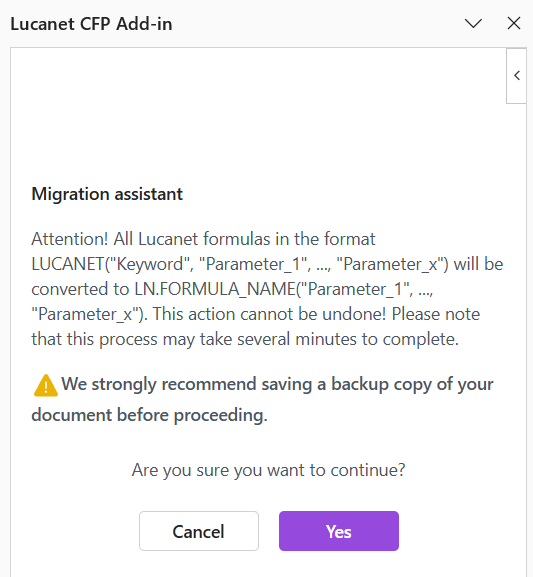
The Migration assistant opens on the right side of the Excel window with a confirmation message:

Shows the dialog that opens on the right side of the window when you open the migration assistant. The purple button is to confirm execution of the assistant
Confirmation message of the migration assistant

Click Yes to start the conversion using the assistant.

Proceed as follows, depending on the success of the conversion:

  • If the conversion was successful, the migration assistant shows a corresponding confirmation message. Click OK to complete the migration.
  • If the conversion failed, the migration assistant lists the cells causing the failure. In this case, go to the listed cell, correct the formula, and run the conversion again using the command Retry.

The conversion cannot be undone. we therefore strongly recommend to create a backup copy of the workbook before you start using the migration assistant.

Conversion Patterns

The migration assistant applies the following conversions to LUCANET formulas:

Legacy formula pattern Converted formula pattern
LUCANET("YTD exchange rate", ...) LN.RATE.YTD(...)
LUCANET("Average exchange rate", ...) LN.RATE.AVERAGE(...)
LUCANET("Closing exchange rate", ...) LN.RATE.CLOSING(...)
LUCANET("ATTRIBUTE", ...) LN.ATTRIBUTE(...)
LUCANET("COMMENT", ...) LN.COMMENT(...)
LUCANET(...) LN.VALUE(...)
  • The migration assistant supports comma and semicolon separators in legacy formulas.
  • During conversion, line breaks in formulas are removed and only lines that start with = are retained.
Contact Us