: Runs theTest update environment planned software version, available for a limited testing period ahead of each planned production update. It is particularly relevant for business processes subject to regulatory or compliance requirements, where pre-release validation helps ensure continuity before the update takes effect.next : Runs theSandbox environment software version as your production system. It can be used for testing configurations, training new users, or validating workflows before applying changes to production.same
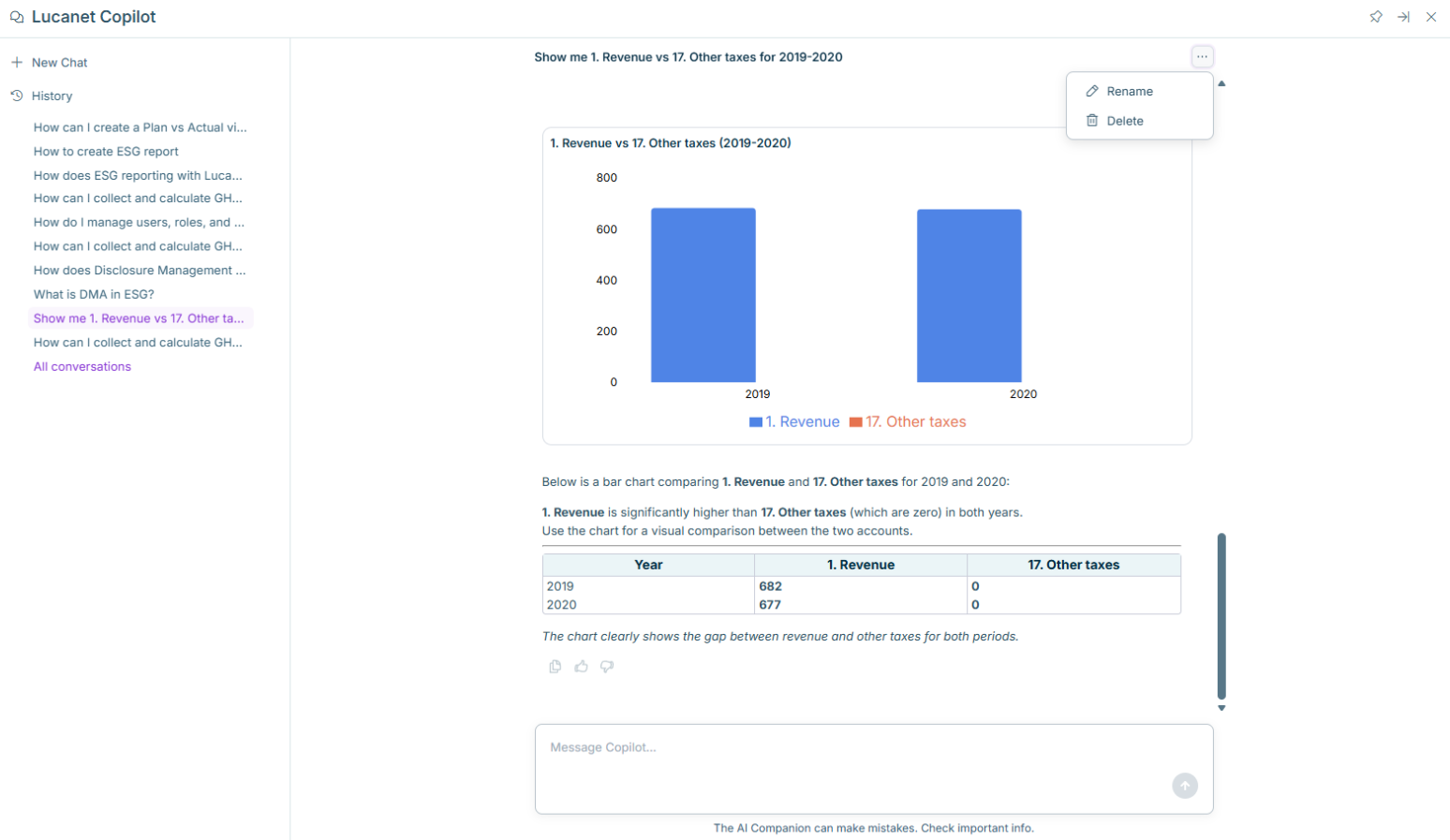
The Copilot panel now opens with a welcome screen showing suggested prompts. A sidebar with quick access to start a new chat using the + icon Toolbar actions for pinning, expanding, and closing the Copilot panel
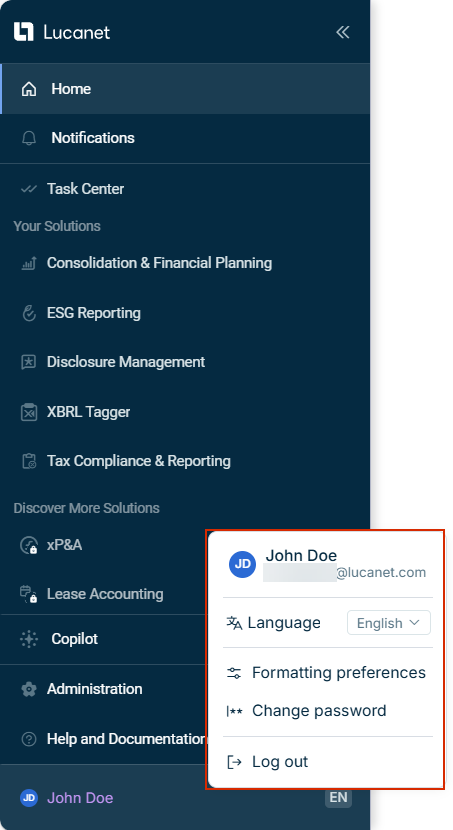
: The main menu now includes a dedicatedHome navigation item, allowing you to return to the start page of the Lucanet CFO Solution Platform with a single click.Home : A newUser account area and Account menu area at the bottom of the main menu displays your avatar, name, and selected language. Clicking anywhere in the user account area opens theuser account , which provides quick access toAccount menu ,Language ,Formatting preferences , andChange password . To view your profile or manage consents, click the user info area at the top of the Account menu.Log out
: Has full access to all documents in the XBRL Tagger. Can view and perform all actions on all documents in the company, and assign roles and documents to other users.Administrator : The standard user role. Can perform all available actions within the documents they have created or to which they have been invited.Editor
Users who previously had the role inAdministrator and access to the XBRL Tagger have been assigned theDisclosure Management role.Administrator All other users with access to the XBRL Tagger have been assigned the role.Editor

File Attachments and Multiple Links
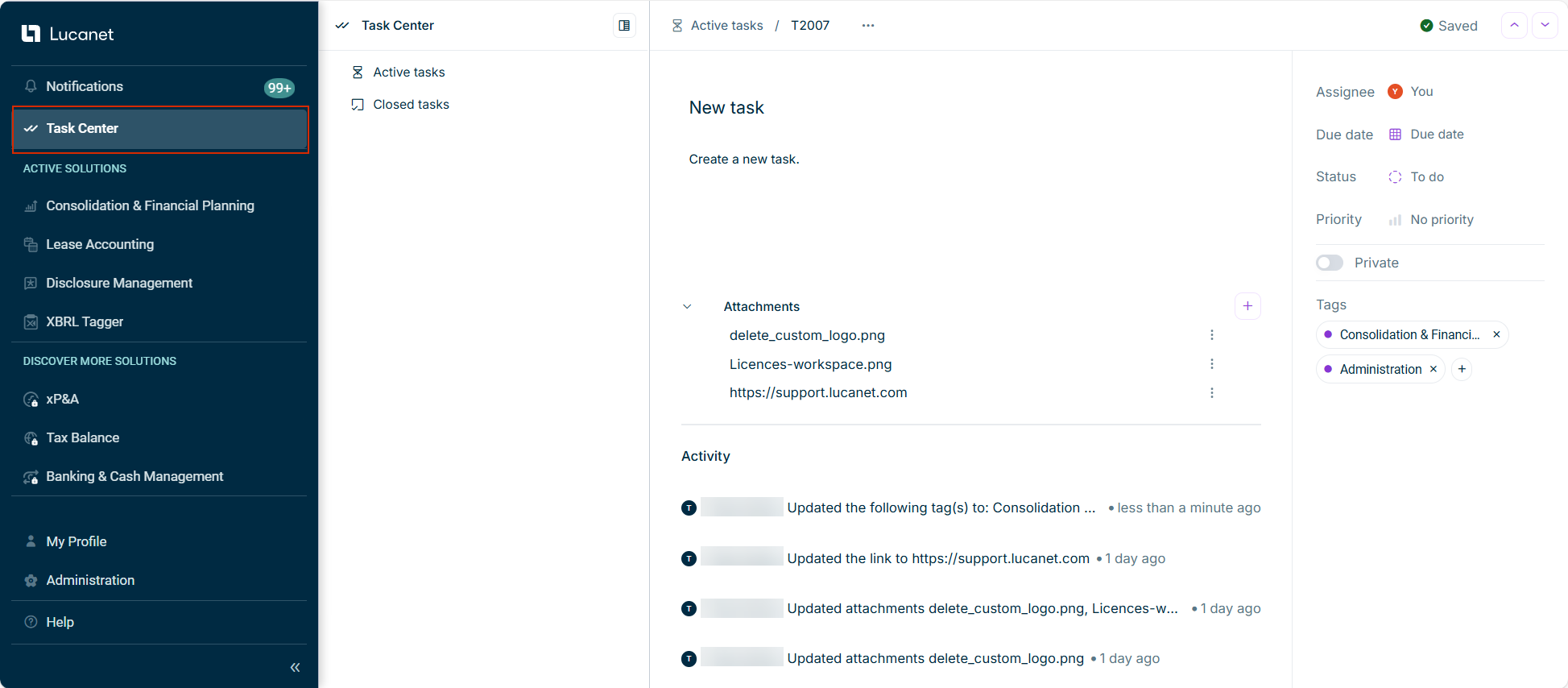
You can now to tasks. Supported file formats include .pdf, .jpg, .png, .docx, and .xlsx, with up to 10 files per upload session. In addition, you can addattach files to tasks to provide additional information.multiple URL links Private and Public Tasks
Tasks can be set as private or public. Public tasks are visible and editable by all users, while private tasks are visible and editable only by the task creator and assignee. Platform administrators can view all tasks. Only the task creator and platform administrators can delete tasks.Additional Improvements Tasks are now organized into andActive tasks workspaces.Closed tasks Each task is assigned a for easier reference.unique task identifier A allows you to quickly find specific tasks by status, assignee, priority, privacy, tags, and other criteria.new filtering function
At least in length14 characters Characters from at least : uppercase letters (A-Z), lowercase letters (a-z), numbers (0-9), and special characters (e.g., ! @ # $ % ^ & *)3 of 4 categories
Passwords expire after .90 days New passwords cannot match any of your .previous 5 passwords Password changes are limited to .twice per day You will receive email and in-app notifications before your password expires, giving you time to plan ahead.30, 14, 7, and 1 day(s)
voluntarily change your password use the feature, orForgot your password when your password expires.
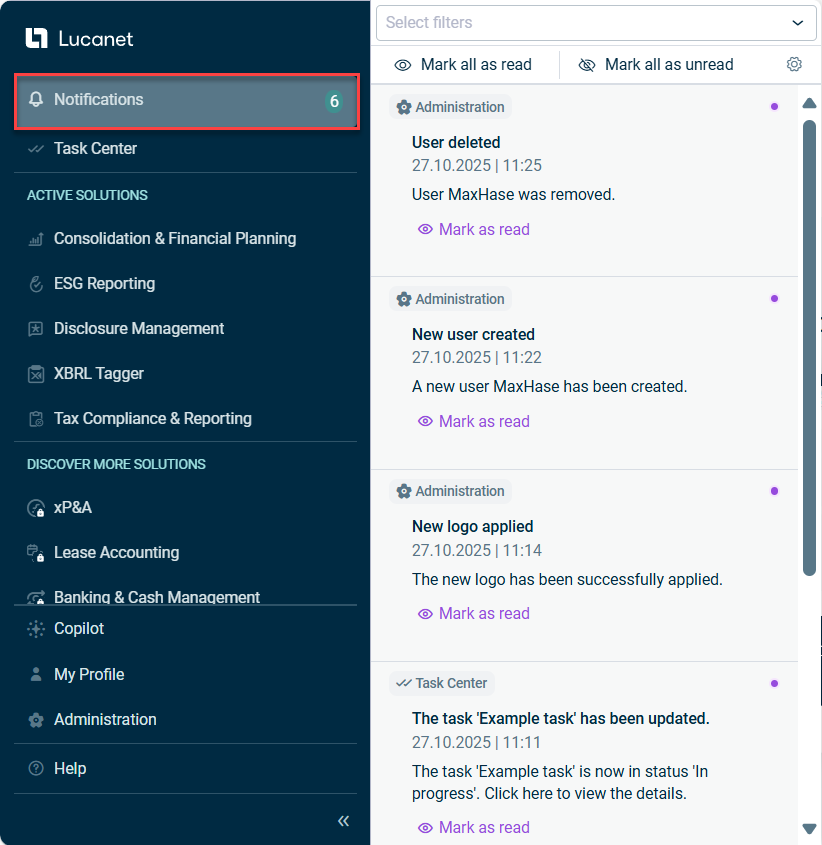
by selecting which specific events forConfigure notification preferences andTask Center to be notified about and choosing in-app and/or email notificationsAdministration by section where they were generated, based on your access permissions, while maintaining a 30-day notification historyView and filter notifications by marking items as read or unread individually or processing all notifications at onceManage notification status to the section on the platform where the notification was generated, allowing you to view or perform further actionsClick notifications to be redirected

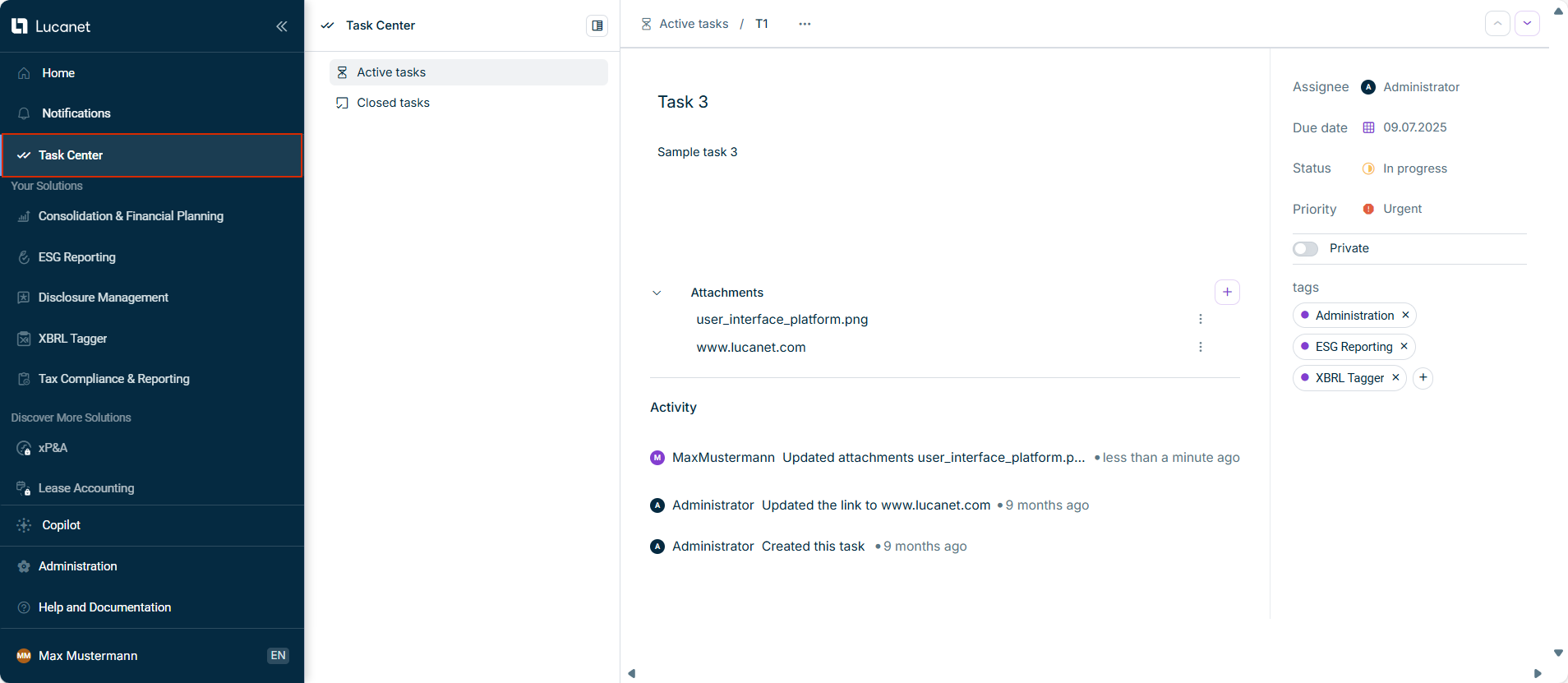
Centralized access to all tasks via a structured dashboard with dedicated tabs for tasks you’ve created, those assigned to you, and all existing tasks. Ability to assign a responsible user, set task status, priority, due date, add solution tags, and include relevant links during task creation. All task details can be edited and updated at any time. Complete task activity history is available for auditing and tracking changes.
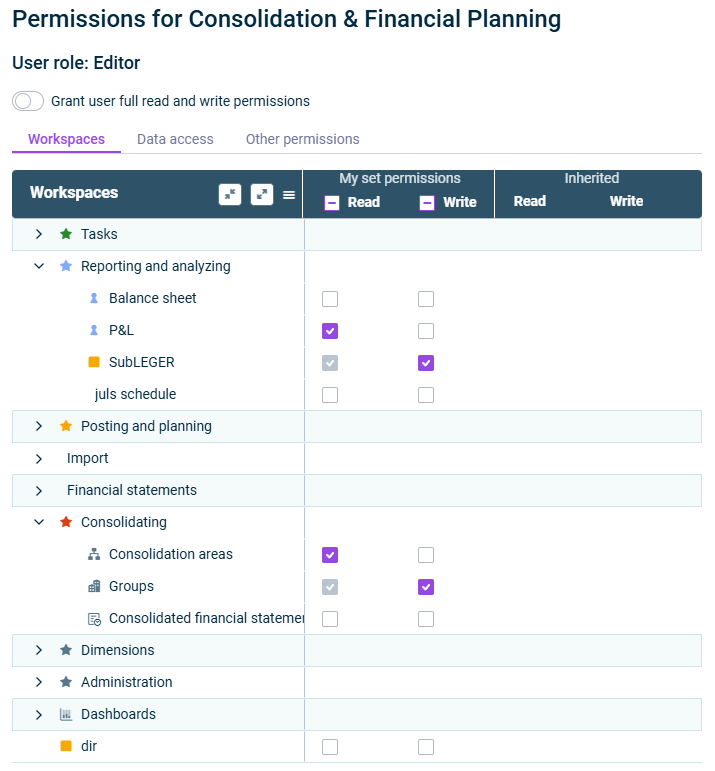
rolesData model : Editors have read and write permissions for all workspaces or certain workspaces within the Lucanet data model.Editor : Group report data collectors have read permission for the Lucanet data model. They can also execute all tasks required to collect data in relation to Lucanet.Group Report.Group Report data collector : Observers have read permission for all workspaces or certain workspaces within the Lucanet data model.Observer
rolesUser management : Masters have unrestricted write and read permissions for user management. There must be at least one master per database.Master : Administrators have write and read permissions for user management. Administrators can, similarly to the master role, manage all users and user groups, but have more limited permissions than masters. An administrator is only able to assign the permissions defined by the master.Administrator : Observers have read permission for all workspaces or certain workspaces within the Lucanet data model.Observer

: Users with theAdministrator role are granted comprehensive access to Banking & Cash Management. Administrators can view all data, including financial figures and identities, and access all configuration settings—such as users, channels, bank profiles, and accounts.Administrator : Users assigned withNo specific role receive theNo specific role role within the Banking & Cash Management solution and have only the most basic permissions. This allows access to the user interface and their own profile, without permission to view data or use any functions.Essential
For a user with to be able to access data or perform any actions, the Administrator must grant the necessary permissions in theNo specific role solution. Depending on requirements, the Administrator can enable access to selected identities, functionalities (such as processing payments or reviewing account statements), or authorization processes.Banking & Cash Management

Unified Navigation
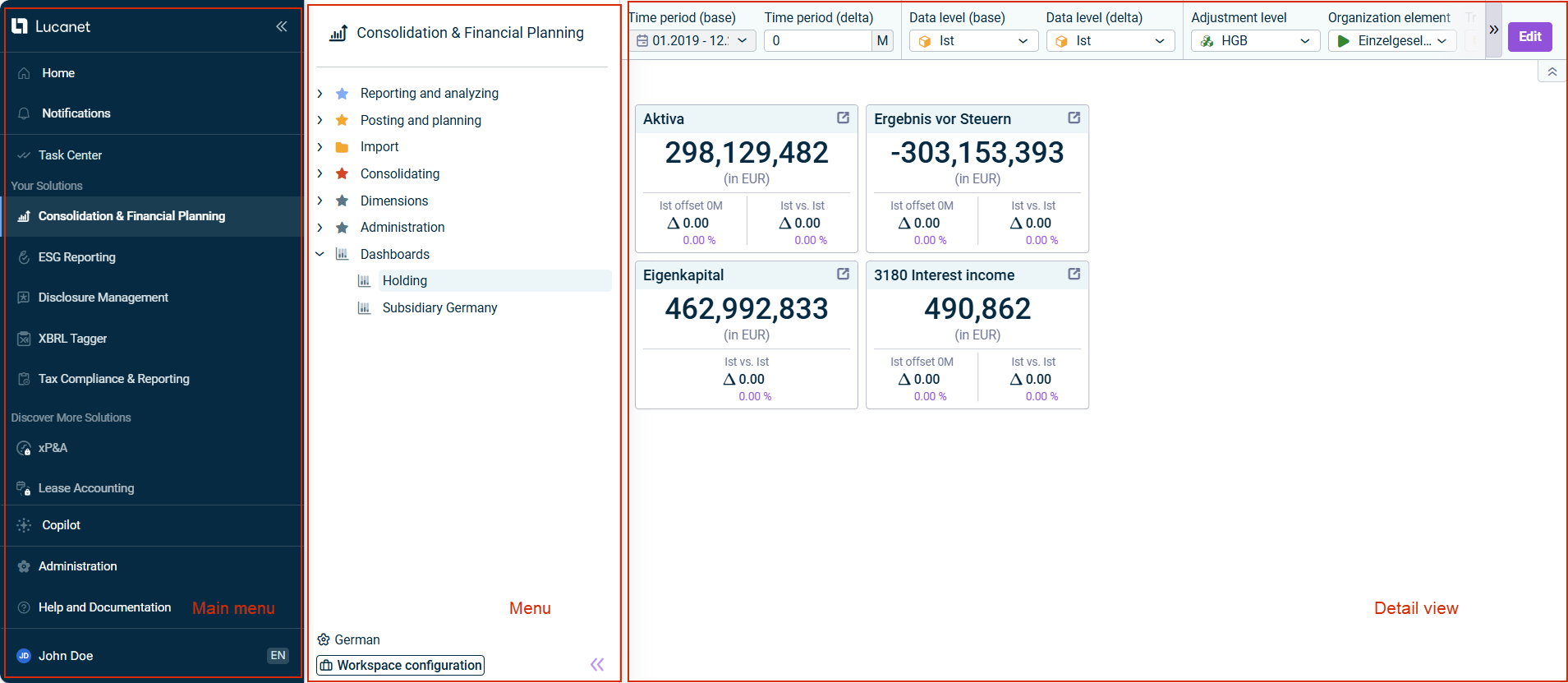
The quick access bar and top bar have been removed. You will now find key functions such as ,Lucanet Copilot , andMy Profile — previously located in the top bar — integrated into the main menu. Additionally, the option to change the user interface language can now be found underHelp .My Profile Reorganized and Expanded Main Menu
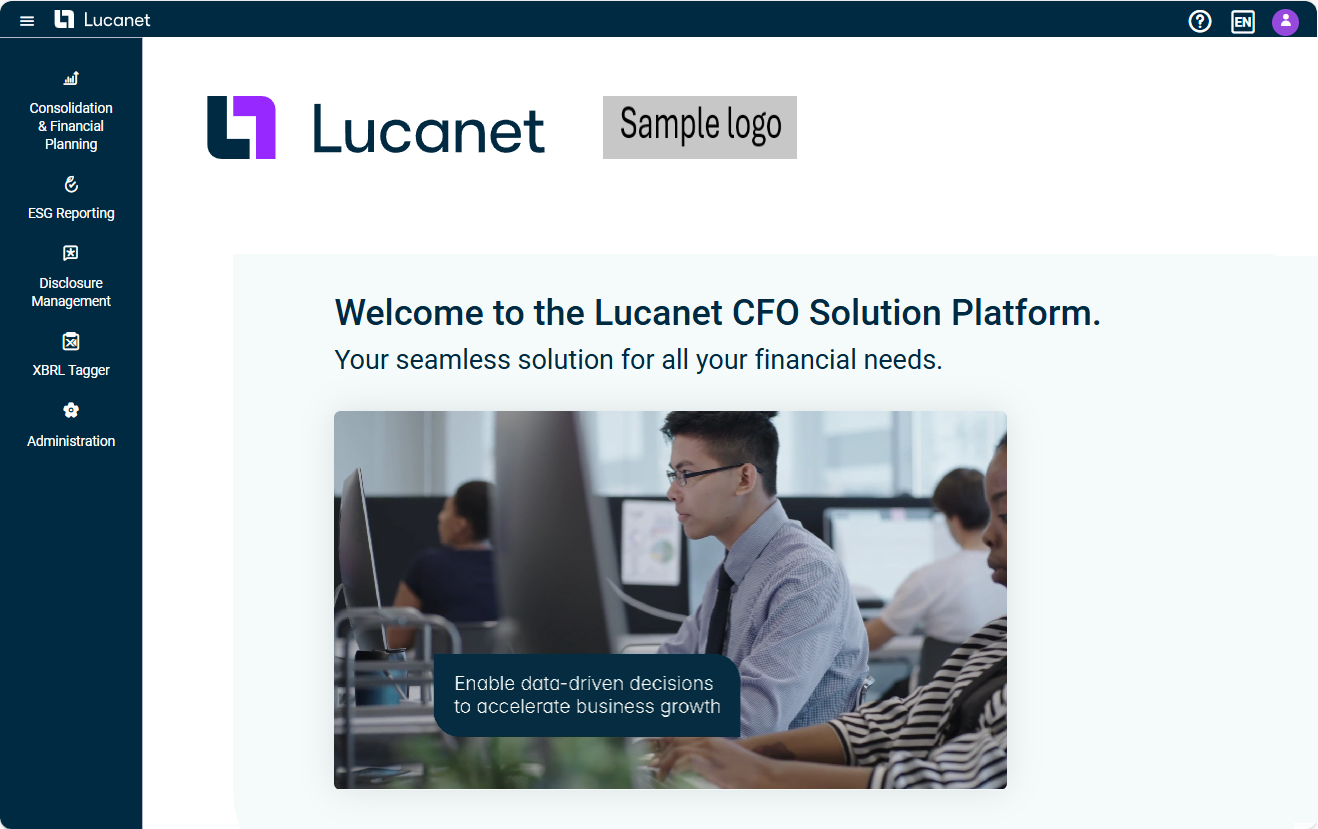
In addition to the centralized functionalities outlined above, the main menu has been restructured for improved usability. In the section, you can quickly access your licensed Lucanet solutions. The newly addedActive Solutions section allows you to explore additional Lucanet solutions on a dedicated demo page, with options to access documentation, connect with experts, explore learning resources, and visit the Customer Portal.Discover More Solutions Solution Menu Updates
Solution-specific menus, such as those for Consolidation & Financial Planning and ESG Reporting, you will now see both licensed and unlicensed modules, making navigation and discovery easier.
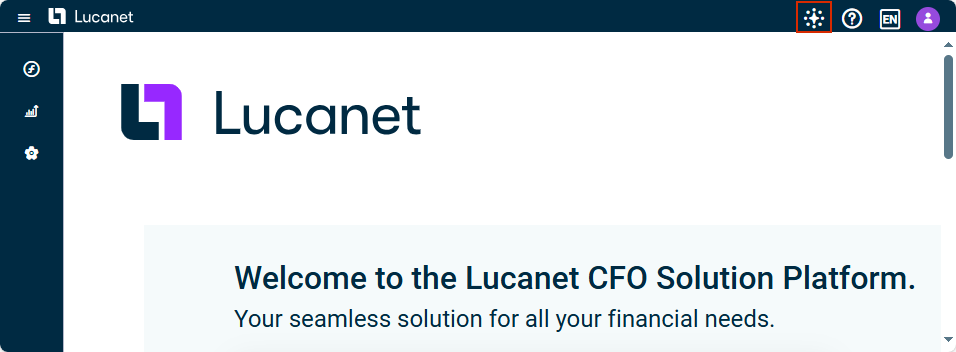
Ask and get answers anywhere in the CFO Solution Platform
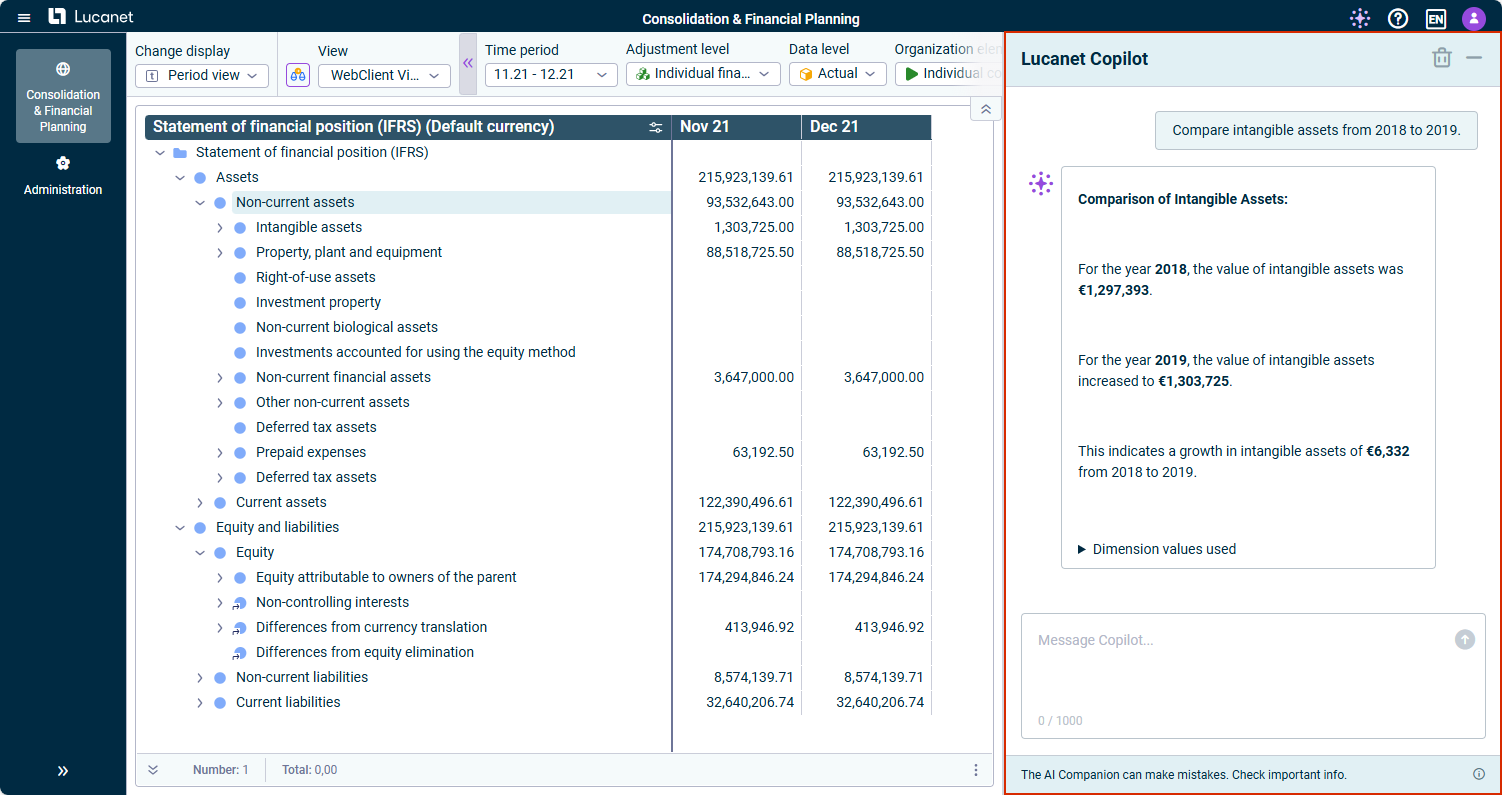
Now you can ask questions about Lucanet in simple language from anywhere in the Lucanet CFO Solution Platform. Lucanet Copilot uses our online documentation and delivers clear, user-friendly answers to you.Lucanet Knowledge Base Quick Insights for Consolidation & Financial Planning Reports
Get fast and helpful insights about your Consolidation & Financial Planning reports. To do so, simply navigate to the ledger on which you want to have more information, and ask your question, such as:
: Automatically receives the role ofAdministrator within theGlobal Administrator solution, along with all solution-wide and cross-document administrative permissions.Disclosure Management : Automatically receives the role ofEditor within the Disclosure Management solution.Global Editor : Automatically receives the role ofReviewer within the Disclosure Management solution.Global Reviewer : Automatically receives the role ofReader within the Disclosure Management solution.Global Reader : Theses users initially receive no specific role within the Disclosure Management solution. Only when a user role is assigned by a Global Administrator can different permissions be assigned.No specific role
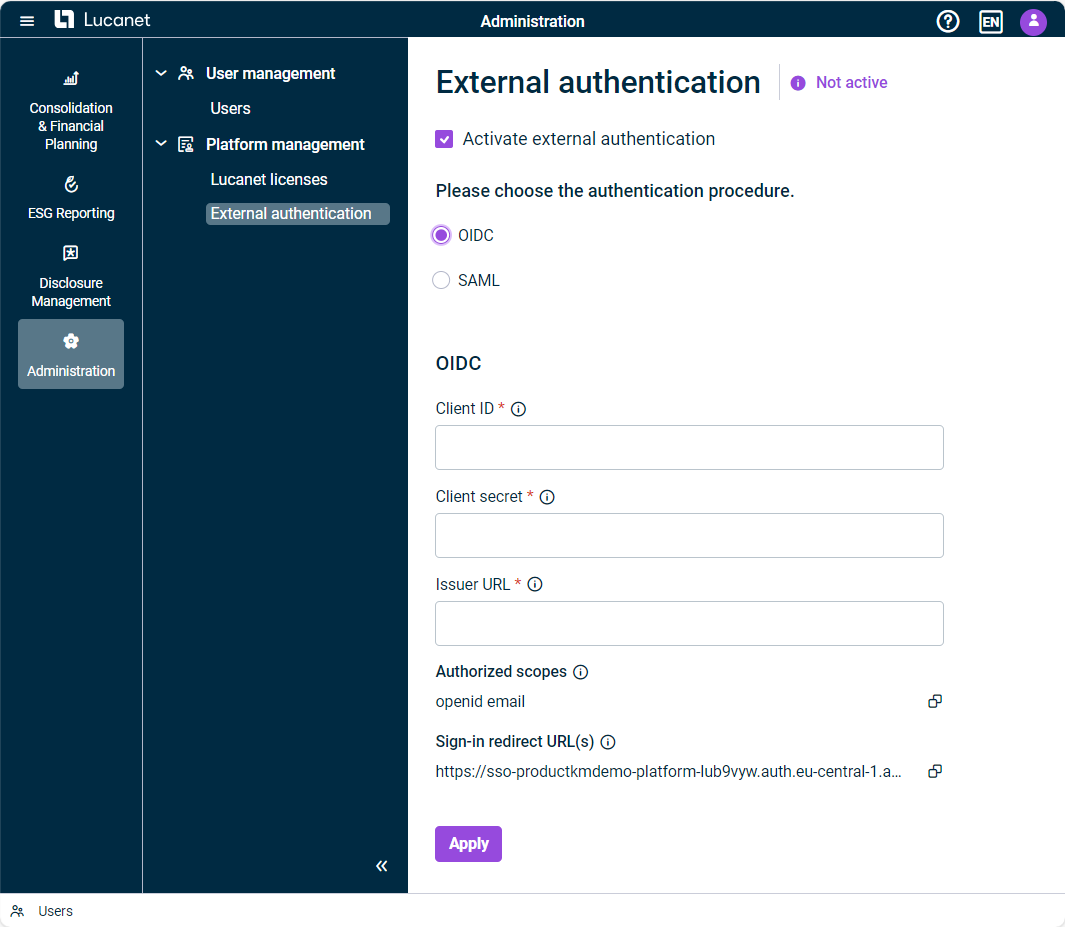
with the following options:Edit users Change user access and user roles Enable or disable external authentication Lock or unlock users Change language and formatting settings, if these settings have not been changed by the user
Resend invitation e-mail Delete users
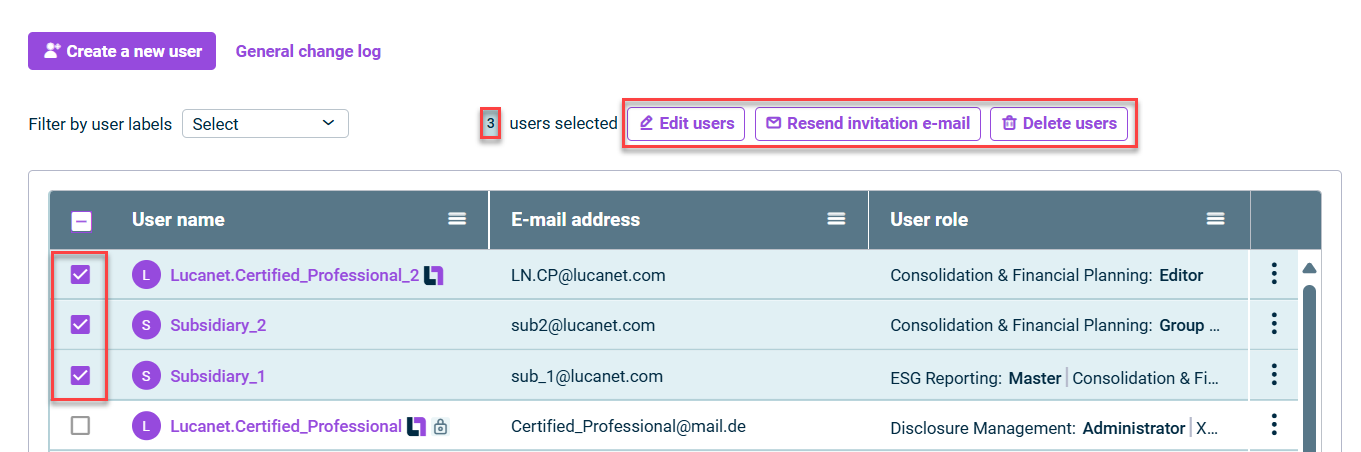
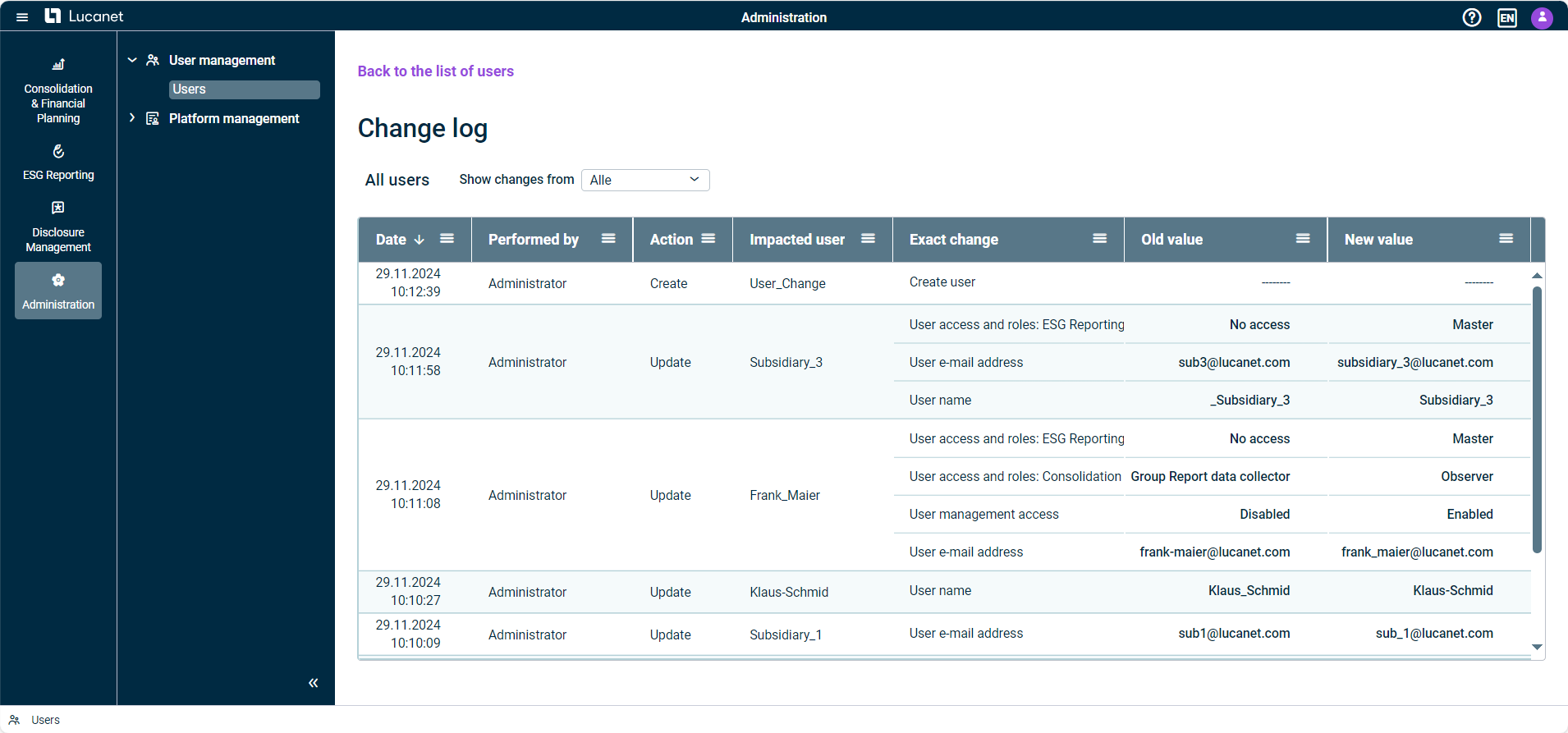
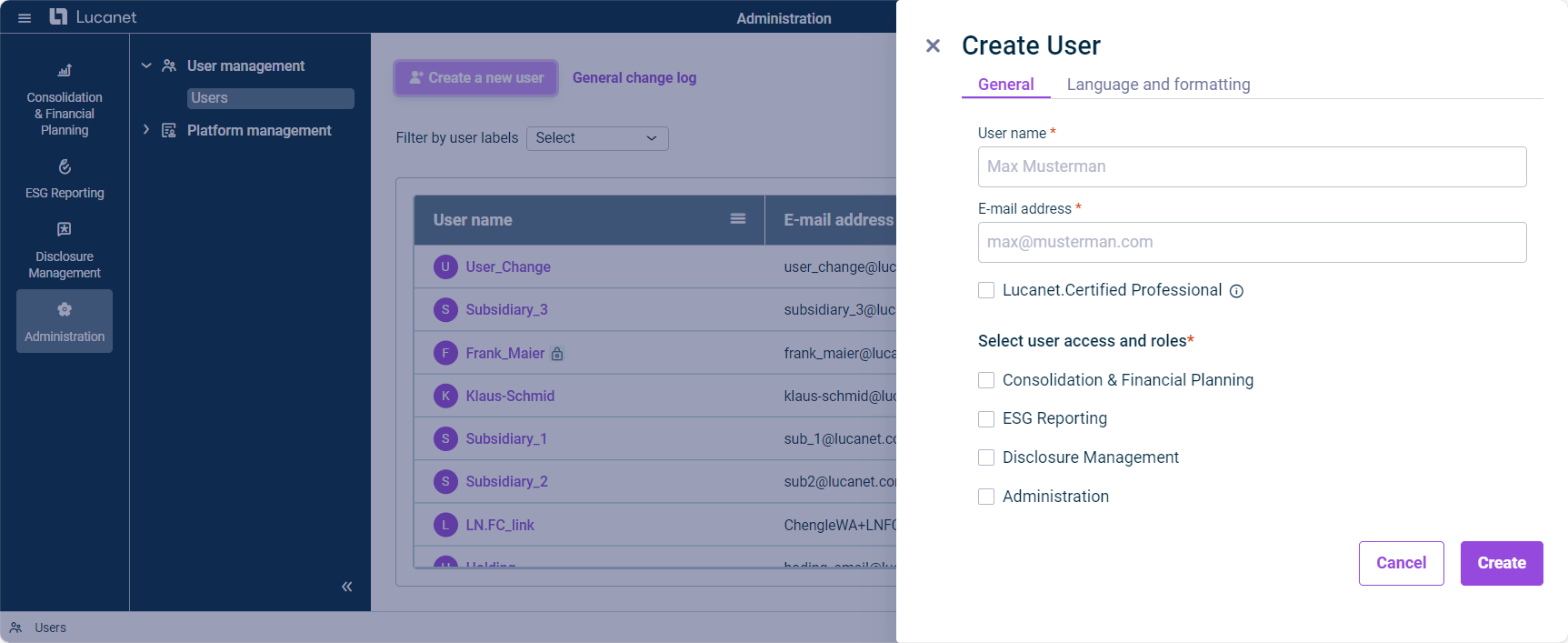
By using infinite scrolling, administrators can now better navigate the list of users by first displaying 20 users and then loading more by scrolling as needed. By default, the most recently updated users appear at the top of the list.Navigation improvements in the list of users: Administrators of the Lucanet CFO Solution Platform can now use the right side panel to create or update users. The side panel replaces the previous dialog and offers the same fields, input requirements, and validation checks. This allows an intuitive and efficient configuration of all necessary user settings.Moving user configuration to the right side panel:
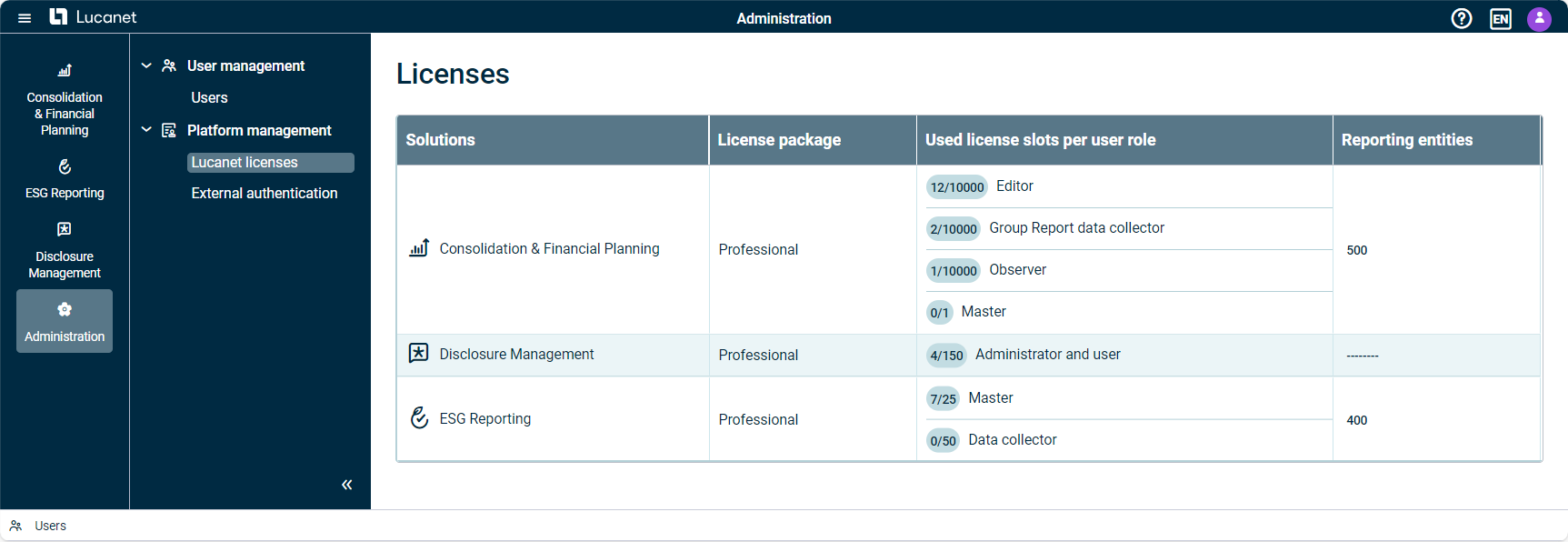
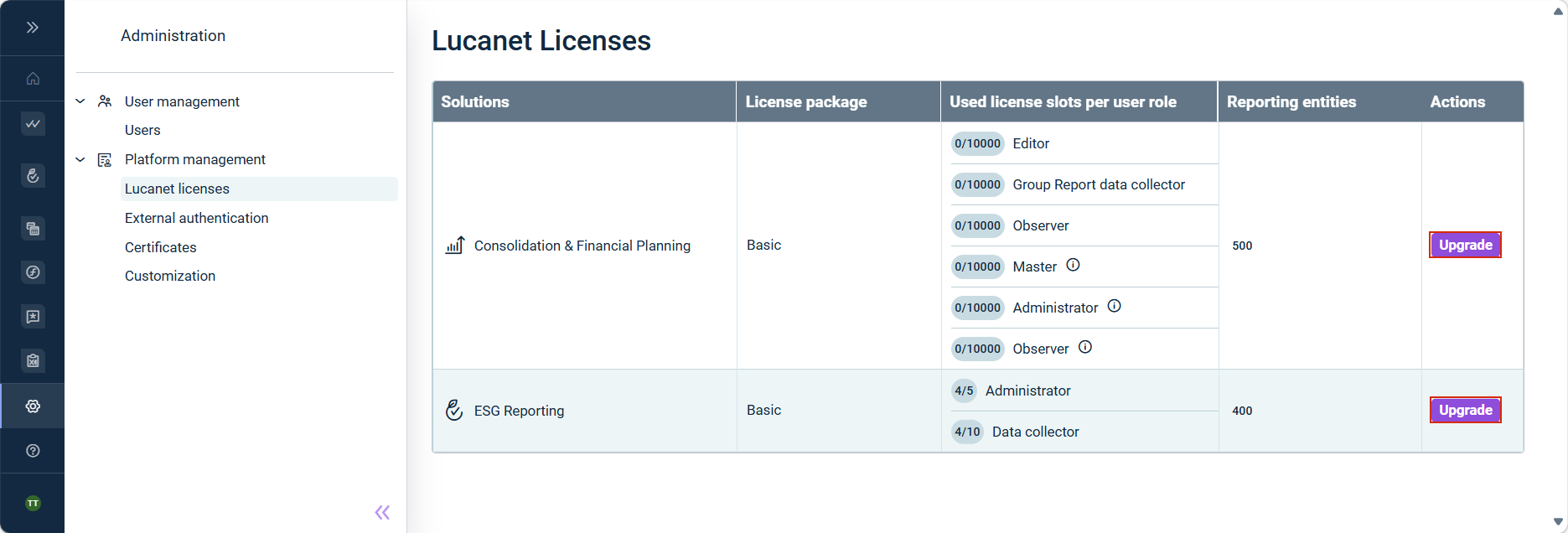
Lucanet 25 offers you as administrator an improved overview of your license information. The table in the Licenses workspace shows the used and available license slots per user role for each solution, whereby user roles with 100,000 or more license slots are marked with the infinity symbol (∞). In addition, the user roles are listed on separate lines for a better overview. The workspace Licenses, is displayed as follows, for example:Optimization of the license display:


: Runs theTest update environment planned software version, available for a limited testing period ahead of each planned production update. It is particularly relevant for business processes subject to regulatory or compliance requirements, where pre-release validation helps ensure continuity before the update takes effect.next : Runs theSandbox environment software version as your production system. It can be used for testing configurations, training new users, or validating workflows before applying changes to production.same
The Copilot panel now opens with a welcome screen showing suggested prompts. A sidebar with quick access to start a new chat using the + icon Toolbar actions for pinning, expanding, and closing the Copilot panel


: The main menu now includes a dedicatedHome navigation item, allowing you to return to the start page of the Lucanet CFO Solution Platform with a single click.Home : A newUser account area and Account menu area at the bottom of the main menu displays your avatar, name, and selected language. Clicking anywhere in the user account area opens theuser account , which provides quick access toAccount menu ,Language ,Formatting preferences , andChange password . To view your profile or manage consents, click the user info area at the top of the Account menu.Log out
: Has full access to all documents in the XBRL Tagger. Can view and perform all actions on all documents in the company, and assign roles and documents to other users.Administrator : The standard user role. Can perform all available actions within the documents they have created or to which they have been invited.Editor
Users who previously had the role inAdministrator and access to the XBRL Tagger have been assigned theDisclosure Management role.Administrator All other users with access to the XBRL Tagger have been assigned the role.Editor

File Attachments and Multiple Links
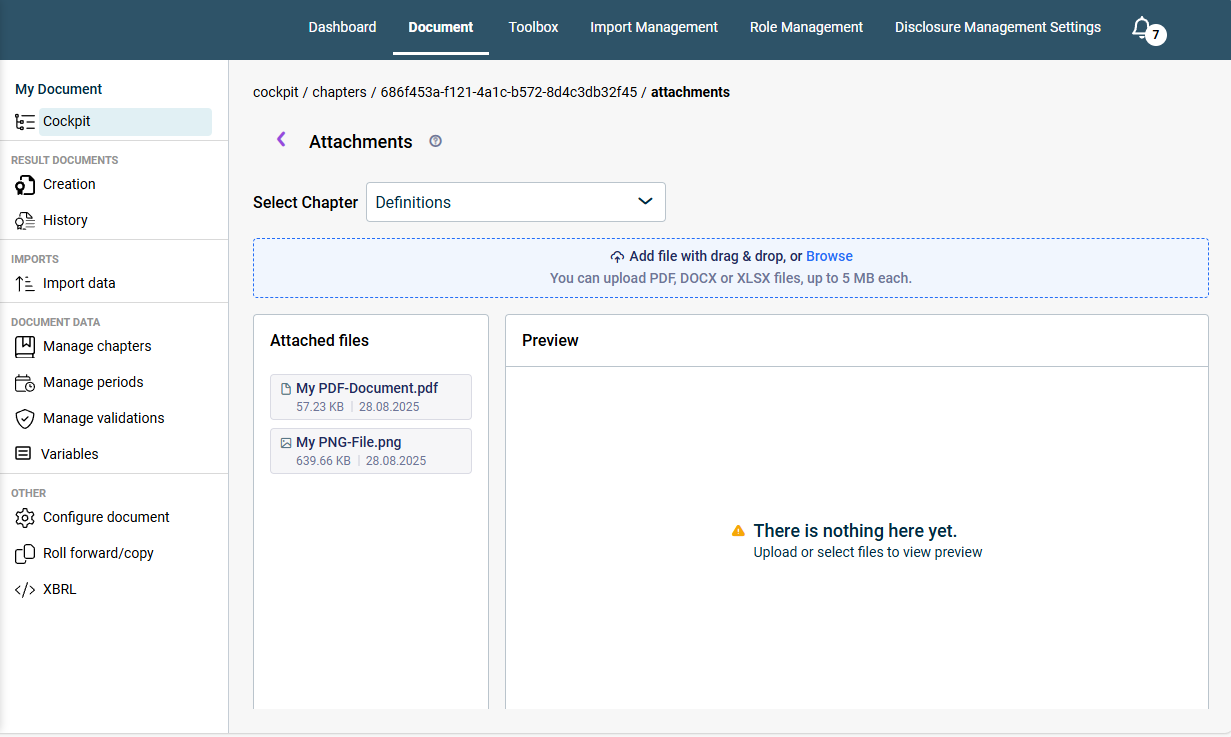
You can now to tasks. Supported file formats include .pdf, .jpg, .png, .docx, and .xlsx, with up to 10 files per upload session. In addition, you can addattach files to tasks to provide additional information.multiple URL links Private and Public Tasks
Tasks can be set as private or public. Public tasks are visible and editable by all users, while private tasks are visible and editable only by the task creator and assignee. Platform administrators can view all tasks. Only the task creator and platform administrators can delete tasks.Additional Improvements Tasks are now organized into andActive tasks workspaces.Closed tasks Each task is assigned a for easier reference.unique task identifier A allows you to quickly find specific tasks by status, assignee, priority, privacy, tags, and other criteria.new filtering function
At least in length14 characters Characters from at least : uppercase letters (A-Z), lowercase letters (a-z), numbers (0-9), and special characters (e.g., ! @ # $ % ^ & *)3 of 4 categories
Passwords expire after .90 days New passwords cannot match any of your .previous 5 passwords Password changes are limited to .twice per day You will receive email and in-app notifications before your password expires, giving you time to plan ahead.30, 14, 7, and 1 day(s)
voluntarily change your password use the feature, orForgot your password when your password expires.

by selecting which specific events forConfigure notification preferences andTask Center to be notified about and choosing in-app and/or email notificationsAdministration by section where they were generated, based on your access permissions, while maintaining a 30-day notification historyView and filter notifications by marking items as read or unread individually or processing all notifications at onceManage notification status to the section on the platform where the notification was generated, allowing you to view or perform further actionsClick notifications to be redirected

Centralized access to all tasks via a structured dashboard with dedicated tabs for tasks you’ve created, those assigned to you, and all existing tasks. Ability to assign a responsible user, set task status, priority, due date, add solution tags, and include relevant links during task creation. All task details can be edited and updated at any time. Complete task activity history is available for auditing and tracking changes.


rolesData model : Editors have read and write permissions for all workspaces or certain workspaces within the Lucanet data model.Editor : Group report data collectors have read permission for the Lucanet data model. They can also execute all tasks required to collect data in relation to Lucanet.Group Report.Group Report data collector : Observers have read permission for all workspaces or certain workspaces within the Lucanet data model.Observer
rolesUser management : Masters have unrestricted write and read permissions for user management. There must be at least one master per database.Master : Administrators have write and read permissions for user management. Administrators can, similarly to the master role, manage all users and user groups, but have more limited permissions than masters. An administrator is only able to assign the permissions defined by the master.Administrator : Observers have read permission for all workspaces or certain workspaces within the Lucanet data model.Observer

: Users with theAdministrator role are granted comprehensive access to Banking & Cash Management. Administrators can view all data, including financial figures and identities, and access all configuration settings—such as users, channels, bank profiles, and accounts.Administrator : Users assigned withNo specific role receive theNo specific role role within the Banking & Cash Management solution and have only the most basic permissions. This allows access to the user interface and their own profile, without permission to view data or use any functions.Essential
For a user with to be able to access data or perform any actions, the Administrator must grant the necessary permissions in theNo specific role solution. Depending on requirements, the Administrator can enable access to selected identities, functionalities (such as processing payments or reviewing account statements), or authorization processes.Banking & Cash Management

Unified Navigation
The quick access bar and top bar have been removed. You will now find key functions such as ,Lucanet Copilot , andMy Profile — previously located in the top bar — integrated into the main menu. Additionally, the option to change the user interface language can now be found underHelp .My Profile Reorganized and Expanded Main Menu
In addition to the centralized functionalities outlined above, the main menu has been restructured for improved usability. In the section, you can quickly access your licensed Lucanet solutions. The newly addedActive Solutions section allows you to explore additional Lucanet solutions on a dedicated demo page, with options to access documentation, connect with experts, explore learning resources, and visit the Customer Portal.Discover More Solutions Solution Menu Updates
Solution-specific menus, such as those for Consolidation & Financial Planning and ESG Reporting, you will now see both licensed and unlicensed modules, making navigation and discovery easier.

Ask and get answers anywhere in the CFO Solution Platform
Now you can ask questions about Lucanet in simple language from anywhere in the Lucanet CFO Solution Platform. Lucanet Copilot uses our online documentation and delivers clear, user-friendly answers to you.Lucanet Knowledge Base Quick Insights for Consolidation & Financial Planning Reports
Get fast and helpful insights about your Consolidation & Financial Planning reports. To do so, simply navigate to the ledger on which you want to have more information, and ask your question, such as:


: Automatically receives the role ofAdministrator within theGlobal Administrator solution, along with all solution-wide and cross-document administrative permissions.Disclosure Management : Automatically receives the role ofEditor within the Disclosure Management solution.Global Editor : Automatically receives the role ofReviewer within the Disclosure Management solution.Global Reviewer : Automatically receives the role ofReader within the Disclosure Management solution.Global Reader : Theses users initially receive no specific role within the Disclosure Management solution. Only when a user role is assigned by a Global Administrator can different permissions be assigned.No specific role
with the following options:Edit users Change user access and user roles Enable or disable external authentication Lock or unlock users Change language and formatting settings, if these settings have not been changed by the user
Resend invitation e-mail Delete users


By using infinite scrolling, administrators can now better navigate the list of users by first displaying 20 users and then loading more by scrolling as needed. By default, the most recently updated users appear at the top of the list.Navigation improvements in the list of users: Administrators of the Lucanet CFO Solution Platform can now use the right side panel to create or update users. The side panel replaces the previous dialog and offers the same fields, input requirements, and validation checks. This allows an intuitive and efficient configuration of all necessary user settings.Moving user configuration to the right side panel:

Lucanet 25 offers you as administrator an improved overview of your license information. The table in the Licenses workspace shows the used and available license slots per user role for each solution, whereby user roles with 100,000 or more license slots are marked with the infinity symbol (∞). In addition, the user roles are listed on separate lines for a better overview. The workspace Licenses, is displayed as follows, for example:Optimization of the license display:


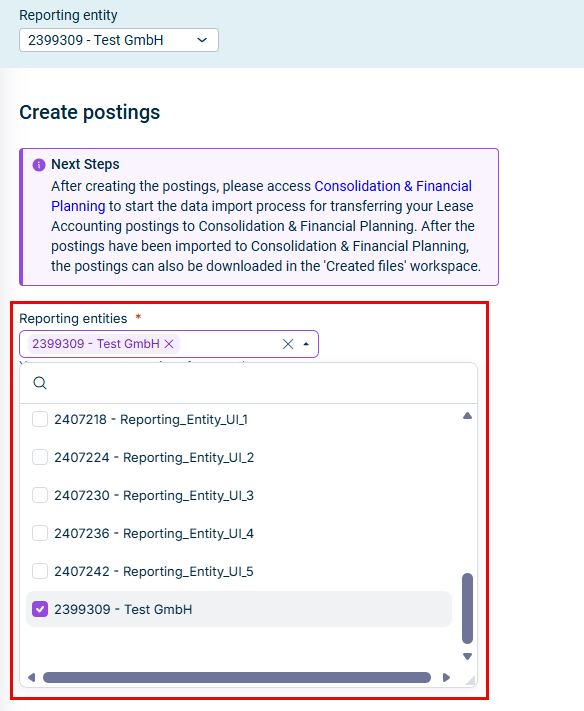
If you are working with an integration between andLease Accounting , you can import the created postings via a script for multiple reporting entities simultaneously.Consolidation & Financial Planning Exporting postings to import them in other systems is still only possible per reporting entity only; but a multi-entity export of postings is planned for a future release.
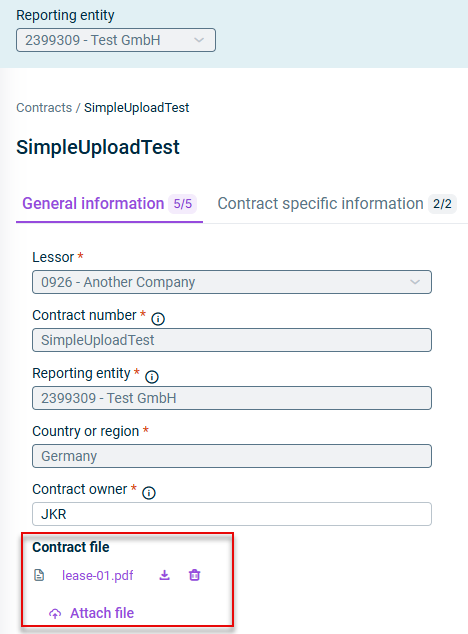
when creating a new contract or editing an existing contract (PDF format, maximum 25 MB per file)Upload files in view modeView and download attached files when editing a contractRemove files at a glance - an attachment icon appears next to theIdentify contracts with attachments in theContract ID overview tableContract

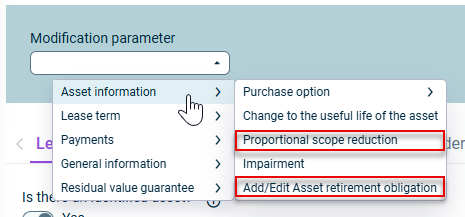
: This modification parameter allows you to reduce lease values by a specific percentage starting from an effective date. The reduction applies to theProportional Scope Reduction ,Gross liability in theNet liability table, andLease liability in theCarrying Amount IFRS table in theRight-of-use asset . This is useful for scenarios where the scope of a lease is partially reduced.Calculation Preview : You can now add or edit asset retirement obligations for lease components. This modification increases theAdd/Edit Asset Retirement Obligation value without affecting theRight-of-Use asset . The currency field defaults to the functional currency and cannot be changed. This feature ensures accurate accounting for obligations related to restoring leased assets at the end of the lease term.Lease liability

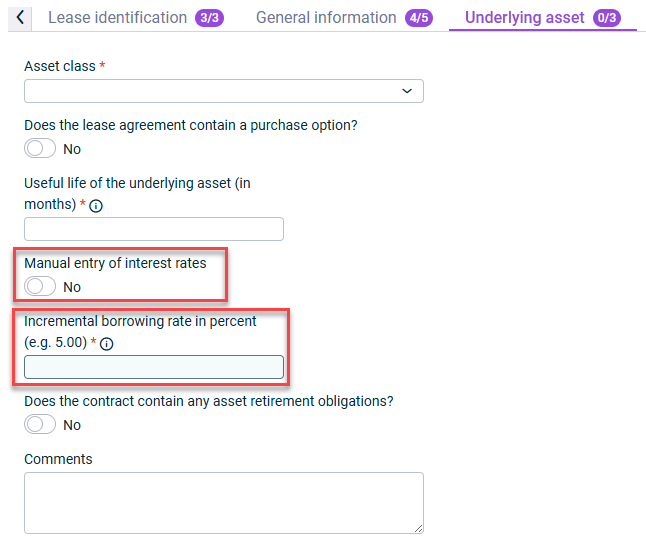
Component currency : Specify the currency for each component during import (positioned after thefield column)End date Interest rate : Enter interest rates directly in templates (positioned after thefield column)Asset Class
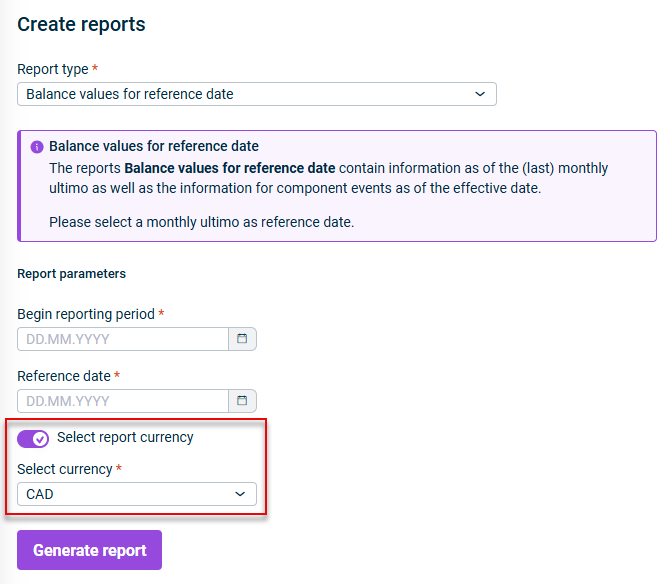
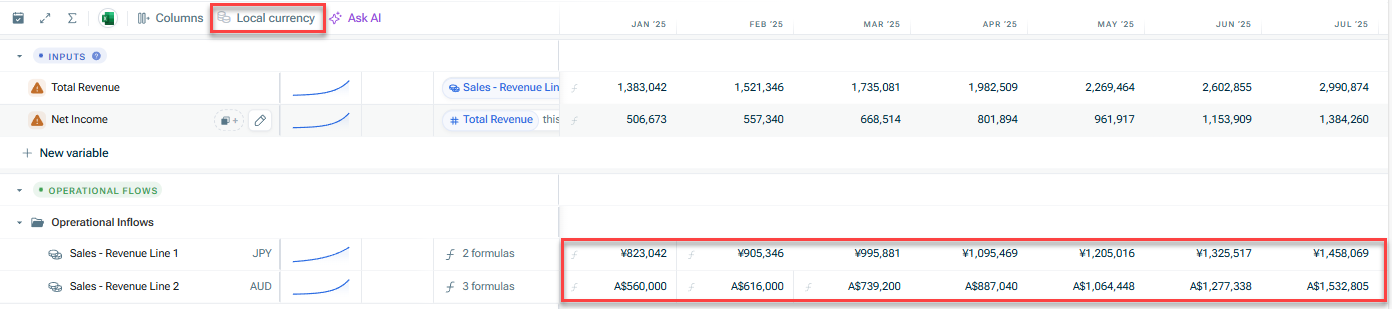
using theEnable currency conversion option (enabled by default)Select report currency from the dropdown menuChoose a reporting currency by disabling the Select report currency option - each contract's values appear in its original currencyView data in contract currencies

- Designed for users responsible for gathering and entering lease contract informationData collector - Intended for users who oversee lease accounting processes, approve critical operations, and perform final steps including postingExecutive reviewer - For users who manage day-to-day lease accounting operations with extensive functional accessLease operations administrator - Provides comprehensive read access across the system for audit and compliance purposesAuditor - Specialized for users responsible for system configuration and maintenanceSettings administrator - Provides the highest level of system access for comprehensive administrationFull access administrator
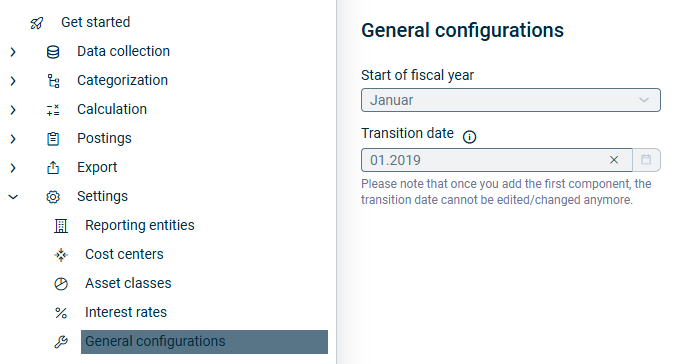
- Defines when your organization's fiscal year begins, essential for accurate lease accounting calculations and reporting periodsStart of fiscal year - Establishes the date when your organization transitions to IFRS 16 lease accounting standardsTransition date


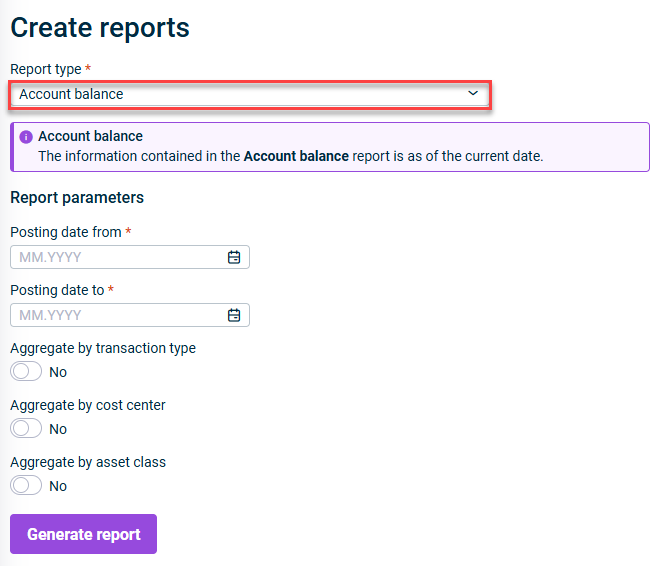
report summarizing all the assets and asset-related information that have been created in Lease Accounting.Asset register report showing the balances for each account, aggregated by transaction type, cost center and/or assets class. This report allows a reconciliation of the balance in the Lease Accounting database with the balance of the accounts in the balance sheet to make sure that both are in line and postings are complete.Account balances


If you are working with an integration between andLease Accounting , you can import the created postings via a script for multiple reporting entities simultaneously.Consolidation & Financial Planning Exporting postings to import them in other systems is still only possible per reporting entity only; but a multi-entity export of postings is planned for a future release.
when creating a new contract or editing an existing contract (PDF format, maximum 25 MB per file)Upload files in view modeView and download attached files when editing a contractRemove files at a glance - an attachment icon appears next to theIdentify contracts with attachments in theContract ID overview tableContract

: This modification parameter allows you to reduce lease values by a specific percentage starting from an effective date. The reduction applies to theProportional Scope Reduction ,Gross liability in theNet liability table, andLease liability in theCarrying Amount IFRS table in theRight-of-use asset . This is useful for scenarios where the scope of a lease is partially reduced.Calculation Preview : You can now add or edit asset retirement obligations for lease components. This modification increases theAdd/Edit Asset Retirement Obligation value without affecting theRight-of-Use asset . The currency field defaults to the functional currency and cannot be changed. This feature ensures accurate accounting for obligations related to restoring leased assets at the end of the lease term.Lease liability

Component currency : Specify the currency for each component during import (positioned after thefield column)End date Interest rate : Enter interest rates directly in templates (positioned after thefield column)Asset Class
using theEnable currency conversion option (enabled by default)Select report currency from the dropdown menuChoose a reporting currency by disabling the Select report currency option - each contract's values appear in its original currencyView data in contract currencies

- Designed for users responsible for gathering and entering lease contract informationData collector - Intended for users who oversee lease accounting processes, approve critical operations, and perform final steps including postingExecutive reviewer - For users who manage day-to-day lease accounting operations with extensive functional accessLease operations administrator - Provides comprehensive read access across the system for audit and compliance purposesAuditor - Specialized for users responsible for system configuration and maintenanceSettings administrator - Provides the highest level of system access for comprehensive administrationFull access administrator
- Defines when your organization's fiscal year begins, essential for accurate lease accounting calculations and reporting periodsStart of fiscal year - Establishes the date when your organization transitions to IFRS 16 lease accounting standardsTransition date


report summarizing all the assets and asset-related information that have been created in Lease Accounting.Asset register report showing the balances for each account, aggregated by transaction type, cost center and/or assets class. This report allows a reconciliation of the balance in the Lease Accounting database with the balance of the accounts in the balance sheet to make sure that both are in line and postings are complete.Account balances


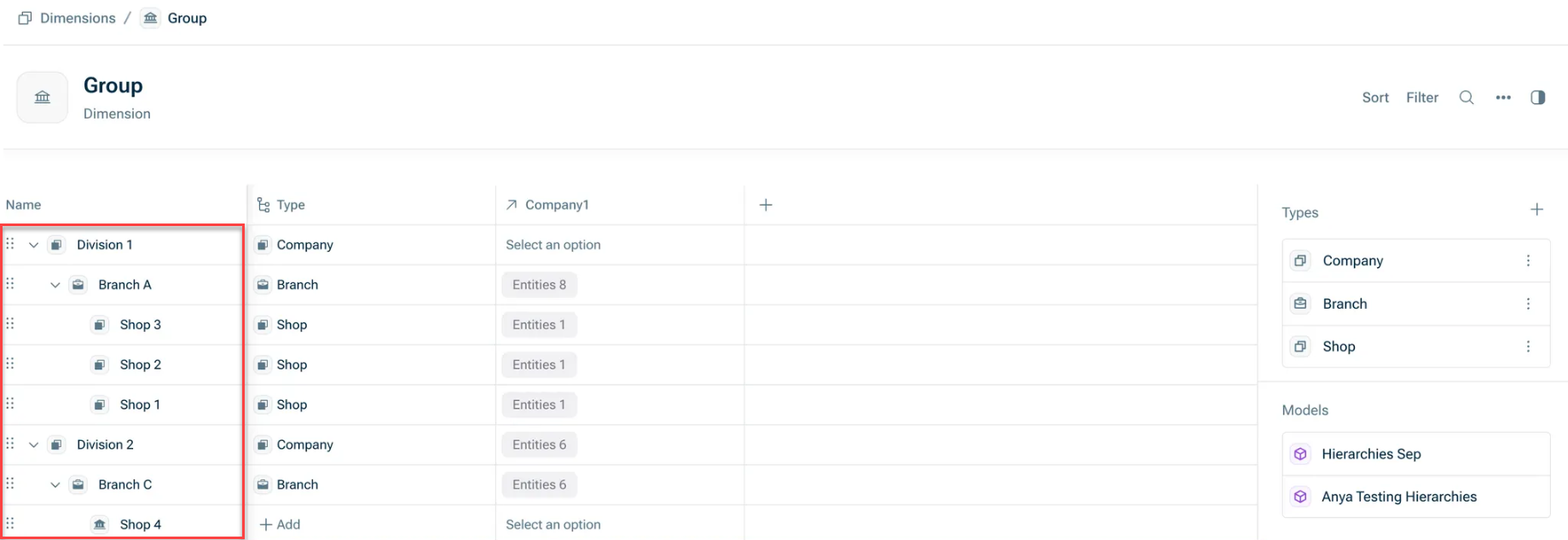
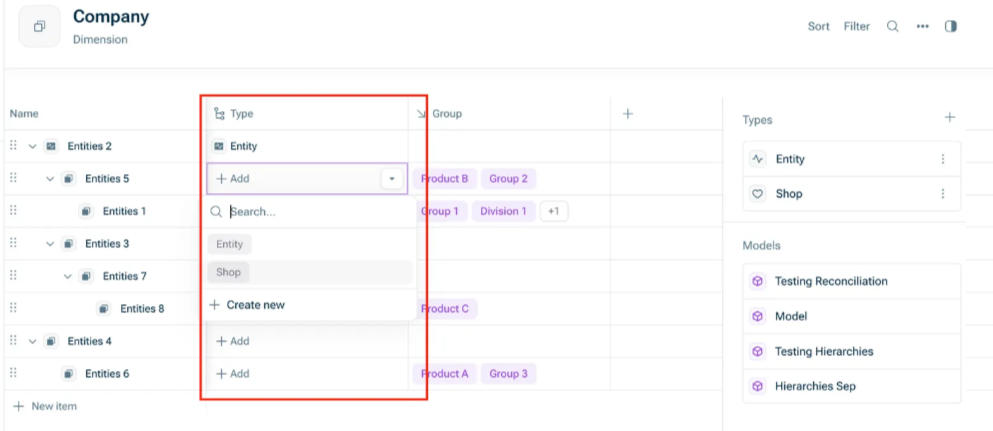
: With this method, you can import all reporting entities and cost centres in a single dimension, mirroring the native structure of Consolidation & Financial Planning. This ensures your xP&A data fully reflects your CFP hierarchy.Single hierarchy (recommended) : This is the previous method using two separate dimensions. This option remains available for updating existing models but will be discontinued in mid-2026.Multiple flat dimensions (deprecated)



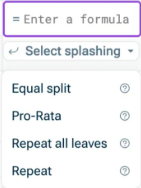
Evenly distributes the entered value across all dimension itemsEqual Split: Distributes the entered value proportionally based on existing values in each dimension itemPro-Rata: Applies the same value to each leaf-level item.Repeat all leaves: Repeats the value at the first level and evenly distributes it across nested levels.Repeat:


: With this method, you can import all reporting entities and cost centres in a single dimension, mirroring the native structure of Consolidation & Financial Planning. This ensures your xP&A data fully reflects your CFP hierarchy.Single hierarchy (recommended) : This is the previous method using two separate dimensions. This option remains available for updating existing models but will be discontinued in mid-2026.Multiple flat dimensions (deprecated)


Evenly distributes the entered value across all dimension itemsEqual Split: Distributes the entered value proportionally based on existing values in each dimension itemPro-Rata: Applies the same value to each leaf-level item.Repeat all leaves: Repeats the value at the first level and evenly distributes it across nested levels.Repeat:


Result document creation Execution of an import


taxonomy with the latest updates of the IFRS taxonomyESEF 2024 for digital sustainability reportingVSME for digital reporting to Dutch authoritiesKVK


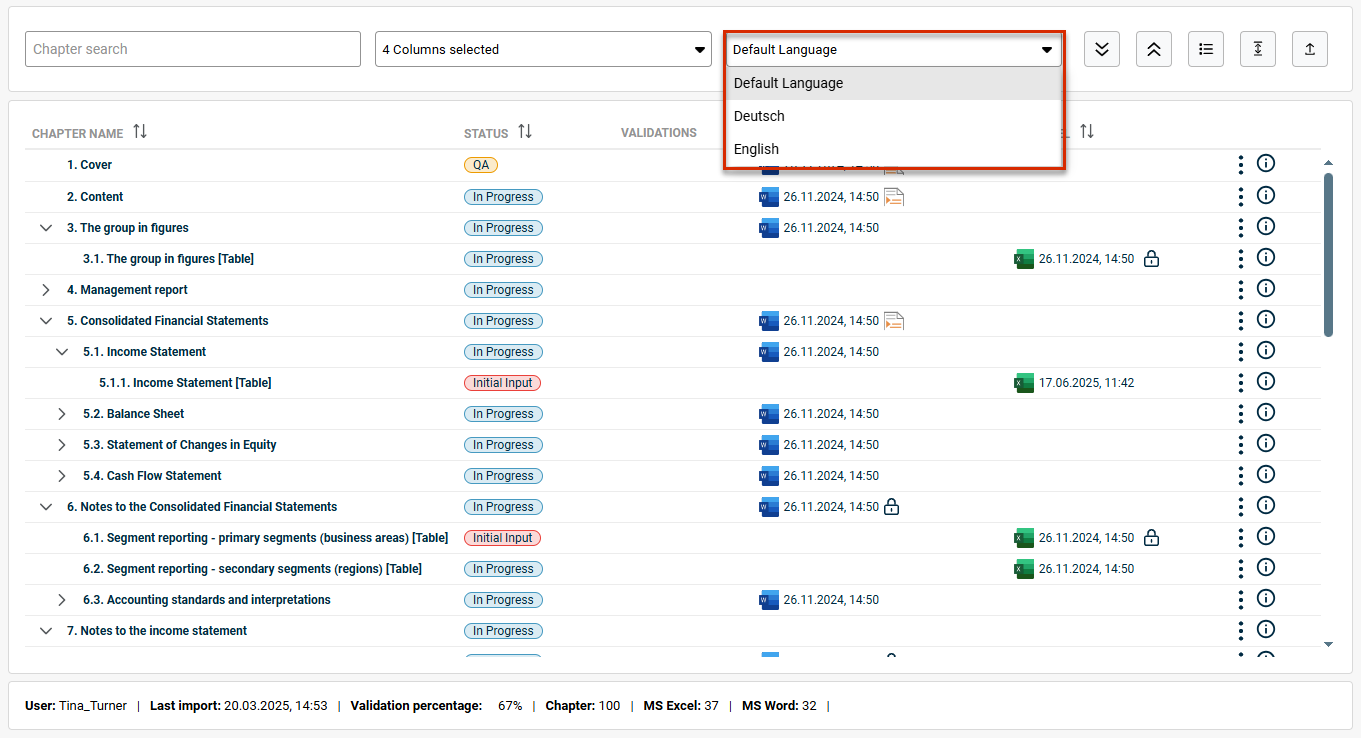
The software can automatically generate the final ESRS-compliant sustainability report at group level based on the subsidiaries' disclosures. As a user, you can select a question from the ESG questionnaire and see the various answers provided by the subsidiaries. You can add additional information. You can discard the result at any time and regenerate the report. If the result meets your requirements, you can add it to your document with a single click.
: Global roles assigned to a CFO Solution Platform user inCreating global roles are now automatically transferred to theAdministration in Disclosure Management. This makes role management much easier and more effective.role management : We have optimized the document roles and permissions. TheDocument roles role has been removed. AllDocument Data Importer permissions are now assigned to theDocument Data Importer role.Document Editor
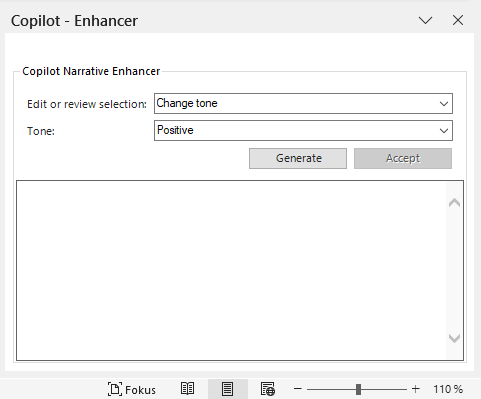
With the following functions, you can optimize your texts in no time:Optimizing texts in Word documents theChange e.g. to positive, neutral, or formal and precisetone of voice orShorten the textexpand content into bullet pointsSummarize conciseCreate headlines sections of the document with specific informationEnrich

Draft taxonomy-compliant texts
\

Disclosure Management automatically generates the required prompts - you don't have to worry about anything else. Discard unwanted results or try again until you are satisfied. If you accept the result, it will be seamlessly inserted into your document.
The first column is added as the .name column The columns in the table are used as for the specified period.value columns The are inserted into the table on the right.programming columns


Result document creation Execution of an import
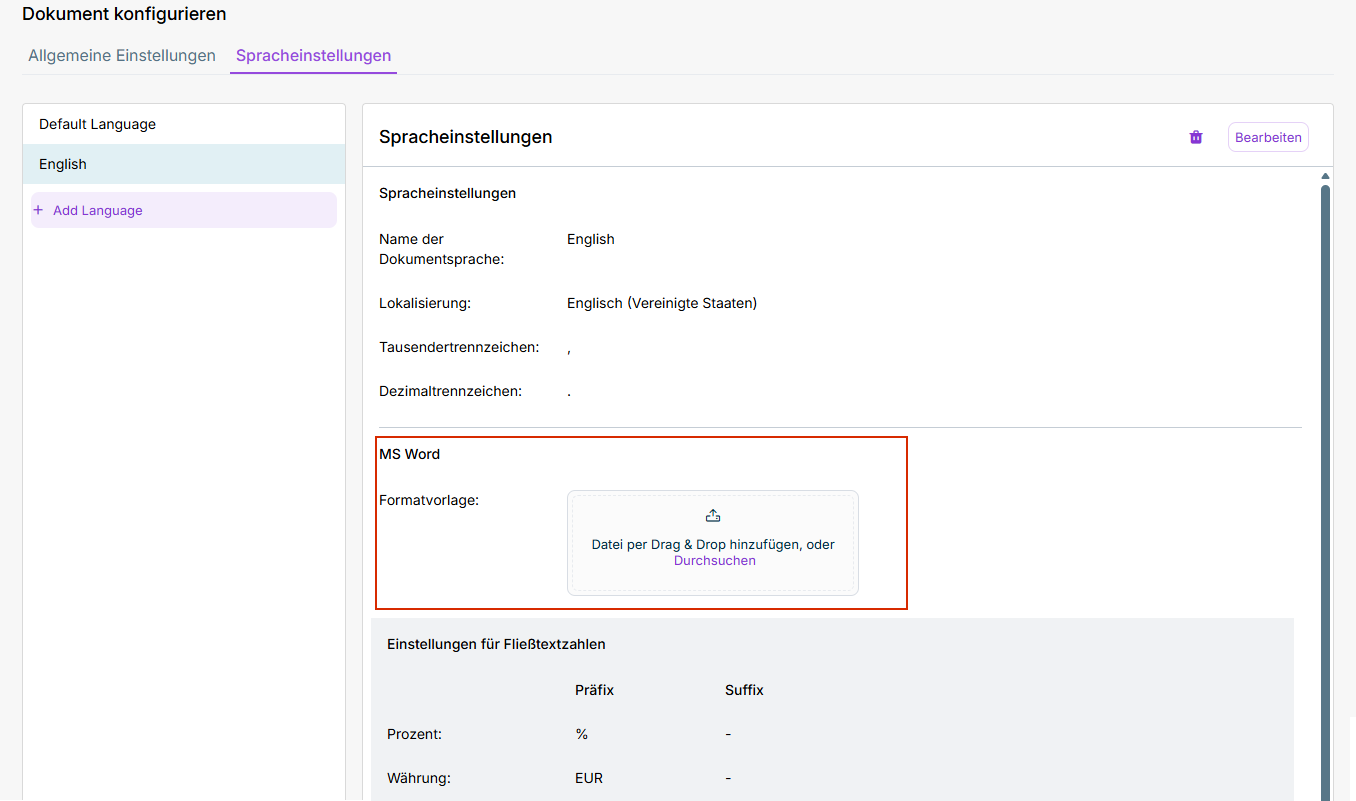


taxonomy with the latest updates of the IFRS taxonomyESEF 2024 for digital sustainability reportingVSME for digital reporting to Dutch authoritiesKVK


The software can automatically generate the final ESRS-compliant sustainability report at group level based on the subsidiaries' disclosures. As a user, you can select a question from the ESG questionnaire and see the various answers provided by the subsidiaries. You can add additional information. You can discard the result at any time and regenerate the report. If the result meets your requirements, you can add it to your document with a single click.
: Global roles assigned to a CFO Solution Platform user inCreating global roles are now automatically transferred to theAdministration in Disclosure Management. This makes role management much easier and more effective.role management : We have optimized the document roles and permissions. TheDocument roles role has been removed. AllDocument Data Importer permissions are now assigned to theDocument Data Importer role.Document Editor
With the following functions, you can optimize your texts in no time:Optimizing texts in Word documents theChange e.g. to positive, neutral, or formal and precisetone of voice orShorten the textexpand content into bullet pointsSummarize conciseCreate headlines sections of the document with specific informationEnrich

Draft taxonomy-compliant texts
\
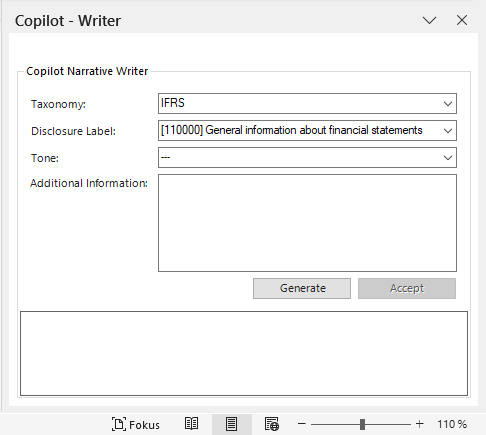
Disclosure Management automatically generates the required prompts - you don't have to worry about anything else. Discard unwanted results or try again until you are satisfied. If you accept the result, it will be seamlessly inserted into your document.
The first column is added as the .name column The columns in the table are used as for the specified period.value columns The are inserted into the table on the right.programming columns


For SEPA credit transfers, a VoP check is performed automatically, where the bank verifies the IBAN and recipient name. You receive the verification result before payment approval, allowing you to make an informed decision and detect transfer errors or fraud attempts early. After entering the IBAN, name, and amount, the VoP check runs automatically (approx. 3–5 seconds). You see the result before submitting the payment.Single payments: You can choose flexibly between VoP activation (Opt-in with individual verification via the new CTV/CIV order types) for higher security with slightly longer processing, or VoP deactivation (Opt-out without individual verification via classic CCT/CIP order types) for faster processing. When VoP is activated, you receive an overview of all verification results and can adjust problematic payments before submission.VoP bulk transfers:
This release introduces new .EBICS order types
Signing of VoP Opt-In jobs and VoP Opt-Out jobs Retrieval of verification results in HTML and PDF format Extension of the existing signature method so that VoP Opt-out jobs, including liability acceptance, can be signed. For 100% matches, an automatic signature can be applied; for No Match or Close Match, automatic cancellation is possible.Automatic signatures: Automatic forwarding of VoP verification results by email to defined recipients – either as an attachment or directly in the email body, in standard or detailed format.Extended e-mail notifications:
: With a comprehensive multi-bank capabilities, you can manage all your banking operations from a single platform.Intuitive Multi-Bank Operations : You work with Banking & Cash Management from payment initiation to reconciliation with no manual intervention needed, thanks to time and event-controlled processes.Full Automation
For SEPA credit transfers, a VoP check is performed automatically, where the bank verifies the IBAN and recipient name. You receive the verification result before payment approval, allowing you to make an informed decision and detect transfer errors or fraud attempts early. After entering the IBAN, name, and amount, the VoP check runs automatically (approx. 3–5 seconds). You see the result before submitting the payment.Single payments: You can choose flexibly between VoP activation (Opt-in with individual verification via the new CTV/CIV order types) for higher security with slightly longer processing, or VoP deactivation (Opt-out without individual verification via classic CCT/CIP order types) for faster processing. When VoP is activated, you receive an overview of all verification results and can adjust problematic payments before submission.VoP bulk transfers:
This release introduces new .EBICS order types
Signing of VoP Opt-In jobs and VoP Opt-Out jobs Retrieval of verification results in HTML and PDF format Extension of the existing signature method so that VoP Opt-out jobs, including liability acceptance, can be signed. For 100% matches, an automatic signature can be applied; for No Match or Close Match, automatic cancellation is possible.Automatic signatures: Automatic forwarding of VoP verification results by email to defined recipients – either as an attachment or directly in the email body, in standard or detailed format.Extended e-mail notifications:
: With a comprehensive multi-bank capabilities, you can manage all your banking operations from a single platform.Intuitive Multi-Bank Operations : You work with Banking & Cash Management from payment initiation to reconciliation with no manual intervention needed, thanks to time and event-controlled processes.Full Automation
Last updated on Aug 24, 2023