
Anlage Bekanntgabe (Notification Attachment)
Last updated on 2026-01-30
Overview
The Anlage Bekanntgabe (Notification attachment) can be used to consent to the digital delivery of the trade tax assessment notice by the municipalities entitled to levy the tax. In the federal states that levy trade tax themselves (Berlin, Bremen, and Hamburg), the respective tax office is responsible for the tax assessment notice. No consent to the digital delivery of the trade tax assessment notice via the Anlage Bekanntgabe is therefore required in these cases.
If consent is given to receive the digital trade tax assessment notice, the tax authorities will transmit the company data obtained with the Anlage Bekanntgabe to the municipalities. The municipalities use this information to issue the trade tax assessment notice digitally.
This article contains the following sections:
You should use the Anlage Bekanntgabe only if your company meets the technical requirements to receive tax assessment notices electronically. A prerequisite is that a business account has been set up by the enterprise. Detailed information on the digital trade tax assessment notice and the business account can be found, for example, on the web site of the Hessian Ministry of Finance at https://www.digitaler-gewerbesteuerbescheid.de/unternehmen.
Navigation
The Anlage Bekanntgabe form is available in two workspaces under Company | Current Taxes:
- Decomposition workspace: The form is automatically activated here and cannot be deactivated. However, the Bekanntgabe attachment will be transmitted electronically to the tax office only if the form contains data.
- Local tax workspace: If Anlage Bekanntgabe is activated in the form configuration, the Bekanntgabe attachment is visible in the Local tax workspace and data can be entered.
The Anlage Bekanntgabe workspace is displayed, for example, as follows:
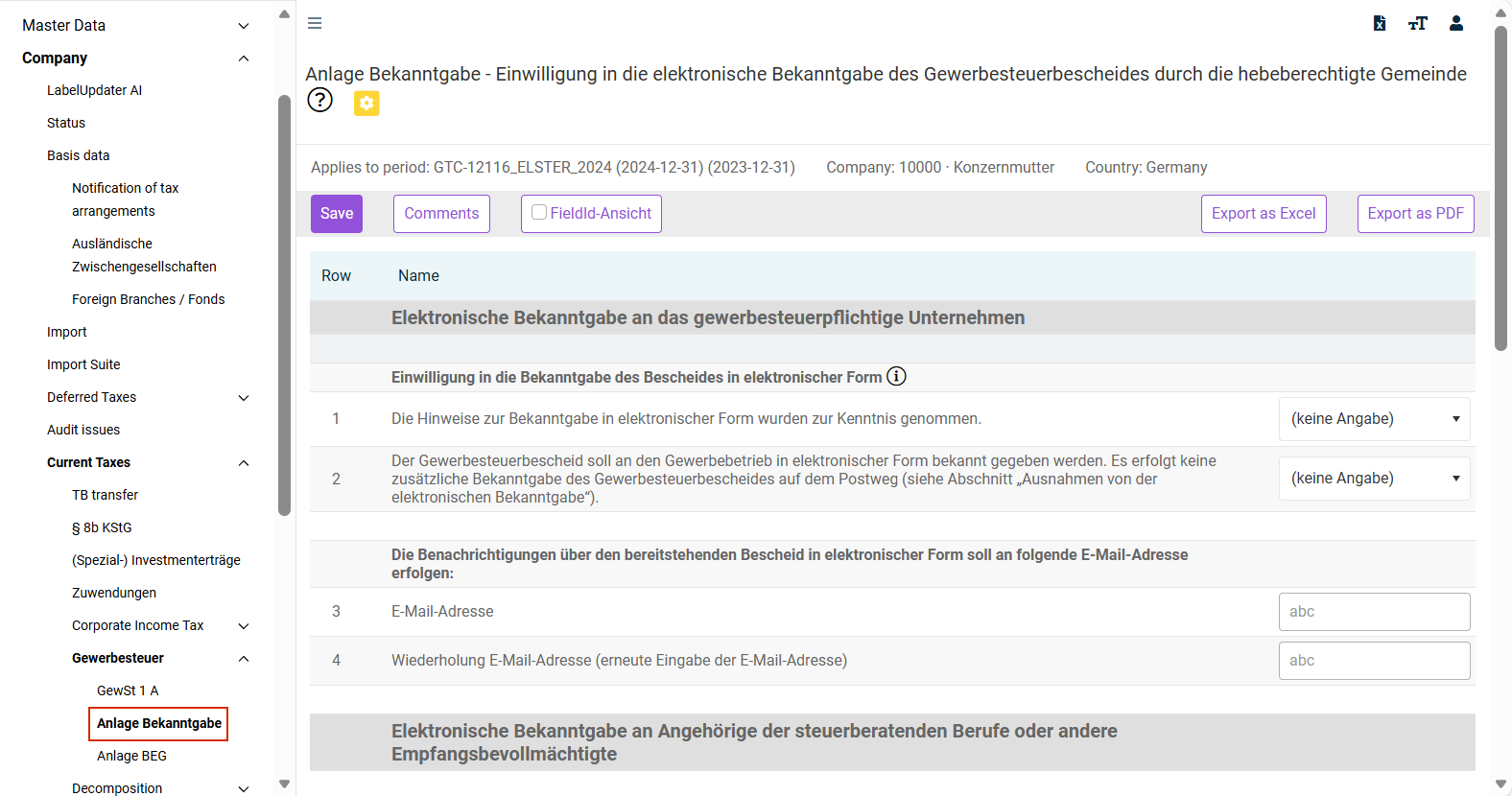
Activating 'Anlage Bekanntgabe' in the 'Local tax' Workspace
To activate the Anlage Bekanntgabe form in the Local tax workspace:
Go to Company | Basic data in the overview.
Click Form configuration.
Activate the check box Anlage Bekanntgabe - Einwilligung in die elektronische Bekanntgabe des Gewerbesteuerbescheides durch die hebeberechtigte Gemeinde (Notification Attachment - Consent to the electronic notification of the trade tax assessment notice by the municipality entitled to levy the tax) on the Local tax tab.
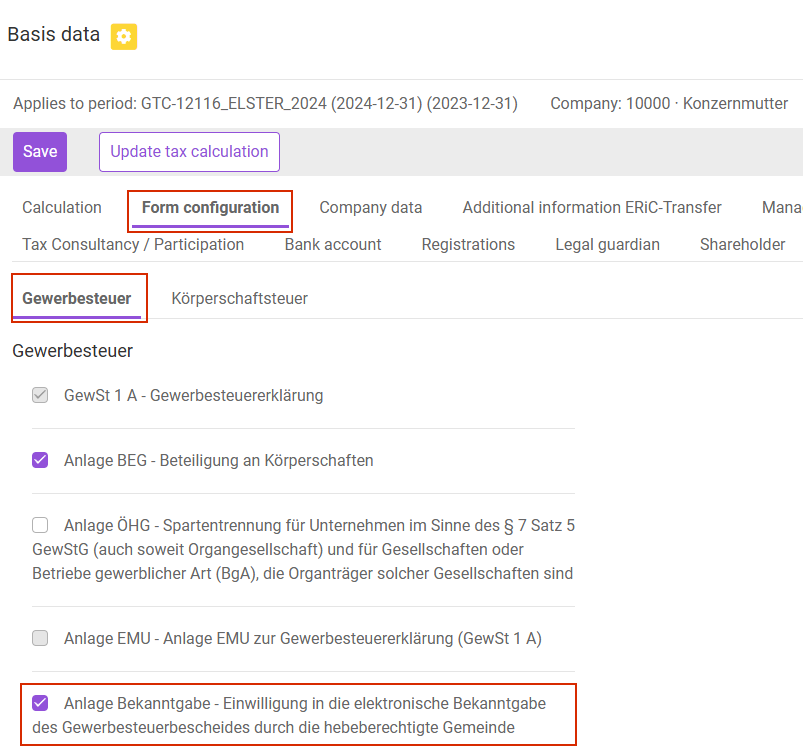
Options
The following options are available in the Anlage Bekanntgabe workspace:
Option
Description
Save
Saves your entries.
Comments
Opens a dialog where you can create a new comment or transfer an existing comment.