
Master Data
Last updated on 2025-12-09
Overview
In the Income Taxes module, master data, transaction data, and changes to the calculation logic refer to periods (e.g. annual or quarterly closings, planning periods). All data is recorded as of a cut-off date within a defined period.
If there are changes in the calculations – for example, due to changes in law – all existing (prior) periods therefore remain unaffected, provided that the calculation bases and active patches are not updated (see Periods).
This article contains the following sections:
General Information
Unique Identification
For data sets in master data, unique codes (ID) must be assigned to clearly identify them. In some cases, the data set ID is assigned automatically by Income Taxes (e.g. when creating periods). For a country to be created, the ID must be specified by the user (e.g. DE for Germany; the ID can be freely chosen at this point).
Since data sets are not permanently deleted, please note that archived data IDs cannot be reused.
Display of Active and Archived Data Sets
In the Master Data functional area, recorded data sets (e.g. countries or companies) cannot be permanently deleted. There is only the option to archive (that is, remove from view).
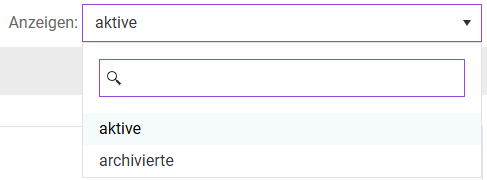
By default, the active data sets are displayed. The archived data sets can be viewed by switching the display from Active to Archived. The option to switch the view is located at the top right of the respective (sub-)workspace within the Master Data functional area.
If necessary, individual data sets (e.g. archived companies) can be restored in the archiving view via the recycling icon  .
.
Change Log
In the Master Data functional area, a change log function is available ( ). All master data changes are registered in the database. The change log makes it possible to evaluate the change history recorded in the database for the individual workspaces (who made which change when). The change log is only accessible if you have the necessary authorization. This evaluation is displayed in an Excel file.
Selection of Period and Company
Within Income Taxes, most master data is maintained by period. One period corresponds to a set of master and transaction data for all associated companies. This can be an annual or quarterly financial statement, or a tax declaration as of a cut-off date. Among other things, this ensures that changes in group structures can be represented over time.
Within Income Taxes, you can select created periods and companies independently of each other for editing. Depending on whether a workspace is period-dependent, company-dependent, or both, the corresponding selection fields for period and/or company are available in the upper area of the respective workspace. This allows you to select the desired period and/or company that is to be viewed or edited.
Workspace
Dependencies of periods and companie
Periods
- Period-dependent: no
- Company-dependent: no
Countries
- Period-dependent: yes
- Company-dependent: no
Reporting Dimension
- Period-dependent: yes
- Company-dependent: no
Companies
- Period-dependent: yes
- Company-dependent: no
Foreign branches / funds
- Period-dependent: yes
- Company-dependent: yes
CoA Group
- Period-dependent: yes
- Company-dependent: no
CoA Company
- Period-dependent: yes
- Company-dependent: yes
Toolbox
- Period-dependent: yes
- Company-dependent: no
Interfaces
- Period-dependent: yes
- Company-dependent: no
Administration
- Period-dependent: no
- Company-dependent: no