
Creating and Configuring the Script Lucanet xP&A #3700-xP&A.SQL.FOS
Last updated on 2026-05-07
Overview
In order to import an xP&A data export into CFP, you must first create and configure the data transfer script Lucanet xP&A #3700-xP&A.SQL.FOS.
Note for customers who still use Lucanet.Financial Client
You can either perform this step in the Lucanet CFO Solution Platform or in Lucanet.Financial Client. The script will be visible and editable in both systems, no matter where you created it.
This article contains the following sections:
Creating and Configuring the Script
To create and configure the data transfer script Lucanet xP&A #3700-xP&A.SQL.FOS, proceed as follows:
- In the overview, click the Import and Journals workspace.
- In the tree view of the workspace, right-click Scripts or a folder and select the following from the context menu: Create | Script:
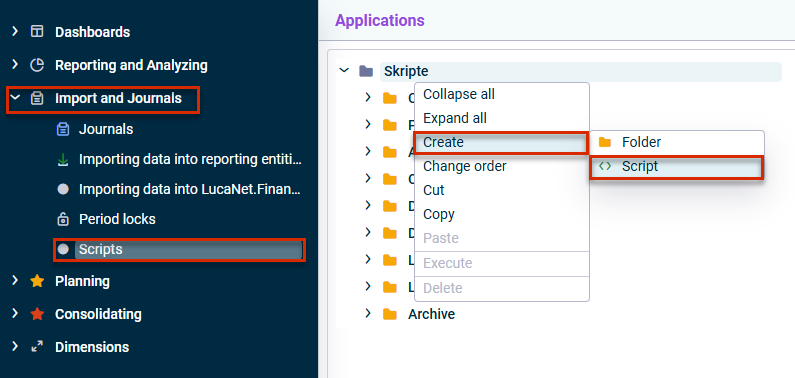
Create a new script - Choose one of the following options to load the script xP&A #3700-xP&A.SQL.FOS into the Scripts workspace in the subsequent dialog:
- Drag and drop the desired script into the dialog.
- Click browse and navigate to the desired script.
- Create the script.
- In the detail view of the script, click Edit and configure the tabs of the script as described in the following under Script Parameters.
- Click Save (or press Ctrl+S) to save the script configuration.
Script Parameters
'Connection' Tab
The Connection tab is displayed as follows, for example:
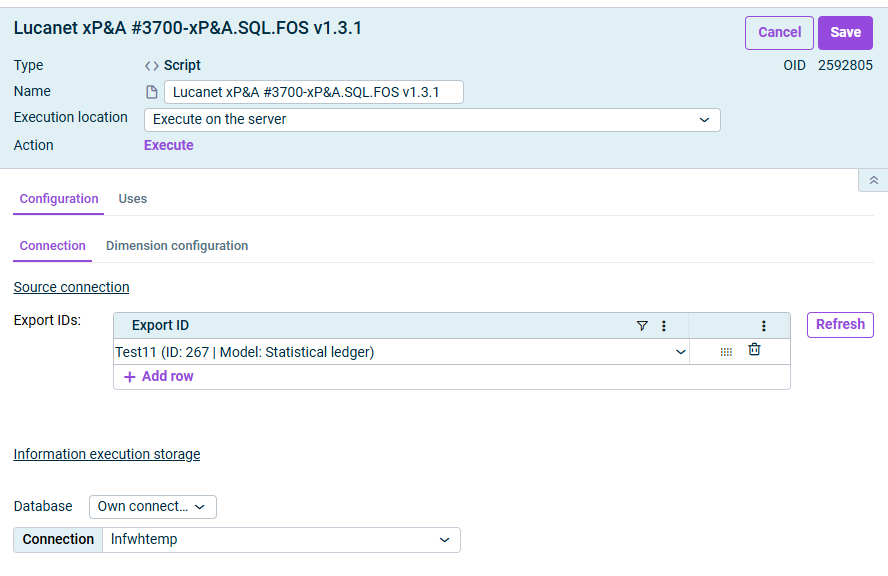 'Connection' tab
Configure the following options on the Connection tab:
| Parameter | Description |
|---|---|
| Export IDs | Select all xP&A exports, i.e. the models that should be imported. All exports are available which have been created in xP&A and for whose model you have access permissions. You can click Refresh to update the selection of available exports. |
| Database | Optional: Connection to an SQL database Serves as a temporary storage location for reimporting exports already performed from xP&A and for drill-down without restarting the export from xP&A. Connection information for Lucanet.Financial Warehouse can be used here.
|
'Dimension configuration' Tab
The Dimension configuration tab is displayed as follows, for example:
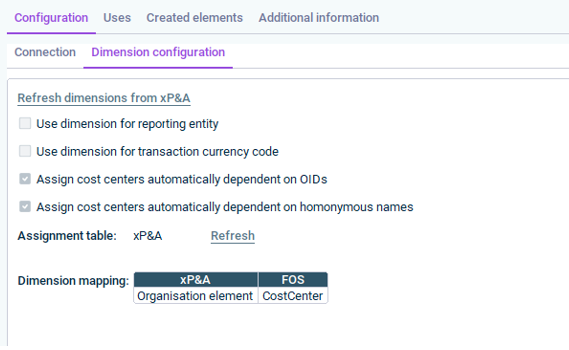
On the Dimension configuration tab, you map xP&A dimensions to CFP dimensions.
The key mapping dimension is entity (i.e. how does the entity dimension in your xP&A model translate to cost centers in CFP).
The following options are available on the Dimension configuration tab:
| Option | When to use |
|---|---|
| Refresh dimensions from xP&A | Click Refresh dimensions from xP&A to update the available dimensions from the specified xP&A export(s). |
| Use dimension for reporting entity | Activate if you use a custom dimension in xP&A (not integrated from CFP) and want to map it to reporting entities manually. |
| Use dimension for transaction currency code | This is a legacy option and not needed in the current xP&A setups. |
| Assign cost centers automatically dependent on OIDs | Activate when you use the organization element structure from CFP in xP&A. The OID (unique identifier per cost center) enables automatic matching. |
| Assign cost centers automatically dependent on OIDs | This is a fallback option — where matches are based on name. Requires a dedicated assignment table. |
| Dimension mapping | Assign xP&A dimensions to Lucanet.Financial OLAP Server (FOS) dimensions. For user-defined dimensions, you can use the target dimensions UserdefinedDimension1 to UserdefinedDimension9; when configuring the data source, use the corresponding DimensionsCode as needed. |
Best practice: Always create a separate assignment table for xP&A imports to avoid conflicts with other import processes.