
Current Taxes
Last updated on 2026-01-30
Overview
In the Current Taxes workspace, you can enter country-specific tax data for foreign companies to calculate taxes. These data are required above all to create the tax rate reconciliation (TRR).
The structure of the Current Taxes workspace is configured for each country within the master data in the Master Data | Toolbox workspace. After configuration, the corresponding country-specific data can be entered in the Current Taxes workspace.
The Current Taxes workspace is displayed by default in condensed view. All rows with the value 0.00 are hidden in all columns. They can be displayed again with the Show all lines button.
This article contains the following sections:
Navigation
The Current Taxes workspace is part of the Current Taxes functional area and is displayed, for example, as follows:
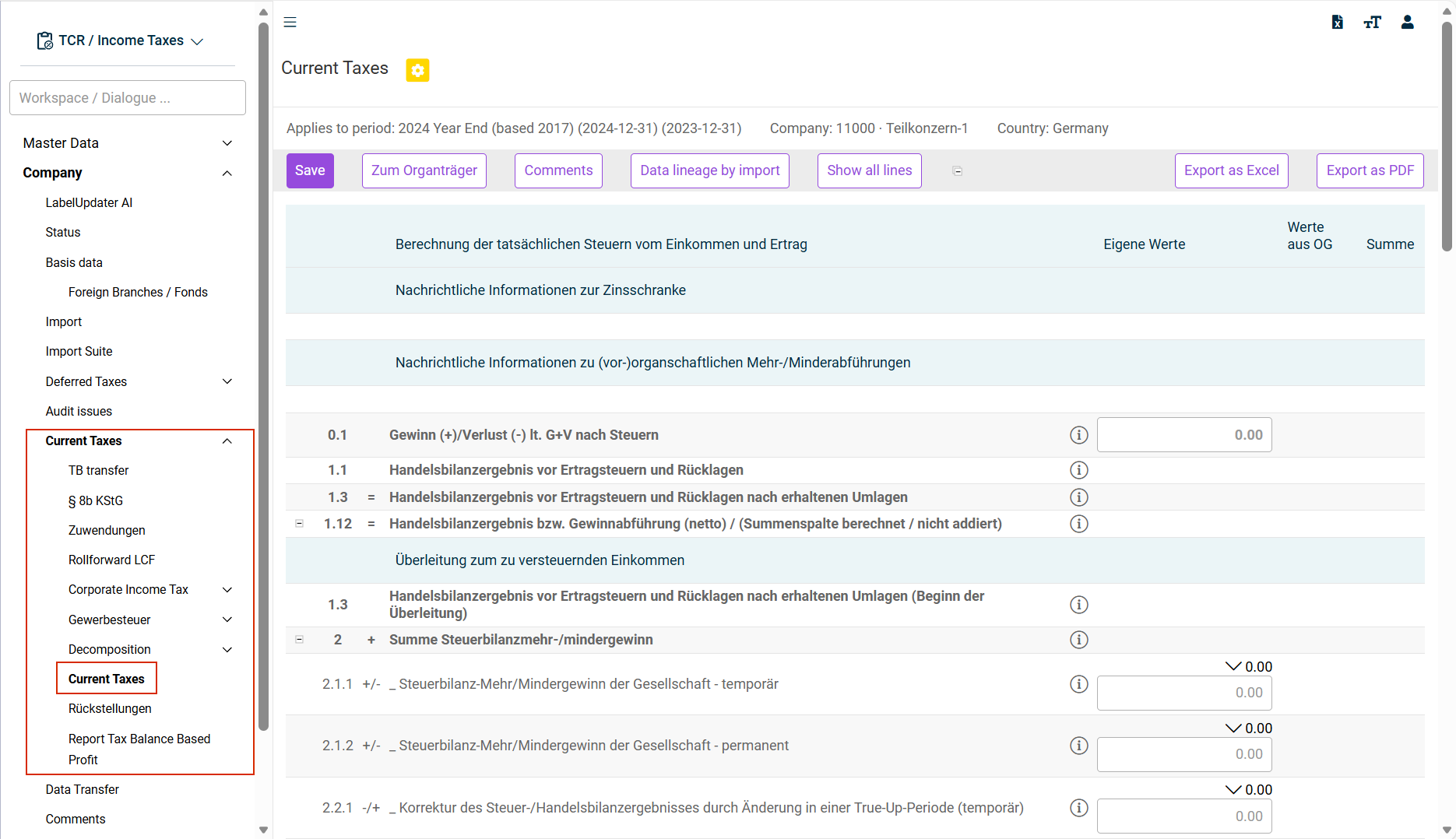
Options in the 'Current Taxes' Workspace
The following special options are available in the Current Taxes workspace:
Option
Description
Back to tax payer of group
Switches to the superior tax group parent and opens the Company | Status workspace.
Data lineage by import
Downloads an Excel file with the data imported into Income Taxes.
Show all lines
Show also rows with the value 0.00.
Details on Selected Aspects
The following sections provide detailed coverage of specific aspects in the context of current taxes:
By default, the income assessment takes only corporate tax into account.
If the Local tax column in Toolbox check box is activated for the chosen company in the master data, it can also be taken into account in a separate column for the income assessment. This allows different assessment bases to be drawn on for the two tax types:

It is also possible to enter a comment for each row.
Starting Value: Profit Before Tax
The income assessment starts with the profit before taxes determined according to local commercial law (not with the result before taxes according to IFRS). Balance sheet and off-balance sheet adjustments are subsequently taken into account.
Balance Sheet Adjustments (Surplus/Deficit)
In row 2 ff., the tax surplus/deficit is taken into account and differentiated into a temporary and permanent portion:

The proposed values are derived from the B&S Comparison functional area (Local GAAP - Tax Balance workspace). Based on the prior period (which is defined when creating the period), Income Taxes determines the change in differences between the local balance sheet and tax balance sheet. The distinction between temporary and permanent differences made in the balance sheet comparison is also taken into account.
The proposed values (thereof temporary differences, thereof permanent differences) can be traced for each balance sheet item on the basis of the balance development using the Local gaap - tax comparison report.
Off-Balance-Sheet Adjustments
All off-balance sheet adjustments are entered by the user (there is also the option of automated import from, for example, Excel tax calculation sheets). The rows available within the dialog are defined in the Toolbox configuration.
Deferred taxes and any tax losses carried forward can also be taken into account in addition to the off-balance-sheet adjustments. Both topics are subsequently covered in separate chapters.
Tax Rates Used
For corporate income tax purposes, the taxable income is multiplied by the tax rate stored in the master data. The local tax rate is used to calculate the local tax.
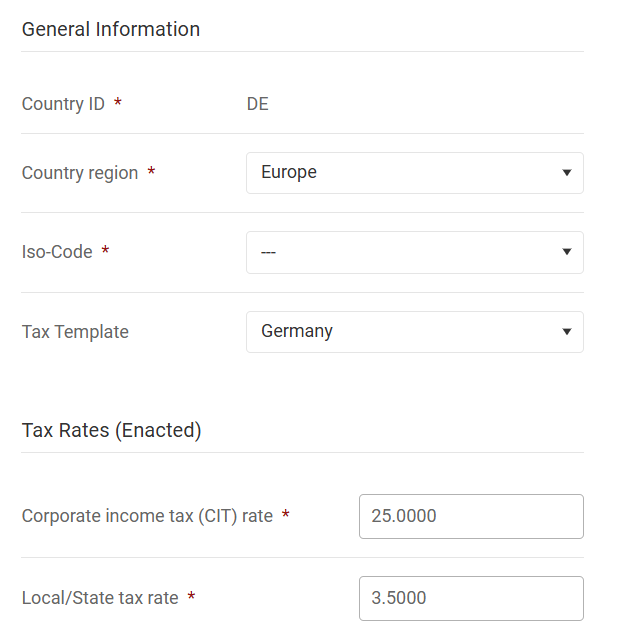
For TRR purposes: The individual off-balance-sheet adjustments in the Corporate income tax (CIT) rate column are taken into account in the TRR on an issue-specific basis (e. g. tax-free dividends or non-deductible expenses). Off-balance-sheet adjustments for local income tax purposes are processed in total in the TRR row Local tax (only foreign countries).
Special Issues
Further issues, such as withholding taxes or current taxes entered in the OCI and equity can be entered at the end of the workspace.
Utilization of and Addition to Losses Carried Forward
Tax losses carried forward are utilized and added in the toolbox in rows 12 and 13 and are linked to the LCF workspace for the purpose of determining deferred taxes.
Scenario: Addition to Losses Carried Forward
If the income assessment results in a tax loss, row 13 (Steuerpflichtiges Einkommen für Körperschafts-/Lokale Steuer (Taxable Income for Corporate/Local Tax)) is decisive for the addition to the loss carried forward:
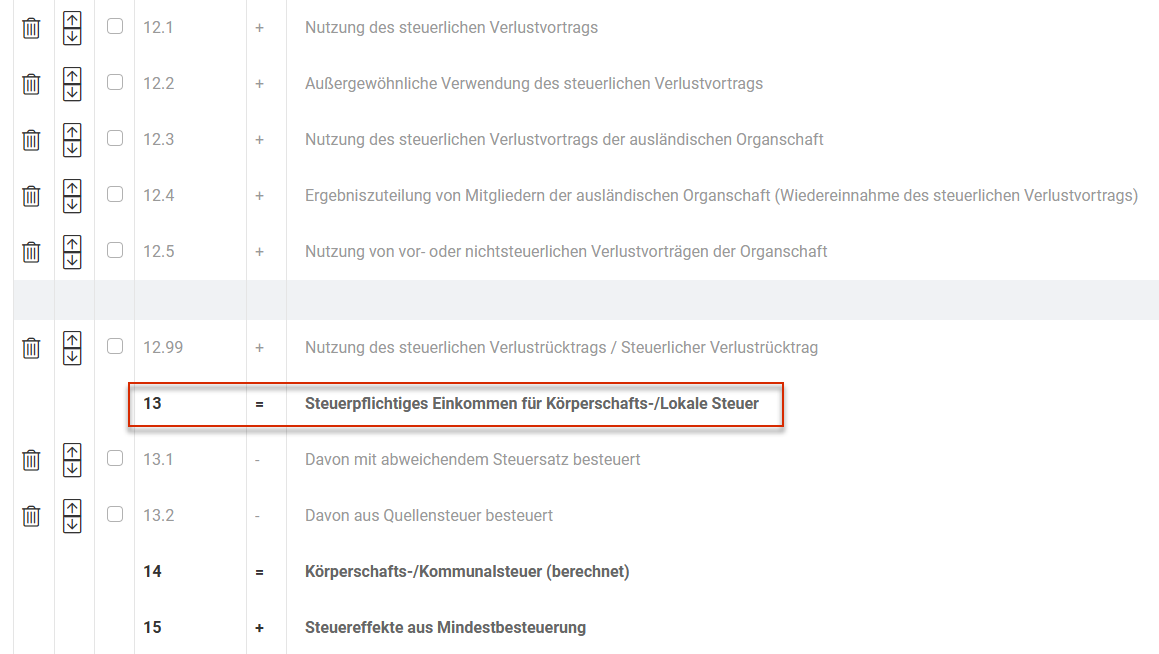
The calculated loss carried forward is linked to the Rollforward LCF sub-workspace in the LCF workspace:
Scenario: Utilization of Losses Carry Forward
If the income assessment results in a taxable profit and usable tax losses carried forward are available at the same time, they must be entered in row 12.1 (Nutzung des steuerlichen Verlustvortrags (Utilization of tax loss carried forward)). The loss utilization is also automatically taken into account in the LCF workspace.
Consideration of Corporate Tax and Local Tax
If the column used to calculate the local income tax (local tax in Toolbox) is activated in the master data, the respective addition and utilization of the loss carried forward with regard to local income tax is taken into account (in the LCF workspace: Tax losses carry forward local tax).
Asset differences between commercial and tax balance sheets at the level of the tax group member mean that the profit transferred to the tax group parent falls short of (deficit transfers) or exceeds (excess transfers) the tax balance sheet profit of the tax group member.
A distinction must be made here between pre-tax group excess and deficit transfers (section 14 (3) of the Corporate Tax Act) and tax group excess and deficit transfers (section 14 (4) of the Corporate Tax Act).
The tax group and pre-tax group asset differences of the tax group member calculated outside of Income Taxes (e. g. in Tax Balance) must be included in Income Taxes for the preparation of the tax return.
Pre-Tax Group Excess and Deficit Transfers
Therefore, according to section 14 (3) of the Corporate Tax Act, an active or passive balancing item must be created at the level of the tax group parent.
The rows are used further according to their name. Here is a brief explanation:
- N-4.0: total of all pre-tax group excess transfers (total of N-4.1 to N-4.3).
- N-4.1: You can enter pre-tax group excess transfers in accordance with section 14 (3.1) of the Corporate Tax Act here, provided they do not come from the tax contribution account. If data are imported from Tax Balance, the corresponding import value is inserted as a proposed value in this row.
A different assessment will be necessary if the excess transfer is taken from the tax contribution account or no issue according to section 8b of the Corporate Tax Act is to be created. In these cases, the proposed value is entered in rows N-4.2 or N-4.3 according to the tax treatment. The value in row N-4.1 must be adjusted accordingly.
Values in row N-4.1 are transferred to the OG attachment and the KSt1F form of the respective tax group member for the preparation of the tax return. Furthermore, an automatically generated issue in accordance with section 8b (1) of the Corporate Tax Act with the corresponding capital gains tax will be triggered at the tax group parent by saving the assessment basis transfer. - N-4.2: Pre-tax group excess transfers from the tax contribution account are entered here. The data entered here are further processed accordingly for the tax group member on the KSt1F form and in the OG attachment. No issue according to section 8b of the Corporate Tax Act is created in this case.
- N-4.3: Pre-tax group excess transfers that do not come from the tax contribution account are entered here. The entry is further processed accordingly in KSt1F and the OG attachment. In contrast to row N-4.1, no issue in accordance with section 8b (1) of the Corporate Tax Act with the corresponding capital gains tax is transferred for the tax group parent. If it is a tax-free distribution, a corresponding issue must be created manually in the §8b KStG (Corporate Tax Act, section 8b) workspace for the tax group parent (pre-tax group excess transfer without capital gains tax withholding).
Note for the Tax Return:
If it is a tax-free distribution, enter it in the tax return of the tax group member in row D11.2.5 of the GK attachment "Davon vororganschaftliche Mehrabführungen (ohne Einlagekonto; Anlage eines Sachverhaltes im Sinne d. § 8b Absatz 1 KStG auf Ebene des (Z)OT ohne KapESt und SolZ)“ ("Of which pre-tax group excess transfers (without contribution account; creation of an issue in accordance with section 8b (1) of the Corporate Tax Act at the level of the (I)TP without capital gains tax and solidarity surcharge)"). In this case, an issue according to section 8b of the Corporate Tax Act is automatically created for the tax group parent.
- N-5.1: Pre-tax group deficit transfers in accordance with section 14 (3.2) of the Corporate Tax Act must be entered here. They are processed accordingly on KSt1F and in the OG attachment for the respective tax group member.
- N-6: Tax group excess transfers in accordance with section 14 (4.1) of the Corporate Tax Act must be entered here. The values are included in the OG attachment and made available to the tax group parent by means of the TB transfer for processing in the OT attachment and on KSt1A.
- N-7: Tax group deficit transfers in accordance with section 14 (4.1) of the Corporate Tax Act must be entered here. The values are included in the OG attachment and made available to the tax group parent by means of the TB transfer for processing in the OT attachment and on KSt1A.
- MM_CHECK: The tax group and pre-tax group excess and deficit transfers are entered in detail in rows N-4.0 to N-7. The deviations between the commercial balance sheet and tax balance sheet (section 60 (2) of the Income Tax Ordinance), which were entered when determining the tax balance sheet profit, are validated with the values in rows N-4.0 to N-7 in the MM_CHECK row. The control value should be € 0.00. This validation is only for reconciliation purposes and does not affect any milestones or other value transfers.
Tax Group Excess and Deficit Transfers
Legal status for fiscal years ending after December 31, 2021:
- According to section 14 (4) of the Corporate Tax Act, an active or passive balancing item for tax group relationships must be consequently created at the level of the tax group parent.
- The tax group balancing items are developed for each tax group member and entered in the Current Taxes workspace in Income Taxes.
- As part of the system change to contribution solution, the tax group balancing items had to be dissolved and transferred to the investment account.
Legal status for fiscal years beginning after December 31, 2021:
- During the tax group period, deficit transfers are to be treated as contributions and excess transfers as return of contributions, which increases or decreases the investment book value of the tax group member at the tax group parent accordingly.
- Tax group excess and deficit transfers are entered as follows:
- GK attachment, row D11.2.1: Mehrabführungen (Excess transfers)
- GK attachment, row D11.2.2: Minderabführungen (Deficit transfers)