
Periods
Last updated on 2025-07-16
Overview
In the Income Taxes solution, master data, transaction data, and changes to the calculation logic relate to periods (annual or quarterly reports, planning periods, etc.). All data is recorded in relation to a cut-off date within a defined period.
If changes are made to calculations (due to changes in laws, for example), all existing (prior) periods will remain unaffected, provided the calculation base and active patches are not updated. Further details are provided later on in this chapter.
Deleted periods are not physically deleted, but merely marked as archived so that you can access previous calculations at any time.
Periods are usually created centrally by the group in question. Special authorizations are required for the maintenance of periods.
In certain cases, it may be necessary or useful to export all data for a period and import it into another Income Taxes instance; see Exporting Periods and Importing Periods.
This article contains the following sections:
Standard Period
The standard period (---) is the period initially set in Income Taxes. In it, only master data can be managed. When using Income Taxes for the first time, it is advisable to first enter the master data in the standard period. When creating a closing period, the standard period will then serve as a template for the master data.
In principle, every user is free to always keep the standard period up to date with regard to the master data. For some modules of Income Taxes (e.g. Tax Compliance), maintaining the standard period is required.
Creating and Configuring Periods
Periods can be created in normal or expert mode. A detailed guide and example configurations can be found under Creating and Configuring Periods.
Deactivating Functions and Modules
In an already created period, you can individually activate or deactivate the following modules or functions within the period:
- Tax calculation (in the Company area)
- Questionnaire (optional additional module)
- Risk Management (optional module)
- Capital gains tax registration (in the Company area)
To do this, navigate to the upper right area of the desired period and activate or deactivate the respective check boxes in the Deactivated? column.
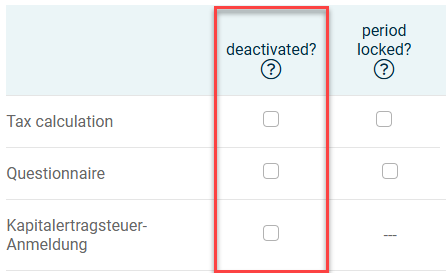
If the Deactivated? Check box is activated for a module or function and the period is saved, the respective area will no longer be displayed in that period.
Locking Periods
In a period, tax calculation and the Questionnaire module can be locked – for example, if the calculations for a period are considered final and the period should be protected from subsequent changes. Regardless of the status of the inputs in the respective companies, the dialogs in this period will then only be displayed in the reading view.
To do this, navigate to the upper right area of the desired period and activate the respective check boxes in the Period locked? column.
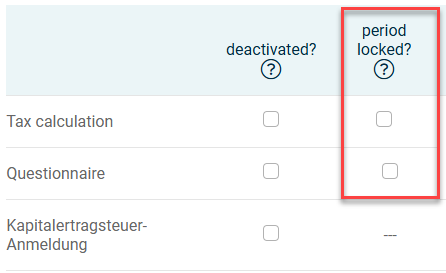
The closing of the period will be documented with a timestamp. You can undo the closing of a period at any time by deactivating the check boxes again.