
Managing GCD Master Data
Last updated on 2026-01-31
Overview
A distinction is made between two areas when transmitting the e-balance sheet:
- GCD (Global Common Data), which specifies the master data to be transmitted, such as the name of the enterprise, legal form, etc.
- GAAP (Generally Accepted Accounting Principles), which represents the taxonomy for the financial data, such as accounts and items of the balance sheet, P&L, etc.
In Tax Balance, the data for the GCD area are entered in the GCD Master Data workspace.
The master data managed here can be pre-filled partially by the master data import from Income Taxes.
All master data that are not imported from Income Taxes must be entered in this step.
In addition, pre-filled data can be changed if necessary.
This article contains the following sections:
Navigation
The GCD Master Data workspace is displayed in the tree view as soon as you open a tax balance sheet under Company:
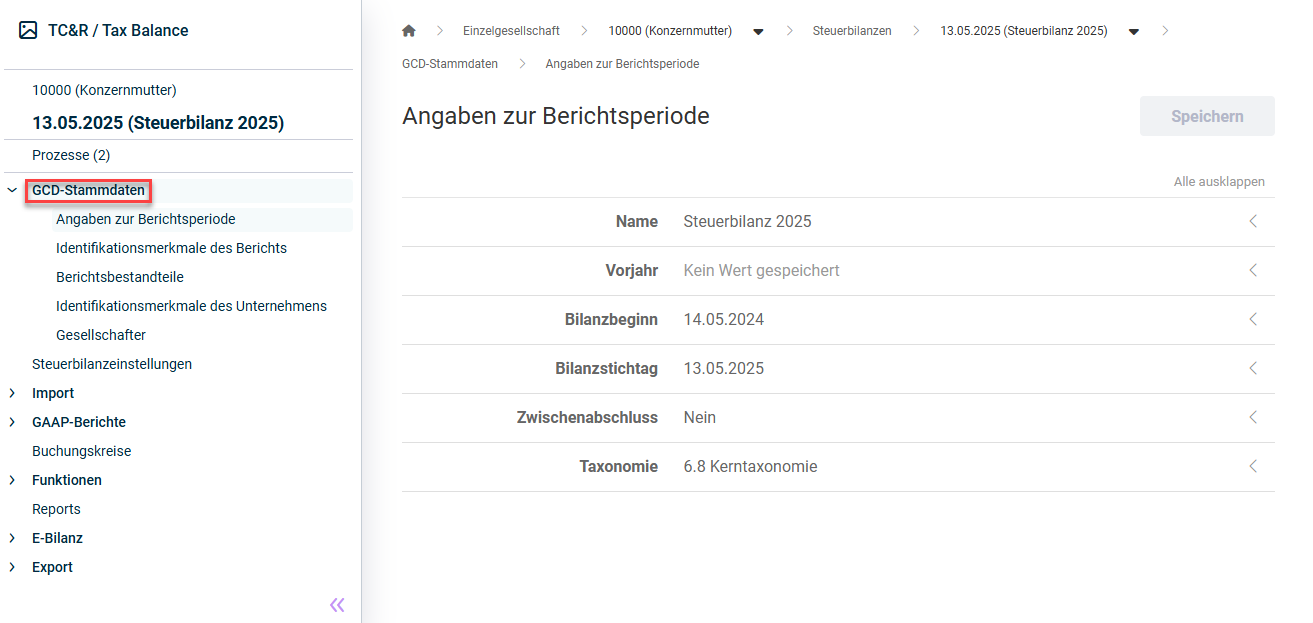
Configuring GCD Master Data
The following GCD master data must be configured:
Specify the following for the reporting period:
- Name of the tax balance sheet
- Previous year to be used as the basis for the tax balance sheet
- Start of reporting period
- End of reporting period
- Indication of whether the tax balance sheet is an interim financial statement
- Taxonomy to be used for the tax balance sheet (see also Notes on Taxonomies)
Specify the following:
Option
Description
Type of report
Choose one of the following options:
- Annual financial statements
- Other report (e.g. when transmitting opening, discontinued, or reorganization balance sheets)
Completion status of report
Choose one of the following options:
- final
For assessment purposes, a report labelled as "final" must be transmitted to the tax authorities. - Preliminary
A preliminary report is for information or explanatory purposes only.
Status of report
Choose one of the following options:
- First-time
- Corrected
- Modified
- Corrected and modified
- Same financial statements with more detailed information
- Otherwise amended
Financial statement type
Choose one of the following options:
- Annual financial statements
- Reorganization balance sheet, simultaneously annual financial statements
- Opening balance sheet
- Interim financial statements
- Intraperiod figures
- Reorganization balance sheet
- Opening balance sheet at begin of liquidation
- Liquidation interim balance sheet
- Liquidation closing balance sheet
- Winding-up accounts (within the meaning of EStG s. 16)
Accounting standards
Choose one of the following options:
- German GAAP
- German GAAP also meeting tax standards (uniform balance sheet)
- German tax law
Industries
Choose one of the following options:
- Core taxonomy
- Accounting regulations for credit institutes, RechKredV - Taxonomy Scheme for Credit Institutions and Financial Services Institutions
- Accounting regulations for credit institutes, RechZahlV - Taxonomy Scheme for Payment Institutions
- Accounting regulations for insurances, RechVersV - Taxonomy Scheme for Insurance Companies
- Accounting regulations for caring institutes, PBV - Supplementary industry taxonomy - here specifically for the area of care facilities
- Accounting regulations for hospitals, KHBV - Supplementary sector taxonomy - here specifically for the hospitals sector
- Accounting regulations for owner operated municipal enterprises, Eigenbetriebsverordnung - Supplementary industry taxonomy - here specifically for the area of state-specific ordinances on own-account enterprises
- Accounting regulations for residential renting businesses, JAbschlWUV - Supplementary industry taxonomy - here specifically for the area of companies covered by the Ordinance on Forms for the Classification of the Annual Financial Statements of Housing Companies
- Accounting regulations for transport businesses, JAbschlVUV - Supplementary industry taxonomy - here specifically for the area of companies covered by the Ordinance on Forms for the Classification of the Annual Financial Statements of Transport Companies
- Instructions to BMELV financial statements (forestry and agriculture) - Supplementary industry taxonomy - here specifically for the area of agriculture and forestry
Income statement format
Choose one of the following options:
- Total cost (nature of expense) method
- Cost of sales (function of expense) format
Basis of consolidation
Unconsolidated/Single-entity financial statements
Credit institute code
Choose one of the following options:
- Building society (RechKredV)
- Financial service provider (without settlement services) (RechKredV)
- German central cooperative central bank (RechKredV)
- Giro centre (RechKredV)
- Capital management company (RechKredV)
- Credit cooperative (RechKredV)
- Credit cooperative with commodities transactions (RechKredV)
- Pfandbrief bank (RechKredV)
- Settlement services (RechKredV)
- Sparkasse (RechKredV)
- Universal institute (RechKredV)
The following report elements can be selected:
- Balance sheet
- Determination of taxable income by comparison of business assets
- Opening balance sheet without income statement
- Income statement ends with net retained profits / accumulated loss
- Income statement
- Statement of changes in fixed assets (gross)
- No transmission
- Carrying amount in financial statements
- Tax base
- Carrying amount in financial statements, tax reconciliation and tax base
- Register of fixed assets
- Appropriation of net income
- Tax reconciliation statement
- Account balances
- Determination of taxable income
- Determination of taxable income in transparent cases
- Determination of taxable profit for special cases
- Statement of changes in capital accounts
Specify the following:
- General information
- Entity name
- Legal form
- Legal form type
- Information on consolidated tax group for corporation tax and income tax
- Tax group type
- Tax group parent
- Group share of the tax group parent
- Registered office
- Entity ID numbers
- Tax number
- Business tax ID number
- Federal tax office number
- Further information
- Business
- Classification of income
- Option under KStG sec. 1a
- Entity with determination of income for special cases
- Transmission option
- Permanent establishment of foreign company
If necessary, add the individual partners of the enterprise by clicking Add and specifying the following:
- Affiliation of the shareholderer from (entry date) to (leaving date)
- Legal form of the partner:
- Natural person - private assets
- Natural person - business assets
- Partnership
- Corporate entity
- First and last name of the partner
Further information and explanations regarding the required details can be obtained, if necessary, by clicking the corresponding input field:
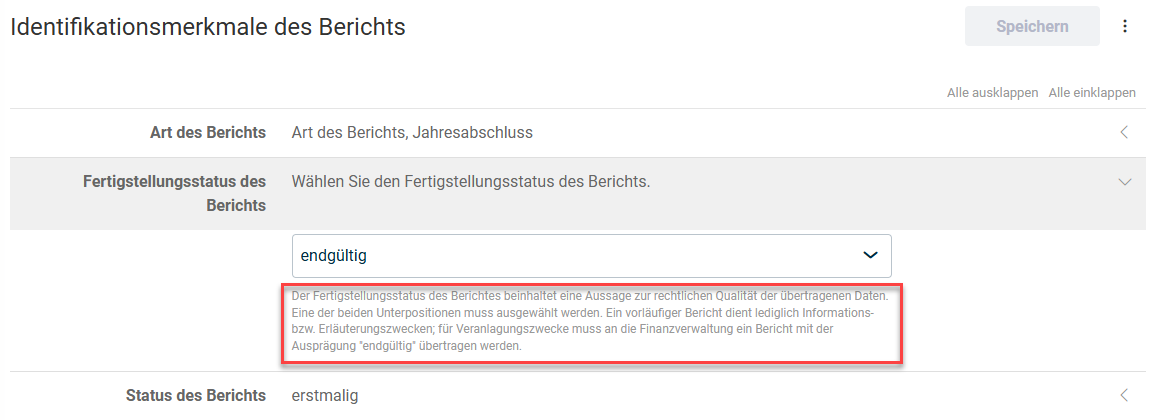 Further information
Applying GCD Master Data from an Existing Tax Balance Sheet
You can also transfer GCD master data from an existing tax balance sheet. To do so:
Open any workspace below GCD Master Data (except Disclosures on Reporting Period).
Open the More actions menu and choose the Apply GCD master data command.
 'More actions' menu
Choose the tax balance sheet from which you want to take the GCD master data from the Apply GCD master data dialog and click Continue.
Choose which GCD master data are to be taken and click Apply.
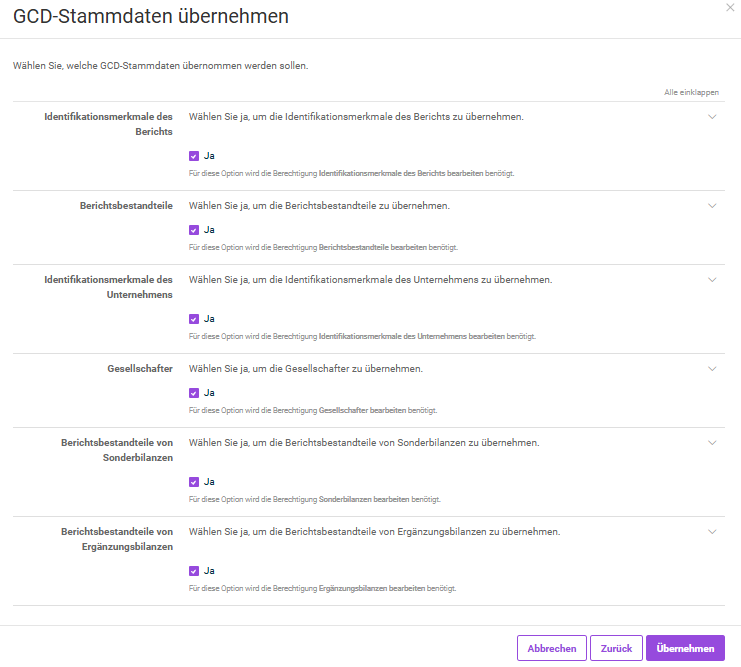 Selection of GCD master data to be transferred