This page archives the release notes for older versions of the Lucanet CFO Solution Platform.
The versions of all solutions that you are currently using and those of the CFO Solution Platform are displayed when you select About Lucanet from the Help section in the CFO Solution Platform.
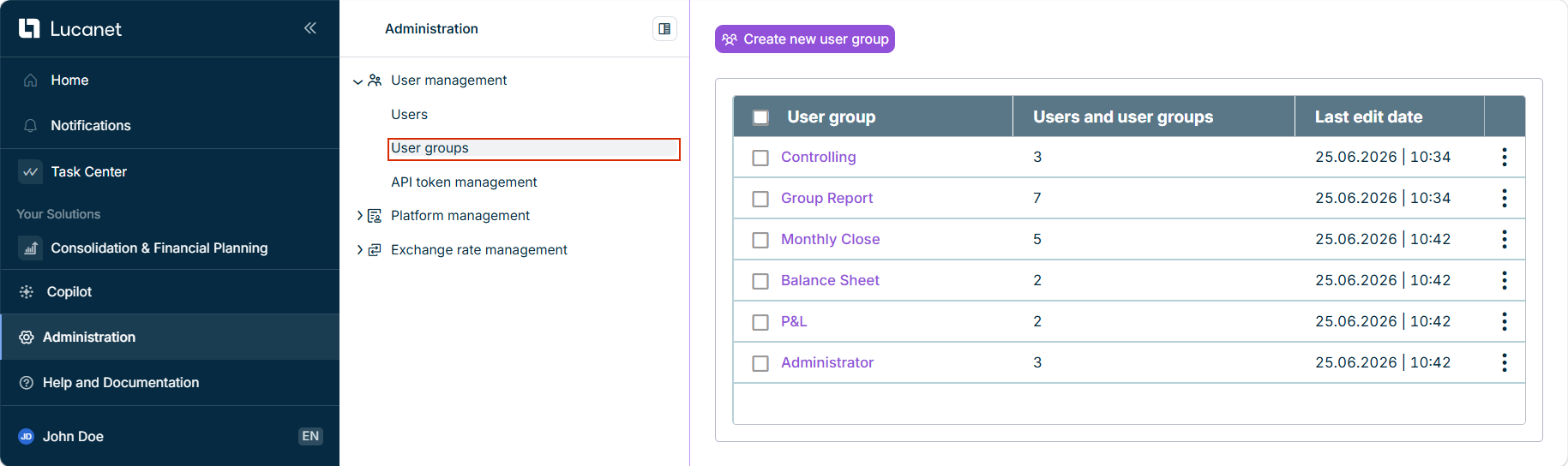
You can now combine Consolidation & Financial Planning users into user groups and assign shared permissions to all members at once, instead of configuring each user individually. User groups are available in the Administration | User management | User groups workspace for administrators with the Administrator or Master role for Consolidation & Financial Planning.
For each user group, you can define permissions for the data model, transfer the group's permissions to individual users or other user groups (optionally for a limited period), inherit permissions from other user groups, and review the group's change log.
The new workspace is displayed as follows, for example:
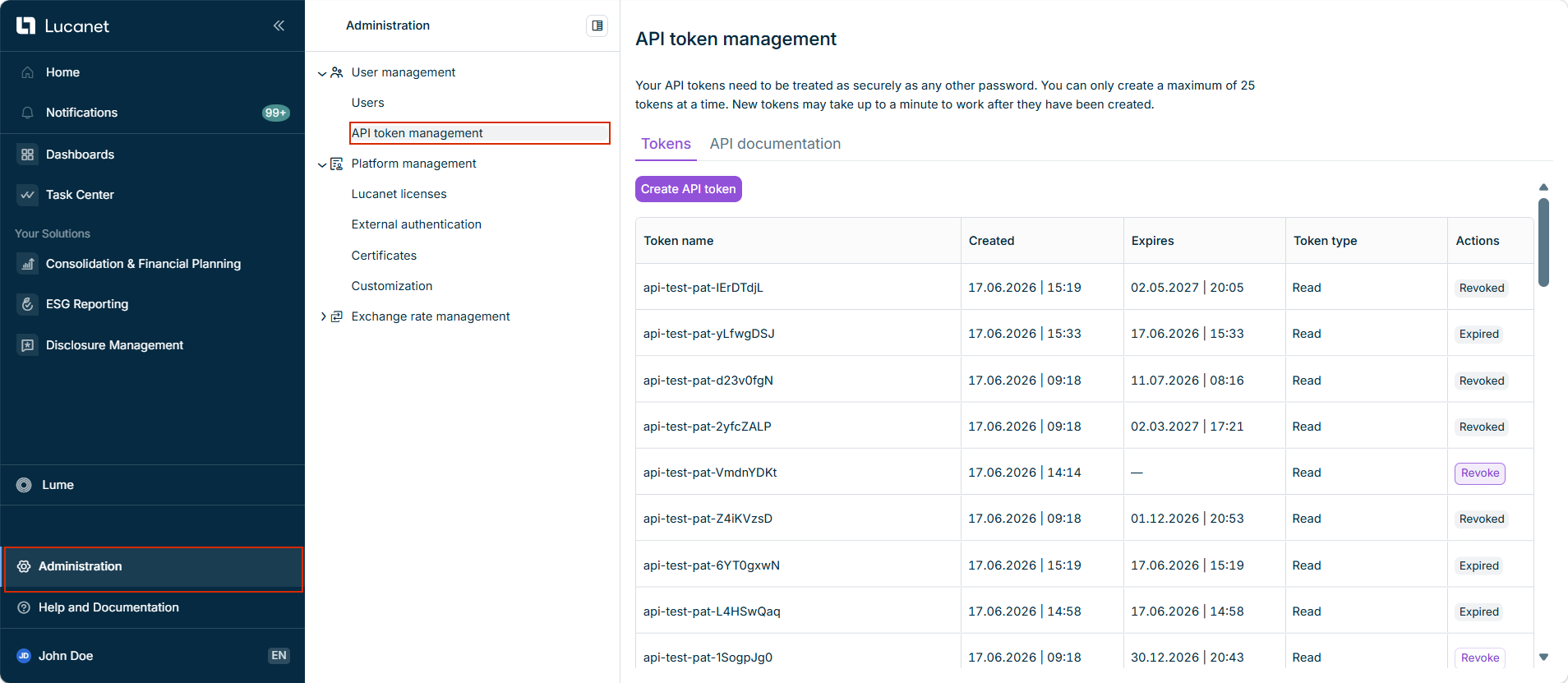
You can now connect your central identity system directly to Lucanet through the Platform API, so users are created, updated, and deactivated automatically instead of being managed manually. In the new API token management workspace, administrators can create scoped API tokens, give them an optional expiration date, and revoke them at any time.
Every action performed with a token is attributed to the user who created it and is recorded in the change log. To make API-driven changes easy to identify, the change log now includes an Authenticated as column and displays the token name for changes performed through the Platform API.
The new API token management workspace is displayed as follows, for example:
Configuring external authentication is now faster and less error-prone. When you set up SSO in Administration | Platform management | External authentication, you first choose your combination of protocol and identity provider (OIDC or SAML with Microsoft Entra ID, Okta, or Custom). The form then displays provider-specific hints for each field and validates the Issuer URL in real time, so you can fix common mistakes before saving. For added security, the client secret can no longer be displayed in full after activation.
For SAML setups, Lucanet now also reminds you by e-mail before the SAML signing certificate expires, so you can renew it in time and avoid sign-in failures.
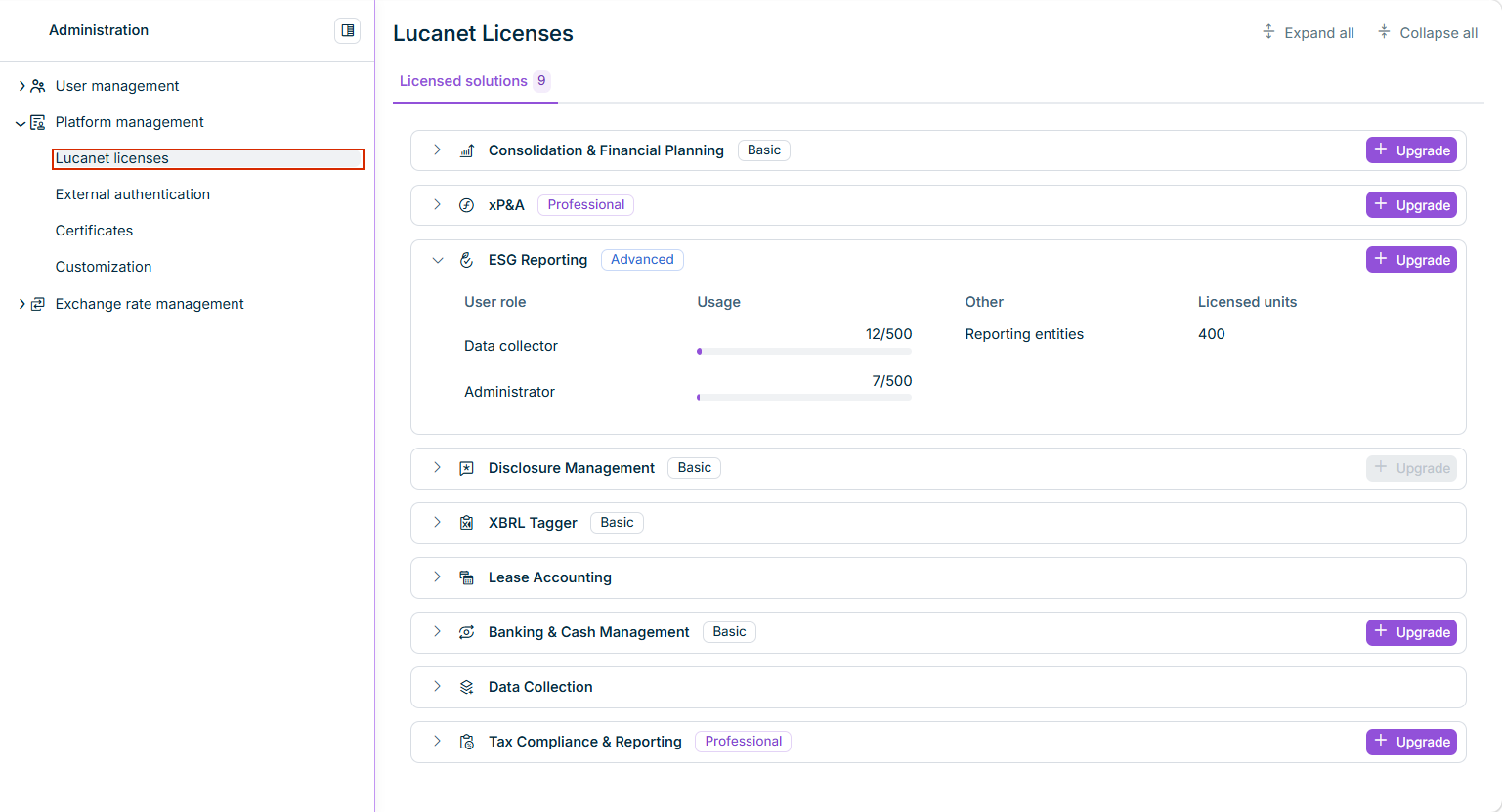
The Lucanet licenses workspace has been redesigned. Each licensed solution is now displayed as an expandable card with its license package, the used license slots per user role (with a usage bar), and its licensed units, where applicable.
In addition, each solution card now displays a usage limit warning when the license slots for a user role are used up (red) or are running low (orange), so you can spot license bottlenecks at a glance and request an upgrade in time.
The redesigned page is displayed as follows, for example:
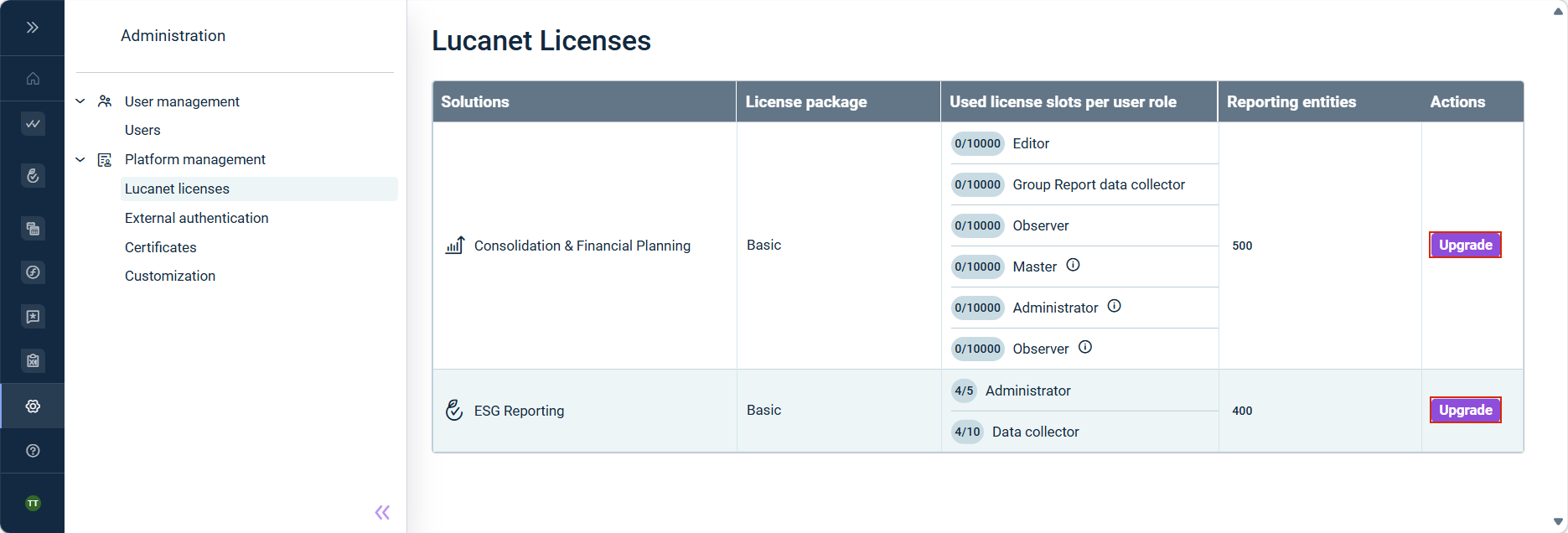
You can now request license upgrades for your solutions directly in the Lucanet CFO Solution Platform, without contacting your Lucanet representative or creating a support ticket. The function is available in the Administration | Platform management | Lucanet licenses workspace.
License overview with upgrade option per solution
When you submit an upgrade request, the platform automatically forwards the request to Lucanet and triggers the corresponding sales and approval processes. You will receive an e-mail and an in-app notification once your request has been processed. After approval, the upgrade is activated in your environment and the additional license slots become available.
With the new License Manager user role, you can define which users are authorized to request license upgrades. Users with this role act as authorized representatives with contractual authority. All actions performed by License Manager users are legally binding. Grant this role only to users authorized to make contractual commitments.
Important for existing customers: With this release, all users with access to the Administration module automatically receive the License Manager user role. This makes the function available without additional configuration. You can adjust the role assignment afterwards to meet your internal requirements. Note that at least one user with the License Manager user role must exist in your environment.
Lucanet now offers non-production environments so you can test on an isolated copy of your production system without affecting your live data or configuration. Two environment types are available:
Test update environment: Runs the next planned software version, available for a limited testing period ahead of each planned production update. It is particularly relevant for business processes subject to regulatory or compliance requirements, where pre-release validation helps ensure continuity before the update takes effect.
Sandbox environment: Runs the same software version as your production system. It can be used for testing configurations, training new users, or validating workflows before applying changes to production.
Both environment types are currently available for limited solutions and can be purchased as an add-on to your existing license. Contact your account manager for availability and pricing.
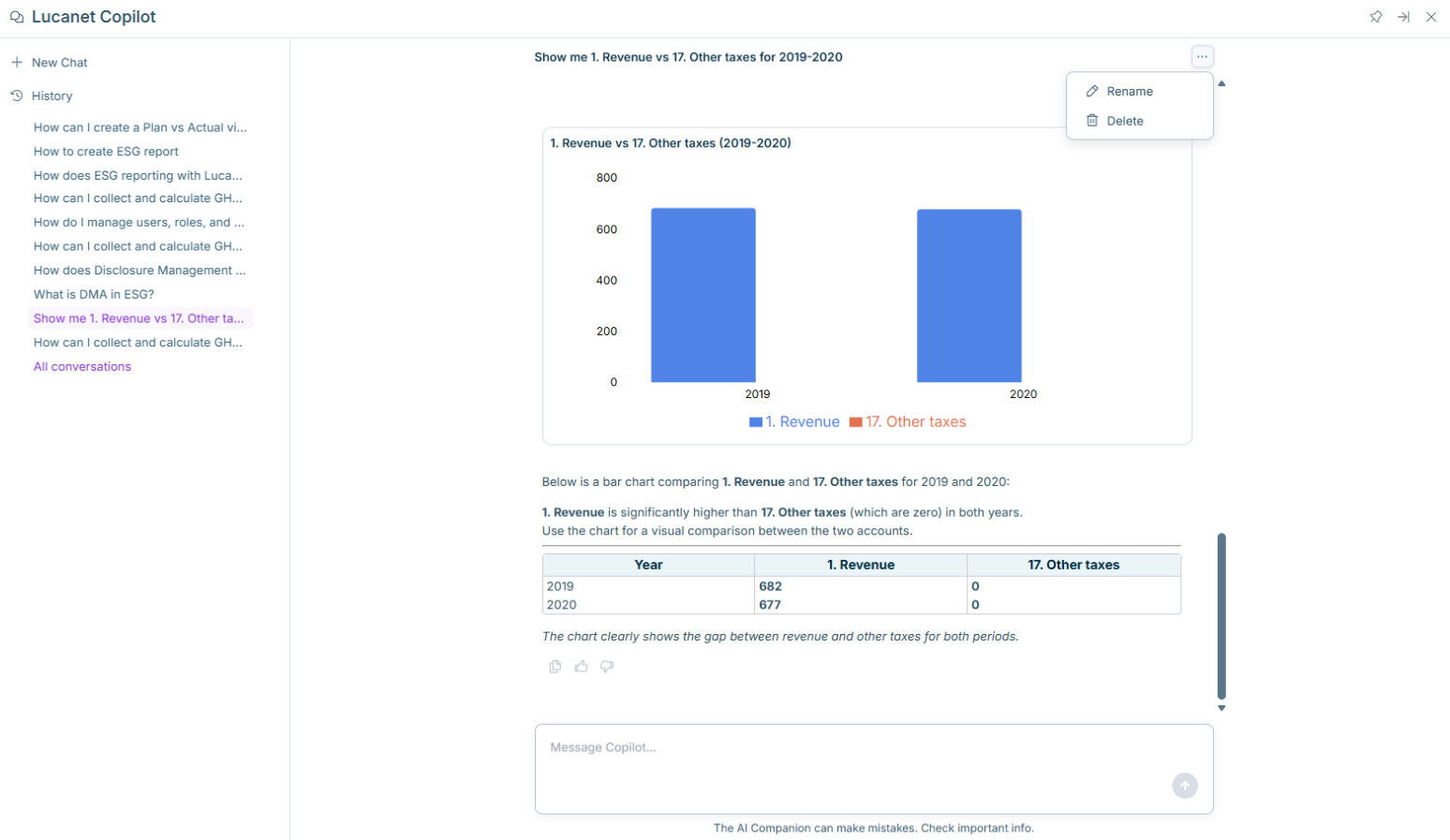
With this release, the following new features are available for Lucanet Copilot:
Redesigned User Interface
Lucanet Copilot has a refreshed look & feel, which includes:
The Copilot panel now opens with a welcome screen showing suggested prompts.
A sidebar with quick access to start a new chat using the + icon
Toolbar actions for pinning, expanding, and closing the Copilot panel
Persistent Conversation History
You can now start a new chat with our Lucanet Copilot without losing previous conversations. Each conversation is saved as a separate thread and is accessible via the history panel, which is searchable and grouped by recency (e.g. "Previous 7 days"). Conversations are automatically named after the first message you send.
You can also rename or delete any conversation thread via the three-dot menu in the chat history panel. This allows you to organize and manage your conversation history.
Full-Screen Mode
Lucanet Copilot can now be expanded to full screen, providing more space for longer conversations or complex outputs.
Streaming Responses
Lucanet Copilot's responses now stream word by word as they are generated, so you can see the generated output progressively rather than waiting for the full response to appear at once.
Important - Chat History Retention Extended to 30 Days
Previously, chat history was stored for 24 hours only. Starting now, conversation history is retained for up to 30 days.
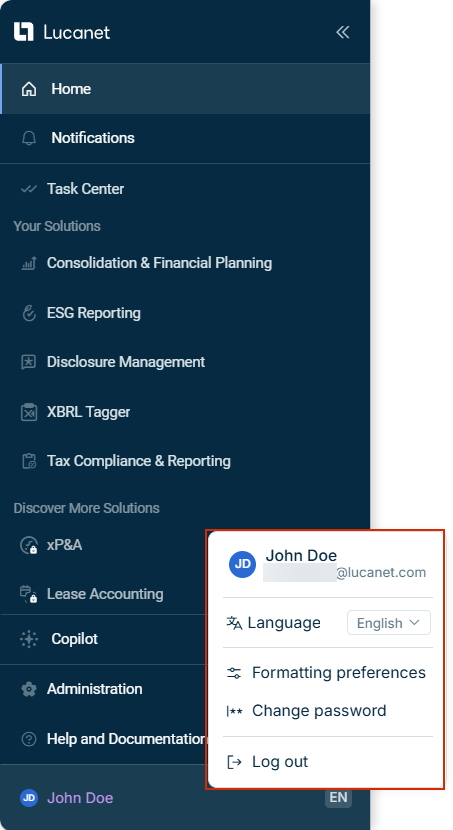
The main menu of the Lucanet CFO Solution Platform has been redesigned to provide a clearer and more consistent navigation experience.
The new main menu is displayed as follows, for example:
New main menu with account menu open
Key changes include:
Home navigation: The main menu now includes a dedicated Home item, allowing you to return to the start page of the Lucanet CFO Solution Platform with a single click.
User account area and Account menu: A new user account area at the bottom of the main menu displays your avatar, name, and selected language. Clicking anywhere in the user account area opens the Account menu, which provides quick access to Language, Formatting preferences, Change password, and Log out. To view your profile or manage consents, click the user info area at the top of the Account menu.
You can now assign dedicated user roles for the XBRL Tagger in User management, allowing administrators to control access and permissions more precisely.
The following roles are available:
Administrator: Has full access to all documents in the XBRL Tagger. Can view and perform all actions on all documents in the company, and assign roles and documents to other users.
Editor: The standard user role. Can perform all available actions within the documents they have created or to which they have been invited.
Existing XBRL Tagger users have been automatically assigned a role based on their previous configuration:
Users who previously had the Administrator role in Disclosure Management and access to the XBRL Tagger have been assigned the Administrator role.
All other users with access to the XBRL Tagger have been assigned the Editor role.
Managing Consolidation & Financial Planning roles and permissions in the Administration workspace now requires both access to Administration and the Consolidation & Financial Planning Master or Administrator role.
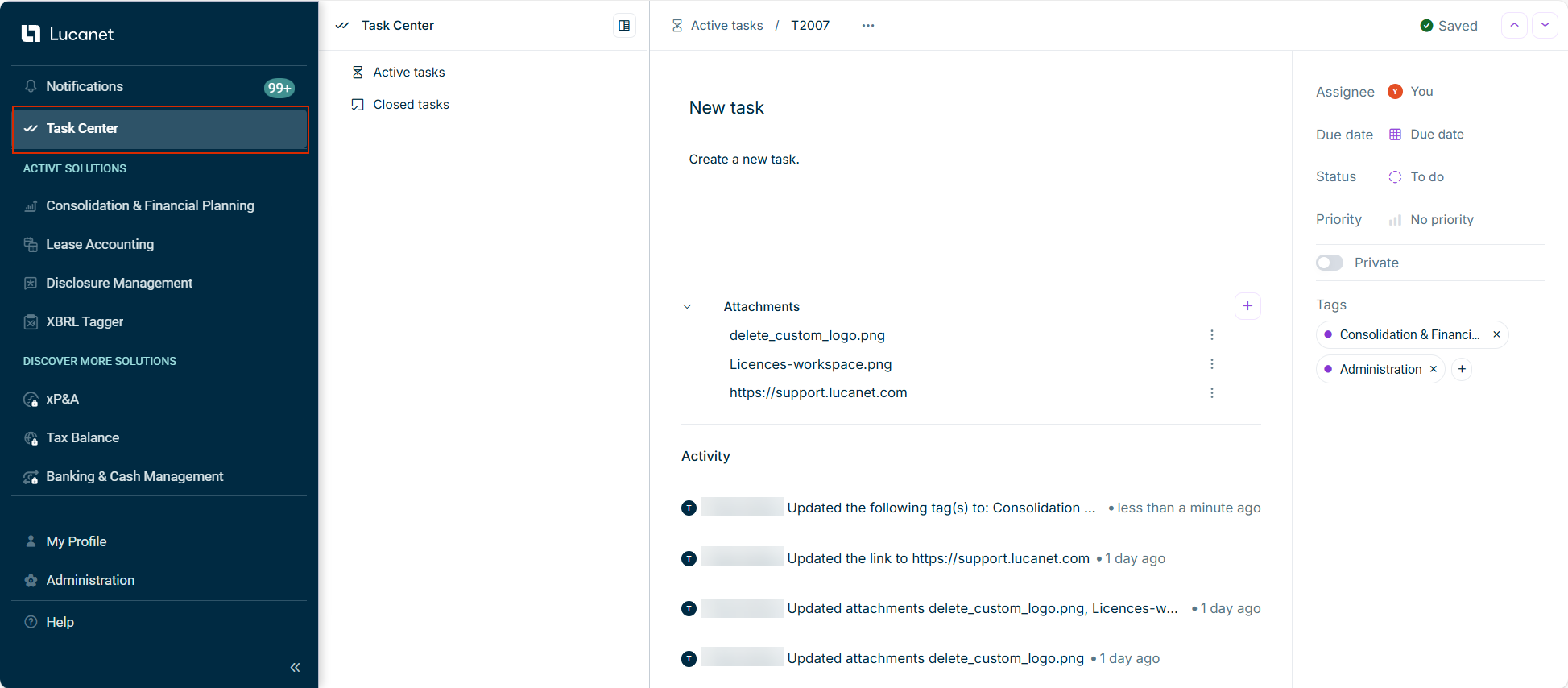
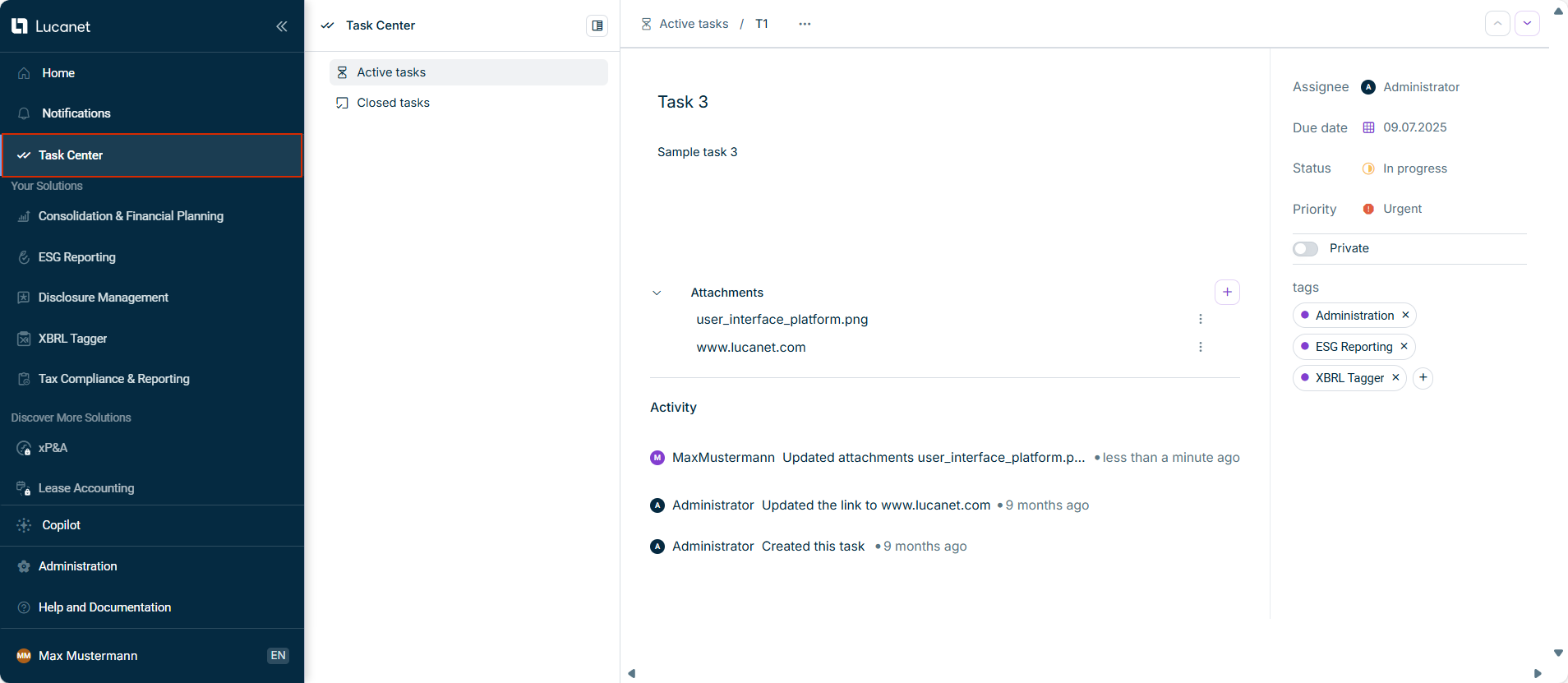
With this release, the Task Center has been enhanced to improve task management and collaboration. The Task Center is now displayed as follows, for example:
Task Center with details of a task
The following new capabilities are now available:
File Attachments and Multiple Links
You can now attach files to tasks. Supported file formats include .pdf, .jpg, .png, .docx, and .xlsx, with up to 10 files per upload session. In addition, you can add multiple URL links to tasks to provide additional information.
Private and Public Tasks
Tasks can be set as private or public. Public tasks are visible and editable by all users, while private tasks are visible and editable only by the task creator and assignee. Platform administrators can view all tasks. Only the task creator and platform administrators can delete tasks.
Additional Improvements
Tasks are now organized into Active tasks and Closed tasks workspaces.
Each task is assigned a unique task identifier for easier reference.
A new filtering function allows you to quickly find specific tasks by status, assignee, priority, privacy, tags, and other criteria.
The Lucanet CFO Solution Platform now includes consent management for external demo pages.
When you click Watch a demo for unlicensed solutions, a consent dialog is displayed before redirecting to the Consensus platform. The dialog provides GDPR-compliant information about data processing and includes a link to the Consensus Privacy Policy. You can accept or decline the consent. For more information, see Discover more solutions.
You can view and revoke granted consents via My Profile | Manage consent in the main menu. After revoking consent, the dialog will be displayed again on your next access to the service.
To better protect your account on the Lucanet CFO Solution Platform and comply with industry security standards, new password security measures are now in place.
Password Complexity Requirements
When creating or changing your password, it must meet the following criteria:
At least 14 characters in length
Characters from at least 3 of 4 categories: uppercase letters (A-Z), lowercase letters (a-z), numbers (0-9), and special characters (e.g., ! @ # $ % ^ & *)
Password Lifecycle Management
To ensure ongoing security, the following password lifecycle policies apply:
Passwords expire after 90 days.
New passwords cannot match any of your previous 5 passwords.
Password changes are limited to twice per day.
You will receive email and in-app notifications 30, 14, 7, and 1 day(s) before your password expires, giving you time to plan ahead.
Account Security Controls
Automated security measures protect your account from unauthorized access: after 5 consecutive incorrect login attempts, your account is automatically locked for 30 minutes.
The Contact an expert button on demo pages for unlicensed solutions now opens a contact form directly within the platform. Your contact information (name and email) is automatically filled from your profile for a faster, more convenient experience.
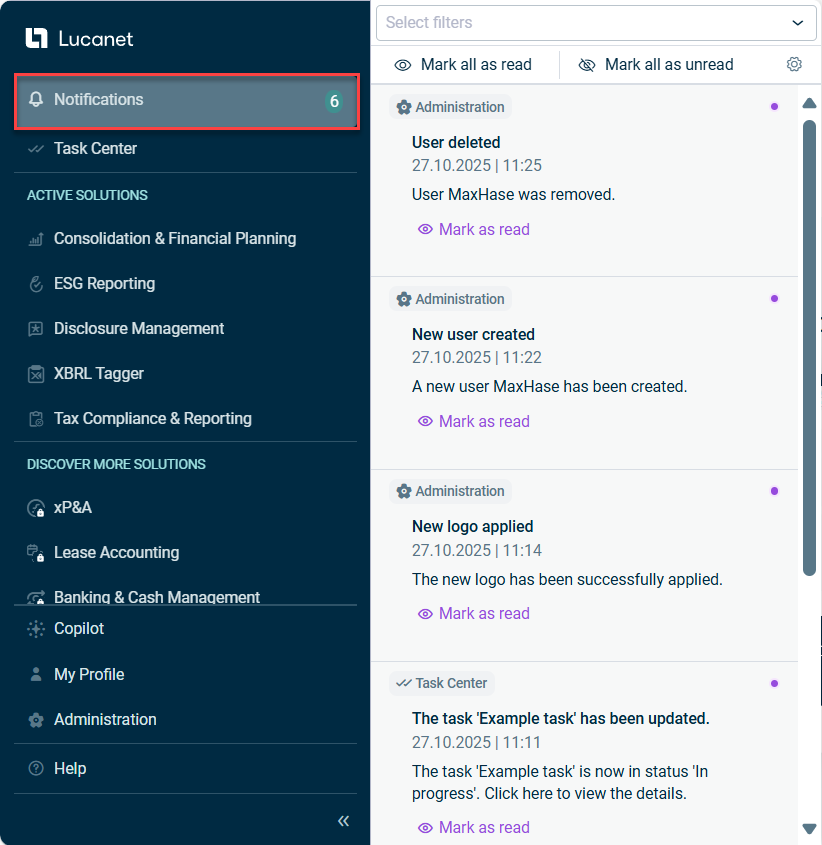
Centralized notifications are now available in the Notifications section in the main menu, marked with a bell icon. This new feature currently aggregates Platform and Task center notifications, providing a single point of access for these communications. The Notifications section is displayed as follows, for example:
'Notifications' section in the main menu
In the Notifications section, you can:
Configure notification preferences by selecting which specific events for Task Center and Administration to be notified about and choosing in-app and/or email notifications
View and filter notifications by section where they were generated, based on your access permissions, while maintaining a 30-day notification history
Manage notification status by marking items as read or unread individually or processing all notifications at once
Click notifications to be redirected to the section on the platform where the notification was generated, allowing you to view or perform further actions
This enhancement streamlines your daily workflow by centralizing notifications from multiple systems, ensuring you stay informed about relevant activities across the platform while maintaining full control over your notification preferences.
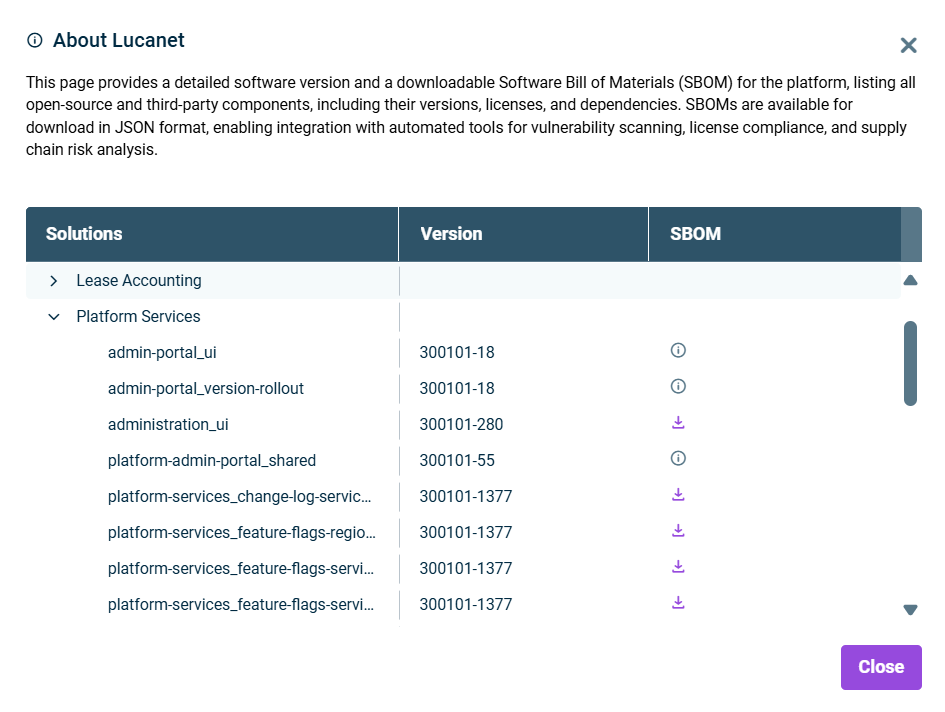
We optimized the About Lucanet dialog with a comprehensive new structure that displays platform and solution information in three organized columns: Solutions, Version, and SBOM (Software Bill of Materials). The new interface features expandable sections for your solutions and the Platform Services, with their respective subcomponents and version details.
For admin users, the new SBOM column provides access to downloadable SBOM files in JSON format, enabling vulnerability scanning, license compliance, and supply chain risk analysis. SBOMs offer complete transparency into software composition, significantly strengthening security posture and supporting regulatory compliance efforts.
The new About Lucanet dialog is dispayed as follows, for example:
Lucanet now provides user roles specifically for the Lease Accounting solution, enabling administrators to control access and permissions with six predefined roles: Data collector, Executive reviewer, Lease operations administrator, Auditor, Settings administrator, Full access administrator. Each role has specific permissions for different functional areas, ensuring users only access the features they need for their responsibilities and improving security and workflow efficiency within the Lease Accounting solution. As an administrator, you can assign these user roles when creating or editing users in the user management of the CFO Solution Platform. To ensure continuity, existing users with Lease Accounting access will automatically receive the Full access administrator role.
Previously, XBRL Tagger access was automatically included with Disclosure Management licenses. With this update, you can now allocate licenses to XBRL Tagger and Disclosure Management independently, allowing for more precise license management and user permission control.
The new Task Center is now available in the main menu of the Lucanet CFO Solution Platform. The Task Center offers a centralized interface for creating, organizing, and tracking tasks across the platform.
Key features include:
Centralized access to all tasks via a structured dashboard with dedicated tabs for tasks you’ve created, those assigned to you, and all existing tasks.
Ability to assign a responsible user, set task status, priority, due date, add solution tags, and include relevant links during task creation.
All task details can be edited and updated at any time.
Complete task activity history is available for auditing and tracking changes.
The Task Center is displayed as follows, for example:
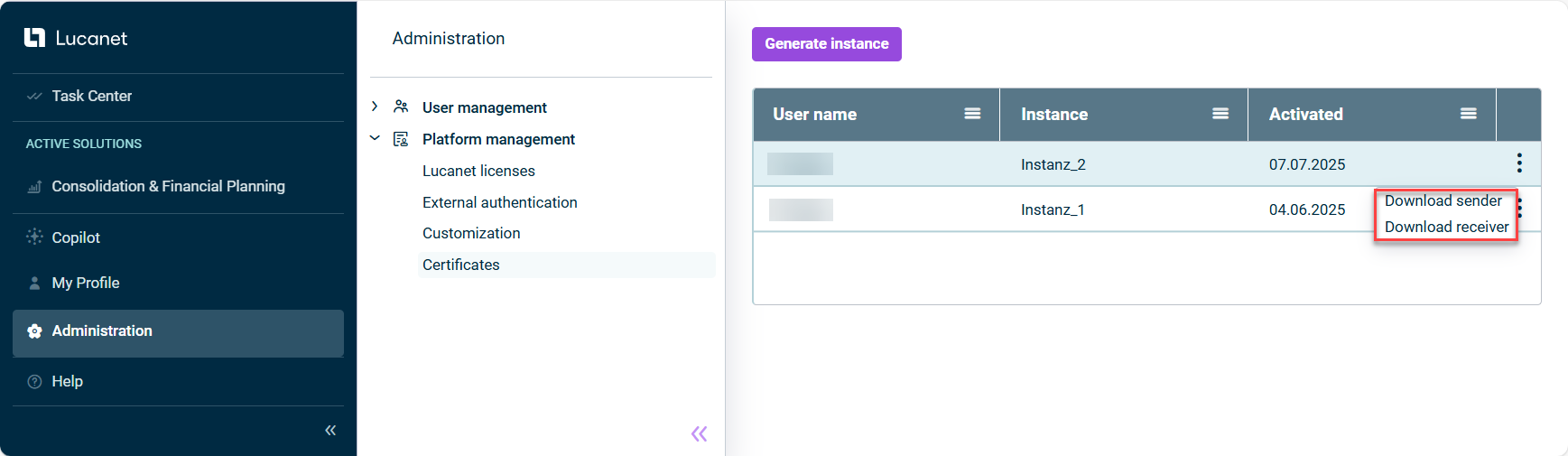
The new Certificates workspace is now available in the Lucanet CFO Solution Platform. This enables administrators to create a SEA instance and download the corresponding sender and receiver certificates. These certificates are used both for installing Lucanet.Script Execution Application (SEA) in Lucanet.Software Manager and for setting up the application in Consolidation & Financial Planning to execute ETL scripts.
The Certificates workspace is displayed as follows, for example:
The user management for Consolidation & Financial Planning now offers various functions that are also available in Lucanet.Financial Client. For example, the following user roles can be assigned when creating or editing users:
Data model roles
Editor: Editors have read and write permissions for all workspaces or certain workspaces within the Lucanet data model.
Group Report data collector: Group report data collectors have read permission for the Lucanet data model. They can also execute all tasks required to collect data in relation to Lucanet.Group Report.
Observer: Observers have read permission for all workspaces or certain workspaces within the Lucanet data model.
User management roles
Master: Masters have unrestricted write and read permissions for user management. There must be at least one master per database.
Administrator: Administrators have write and read permissions for user management. Administrators can, similarly to the master role, manage all users and user groups, but have more limited permissions than masters. An administrator is only able to assign the permissions defined by the master.
Observer: Observers have read permission for all workspaces or certain workspaces within the Lucanet data model.
Note: The user management roles described above apply only to Lucanet.Financial Client. For user management in Lucanet CFO Solution Platform, users need access to the Administration section of the platform.
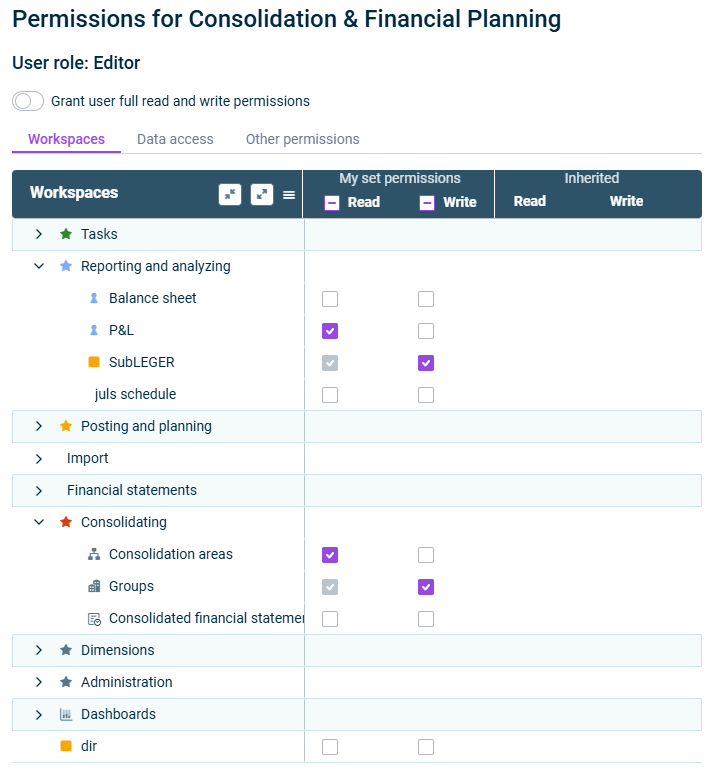
In addition, administrators now have extensive options for defining read and/or write permissions for Consolidation & Financial Planning users:
Permissions for CFP users
To be able to effectively edit users for Consolidation & Financial Planning, the platform Administrator must be assigned the role of Master in Lucanet.Financial Client. All settings made in the user management of the CFO Solution Platform are then automatically synchronized with the user management in Lucanet.Financial Client.
With the release of our new Banking & Cash Management solution, it’s now possible to create and manage user roles for this solution directly within the platform’s user management.
Two roles are available:
Administrator: Users with the Administrator role are granted comprehensive access to Banking & Cash Management. Administrators can view all data, including financial figures and identities, and access all configuration settings—such as users, channels, bank profiles, and accounts.
No specific role: Users assigned with No specific role receive the Essential role within the Banking & Cash Management solution and have only the most basic permissions. This allows access to the user interface and their own profile, without permission to view data or use any functions.
For a user with No specific role to be able to access data or perform any actions, the Administrator must grant the necessary permissions in the Banking & Cash Management solution. Depending on requirements, the Administrator can enable access to selected identities, functionalities (such as processing payments or reviewing account statements), or authorization processes.
To enhance clarity when working with the Lucanet Copilot in Consolidation & Financial Planning, you can now precisely reference dimensions in your Copilot prompts using a simple forward slash ("/") notation. When typing a forward slash, a drop-down list of available dimensions such as account, data level, or organization element appears. You can select any dimension to narrow your request. After selecting a dimension, another drop--down list is displayed, showing only elements that are relevant to that dimension. This makes it easier to filter and choose the right data.
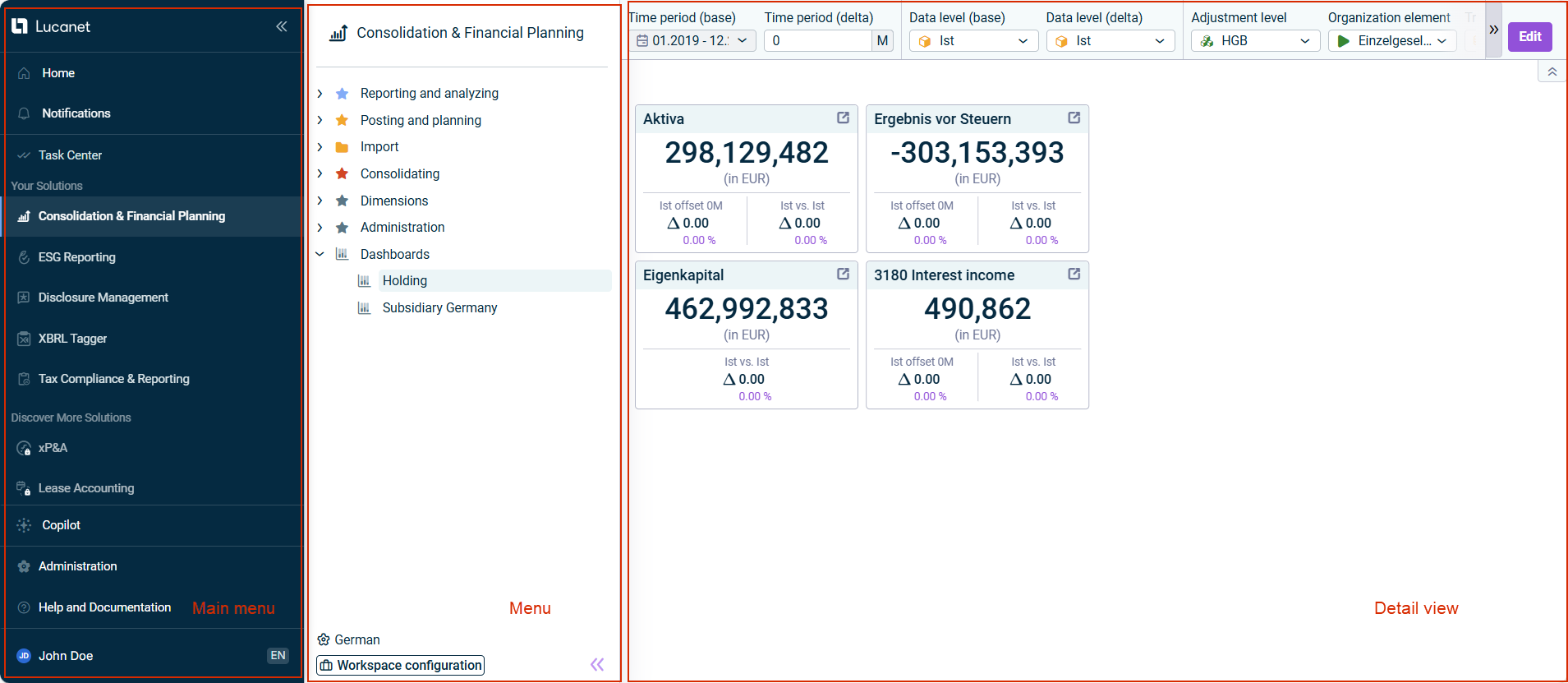
We are excited to introduce a redesigned user interface for the Lucanet CFO Solution Platform. With an improved main menu that centralizes all essential functionalities, this update makes it easier for you to navigate through the platform and manage your tasks efficiently.
The new user interface is displayed as follows, for example:
User interface of the Lucanet CFO Solution Platform
Key changes of this feature include:
Unified Navigation
The quick access bar and top bar have been removed. You will now find key functions such as Lucanet Copilot, My Profile, and Help— previously located in the top bar — integrated into the main menu. Additionally, the option to change the user interface language can now be found under My Profile.
Reorganized and Expanded Main Menu
In addition to the centralized functionalities outlined above, the main menu has been restructured for improved usability. In the Active Solutions section, you can quickly access your licensed Lucanet solutions. The newly added Discover More Solutions section allows you to explore additional Lucanet solutions on a dedicated demo page, with options to access documentation, connect with experts, explore learning resources, and visit the Customer Portal.
Solution Menu Updates
Solution-specific menus, such as those for Consolidation & Financial Planning and ESG Reporting, you will now see both licensed and unlicensed modules, making navigation and discovery easier.
With this release, two new mandatory fields First name and Last name have been introduced in the Create user and Edit user panels. Platform administrators can now accurately maintain personal name information for each user. This enhancement ensures more complete and reliable user data across the system.
Existing users are not affected until their accounts are updated, at which point first name and last name must be entered before saving.
Administrators of the Lucanet CFO Solution Platform now see only licensed solutions when creating, updating, or managing multiple users. Options for unlicensed solutions are hidden, providing a cleaner and more efficient user management interface.
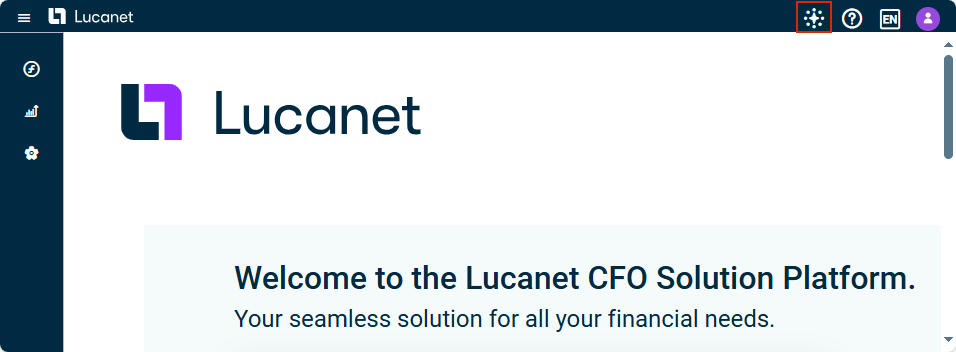
The new Lucanet AI functionality Lucanet Copilot is now available and is here to help you with everyday questions as well as gaining quick insights on Consolidation & Financial Planning data.
Lucanet Copilot in the top bar of the CFO Solution Platform
Lucanet Copilot can help you with the following:
Ask and get answers anywhere in the CFO Solution Platform
Now you can ask questions about Lucanet in simple language from anywhere in the Lucanet CFO Solution Platform. Lucanet Copilot uses our online documentation Lucanet Knowledge Base and delivers clear, user-friendly answers to you.
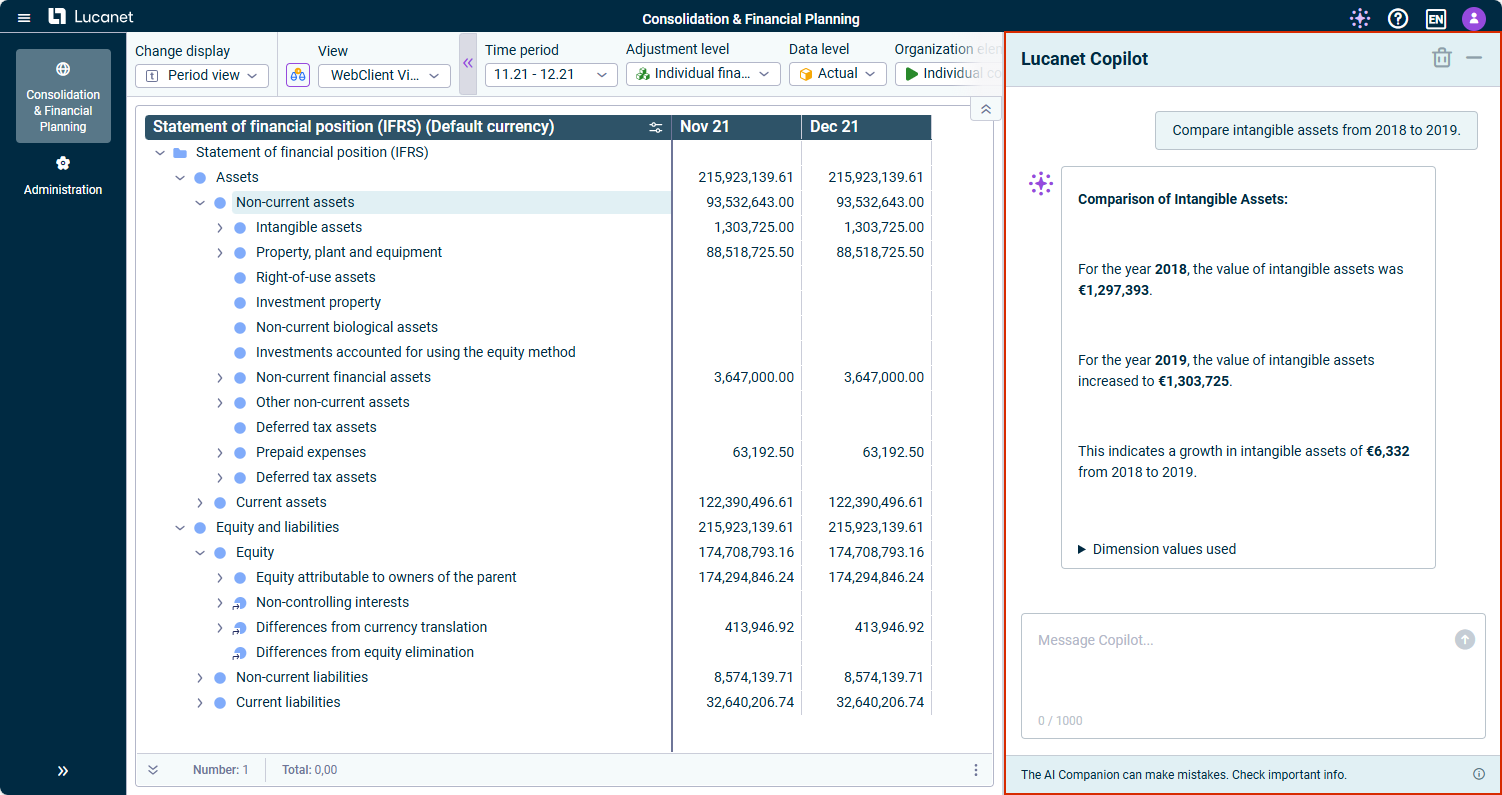
Quick Insights for Consolidation & Financial Planning Reports
Get fast and helpful insights about your Consolidation & Financial Planning reports. To do so, simply navigate to the ledger on which you want to have more information, and ask your question, such as:
Quick insights on financial information via Lucanet Copilot
Italian and Polish have been added to the user interface languages. The CFO Solution Platform and the ESG Reporting solution are now available in both languages, with the xP&A solution additionally available in Italian. In the near future, further solutions will be localized in these two languages.
This enhancement allows users to use the software in their preferred language, which increases user-friendliness and efficiency.
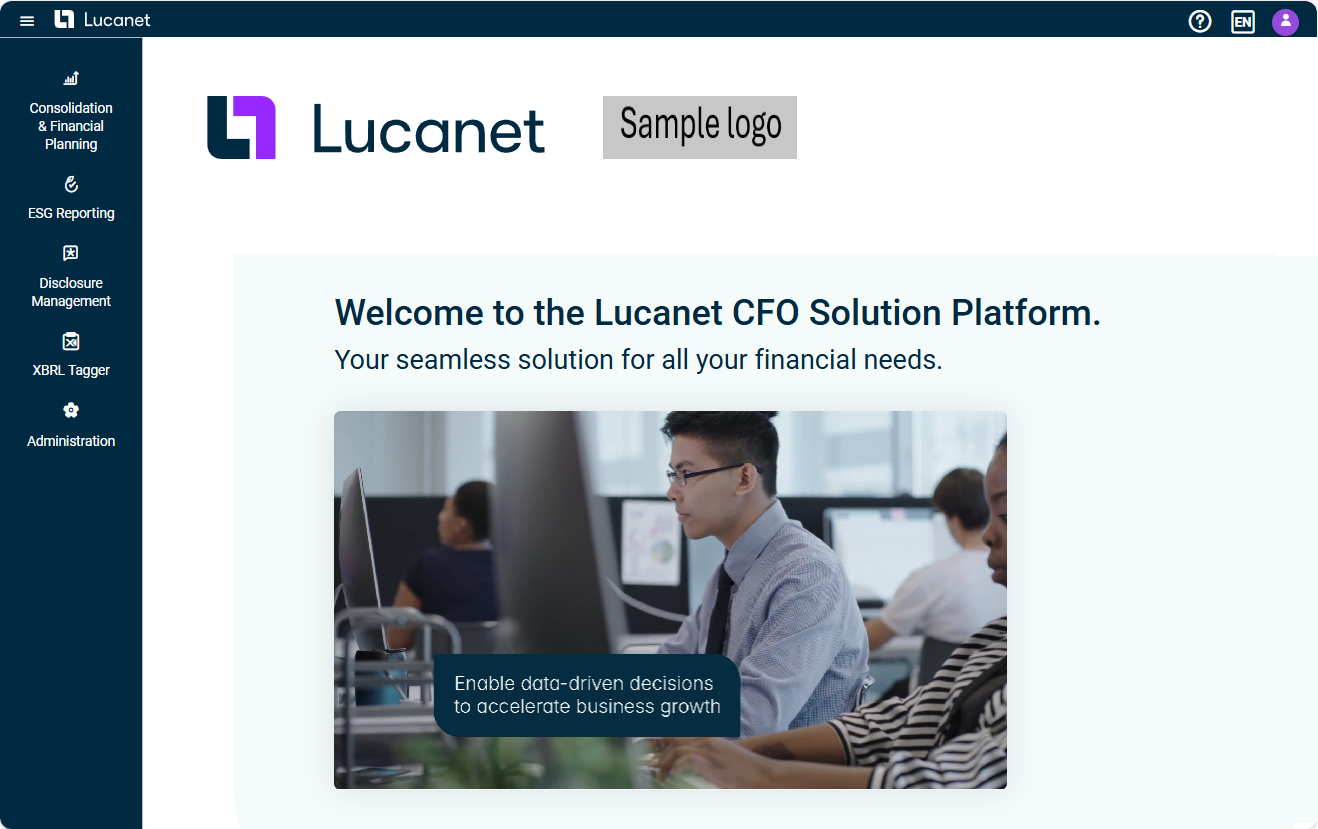
A new workspace Customization has been added in the Administration under Platform management. As an administrator, you can customize certain elements of the Lucanet CFO Solution Platform to match your corporate design. Currently, you can upload your company logo and configure it for use on the start page, in the top bar, and in e-mail templates.
The start page with a customer logo is displayed as follows, for example:
All global user roles for Disclosure Management can now be assigned and edited in the user management of the Lucanet CFO Solution Platform, making user management more effective and easier. The following roles are available:
Administrator: Automatically receives the role of Global Administrator within the Disclosure Management solution, along with all solution-wide and cross-document administrative permissions.
Editor: Automatically receives the role of Global Editor within the Disclosure Management solution.
Reviewer: Automatically receives the role of Global Reviewer within the Disclosure Management solution.
Reader: Automatically receives the role of Global Reader within the Disclosure Management solution.
No specific role: Theses users initially receive no specific role within the Disclosure Management solution. Only when a user role is assigned by a Global Administrator can different permissions be assigned.
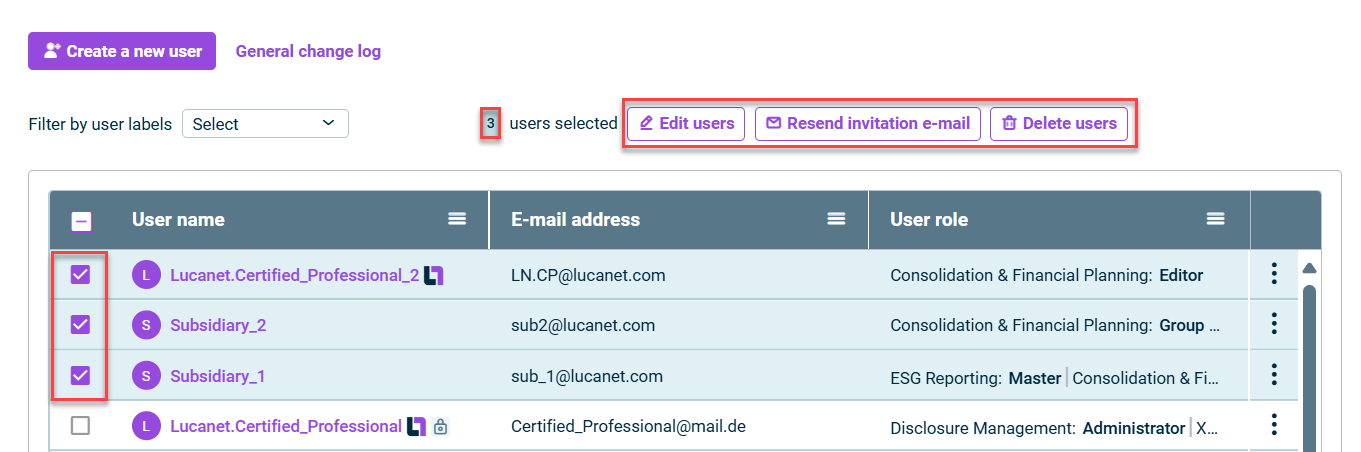
User management has been enhanced to enable simultaneous management of multiple users, making administrative tasks easier and more efficient. In the list of users, you can now select multiple users and perform the following actions:
Edit users with the following options:
Change user access and user roles
Enable or disable external authentication
Lock or unlock users
Change language and formatting settings, if these settings have not been changed by the user
Our new solutions, Lucanet XBRL Tagger and Lucanet Lease Accounting, are now available in the Lucanet CFO Solution Platform. In the About Lucanet menu you can also view the current versions of XBRL Tagger, XBRL Engine, and Lease Accounting. This gives you a complete overview and makes it easier to track updates.
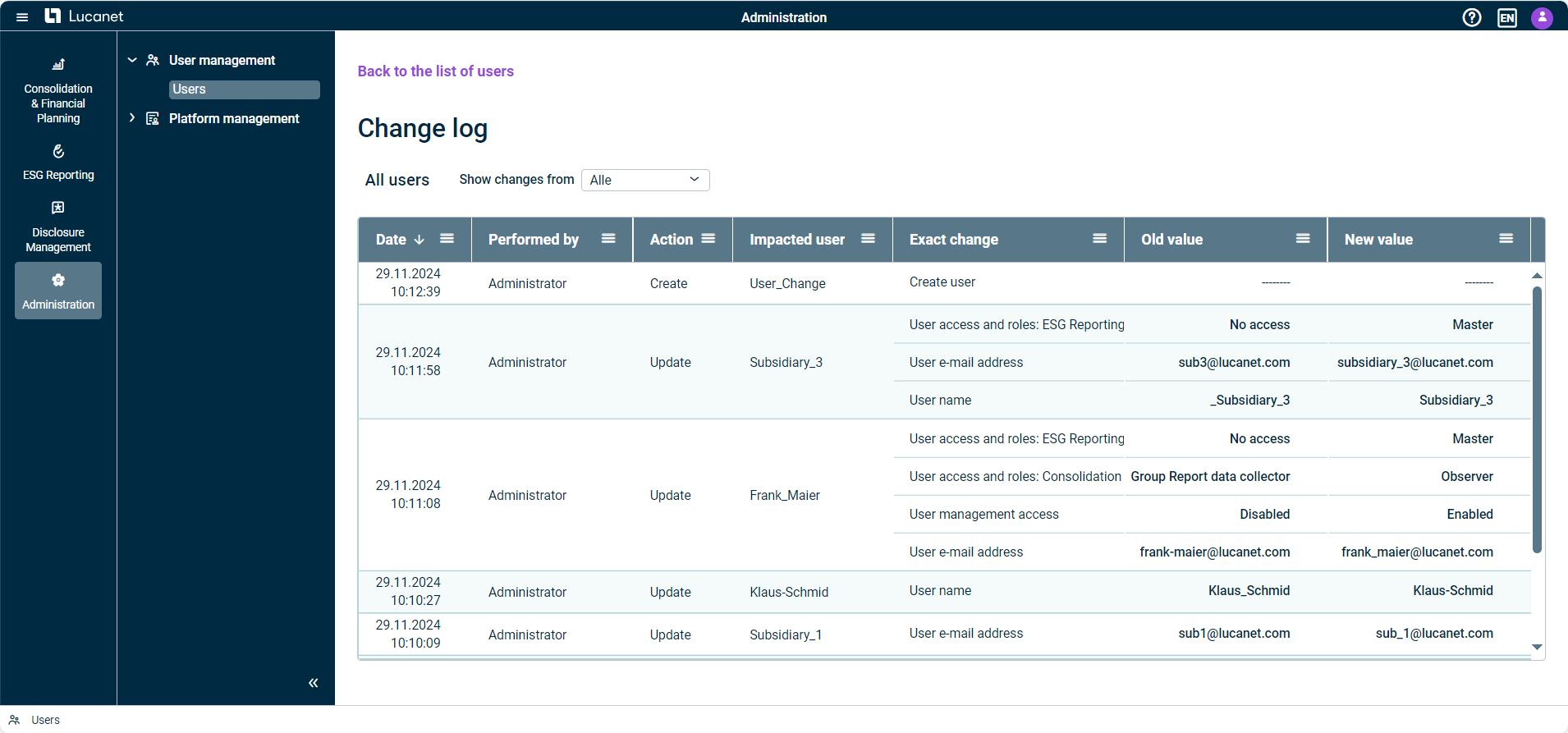
The new change log in the user management allows you to efficiently monitor and manage all changes made to your users. You can display a user's change log or an overview of all user changes.
In the change log table, you will find detailed information about the changes made. This includes the date of the change, who performed the change, the action, the impacted user (in the general change log only), the exact change, and the old and new values of the changed settings. The general change log is displayed as follows, for example:
General change log in user management
You can set the desired time period for the display of changes and sort the data by date of change or filter the data according to specific criteria in order to find the desired information more quickly.
As a user of the Lucanet CFO Solution Platform, if you have access to Lucanet.Financial Client, you can now log in to Lucanet.Financial Client using the same login page as for the Lucanet CFO Solution Platform. You can either log in with your Lucanet credentials or via SSO, if external authentication is enabled for your Lucanet CFO Solution Platform account. This new feature provides a seamless user experience when logging in and streamlines access to your Lucanet services.
In Lucanet 25, we have introduced a number of updates to the Administration section that are designed to improve the user experience and increase user-friendliness. Some of the main improvements are:
Navigation improvements in the list of users: By using infinite scrolling, administrators can now better navigate the list of users by first displaying 20 users and then loading more by scrolling as needed. By default, the most recently updated users appear at the top of the list.
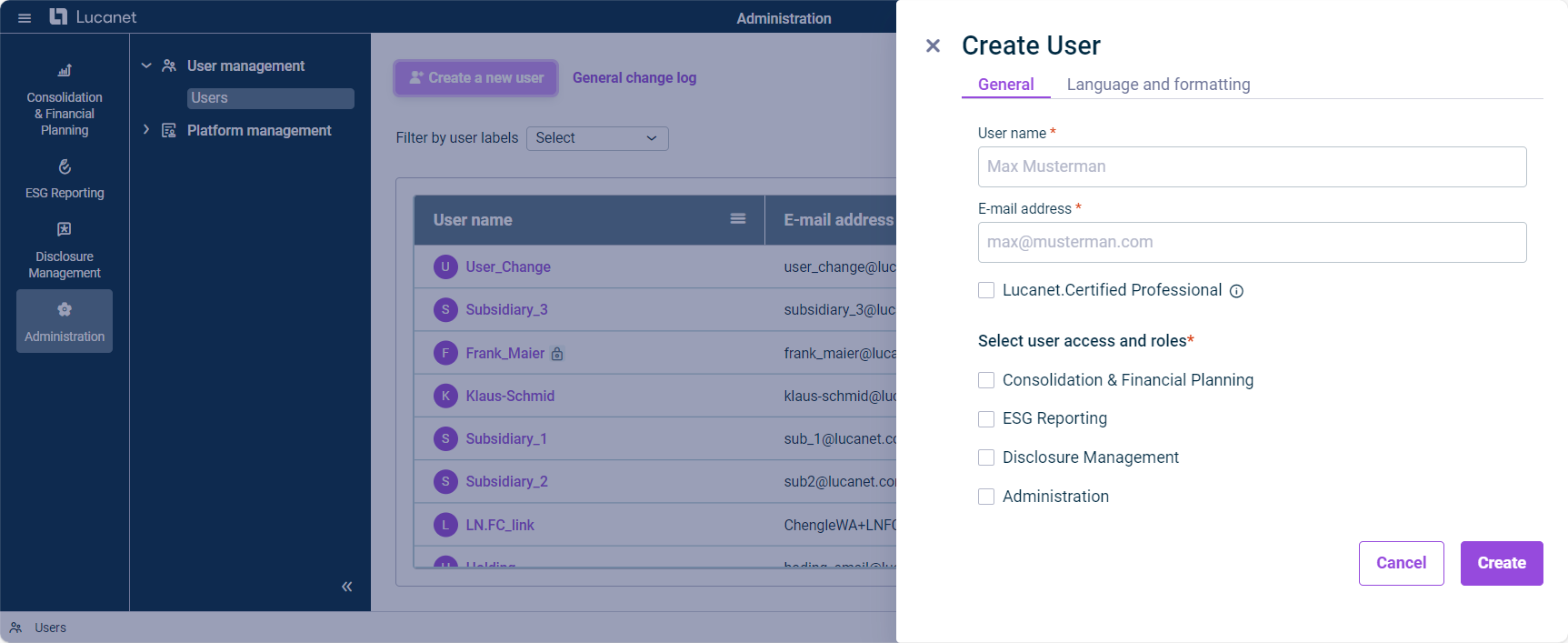
Moving user configuration to the right side panel: Administrators of the Lucanet CFO Solution Platform can now use the right side panel to create or update users. The side panel replaces the previous dialog and offers the same fields, input requirements, and validation checks. This allows an intuitive and efficient configuration of all necessary user settings.
Side panel for creating users
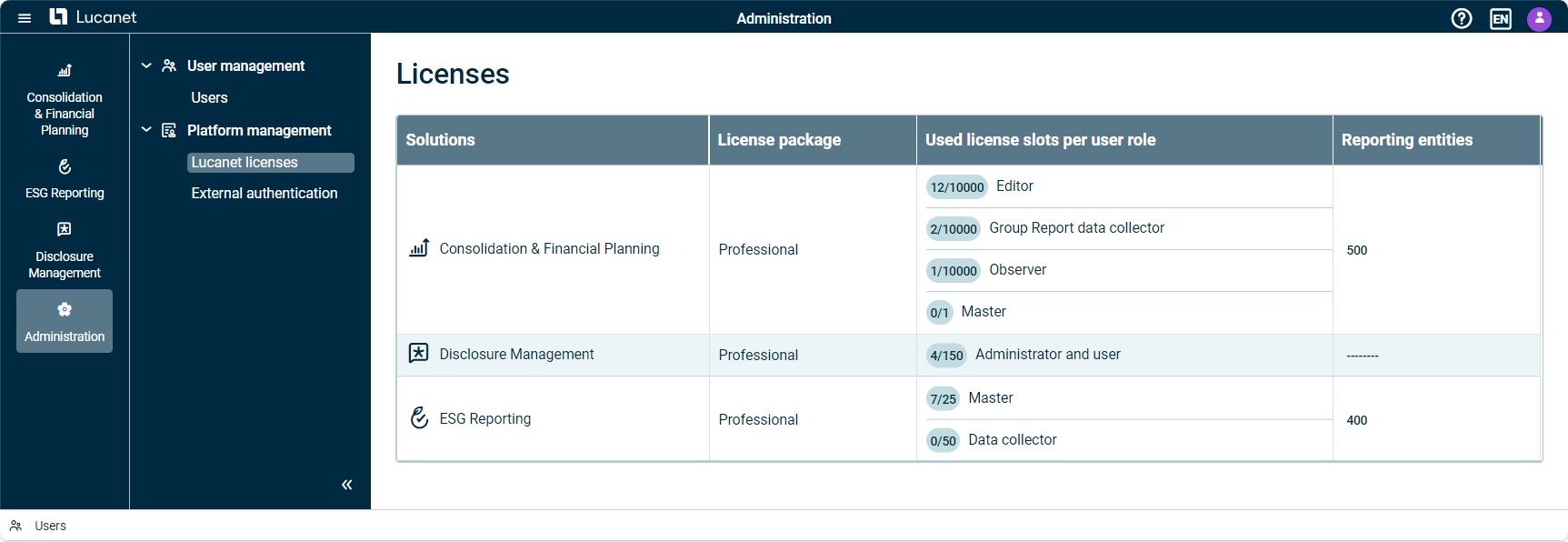
Optimization of the license display: Lucanet 25 offers you as administrator an improved overview of your license information. The table in the Licenses workspace shows the used and available license slots per user role for each solution, whereby user roles with 100,000 or more license slots are marked with the infinity symbol (∞). In addition, the user roles are listed on separate lines for a better overview. The workspace Licenses, is displayed as follows, for example:
From now on, administrators of the Lucanet CFO Solution Platform can configure and enable an External Identity Provider in the External Authentication workspace. The following authentication protocols are available: OIDC and SAML.
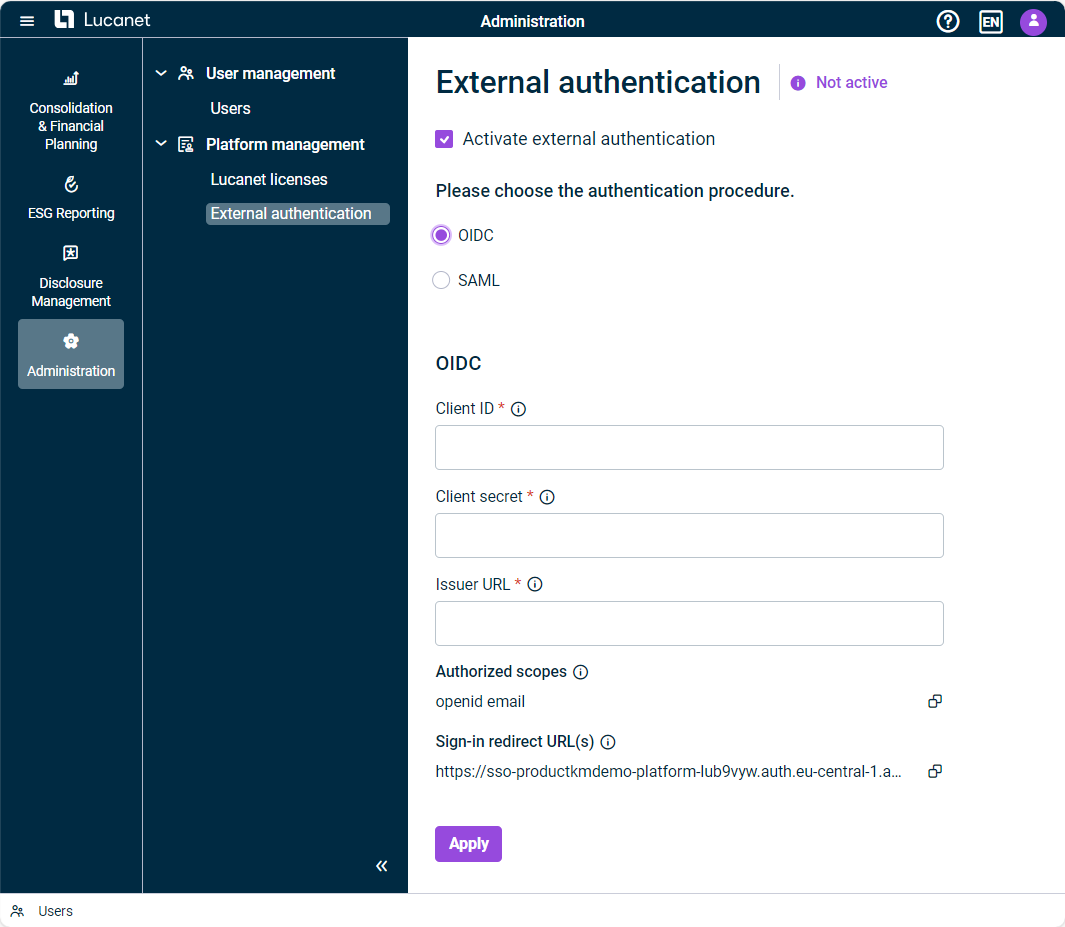
The External authentication workspace is displayed as follows, for example:
The ‘External authentication’ workspace
If external authentication is activated, the Enable external authentication option is available when creating or editing a user. If external authentication is not activated within the External Authentication workspace, the option to Enable external authentication will not be visible for the administrator when creating or editing a user. Thus, the users will continue to log in with their Lucanet credentials.
This enhancement allows for more flexibility and security when logging in, improves the user experience, and enables seamless integration into our customers' existing IT infrastructure.
In version 1.3, we have further optimized the user management. Administrators of the Lucanet CFO Solution Platform can now identify and manage users more quickly using the following labels:
Label
Users
Lucanet.Certified Professional users
Permanently locked users
Users for whom external authentication is activated
As soon as one of these options is configured for a new or existing user, the label appears after the user name in the list of users. If you hover over the label, a tooltip displays the corresponding information.
In addition, a new filter above the list of users enables a targeted search and quick display of the three user groups.
With the new release, Lucanet.Certified Professional users no longer require license slots. This allows Lucanet.Certified Professional users to be assigned roles in a licensed solution even when there are no more license slots available.
This content was generated using AI and reviewed by Lucanet subject matter experts before publication.