In the Users workspace of the Administration area, you can define which reporting entities a user can access in Lease Accounting. In addition to the permissions of the user role, the user then only works with the data of the assigned reporting entities.

By default, all reporting entities are assigned to a user. Access is only restricted once you remove reporting entities from the user.

You can only assign reporting entities when you edit an existing user.

To assign reporting entities to a user:

1

In the Users workspace, select the user to whom you want to assign reporting entities.

2

Click Edit user.

3

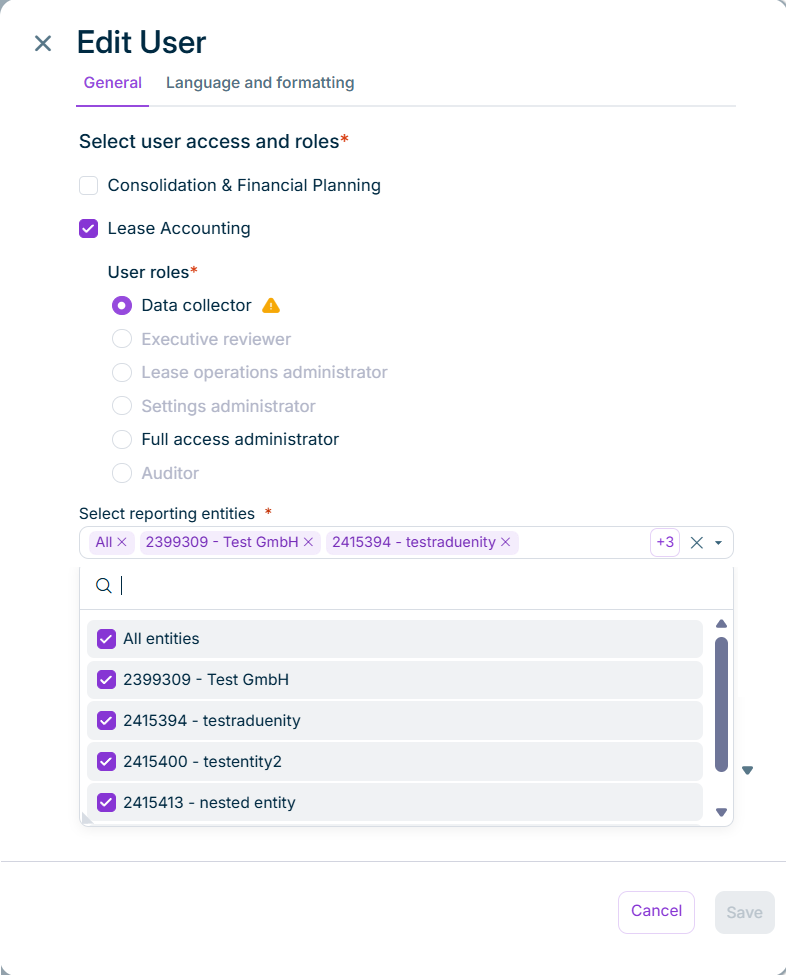
Below the user roles for Lease Accounting, remove the reporting entities that the user should not have access to.

The Select reporting entities option is displayed as follows, for example:

The 'Edit User' side panel with the 'Select reporting entities' option below the user roles and the opened list of reporting entities.
'Select reporting entities' option in the 'Edit User' side panel
4

Click Save.

To grant the user access to all reporting entities again, select All entities.

At least one reporting entity must be selected.

If you change the user role of a user, the assignment is reset and the user can access all reporting entities again.

This content was generated using AI and reviewed by Lucanet subject matter experts before publication.