An API token is an alternative authentication method for accessing the Lucanet CFO Solution Platform programmatically through the Platform API, without an interactive login session. API tokens are typically used to automate user and access management, for example, to connect your central identity system and create, update, or deactivate users automatically.

Each API token has the following characteristics:

  • It is scoped: each token is granted specific permissions that restrict which endpoints it can access.
  • It is tied to a specific user and tenant. Any action performed with a token is attributed to the user who created it and is recorded in the Change Log.
  • It can be given an expiration date and can be revoked at any time.

Your API tokens need to be treated as securely as any other password. Anyone who has a token can act on your behalf within the scope granted to it.

To open the API token management workspace:

1

Click Administration in the main menu of the CFO Solution Platform.

2

Open the User management area and click API token management.

The workspace has two tabs:

TabContent
TokensThe list of API tokens that currently exist for your tenant, where you create and revoke tokens
API documentationThe reference documentation for the Platform API: authentication, available scopes, endpoints, and example requests and responses

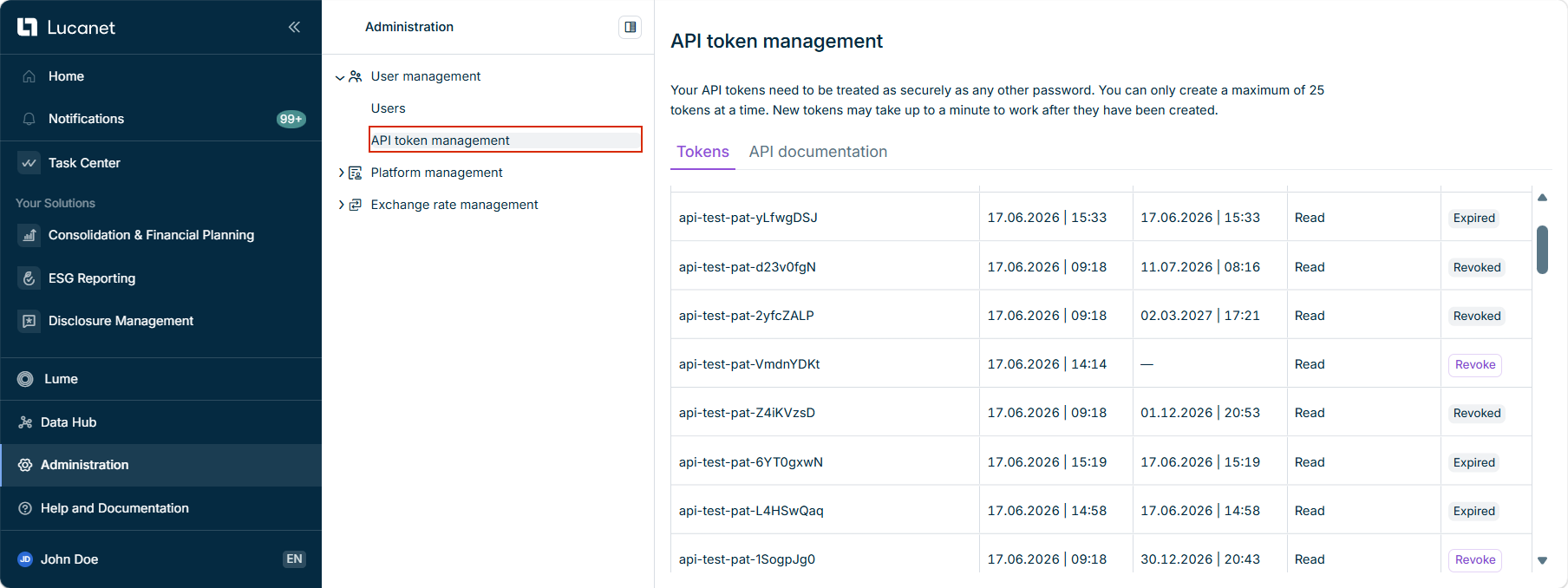
The Tokens tab lists all API tokens for your tenant. The API token management workspace is displayed as follows, for example:

Shows the 'API token management' workspace with the list of API tokens.
The 'API token management' workspace

The following information is available for each token:

ColumnDescription
Token nameThe name given to the token when it was created
CreatedThe date and time the token was created
ExpiresThe date and time the token expires. A dash (—) indicates that the token has no expiration date.
Token typeThe permissions (scopes) granted to the token: Read, Write, and/or Read and write
ActionsThe option to revoke an active token. Tokens that can no longer be used are displayed as Expired or Revoked instead.

You can only create a maximum of 25 API tokens at a time. New tokens may take up to a minute to work after they have been created.

To create an API token:

1

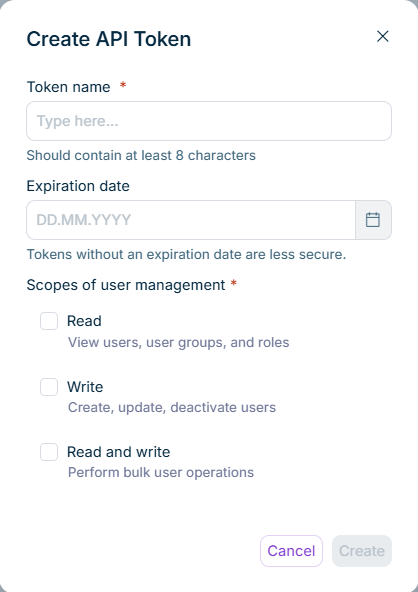
On the Tokens tab, click Create API token. The Create API Token dialog is displayed as follows, for example:

Shows the 'Create API Token' dialog with the token name, expiration date, and scope options.
'Create API Token' dialog
2

Enter a Token name. The name must contain at least 8 characters.

3

Optional: Select an Expiration date. Tokens without an expiration date are less secure, so we recommend setting one.

4

Under Scopes of user management, select the permissions the token should have. You must select at least one scope.

5

Click Create.

6

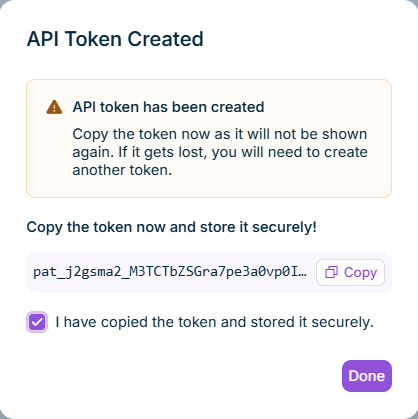
In the API Token Created dialog, click Copy to copy the token, and store it in a secure location.

Shows the 'API Token Created' dialog with the one-time token value and a copy option.
'API Token Created' dialog
7

Select the check box to confirm that you have copied and securely stored the token, and click Done.

The token value is displayed only once, immediately after creation. Copy it before you close the dialog. A lost token value cannot be retrieved; in that case, you have to create a new token instead.

Revoke a token when it is no longer needed or might be compromised.

1

On the Tokens tab, find the token you want to revoke and click Revoke in its row.

2

In the Revoke Token dialog, click Revoke token to confirm.

Revoking a token cannot be undone. Any integration that uses the token stops working within 60 seconds. The action is recorded in the change log. After revoking, the token is displayed as Revoked in the list.

Open the API documentation tab for the full Platform API reference, where API tokens are referred to as Personal Access Tokens (PATs). It includes:

  • Authentication: pass the token in the Authorization header as a Bearer token, in the form Authorization: Bearer pat_<tenantId>_<token>.
  • Available scopes: um:read, um:write, and um:bulk, which correspond to the Read, Write, and Read and write options in the token dialog. A token can have one or more scopes. A request to an endpoint the token is not scoped for is rejected with 403 Forbidden.
  • Endpoints: the available user management operations (read, write, and bulk), with example requests, responses, and error codes.

Because every action performed with a token is attributed to the user who created it, you can trace API-driven changes in the Change Log.