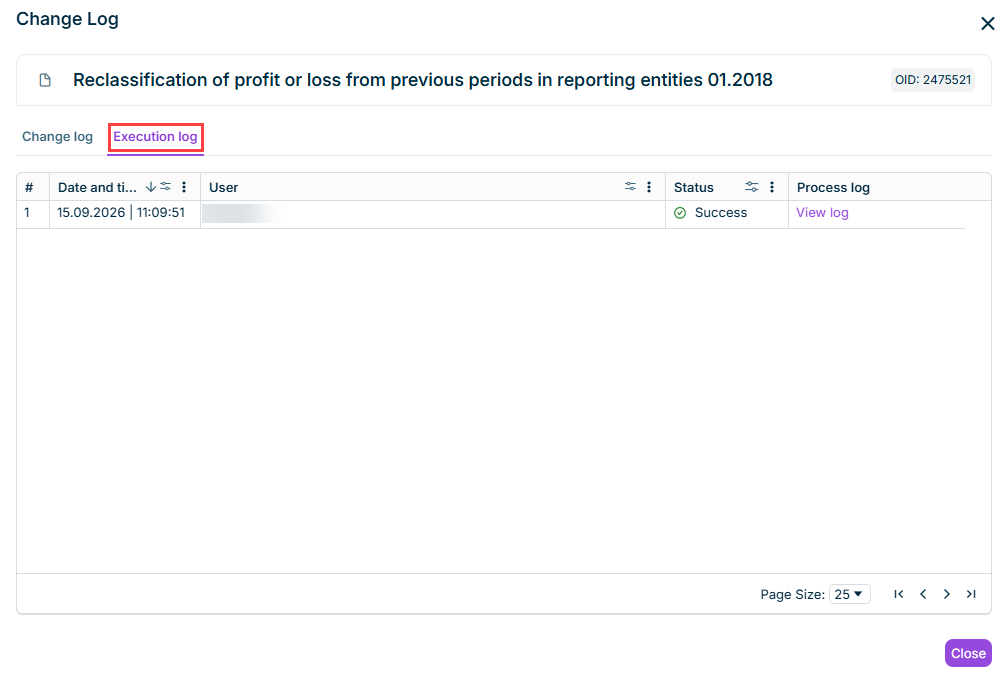
You can now open the detailed log of an execution directly from the change log. For Apps, Scripts, Data Imports, and Execution settings, the change log window now includes an Execution log tab that lists every run of the element, including date/time, user, status, and a link to its detailed process log.
Execution log
The process log shows the individual steps of the execution in an expandable tree, including their timing, duration, and progress. You can activate Show debug messages for additional technical details.
Process logs can be downloaded as a text file (.txt) or an Excel file (.xlsx).
Note: Execution and process log data is kept for a rolling retention period of 30 days. Executions older than that no longer appear in the execution log, but remain visible as an Executed entry on the Change log tab.
The app Copy postings into other consolidation areas now also copies the Cancel posting setting (Cumulative after the last month or After every month) of a base posting to the corresponding target posting. Previously, this setting had to be activated manually on the target posting after the copy.
Lucanet.Script Execution Application (SEA) is now updated automatically. Once a day, from 06:00 local time, SEA checks for a newer version and installs the new version. For SEA installations, the automatic updates mean the following:
Security fixes, bug fixes, and new SEA capabilities reach every installation as soon as they are released.
You no longer need to check each SEA installation individually for updates in Lucanet.Software Manager.
If the computer running SEA was switched off or asleep at 06:00, SEA checks for updates about 5 to 15 minutes after the computer starts or wakes up.
With the new Analyze database function, you can run read-only SQL queries against a connected database directly in Consolidation & Financial Planning, without using a separate database tool. Typical use cases are verifying that data was imported correctly and analyzing the database of a source system. You can open multiple query windows at the same time and compare the data of related tables side by side.
The Analyze database function is available in the detail view of the following elements: elements of type Connection, data sources for importing data into Lucanet.Financial Warehouse, and data sources of type Lucanet.Financial Warehouse (#2068) for importing data into reporting entities.
The new app Copy postings into other consolidation areas lets you copy manual postings and translations with historical exchange rates from one consolidation area to another with a single execution, replacing the manual reconciliation and copy-pasting previously required.
Configure a base and target consolidation area, the consolidation unit assignment between them, and the posting types and folders to include. Each execution replaces the postings created during the previous run, so the app can be re-executed safely at any time.
Note: With the current release, the Cancel posting setting of a posting (Cumulative after the last month or After every month) is not copied to the target posting. This feature will be provided with an upcoming release. If needed, activate the setting manually on the target posting after the copy.
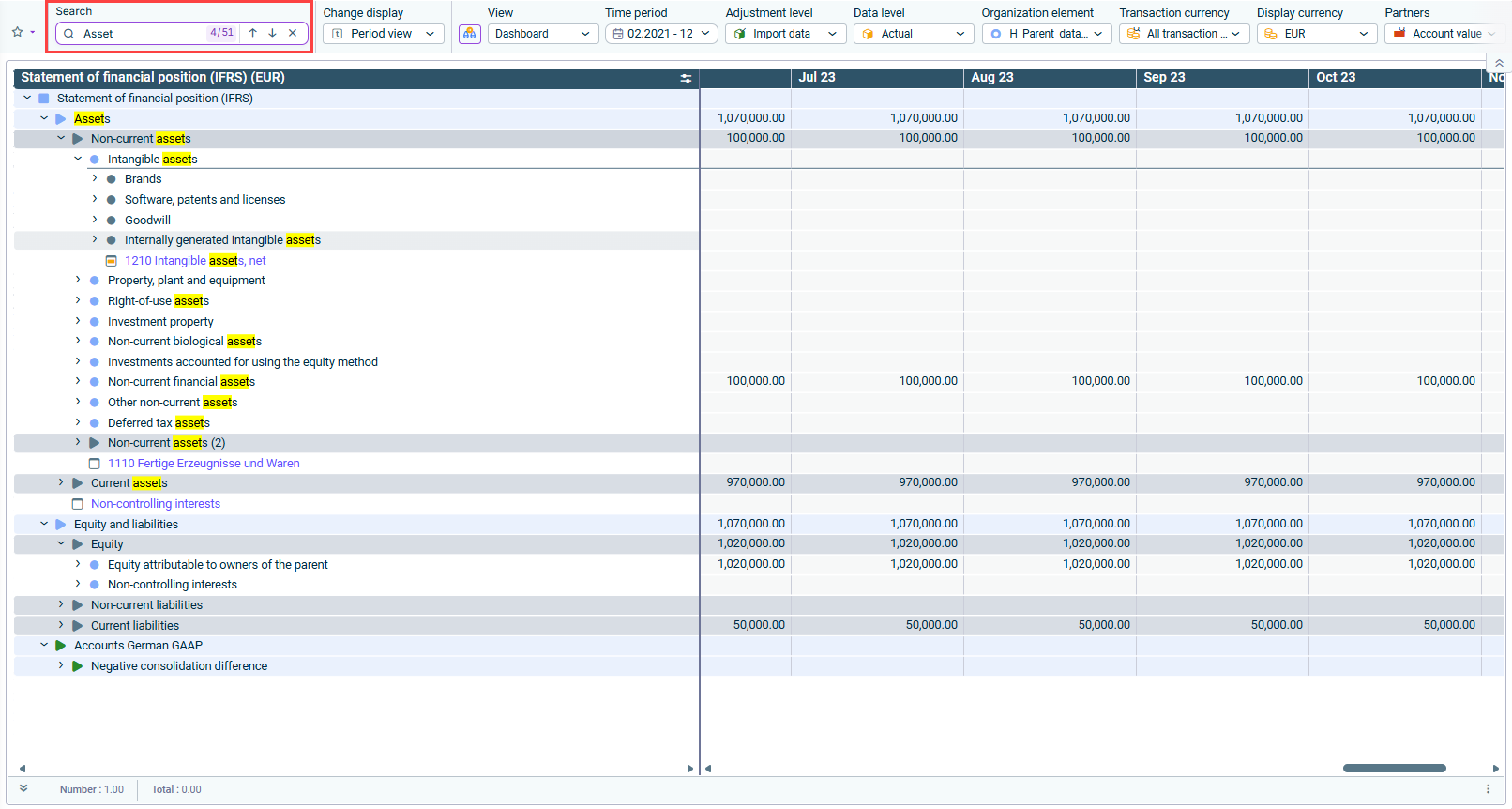
You can now search for elements — such as items, accounts, formulas, folders, references, and total lines — directly in ledgers and schedules using the new Search field in the dimension bar. This is especially useful in large or deeply nested hierarchies, where the element you are looking for can be several levels deep, or hidden behind a collapsed node.
Matching elements are highlighted and you can use the navigation arrows to move between matches.
Search field in the dimension bar with highlighted matches
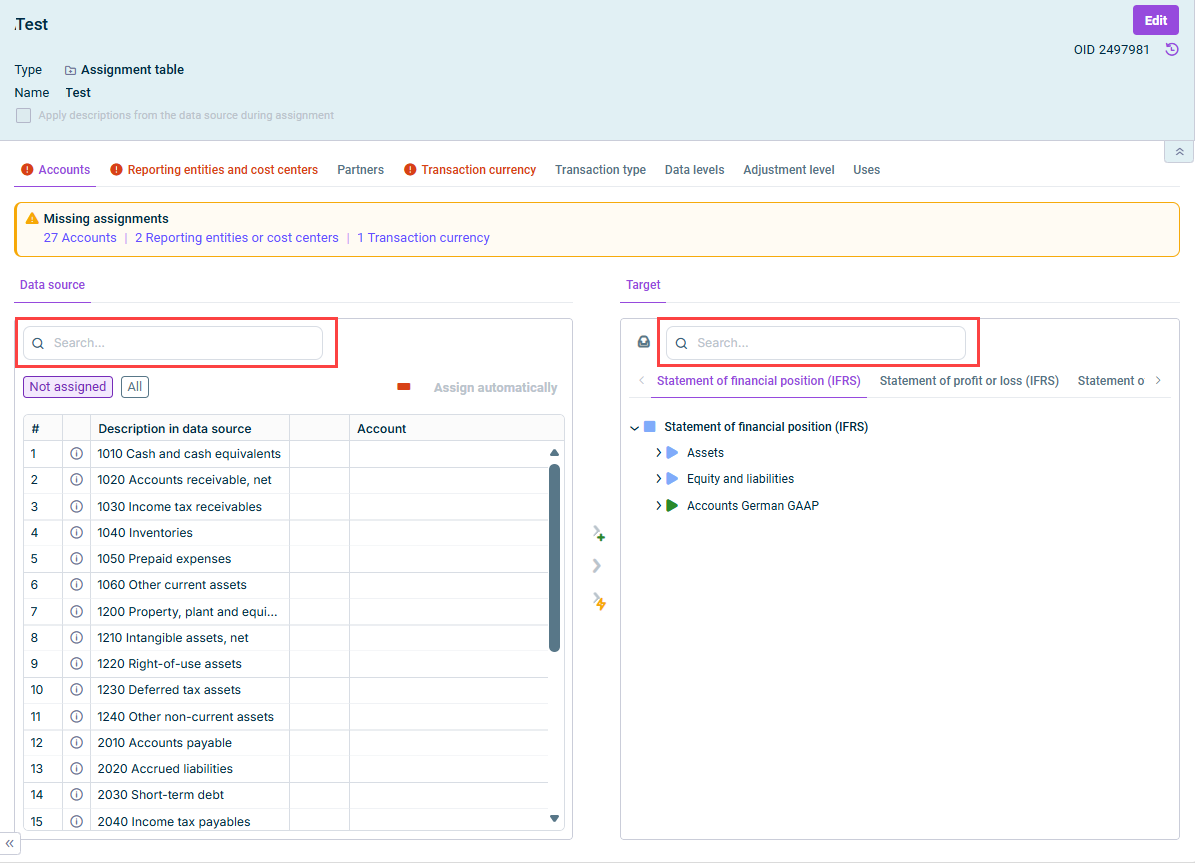
Also in assignment tables when importing data into reporting entities, you can now search for elements directly in the Data source and Target areas. Enter a search term and press Enter to run the search; matching elements are highlighted, and you can navigate between results using the arrow keys.
Search fields in the 'Data source' and 'Target' areas
Two new column types are now available when configuring views for ledgers and schedules: Value in % displays the value of a column as a percentage of a reference column, and Exchange rate displays the exchange rate between the display currencies of two columns.
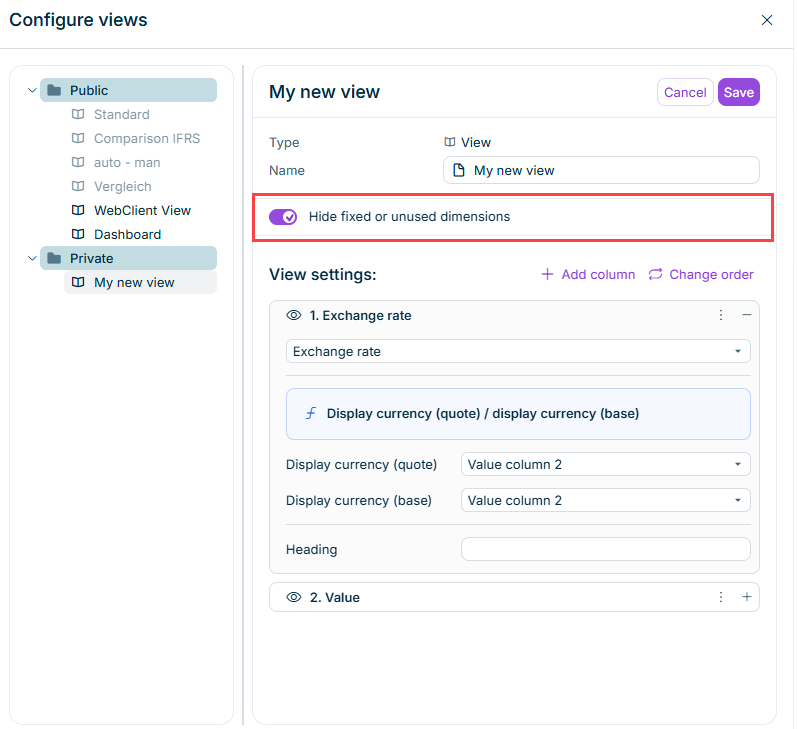
Views can now be configured to hide the drop-down lists for dimensions that are fixed to a single element or not used in the dimension bar. Activate Hide fixed or unused dimensions when creating or editing a view to simplify the dimension bar for its users.
'Hide fixed or unused dimensions' option when configuring a view
As of this release, a change log is available in Lucanet Consolidation & Financial Planning. It shows what changed, when, and whether a user or the system did it — covering new entries, edits, deletions, and moves.
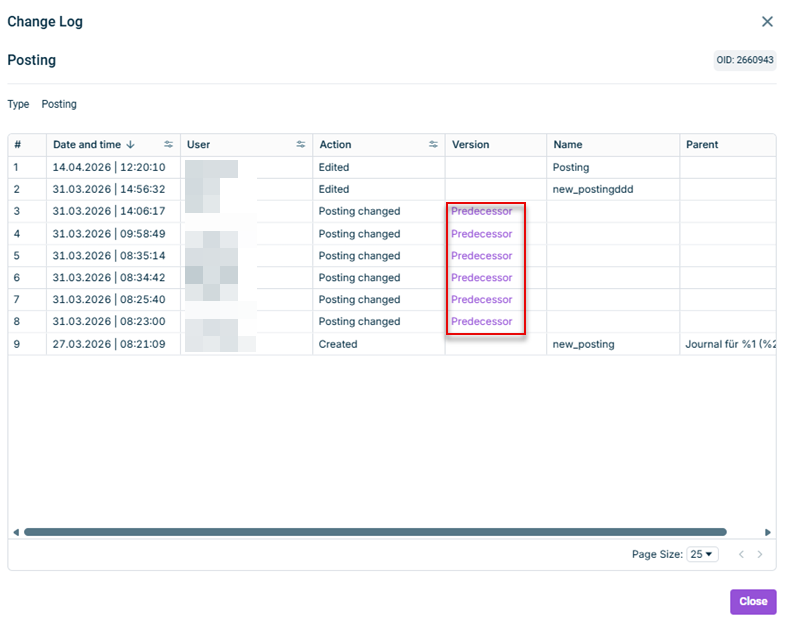
You can open the change log from each workspace. It lists the element, its unique identifier, its parent when relevant, the action performed on the element, and, depending on the workspace, additional columns. In the Journals workspace, for example, change log entries for manual and Excel Add-In postings additionally offer a Predecessor link in the Version column that opens the previous version in a new window, so you can compare what changed without leaving your audit trail.
You can sort, filter, and page through the change entries of the log:
Sorting, filtering, and paging through change log entries
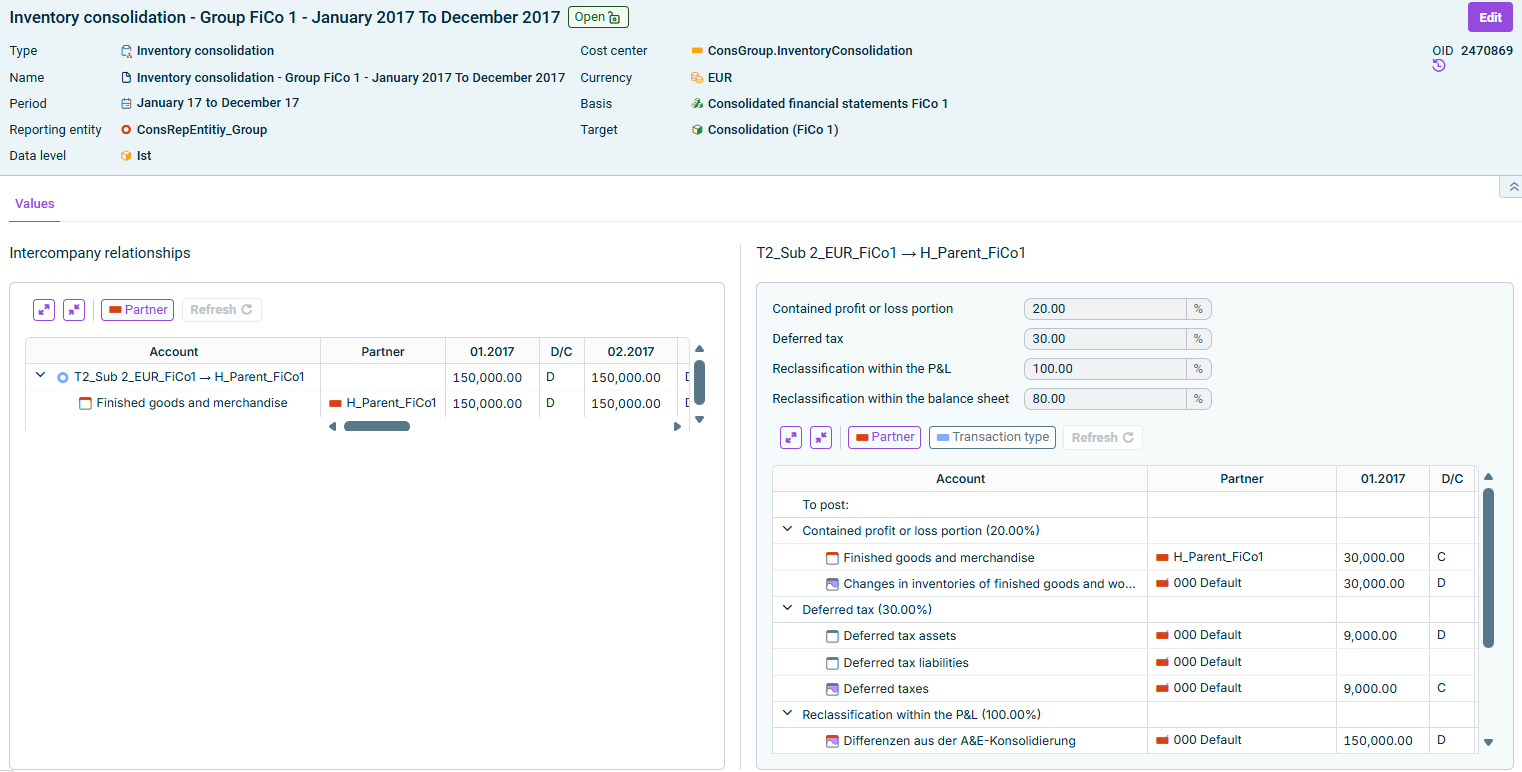
Consolidation 1 now also supports wizard-assisted Inventory consolidation, as an elimination type for intercompany profit or loss contained in stock.
In the Consolidation areas workspace, you can configure default values per consolidation area, including the balance sheet items that contain the profit or loss, the contained profit or loss portion, and optional deferred tax and reclassifications within the P&L and/or the balance sheet. Deviating values can be defined per pair combination.
In the Journals workspace, the Inventory consolidation wizard applies these settings per intercompany relationship and lets you refresh and override the percentages before saving.
The app for Equity Elimination now automates all required consolidation steps when an associate transitions from the equity method to full consolidation. When you enter the change in consolidation method in the master data administration, the app automatically:
Reverses previous entries related to the equity method calculation
Executes all required equity elimination steps according to full consolidation.
Posts the goodwill or negative consolidation difference resulting from initial consolidation. Direct and indirect non-controlling interests are recognized where applicable.
The transition can be executed at the beginning or end of the period. IC transfers are not yet supported.
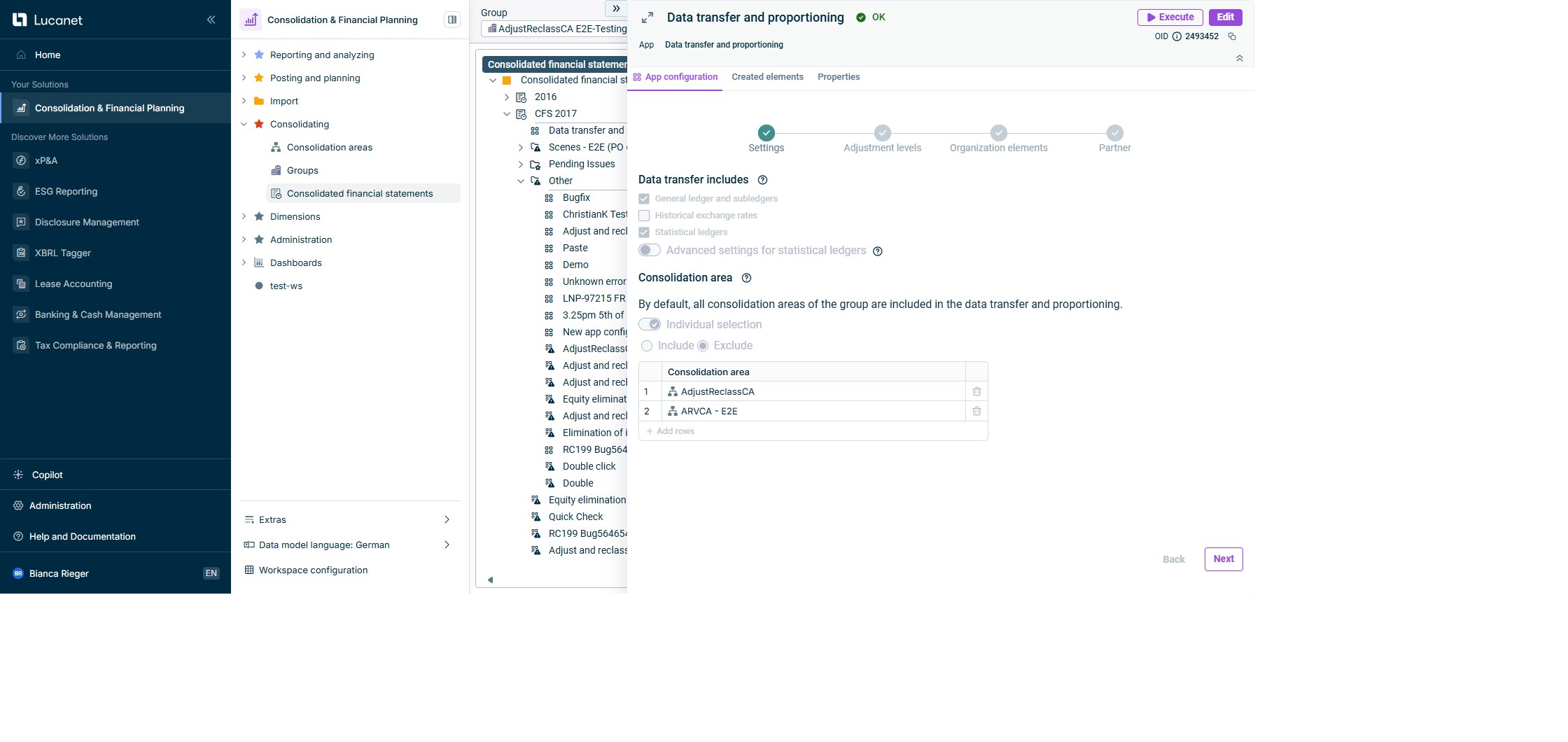
The app for Data Transfer and Proportioning now supports the transfer of historical exchange rates from organization elements to consolidation units. This transfer is configured in the Settings step in the Data transfer includes section. The Historical exchange rates check box can only be activated together with General ledger and subledgers: if you deactivate General ledger and subledgers, Historical exchange rates is automatically deactivated as well. There is no dependency on Statistical ledgers.
'Historical exchange rates' check box on the 'Settings' step