To create consolidated financial statements, you first have to define the master data that form the basis for consolidation of a company within a group.
The master data administration is used to enter, display, and save the following issues within a group:
Investment relationships within a group in the form of shares and their changes over time
Changes in investors in the event of group-internal share acquisitions from one or more investors in an investment
Consolidation methods for including consolidation units in consolidation areas and their evolution over time
Fair value of non-controlling interests for including fully consolidated subsidiaries using the full goodwill method
Increase and decrease in capital for fully consolidated subsidiaries
Periods and accounts for the amortization of goodwill
Translation with historical exchange rates for foreign currency companies
For every group and every data level, you must create a master data administration that is used for all consolidated financial statements of the group.
Select one of the following options to create the master data administration for a combination of group and data level:
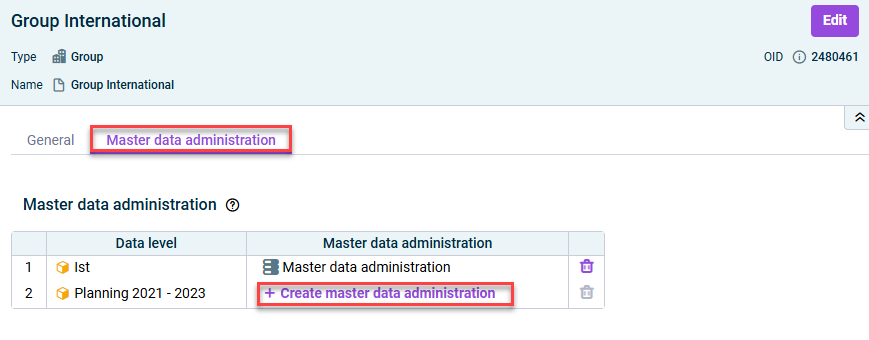
In the ‘Groups’ workspace
Select the desired group in the overview and navigate to the Master data administration tab in the detail view. Then click Create master data administration.
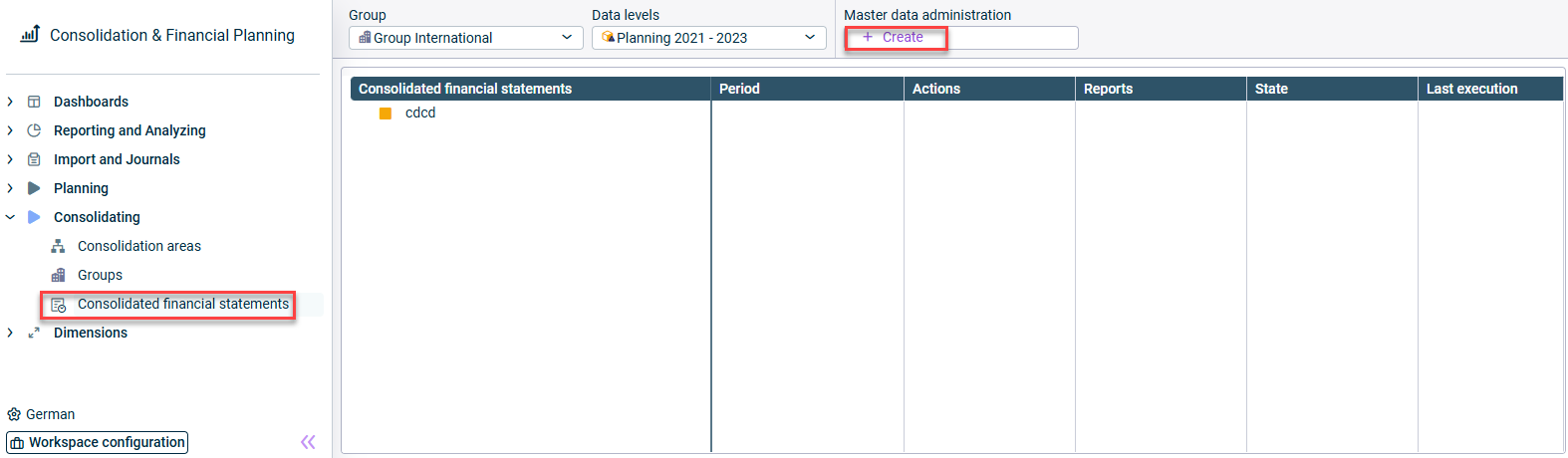
Creating master data administration in the ‘Consolidated financial statements’ workspaces for the desired data level.
In the ‘Consolidated financial statements’ workspace
Select the desired combination of group and data level in the dimension bar and click Create in the Master data administration field.
Creating master data administration in the detail view of a group
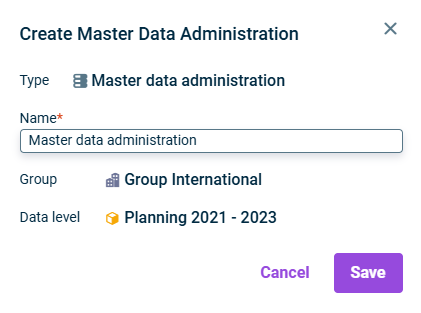
After that, enter a name for the master data administration in the Create element dialog and click Save.
'Create master data administration’ dialog
The master data administration is shown both in the Groups workspace and in the Consolidated financial statements workspace for the selected combination of group and data level and can be configured and edited subsequently in both workspaces.
To configure the master data administration, select the element in the Groups workspace or in the Consolidated financial statements workspace and click Edit in the upper right corner of the edit dialog.
The following options are available for the master data administration:
The tabs Investments and Consolidation methods must be configured to enable correct consolidation by the Consolidation apps.
The tabs Corporate actions, Goodwill and Historical exchange rates only need to be configured if the issues are relevant in the group.
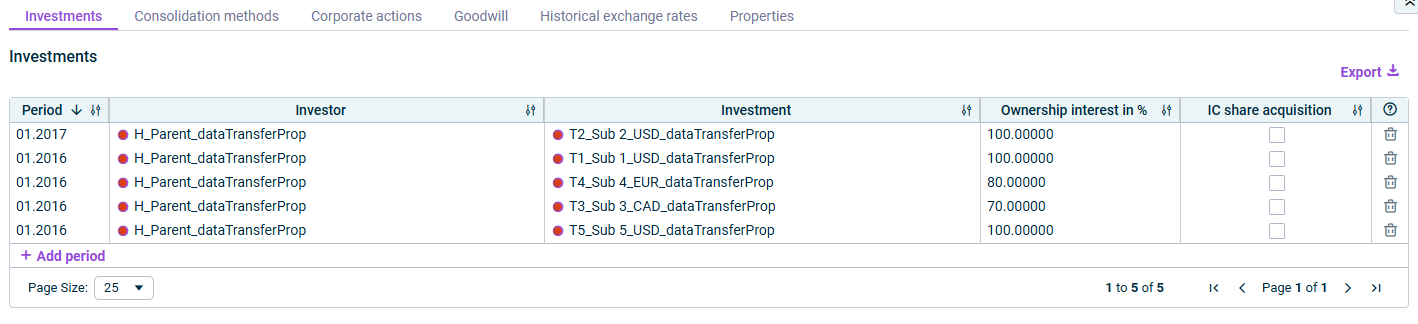
On the Investments tab, the intercompany investment relationships are defined. Enter the percentage ownership interest of each investor in an investment, taking into account the relevant period.
For each investment, add a new row using the command Add period and configure the required columns.
The ownership interest applies from the specified period until you enter a new participation rate for the combination of investor and interest in a subsequent period. Whether the change is applicable from the start or end of the period depends on the point in time selected in the consolidation methods for this investment.
‘Investments’ tab
The following columns are available on the Investments tab:
Column
Description
Period
Period from which an investment in an economic entity exists.
Percentage share of each investor in an investment.
Note: The ownership interest applies from this period until you enter a new ownership interest for the combination of investor and investment in a subsequent period. Whether the change is applicable from the start or end of the period depends on the period selected in the consolidation methods for this investment.
IC share acquisition
Activate the check box if an increased ownership interest in the investment partially or fully results from an IC share acquisition, and configure the displayed details on the IC purchase of shares.
Click the question mark icon to obtain information about the configuration of the tab. Click the trash bin icon to delete a row.
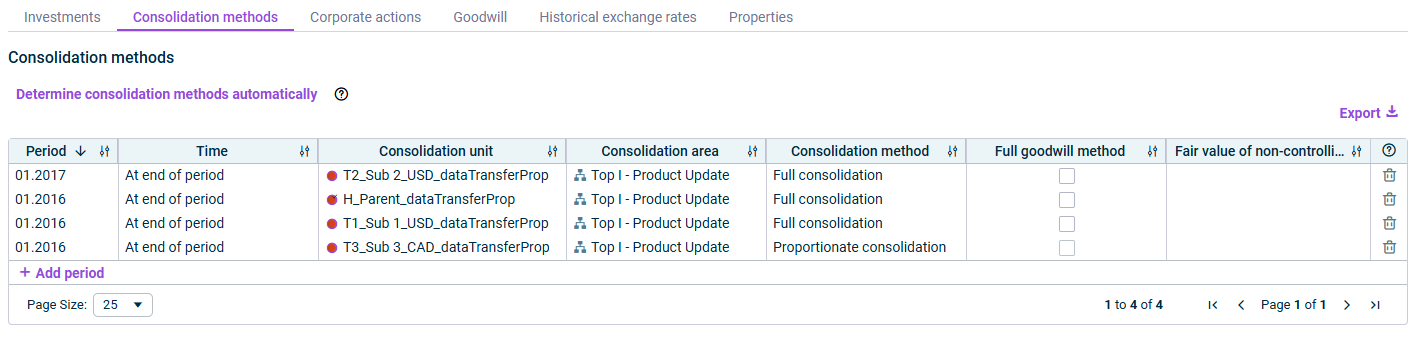
On the Consolidation methods tab, the complete history of the inclusion of the companies in the consolidated financial statements is defined.
For every consolidation method of a consolidation unit within the consolidation area, add a new row using the Add period command, and configure the required columns.
If the consolidation method of a consolidation unit changes, you must enter a new issue for this period.
Automatic determination of consolidation methods
You have the option to insert the consolidation methods automatically based on the information provided on the Investments tab.
To do this, click Determine consolidation methods automatically and then select a period for the automatic determination.
Note: During the automatic determination of the consolidation methods, all existing table entries for the specified period are deleted and determined again, based on the entries made on the Investments tab. This action cannot be undone!
Consolidation methods tab
The following columns are available on the Consolidation methods tab:
Column
Description
Period
Period as of which the consolidation method applies for the consolidation unit.
Time
Choose whether the time of the change of the consolidation method shall apply from the start or from the end of the selected period.
Note: The same setting will be applied to subsequent changes in ownership interests without a change in the consolidation method.
Consolidation unit
Consolidation unit for which you want to define the consolidation method.
Consolidation area
Consolidation area to which the selected consolidation unit belongs. (Is inserted automatically.)
Consolidation method
Consolidation method that applies to the consolidation unit from this period and this time. You can choose the following consolidation methods: - Full consolidation - Proportionate consolidation* - Equity method* - – (not consolidated)
*Cannot be selected for default consolidation units and consolidation units of investors.
Note: In the event of disposal of a consolidation unit from the group, the '–' consolidation method must be selected as well as the period and time.
Full goodwill method
Activate the check box if the full goodwill method is to be applied for fully consolidated subsidiaries as part of equity elimination of the investment.
Note: If you activate the full goodwill method option for a row, you must additionally specify the fair value of non-controlling interests in the following column.
Fair value of non-controlling interests
Fair value of the non-controlling interests at the time of acquisition in the currency of the consolidation area. Only needs to be specified if you have activated the option Full goodwill method.
Click the question mark icon to obtain information about the configuration of the tab. Click the trash bin icon to delete a row.
On the Corporate actions tab, you specify whether capital increases and reductions should be included in the consolidation process for fully consolidated subsidiaries.
If you use the app for equity elimination in the CFO Solution Platform, you do not need to configure this tab, as this configuration step is no longer necessary within the master data administration when the app for equity elimination in the CFO Solution Platform is used.
If you are using the legacy app for equity elimination in Lucanet.Financial Client, you must configure this tab in case of corporate actions. To do this, activate the check box Configure consolidation of corporate actions. After that, for each corporate action to be consolidated, add a new row using the command Add period and configure the required columns.
Corporate actions tab
The following columns are available on the Corporate actions tab:
Column
Description
Period
Period in which a corporate action is to be consolidated
Choose here, whether the corporate action is a: - Capital increase - Capital reduction
The consolidation of corporate actions is carried out using the app for the equity elimination.
Only the capital increases and reductions entered on the Corporate actions tab in the master data administration are included in the consolidation process by the app for equity elimination.
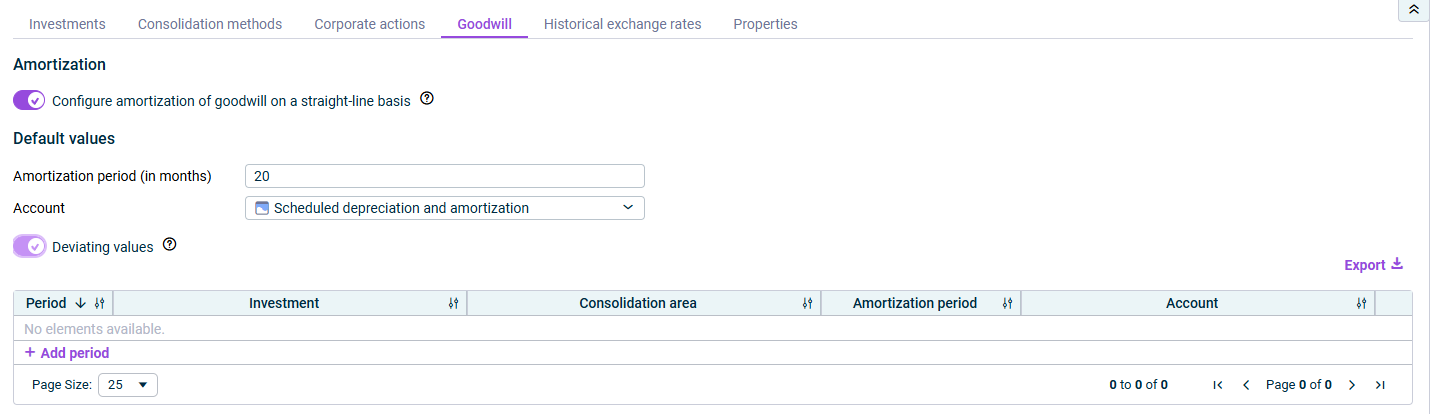
On the Goodwill tab, you specify whether goodwill or negative consolidation differences recognized in the balance sheet from the equity elimination are to be amortized on a straight-line basis.
If yes, activate the check box Configure straight-line amortization of goodwill and configure the options subsequently displayed.
‘Goodwill’ tab
The following options are available:
Option
Description
Default values
Enter the amortization period (in months) and a profit and loss account to be used by default for the straight-line amortization of goodwill or the negative consolidation differences recognized in the balance sheet resulting from equity elimination.
Deviating values
If a different amortization period applies for an investment in a certain period, activate the check box Deviating values.
After that, for each deviating issue, add a new row using the command Add period and configure the required columns.
Note: The specified period must be the one in which the goodwill arose.
Example: If goodwill arose for Subsidiary 1 in 02.2025, 02.2025 and Subsidiary 1 must be specified, as well as a deviating account and/or deviating amortization period if applicable.
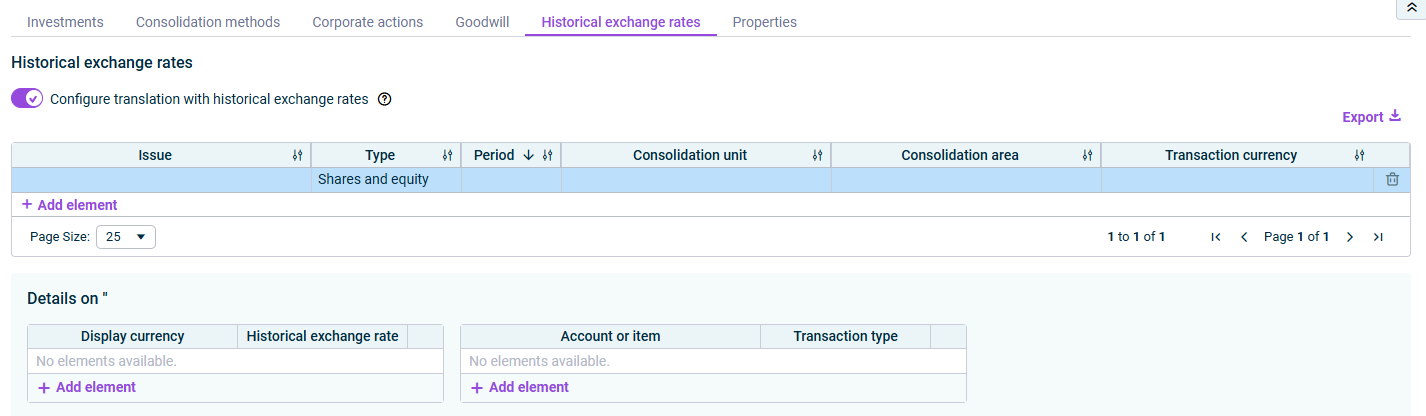
On the Historical exchange rates tab, you specify the issues that are to be translated from the local currency of a foreign currency company into the group currency using a historical exchange rate.
If this is the case, activate the check box Configure translation with historical exchange rates. After that, for each issue, add a new row using the command Add element and configure the required columns.
‘Historical exchange rates’ tab
The following columns are available on the Historical exchange rates tab:
Column
Description
Issue
Double-click in the Issue column and enter a name for the issue.
Type
Type of the historical exchange rate fixation: - Shares and equity - Differential arising during equity elimination
Period
Period for which the translation with historical exchange rates is to be defined.
Consolidation unit
Consolidation unit for which the translation with historical exchange rates is to be defined.
Consolidation area
Consolidation area to which the selected consolidation unit belongs. (Is inserted automatically.)
For each display currency for which a historical exchange rate is to be fixed, add a row in the displayed table and enter the historical exchange rate. If you have selected as the type of historical exchange rate fixation Shares and equity, you also need to specify the accounts or items to be calculated using the historical exchange rate in the table additionally displayed, and select the desired transaction type for each account or item.
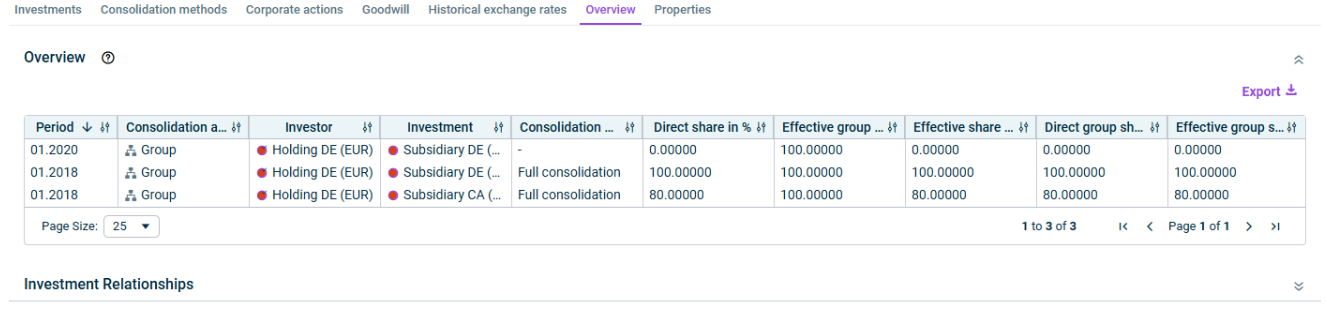
On the Overview tab you can view a summary of the investment relationships defined in the master data administration. The tab is only visible in display mode, but not in edit mode, and is divided into the following sections:
In the Overview section, you can use the Generate report command to generate and display a report listing all investment relationships in table format. This report contains the following figures.
Overview of investment relationships
The following columns are available in the report:
Column
Description
Ownership interest in %
Displays the rates of the economic entity held by the investor.
Effective group share investor in %
Displays the effective group share of the investor. The effective group share of the investor is determined mathematically.
Effective share in %
Displays an investor's effective share of equity in an economic entity across all group levels. The effective share is calculated from the effective group share of the investor multiplied by the direct share of the investor in the economic entity.
Direct group share investment in %
Displays the direct group share in the economic entity. The direct group share in the investment is calculated as the total direct shares of all investors in the economic entity.
Effective group share investment in %
Displays the effective group share in the economic entity. The effective group share in the investment is calculated as the total effective shares of all investors in the economic entity.
You can export the report in XLS and XLSX format using the Export command on the top right of the section.
Notes:
To ensure that the information displayed is up to date, a report that has already been created will be automatically deleted as soon as the user edits the tabs Investments and/or Consolidation methods. In this case, a new report can be generated by clicking the Generate report button.
The app for equity elimination accesses the data of the master data administration report. If no report has been created yet for the master data administration when executing this app, the report will be automatically generated by the app and then displayed here on the Overview tab.
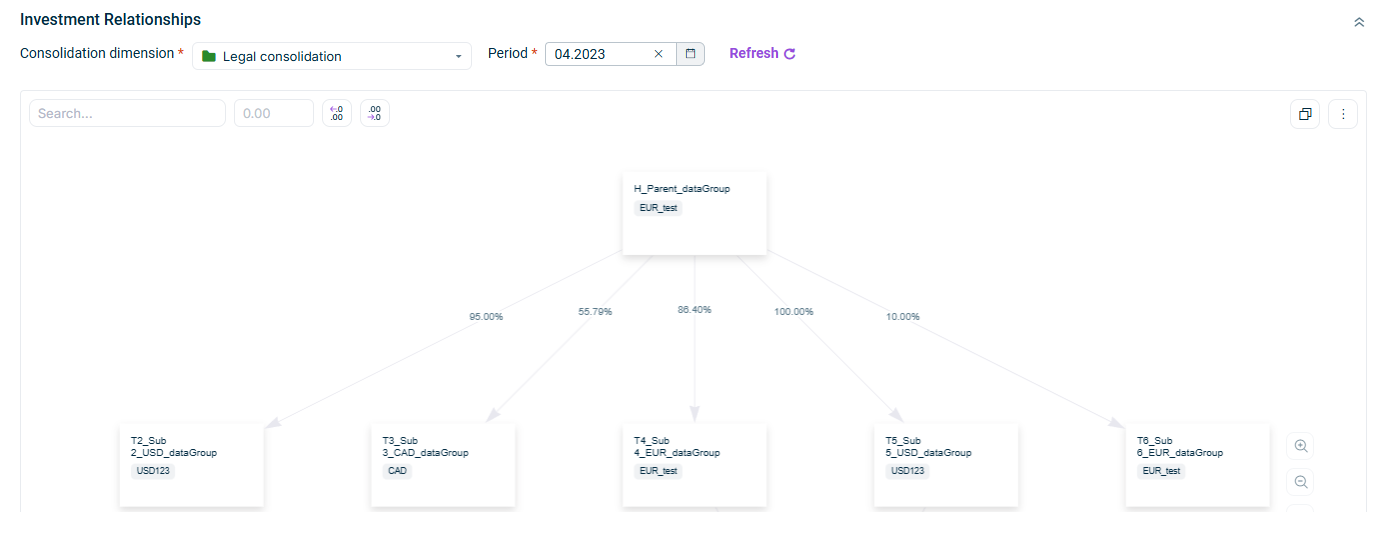
In the Investment Relationships section, you can visualize your investment relationships in a chart.
To do so, select the Consolidation dimension and the Period for which you would like to visualize the investment relationships. The diagram is displayed as follows, for example:
Visualization of investment relationships
Once the chart is visible, you can:
Refresh the chart to reflect changes made to the investment relationship configured in Master data administration
Search for entities within the chart
Adjust the decimal places used for displaying the ownership percentages
Copy the chart to the clipboard using the icon
Save the chart as PNG or JPEG file or print the chart (using the three-dot menu ).
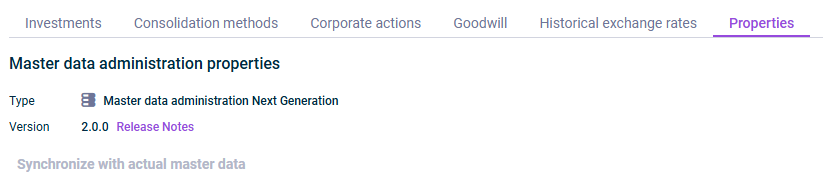
Version of the element If a new version of an app is available, the command Refresh is shown, which can be used to refresh the app to the latest version. In addition, you can access the Release Notes of the currently used version of the master data administration via a link.
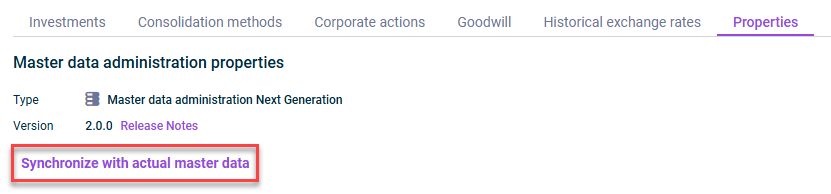
Command to synchronize the master data of a planning data level with the master data of the actual data level. For additional information on this, see the following chapter.
If you want to configure the master data administration for planning data levels of a group, you have the option of synchronizing and adopting master data that you have already configured for the actual data level for this group.
To do so, navigate to the Properties tab and click Synchronize with actual master data.
Synchronize with actual master data
The master data configured for the actual data level of the group are transferred to the selected planning data level for all periods before the start of the planning data level. From the start period of the planning data level onward, the master data are defined as part of the planning. To define deviating details for the master data of the planning data level, proceed as described under Configuring Master Data.
After entering data for the master data administration, you can validate the configuration. Up to the time of the validation, you can close and reopen the app configuration at any time without executing a validation in the background.
To validate, open the edit mode of the master data administration and click Validate in the upper right corner. Any configuration errors are then displayed on the respective tabs. You can fix them and re-validate the configuration.
Publish
In order to use the master data in consolidated financial statements, you must publish the master data in a final step. Only then can the consolidation apps access the master data.
To do this, open the Edit mode of the master data administration and click Publish in the top right corner.
You can also publish the configuration of the master data without prior validation. A validation is also carried out in this case before publication.
You can export the data that you have entered on the individual tabs in the master data administration, as well as the report generated on the Overview tab in Excel format at any time.
To do this, click Export above the configuration table on the right and choose whether you want to create the export in XLS or XLSX format.
After that, the export will be available in your download directory.
Exporting master data
This content was generated using AI and reviewed by Lucanet subject matter experts before publication.