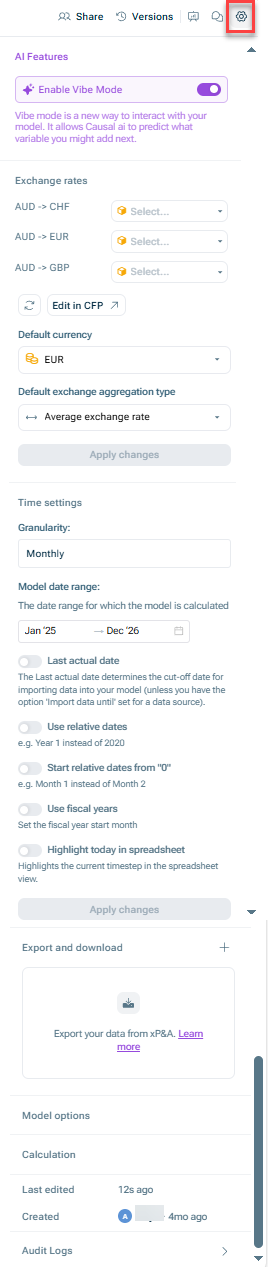
The following options are available for model settings:
The model settings
Option
Description
AI features
Here, you can enable vibe mode. Vibe mode turns on automatic AI suggestions for new variables as you build your model, without needing to be manually triggered each time. For more information on this topic, see Creating Variables Using AI.
Exchange rates
Here, you can configure the exchange rates that are used for currency translation. For more information on this topic, see Using Currency and Currency Translation.
Time settings
Here, you can define certain time settings, which include the granularity, the date range, and the last actual date for your model. For more information on this topic, see Working With Time.
Export and download
Here, you can export your model(s) out of xP&A into a variety of formats and file types. This is useful, for example, if you want to share your model with people outside of xP&A or to save a local or offline copy of your model and its data. For more information on this topic, see Exporting a Model.
Model options
Here, you can define in the model options:
• The Default Uncertainty Interval used for your planning throughout xP&A. • If you want to Hide empty dimension rows, i.e. the rows that do not contain any data for a particular dimension item. • The First cohort name used for cohort modeling.
Calculation
Here, you can specify, if you want the data of your model to be recomputed manually. Once you activate this option, the data will be recalculated.
Last edited
Here, you can see who last edited the model and when.
Audit logs
Here, you can open the audit logs, which are a model-by-model running history of who has made what edits (and when) to a model's variables, dimensions, visuals, or data. For more information on this topic, see Viewing the Audit Logs of a Model.