Come and explore the exciting new features of our solution ESG Reporting! We update our CFO Solution Platform on a regular basis to offer you the latest features and improvements.
The versions of all solutions that you are currently using and those of the CFO Solution Platform are displayed when you select About Lucanet from the Help section in the CFO Solution Platform.
As an ESG Administrator, you can now add formula-based KPIs to the ESRS, ESRS 2.0, or VSME questionnaire. A formula-based KPI is a calculated value: instead of being answered by an ESG Data Collector, it is calculated from the answers to other questions of the same questionnaire.
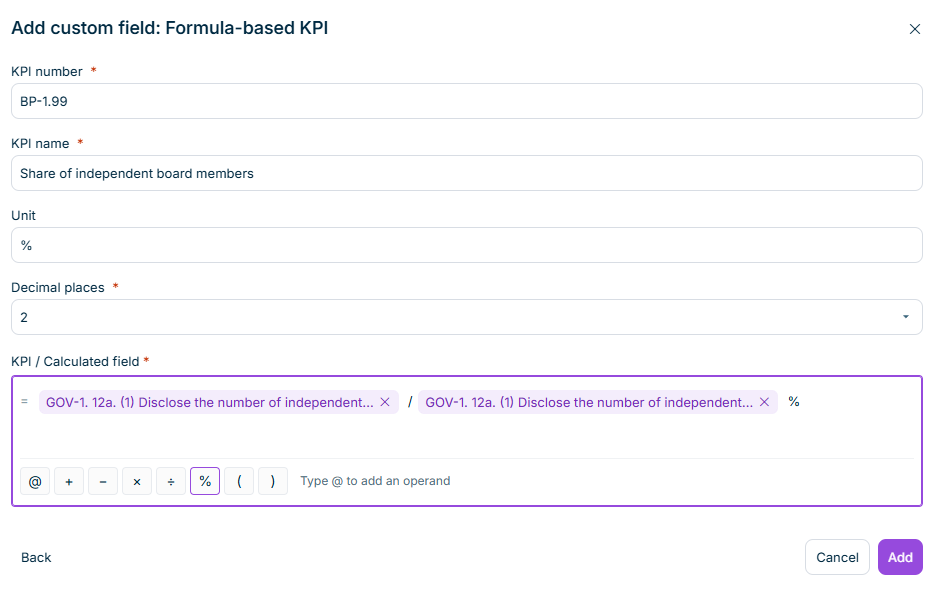
You create a KPI in the Questionnaire builder, in the Custom information section of the Add custom question dialog. A visual formula editor lets you combine values with the operators +, −, ×, ÷, %, and parentheses — without entering any formula syntax. The operands are picked from a searchable catalog of everything in the questionnaire that produces a number, including static table cells and dynamic table column totals.
Building the formula of a KPI
During data collection, the KPI is calculated automatically and displayed as read-only, together with its formula. Every user can open the list of input values to see how the value came about.
In the aggregated report, each KPI is displayed with the values of the individual reporting entities and a group value, which is calculated by aggregating the input values across all reporting entities and then applying the formula. The CSV export of the questionnaire data now also contains the calculated KPI values, their units, and their formulas.
You can now start the AI-supported import of ESG emission data directly from Lucanet Lume. To do so, use the ESG Emission Agent in Lume: Ask the ESG Emission Agent to upload your emissions and select the relevant report and reporting entity. The agent then takes you straight to the import of GHG data in the Emissions Module, with the report and the reporting entity already selected. From there, you upload your Excel file as usual, and the ESG Emission Agent generates the footprint suggestions.
As an ESG Administrator, you can now add custom questions to the Questionnaire Builder that go beyond the standard ESRS or VSME reporting standards. This allows the collection of organization-specific metrics, voluntary disclosures, or internal KPIs within the same ESG data collection workflow.
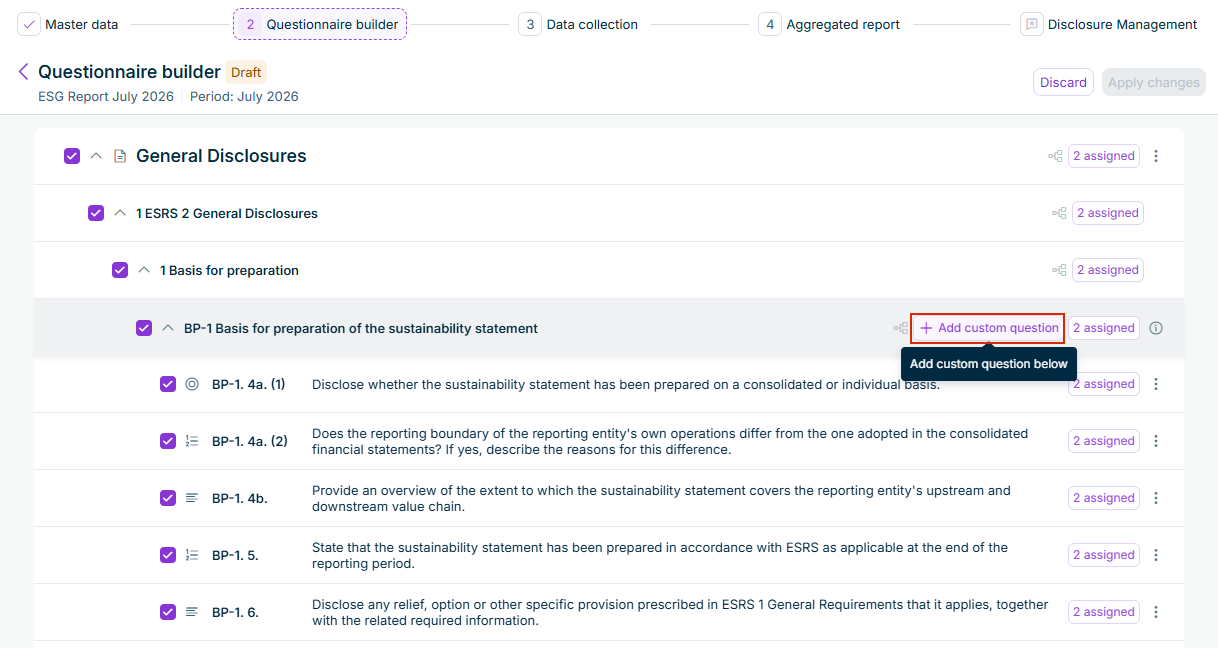
The Add custom question button is available at disclosure requirement level. The following question types are available:
Text input
Yes/No
Monetary
Numeric input
Static table or Dynamic table, with configurable columns
New custom questions are assigned to all reporting entities by default, and are hidden automatically if their parent disclosure requirement is hidden.
Button to add a custom question in the Questionnaire Builder
As an ESG Administrator, you can now export emission data directly from the aggregated report page. A new Export Emission Data option is available in the Export menu, alongside the existing Export Questionnaire Data option.
The Export menu with the Export Emission Data option
When selecting an emission factor for a footprint, the factor list is now automatically narrowed to the factors relevant to that scope. The list is filtered by the footprint's GHG scope — and, for Scope 3, additionally by its GHG Protocol category — so that only applicable factors are offered.
The filter drop-down lists (Location, Sector, Sub-sector, and Unit Type) now display only options that return at least one result in the current context, and you can apply them in any order. Changing or removing one filter refreshes the other drop-down lists and the factor list without clearing your remaining selections.
Emission factor list narrowed by the footprint's scope and category
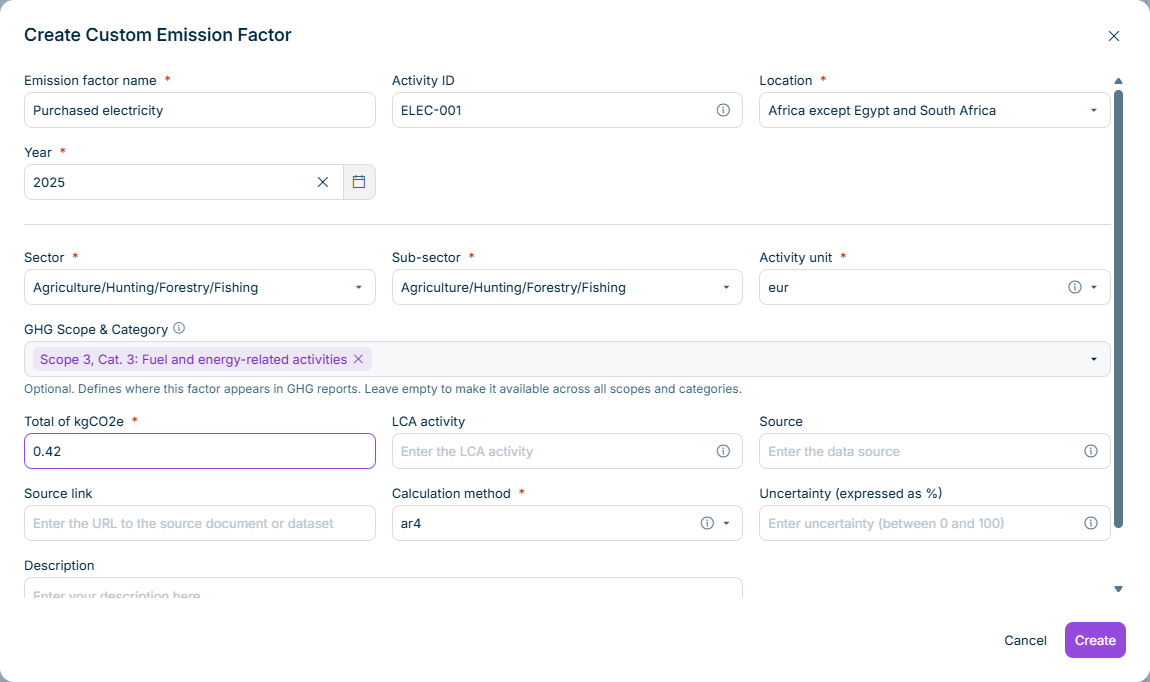
Moreover, when creating a custom emission factor, a new GHG Scope & Category field lets you define the scopes and categories the factor applies to. This way, custom emission factors are included in the same filtering and only appear where they are relevant. Leave the field empty to make the factor available across all scopes and categories.
The new GHG Scope & Category field in the Create Custom Emission Factor dialog
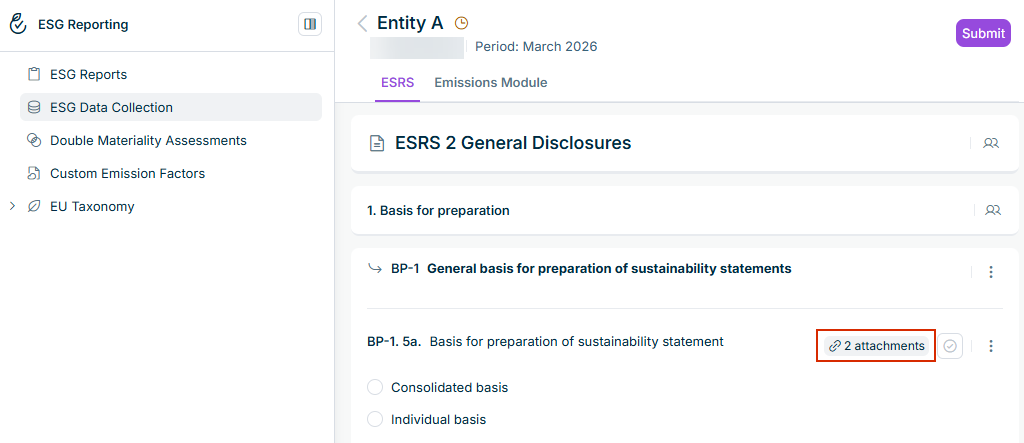
Until this release, it was difficult to get an overview of which documents, if any, were attached to answers. This information was only available in the Attachments three-dot menu, which had to be opened for each answer individually. As of this release, the questionnaire now clearly shows when one or more documents are attached to an answer. This lets you identify answers with additional attachments at a glance without having to open the Attachments menu of each answer individually.
The attachment indicator on an answer with attached documents
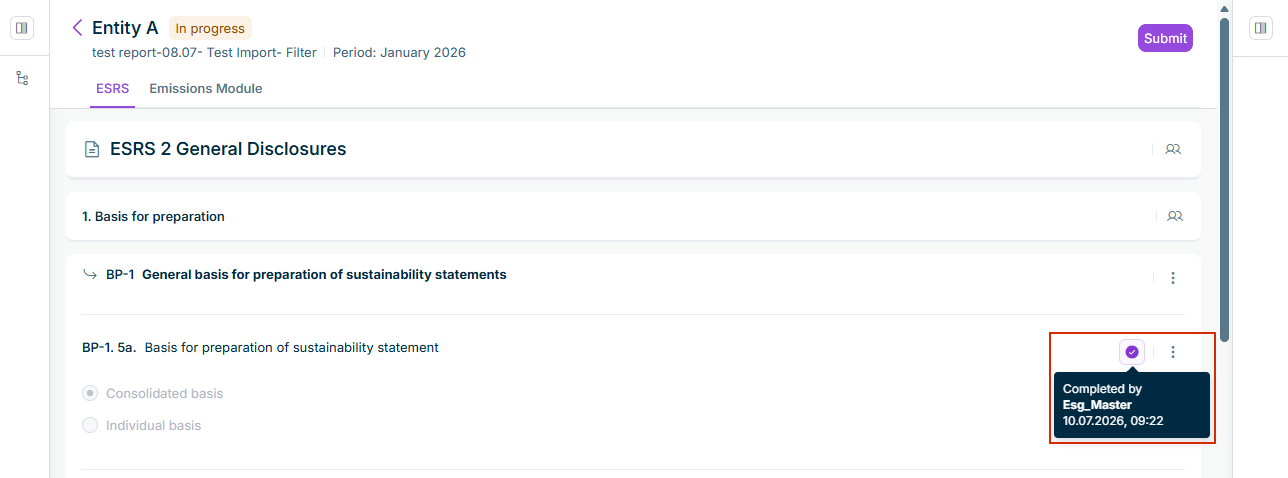
When you hover over the Completed icon of an answer in the questionnaire, the tooltip now shows who marked the question as complete and when, i.e. the name of the user, followed by the date and time. Previously, the tooltip displayed only Completed.
This functionality can currently only be provided upon request. If you are interested in using this functionality, please contact esg@lucanet.com.
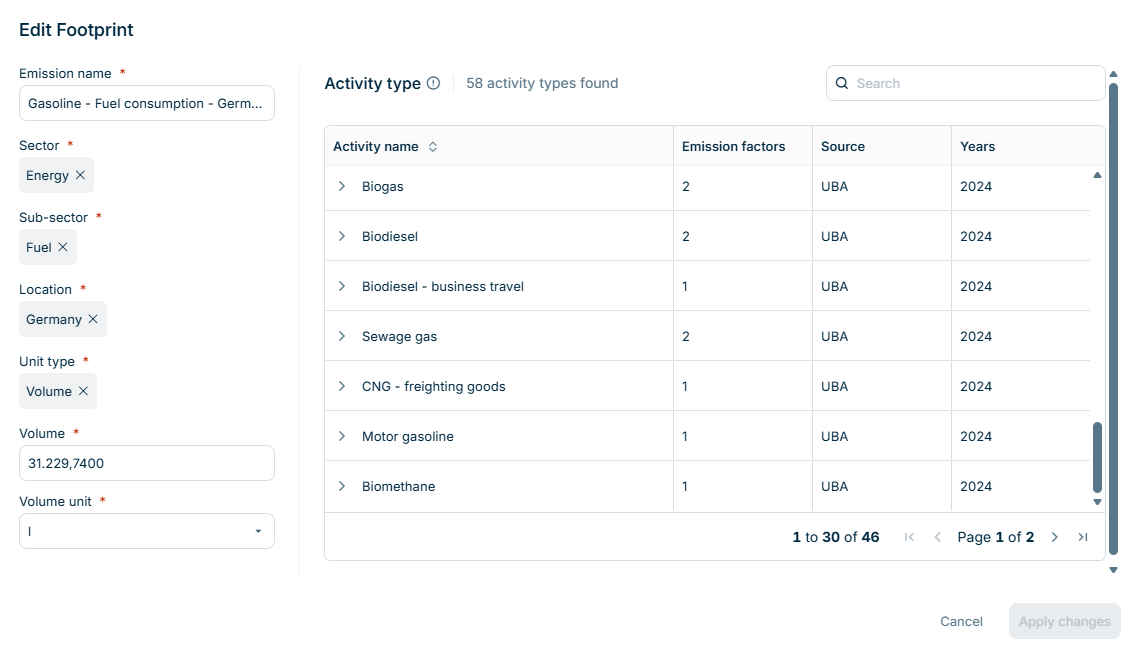
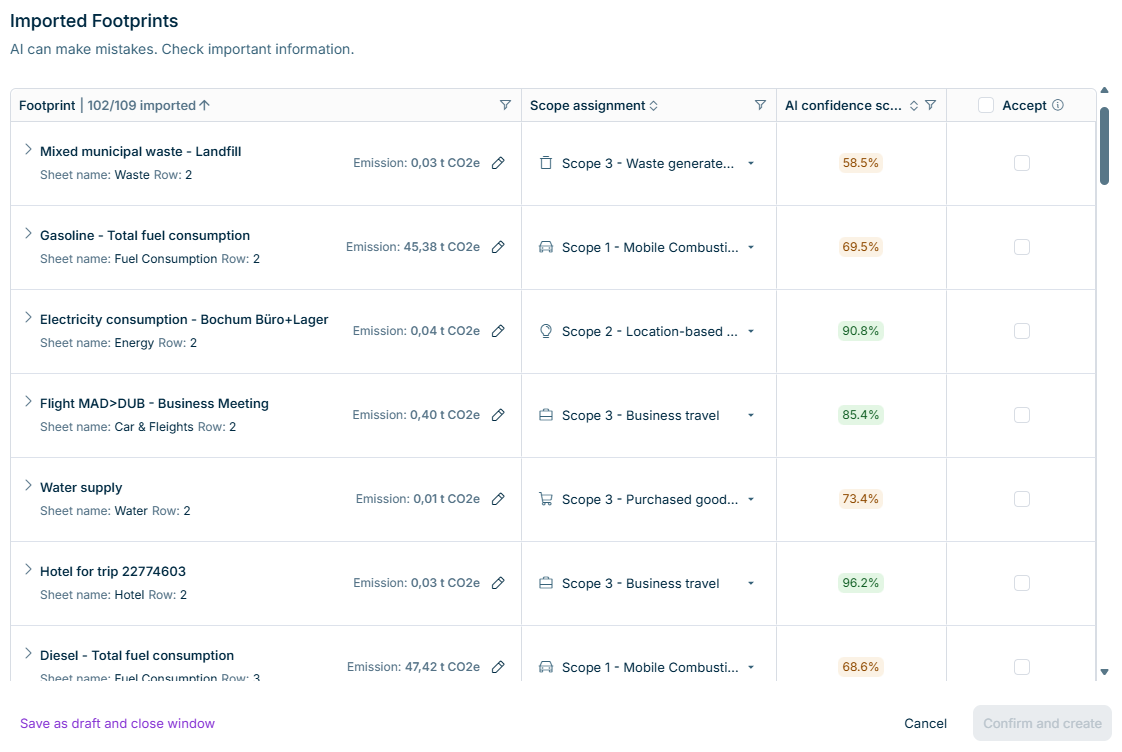
You can now use our AI-supported workflow to import GHG data saved in an MS Excel table. The imported GHG data is generated as footprint suggestions in the Emissions module by AI. After the import, you can review and either accept or reject the footprint suggestions.
For the review, you can access the following:
A summary of generated footprints, e.g. 13/15 footprints created
All AI-generated footprint suggestions in a table
Footprints that could not be created
The AI confidence score, including a tooltip that displays the four weighted factors used in the calculation: semantic match quality, region match, year match, and emission factor specificity.
You can then either accept or reject individual footprints or multiple footprints at once, or make adjustments before accepting the footprint suggestion, such as to the Scope and Category mappings, footprint name, location, sector and sub-sector, etc.
When editing a footprint, you can refer to the source Excel row number and sheet name. After having finished the edits, you can confirm the review to create your footprints, or save the review as a draft to continue later.
Good to know:
You can cancel an import, also while the Excel file is uploading or being processed.
The review is accessible to the ESG user who uploaded the file, and to ESG Data Collectors with access to the ESG report and reporting entity.
ESG Administrators can now add company-specific, additional notes on questions in the Questionnaire Builder, both when configuring the Questionnaire and during data collection. Customized additional guidance is displayed for ESG Data Collectors as well as Reviewers alongside the standard guidelines, and a visual indicator distinguishes company-specific notes from standard guidelines.
Additional guidance is preserved when an ESG report is duplicated.
When an ESG Administrator adds or modifies additional guidance after a reporting entity has already submitted their ESG report, or the ESG report has been approved, the ESG report reverts to the In Progress status.
Previously, when reopening an ESG report after it had been approved to enable one reporting entity to change and re-submit their report data, all other reporting entities also had to submit their report data. As of this release, ESG Administrators can reopen an ESG report for specific reporting entities. The option is available in the Data Collection page and restores edit access for the assigned data collector(s).