As an ESG Administrator, you have the option of exporting data from your ESG reports in different formats depending on the report type:

  • ESRS/VSME reports: Export the aggregated questionnaire data as a CSV file and the aggregated emission data as an Excel file
  • EU Taxonomy reports: Export aggregated data in Excel format using standardized EU Annex II templates

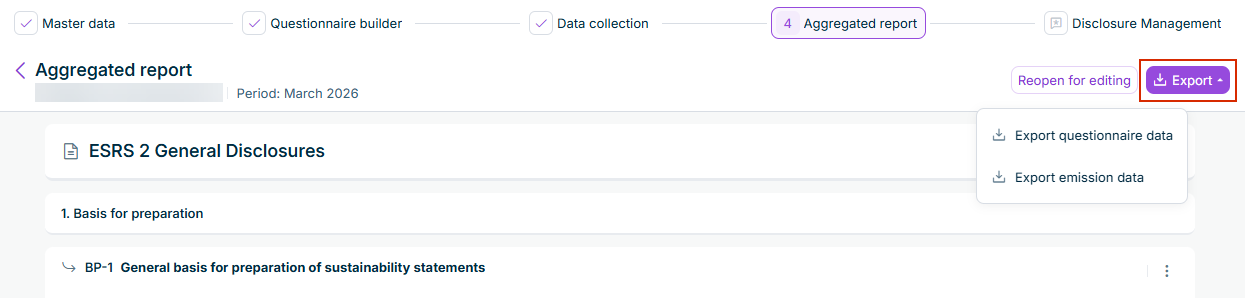
As an ESG Administrator, you can export the aggregated data of your ESRS or VSME report from the Aggregated report page. Two exports are available:

  • Export questionnaire data: downloads all aggregated responses from your reporting entities as a CSV file.
  • Export emission data: downloads the aggregated GHG footprint (emission) data as an Excel (.xlsx) file. This option is only available to ESG Administrators.

To export ESRS or VSME data:

1

Navigate to the Aggregated report page.

2

Click Export at the top right, then select Export questionnaire data or Export emission data.

The 'Export' menu showing the options 'Export questionnaire data' and 'Export emission data'.
'Export' menu on the 'Aggregated report' page

The file is generated and downloaded to your computer automatically.

When the window narrows, the Reopen for editing button and the Export button merge into the Actions button. If necessary, click Actions to continue.

For EU Taxonomy reports, you can export data in a standardized Excel format that complies with EU Annex II reporting templates. This export includes:

  • Template I: Summarized KPIs for Turnover, CapEx, and OpEx
  • Template II: Detailed activity breakdowns for each KPI with environmental objectives

The exported Excel file is structured according to official EU regulations and is ready for import into Lucanet Disclosure Management for further processing and publication.

To export EU Taxonomy data:

1

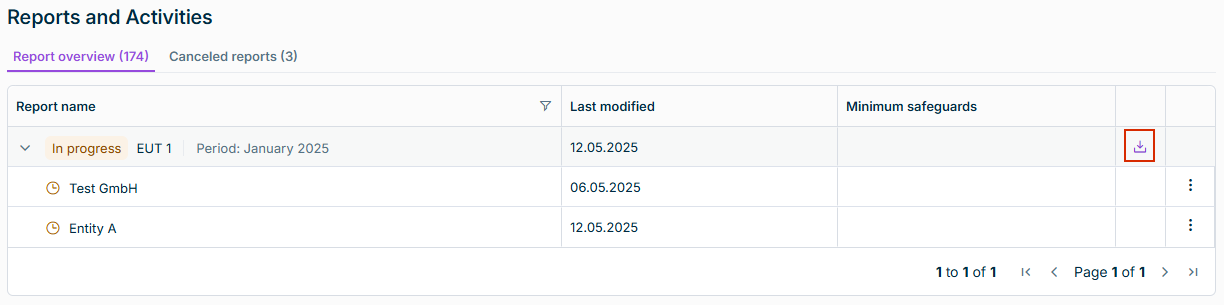
Navigate to the Reports and Activities workspace in the EU Taxonomy functional area.

2

In the Report overview, navigate to the report to be exported.

3

Click the Export button on the right.

The 'Reports and Activities' workspace is displayed. The option to export EU Taxonomy data is highlighted in red.
Button to export EU Taxonomy data

The export file is generated and downloaded to your computer automatically.

The export of an EU Taxonomy report generates a single Excel file containing four worksheets based on the official EU Annex II templates:

The Summary worksheet, based on Template I, provides an overview of your organization's business activities that are aligned with the EU Taxonomy across all three key performance indicators Turnover, CapEx, and OpEx (see also Collecting Financial Data).

For each KPI, the template shows:

  • Total amounts in your reporting currency
  • Percentage of business activities that are eligible for the EU Taxonomy
  • Percentage of business activities that are aligned with the EU Taxonomy
  • Breakdown by the six environmental objectives, i.e., Climate Change Mitigation, Climate Change Adaptation, Water, Circular Economy, Pollution Prevention, Biodiversity
  • Proportion of contribution types, i.e., enabling and transitional business activities

The Turnover, CapEx, and OpEx worksheets, based on Template II, each provide a detailed breakdown of individual business activities for the respective KPI:

  • Business activity name and EU Taxonomy code
  • Percentages of taxonomy eligibility and taxonomy alignment
  • Contribution to each environmental objective
  • Contribution type, i.e., enabling or transitional business activity
  • Proportion of taxonomy-aligned business activities within taxonomy-eligible business activities