Even after the Data collection or Data aggregation step has been finalized, an ESG Administrator can reopen the aggregated ESG report. This might be necessary to collect updated values from the assigned reporting entities.

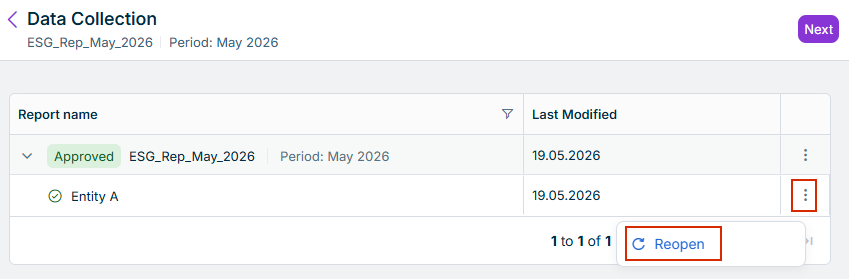
After having approved the report data of the assigned reporting entities of an ESG report, an ESG Administrator can reopen the data collection page for specific reporting entities. The users assigned as ESG Data Collectors can then adjust or add further data for their reporting entity.

1

Navigate to the required ESG report and to the Data Collection page of the reporting entity which is to be given access again to their data collection page.

2

Click the three-dot menu at the right.

3

Select Reopen from the context menu.

The Data Collection page is displayed. The button to reopen the data collection for a single reporting entity is highlighted in red.
Button to reopen the data collection for a single reporting entity

After the Data aggregation step has been finalized, an ESG Administrator can reopen the whole ESG report to collect updated values from the assigned reporting entities.

An aggregated report can be reopened from:

  • The Aggregated report page
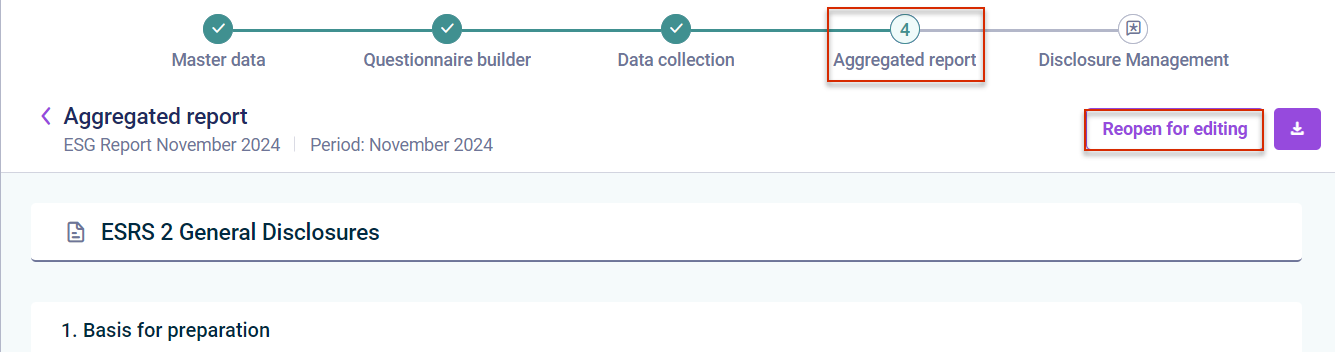
    Reopening an aggregated report from the 'Aggregated report' page

  • The report overview in the ESG Reports workspace

    Reopening an aggregated report from the 'ESG Reports' workspace

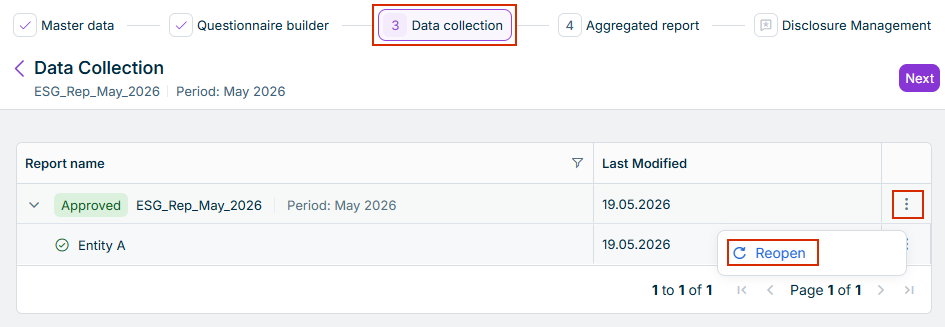
  • The Data Collection page

    Reopening an aggregated report from the 'Data Collection' page

When the window for the Aggregated report page narrows, the Reopen for editing button and the Download icon merge into the Actions button. If necessary, click Actions to continue.

When an approved or aggregated ESG report is reopened, its status, as well as the report statuses of the individual reporting entities, will be set to In Progress. ESG Data Collectors can then edit the values in the ESRS or VSME questionnaire and resubmit the ESG report.

In a reopened ESG report, the ESG Administrator can also edit the additional guidance for questions in the Questionnaire Builder again.