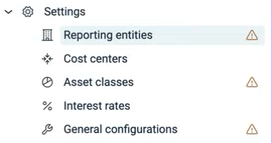
Before you can start accounting for your leases in Lucanet Lease Accounting, you will need to configure a few basic settings in the Settings area. These will form the foundation for your subsequent use of the solution. These comprise:

The first time you open Lease Accounting, a warning icon appears next to General configurations, Reporting entities, and Asset classes in the Settings menu until each section is set up. The icon disappears automatically once the section contains data — for example, after you save the general configurations, import or create a reporting entity, or create an asset class.

Warning icons appear next to the sections that still need to be set up.
Warning icons in the 'Settings' menu

Last updated on Aug 16, 2023