Accounting areas are a master data dimension in Lucanet Lease Accounting. You can assign an accounting area to a contract component in the General information tab.

An accounting area applies either to a specific reporting entity or to all reporting entities.

  • The Accounting areas workspace requires the Full access administrator or Settings administrator role (see User Roles).
  • Accounting areas are also available if you use Lucanet Lease Accounting integrated with Consolidation & Financial Planning. Because this dimension does not exist there, accounting areas are not transferred to Consolidation & Financial Planning.
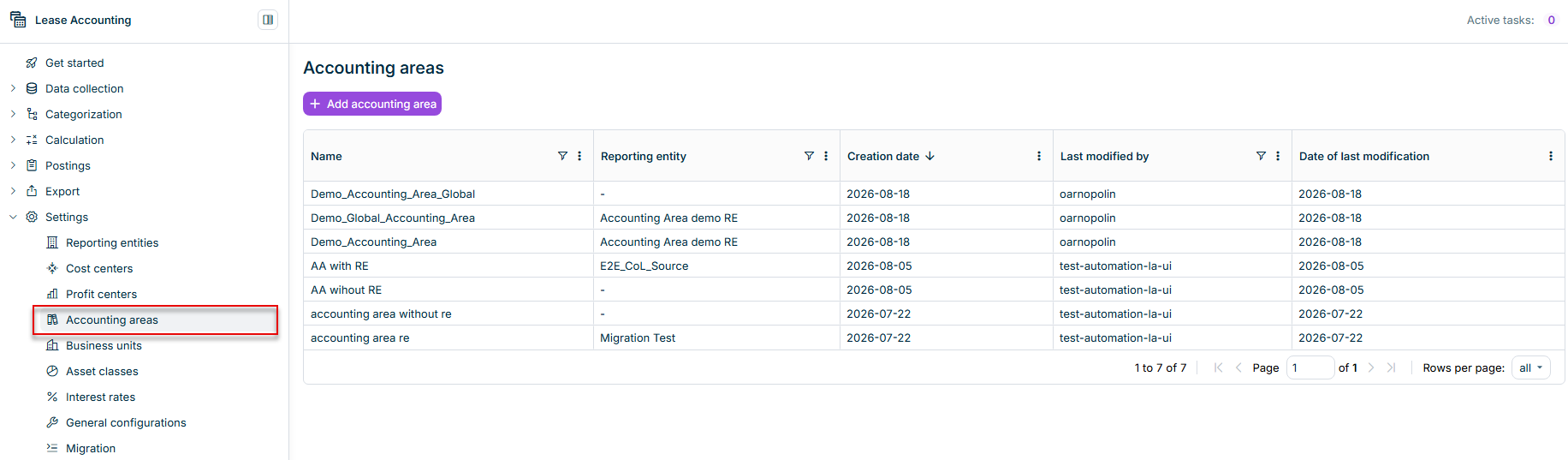
The Accounting areas workspace lists all accounting areas in a table and is displayed as follows, for example:

Displays the Accounting areas workspace with the table of existing accounting areas and the Add accounting area button.
The 'Accounting areas' workspace

To create an accounting area:

1

Navigate to Settings | Accounting areas.

2

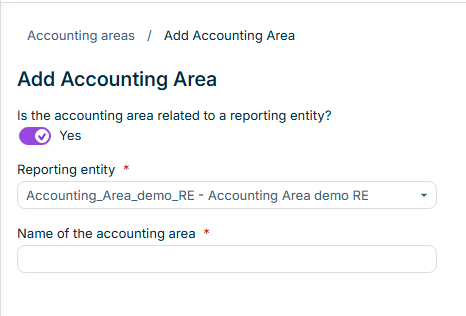
Click Add accounting area. The Add Accounting Area dialog is displayed:

Displays the Add Accounting Area dialog with the reporting entity toggle, the reporting entity drop-down list, and the name field.
The 'Add Accounting Area' dialog
3

Specify whether the accounting area is related to a reporting entity:

  • If Is the accounting area related to a reporting entity? is set to Yes, select the Reporting entity in the drop-down list. By default, the reporting entity you are signed into is selected.
  • If you set the toggle to No, the accounting area is available for all reporting entities.
4

Enter the Name of the accounting area.

5

Click Save. The accounting area is displayed in the Accounting areas table and can be assigned to contract components of the corresponding reporting entity.

Last updated on Sep 2, 2026