Business units are a master data dimension in Lucanet Lease Accounting, in addition to cost centers, profit centers, and accounting areas. You can assign a business unit to a contract component on the General information tab.

A business unit is either related to a specific reporting entity or available for all reporting entities.

  • The Business units workspace requires the Full access administrator or Settings administrator role, see User Roles.
  • Business units are also available if you use Lucanet Lease Accounting integrated with Consolidation & Financial Planning. Consolidation & Financial Planning has no business unit dimension, so the business units that you create in Lease Accounting do not appear in Consolidation & Financial Planning.
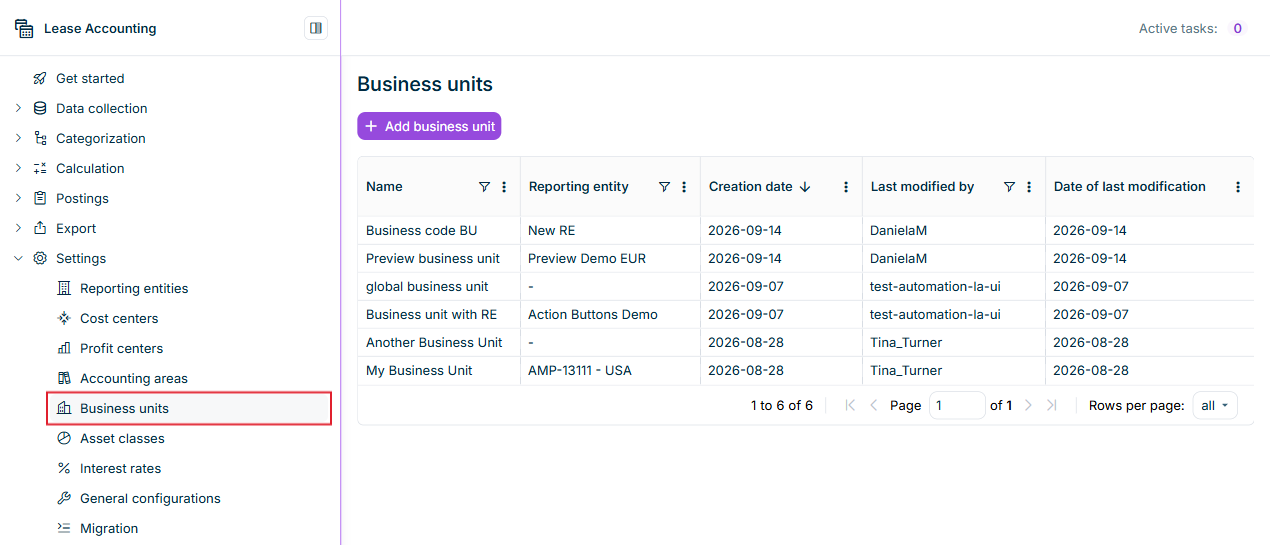
To display the existing business units in Lucanet Lease Accounting, navigate to Settings | Business units. The workspace lists all business units in a table with the columns Name, Reporting entity, Creation date, Last modified by, and Date of last modification. You can sort and filter the columns.

Displays the 'Business units' workspace in Lucanet Lease Accounting with the 'Add business unit' button and the table of existing business units with the columns 'Name', 'Reporting entity', 'Creation date', 'Last modified by', and 'Date of last modification'. Highlighted in red is the 'Business units' entry in the 'Settings' menu.
The 'Business units' workspace

To create a business unit in Lucanet Lease Accounting:

1

Navigate to Settings | Business units.

2

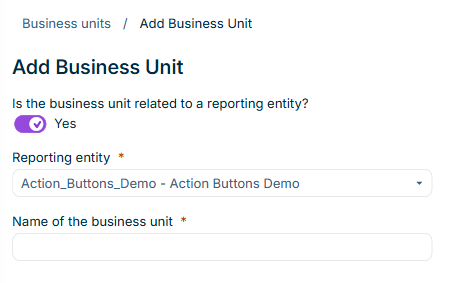
Click Add business unit. The Add Business Unit dialog is displayed:

Displays the 'Add Business Unit' dialog in Lucanet Lease Accounting with the toggle 'Is the business unit related to a reporting entity?' set to 'Yes', the 'Reporting entity' drop-down list, and the 'Name of the business unit' field.
The 'Add Business Unit' dialog
3

Specify whether the business unit is related to a reporting entity:

  • If Is the business unit related to a reporting entity? is set to Yes, select the Reporting entity in the drop-down list. By default, Lucanet Lease Accounting selects the reporting entity that you are signed into.
  • If you set the toggle to No, the business unit is available for all reporting entities.
4

Enter the Name of the business unit. The name must be unique within the selected reporting entity. A business unit for all reporting entities needs a name that no other business unit for all reporting entities uses.

5

Click Save. The business unit is displayed in the Business units table, and you can assign the business unit to contract components of the corresponding reporting entity.

After you have created business units, you can use them in the following places in Lucanet Lease Accounting:

  • Contract components: In the General information tab of a component, the Business unit drop-down list offers the business units for all reporting entities as well as the business units of the component's reporting entity, see Creating and Configuring Contract Components.
  • Modifications: For a calculated component, you can change the business unit with the modification General information | Modify master data dimension | Change business unit. The change applies from the effective date and does not affect any calculation.
  • Reports: You can aggregate the Account balance report by business unit, see Exporting Reports and Postings.

This content was generated using AI and reviewed by Lucanet subject matter experts before publication.