In Lucanet Lease Accounting, contract components are individual elements of a lease contract. Each component enables the precise recording and management of different lease terms, conditions and properties of individual underlying assets within the same lease contract.

This modular approach to recording components offers a high degree of flexibility in accounting for your leases and takes into account the complexity of modern lease contracts.

You can create and configure contract components in the Contract components workspace. You can also modify contract components that have already been calculated.

Lucanet Lease Accounting can only be used for accounting of regular leases in accordance with IFRS 16.3-4. Short-term and low-value leases are therefore not included in the calculation.

As such, we recommend only using this software to record leases that are categorized as regular per IFRS 16.3-4.

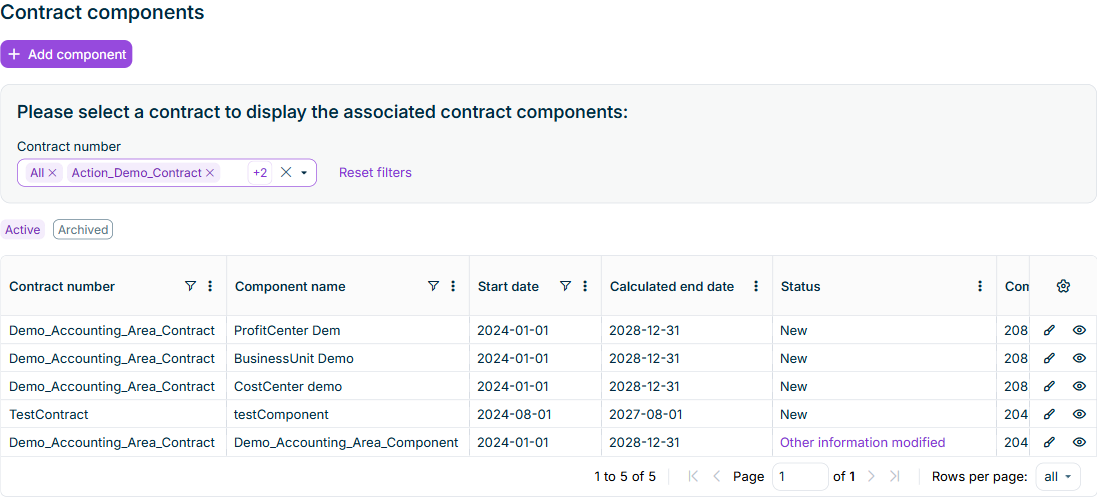
In the Contract components workspace of Lucanet Lease Accounting, you can display the components of one, several, or all contracts of the selected reporting entity. Use the following selection and filter options:

  • In the Contract number drop-down list, select one or several contracts. Select All to display the components of all contracts of the selected reporting entity. The Contract number column identifies the contract of each component.
  • When you select a single contract, you can use Lessor and Start date to narrow down the contract selection. When you select several contracts, these filters are cleared and hidden. All includes every contract of the reporting entity, even if you previously used a lessor or start-date filter.
  • Use Active and Archived to display active or archived components of the selected contracts.
Displays the 'Contract components' workspace in Lucanet Lease Accounting with 'All', 'Action_Demo_Contract', and two further contracts selected under 'Contract number', the 'Add component' button, and a populated component table with the 'Contract number' column.
The 'Contract components' workspace

To create a contract component in Lucanet Lease Accounting:

1

Navigate to Data collection | Contract components.

2

In the Contract number drop-down list, select the contract for which you want to create the component. If you select exactly one contract, that contract is preselected in the New contract component dialog. If you select several contracts or All, the dialog opens without a contract.

3

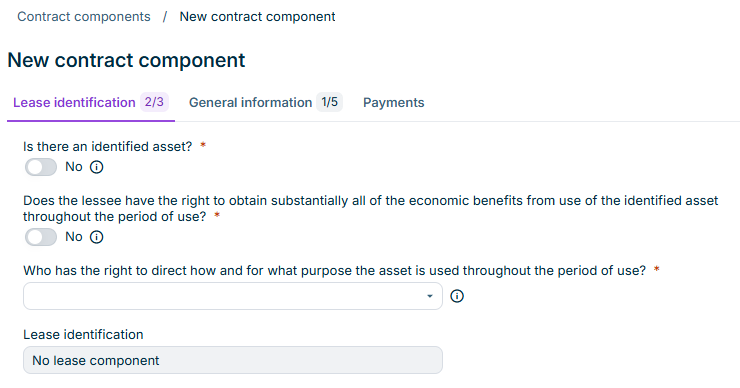
Click Add component. The button is available when the reporting entity has contracts and your role permits creating components. The New contract component dialog is displayed:

Displays the 'New contract component' dialog in Lucanet Lease Accounting with the tabs 'Lease identification', 'General information', and 'Payments', and the questions of the 'Lease identification' tab.
The 'New contract component' dialog
4

If no contract is preselected, select the contract in the External contract number or ID drop-down list on the General information tab.

5

Configure the options as described in Configuring Contract Components in Lease Accounting.

When you configure a contract component in Lucanet Lease Accounting, the following options are available:

The following notes apply to the fields of a contract component in Lease Accounting:

  • Fields marked with a * are mandatory fields. The number of mandatory fields on each tab and how many have already been filled in is displayed next to the name of the tab:

    Shows the 'General information' tab name with the counter '4/4' in Lucanet Lease Accounting. Highlighted in red is the counter of mandatory fields.
    Progress of the mandatory fields

  • Fields that have been grayed out cannot be edited. They are filled in automatically based on the information in Lease Accounting.
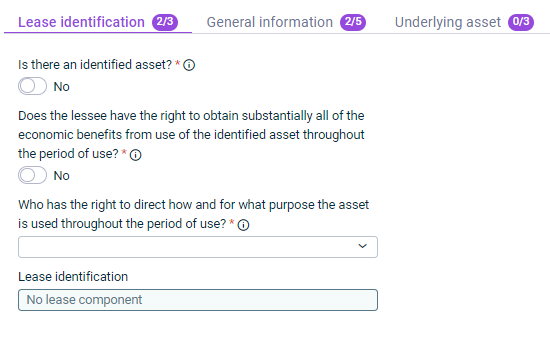
Shows the 'Lease identification' tab of a contract component in Lucanet Lease Accounting with the 'Is there an identified asset?' and 'Does the lessee have the right to obtain substantially all of the economic benefits from use of the identified asset throughout the period of use?' toggles set to 'No', the 'Who has the right to direct how and for what purpose the asset is used throughout the period of use?' drop-down list, and the 'Lease identification' field with the value 'No lease component'.
'Lease identification' tab

The following table describes the options on the Lease identification tab of a contract component in Lease Accounting:

OptionDescription
Is there an identified asset?Specify whether the contract component is an asset that is identified in accordance with IFRS 16.3-4.
Does the lessee have the right to obtain substantially all of the economic benefits from use of the identified asset throughout the period of use?Specify whether the lessee derives substantially all of the economic benefit of the asset during its useful life.

Note: Economic benefits can be fixed, consumption-independent payments, such as fixed basic rents.
Who has the right to direct how and for what purpose the asset is used throughout the period of use?Specify whether the lessee (CUSTOMER), the lessor (SUPPLIER), or neither party (NEITHER) makes the decisions about the nature and purpose of the use of the asset.

If you select NEITHER, use the additional questions to specify whether:
• The lessee has the right to operate the asset throughout the period of use, without the lessor having the right to change those operating instructions.
• The lessee designed the asset in a way that predetermines how and for what purpose the asset will be used throughout the period of use?

Note: In some cases the relevant decisions about how and for what purpose the asset is used are predetermined. For example, the lessee has the right to direct how and for what purpose the asset is used if he
• is able to transform a building originally used for administrative purposes into a production building.
• is able to use a vehicle originally used in Germany autonomously in a foreign country.
• decides about the produced parts.
Lease identificationBased on the information you enter on this tab, this is where Lease Accounting automatically displays whether the component is identified as a leasing component.

Note: If the component is identified here as a non-lease component, you can cancel the recording of the components, as the component does not then have to be accounted for in accordance with IFRS 16.
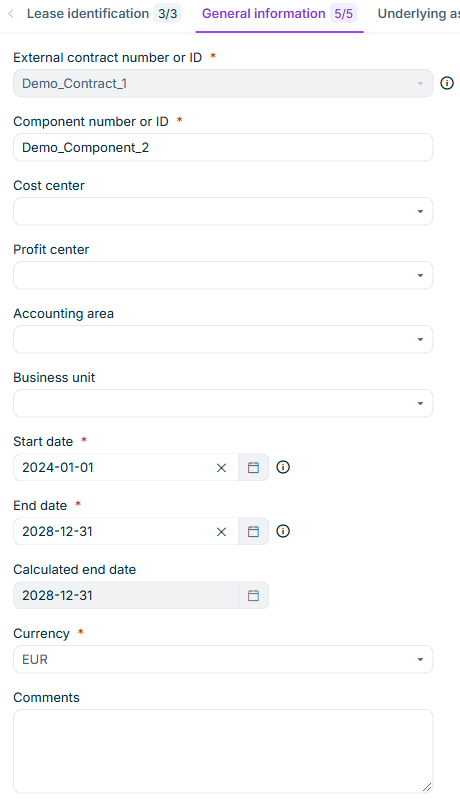
Shows the 'General information' tab of a contract component in Lucanet Lease Accounting with the fields 'External contract number or ID' set to 'Demo_Contract_1', 'Component number or ID' set to 'Demo_Component_2', 'Cost center', 'Profit center', 'Accounting area', 'Business unit', 'Start date' set to '2024-01-01', 'End date' and 'Calculated end date' set to '2028-12-31', 'Currency' set to 'EUR', and 'Comments'.
‘General Information’ Tab

The following table describes the options on the General information tab of a contract component in Lease Accounting:

OptionDescription
External contract number or IDSpecifies the contract to which the component belongs. If you have selected exactly one contract in the Contract components workspace, that contract is preselected.
Component number or IDIdentification number for the component
Cost centerCost center for the component
Profit centerOptional profit center for the component. The drop-down list offers the profit centers that are available for all reporting entities as well as the profit centers of the component's reporting entity, filtered by the selected cost center.
Accounting areaOptional accounting area for the component. The drop-down list offers the accounting areas that are available for all reporting entities as well as the accounting areas of the component's reporting entity.
Business unitOptional business unit for the component. The drop-down list offers the business units that are available for all reporting entities as well as the business units of the component's reporting entity.
Start dateStart date of utilization of the related component
End dateEnd date of utilization of the related component without considering extension and/or termination options
Component currencyCurrency in which the component should be calculated. By default, the functional currency of the selected reporting entity (lessee) is displayed.
CommentsOptional comments on the details configured on this tab
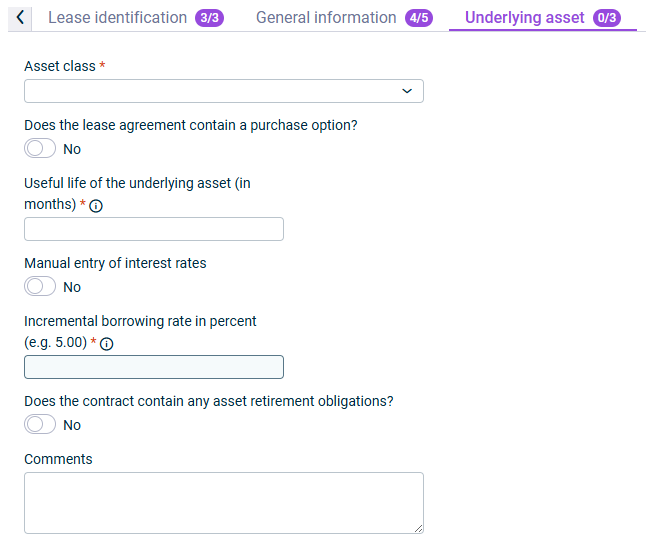
Shows the 'Underlying asset' tab of a contract component in Lucanet Lease Accounting with the 'Asset class' drop-down list, the 'Does the lease agreement contain a purchase option?' toggle set to 'No', the 'Useful life of the underlying asset (in months)' field, the 'Manual entry of interest rates' toggle set to 'No', the 'Incremental borrowing rate in percent (e.g. 5.00)' field, the 'Does the contract contain any asset retirement obligations?' toggle set to 'No', and the 'Comments' field.
'Underlying asset' tab

The following table describes the options on the Underlying asset tab of a contract component in Lease Accounting:

OptionDescription
Asset classAsset class of the component
Does the lease agreement contain a purchase option?Specify whether a purchase option has been agreed for the component.

If Yes, configure the details of the purchase option(s) by clicking Add row in the table that appears and specifying the following:
• Date of purchase option
• Value of purchase option
• Whether the exercise of the purchase option is reasonably certain
Useful life of the underlying asset (in months)Period during which an asset is available for use by the company
Manual entry of interest ratesEnable this option to manually enter a new interest rate in the field Incremental borrowing rate in percent, which will override the value defined during the interest rate creation, if any interest rates were configured.

Note: You can still enable or disable manual entry of interest rates during the modification of contract components, specifically for the following modification parameters:
• Lease term | Extension option/Termination option (if reasonably certain option is activated)
• Payments | Payments
• Asset information | Purchase option (if reasonably certain option is activated)
• General information | Base lease term | Contract term reduction/extension
Incremental borrowing rate in percent (e.g. 5.00)• When Manual entry of interest rates is deactivated: This field is automatically populated with the pre-configured interest rate specific to the selected asset class, if an interest rate was set. If no interest rate was set, the field will remain empty or display 0.
• When Manual entry of interest rates is activated: This field is left empty, and you need to manually enter an interest rate. The manually entered rate will override the interest rate derived from the interest rate configuration.

Note: The lease liability is measured on initial recognition at the present value of future lease payments. For this, the future lease payments are discounted with the incremental borrowing rate of the reporting entity. The incremental borrowing rate is the interest rate that the reporting entity would have agreed to inception date of the lease, if it had to borrow funds for the same period for the purchase of the leased property.
Does the contract contain any asset retirement obligations?Specify whether the contract contains any asset retirement obligations.

If yes, enter the present value of the amount of the obligation (in component currency).
CommentsOptional comments on the details configured on this tab
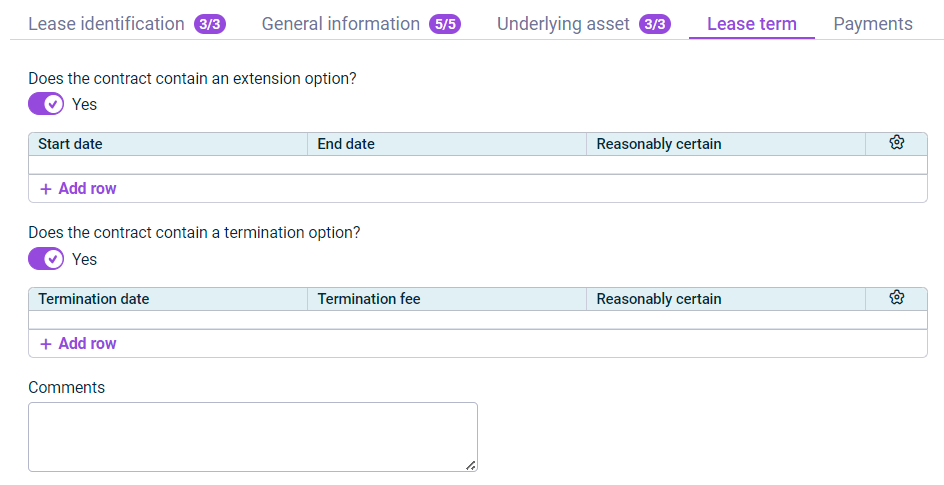
Shows the 'Lease term' tab of a contract component in Lucanet Lease Accounting with the 'Does the contract contain an extension option?' toggle set to 'Yes' and a table with the columns 'Start date', 'End date', and 'Reasonably certain', the 'Does the contract contain a termination option?' toggle set to 'Yes' and a table with the columns 'Termination date', 'Termination fee', and 'Reasonably certain', the 'Add row' links, and the 'Comments' field.
'Lease term' tab

The following table describes the options on the Lease term tab of a contract component in Lease Accounting:

OptionDescription
Does the contract contain an extension option?Specify whether an extension option has been agreed for the component.

If Yes, configure the details of the extension option(s) by clicking Add row in the table that appears and specifying the following:
• Start and end date of the extension option(s)
• Whether the exercise of the extension option is reasonably certain
• The following payment details for each individual extension option that was created by adding a row

Note: A detailed description of the individual fields that are configured in the Create payment dialog can be found in the description of the Payments tab.
Does the contract contain a termination option?Specify whether a termination option has been agreed for the component.

If Yes, configure the details of the termination option(s) by clicking Add row in the table that appears and specifying the following:
• Termination date
• Is it reasonably certain to exercise the option to terminate the lease?
• Are there any additional payments of penalties for terminating the lease agreed in the contract?
• Amount of payments of penalties for terminating the lease (in component currency)
CommentsOptional comments on the details configured on this tab
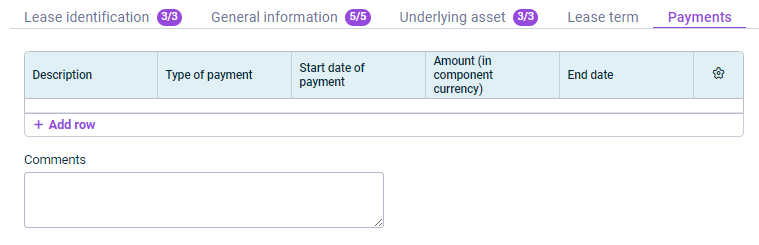
Shows the 'Payments' tab of a contract component in Lucanet Lease Accounting with a table with the columns 'Description', 'Type of payment', 'Start date of payment', 'Amount (in component currency)', and 'End date', the 'Add row' link, and the 'Comments' field.
'Payments' tab

Add the individual payments for the lease component by clicking Add row and specifying the following:

For single payments

The following table describes the options for a single payment on the Payments tab in Lease Accounting:

OptionDescription
Regular paymentSpecifies whether the payment is a regular payment or a single payment.

For a single payment, choose No.
DescriptionDescription for the payment.

Examples for real estate: basic rent; prepayment operating expenses; rent for 1st floor, etc.
Payment amount in component currencyAmount entered in the contract for the payment (in component currency)
Payment date of the single paymentTime agreed for the single payment

For regular payments

The following table describes the options for a regular payment on the Payments tab in Lease Accounting:

OptionDescription
Regular paymentSpecifies whether the payment is a regular payment or a single payment.

For a regular payment, choose Yes.
DescriptionDescription for the payment.

Examples for real estate: basic rent; prepayment operating expenses; rent for 1st floor, etc.
Payment amount in component currencyAmount entered in the contract for the payment (in component currency)
Type of regular paymentSpecifies whether the payment is a fixed payment or a variable payment.
Start and end dates of paymentsFirst and last dates of the payments

Note: The start and end dates of the payments define the interval for a series of payments in Lease Accounting in order to represent contract-specific payment terms. The start and end dates of payments may differ from the start and end of the contract.
Payment patternChoose whether payment is made yearly, half-yearly, quarterly, or monthly.
Are the payments made in advance?Specifies whether the payments are in advance, i.e. that the payments must be made at the beginning of the period.
Start month of the first complete period of regular paymentsMonth in which the first full regular payment is made (in format MM-DD)

Examples:
• Calendar month payments in arrears
• Start of component term: 13 March 2022

I.e. the first full payment for a whole calendar month takes place in April. The start date of the first full period of regular payments is therefore (MM-DD): 04-01

Note: If terms of payment cause regular payments to be scheduled at dates outside the defined component term, please set up those specific payments as single payments using the respective part of the payment dialog. The Lease Accounting validation will not consider regular payments scheduled for dates outside the defined component term.
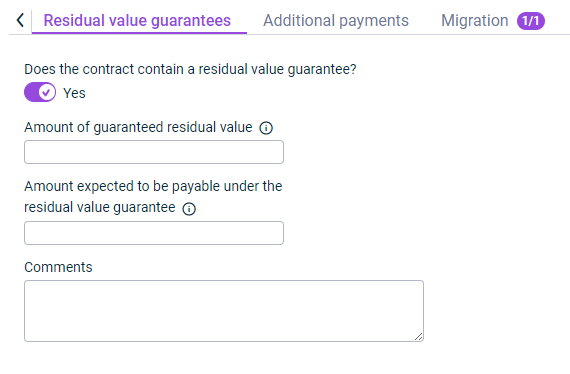
Shows the 'Residual value guarantees' tab of a contract component in Lucanet Lease Accounting with the 'Does the contract contain a residual value guarantee?' toggle set to 'Yes', the fields 'Amount of guaranteed residual value' and 'Amount expected to be payable under the residual value guarantee', and the 'Comments' field.
'Residual value guarantees' tab

The following table describes the options on the Residual value guarantees tab of a contract component in Lease Accounting:

OptionDescription
Does the contract contain a residual value guarantee?Specify whether a residual value guarantee has been agreed for the component.

If Yes, configure the details of the residual value guarantee by entering the following in the displayed fields:
• Amount of guaranteed residual value
• Amount expected to be payable under the residual value guarantee
CommentsOptional comments on the details configured on this tab
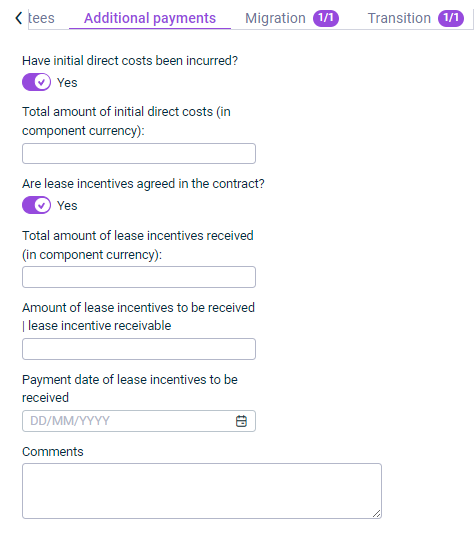
Shows the 'Additional payments' tab of a contract component in Lucanet Lease Accounting with the 'Have initial direct costs been incurred?' toggle set to 'Yes', the 'Total amount of initial direct costs (in component currency):' field, the 'Are lease incentives agreed in the contract?' toggle set to 'Yes', the fields 'Total amount of lease incentives received (in component currency):', 'Amount of lease incentives to be received | lease incentive receivable', and 'Payment date of lease incentives to be received', and the 'Comments' field.
'Additional payments' tab

The following table describes the options on the Additional payments tab of a contract component in Lease Accounting:

OptionDescription
Have initial direct costs been incurred?Specify whether initial direct costs have been incurred.

If Yes, also specify the Total amount of initial direct costs: (in component currency).
Are lease incentives agreed in the contract?Indicate whether incentive payments by the lessor have been agreed in the contract.

If yes, specify the following:
• The Total amount of lease incentives received (in component currency)
• The Amount of lease incentives to be received | lease incentive receivable
• The Payment date of lease incentives to be received
CommentsOptional comments on the details configured on this tab

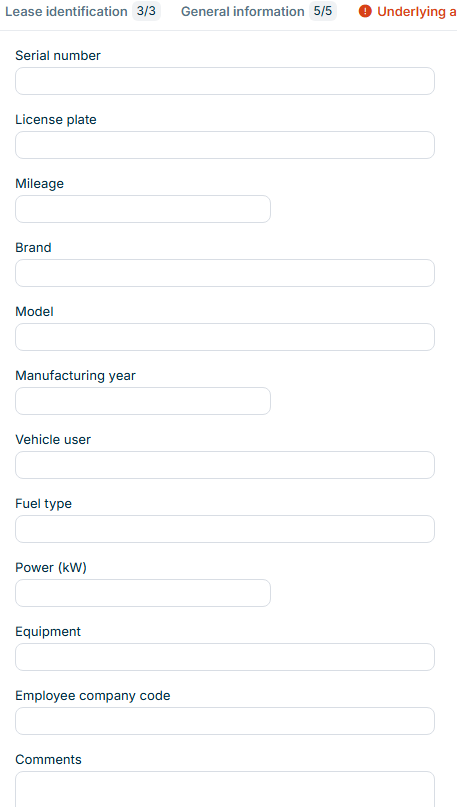
The Car fleet tab is displayed if the asset class selected in the Underlying asset tab collects car fleet details — that is, if Additional asset details is set to Car fleet for the asset class. Use this tab to record vehicle details for the component.

Shows the fields of the 'Car fleet' tab of a contract component in Lucanet Lease Accounting: 'Serial number', 'License plate', 'Mileage', 'Brand', 'Model', 'Manufacturing year', 'Vehicle user', 'Fuel type', 'Power (kW)', 'Equipment', 'Employee company code', and 'Comments'.
'Car fleet' tab

On this tab, you can record details such as the serial number, license plate, mileage, brand and model, the vehicle user, and comments. All fields on this tab are optional. Lucanet Lease Accounting saves the details with the component and includes them when you copy the component.

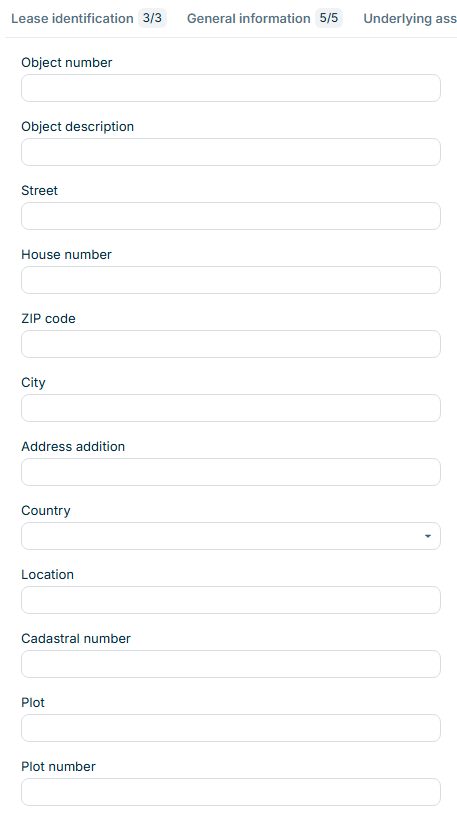
The Real estate tab is displayed if the asset class selected in the Underlying asset tab collects real estate details — that is, if Additional asset details is set to Real estate for the asset class. Use this tab to record property details for the component.

Shows the fields of the 'Real estate' tab of a contract component in Lucanet Lease Accounting, including 'Object number', 'Object description', 'Street', 'House number', 'ZIP code', 'City', 'Address addition', 'Country', 'Location', 'Cadastral number', 'Plot', and 'Plot number'.
'Real estate' tab

On this tab, you can record details such as the object number, the address, cadastral details, area sizes, and comments. In the Reference value field, you specify which of the recorded values serves as the reference value for the property, for example the total area or the number of workplaces. All fields on this tab are optional. Lucanet Lease Accounting saves the details with the component and includes them when you copy the component.

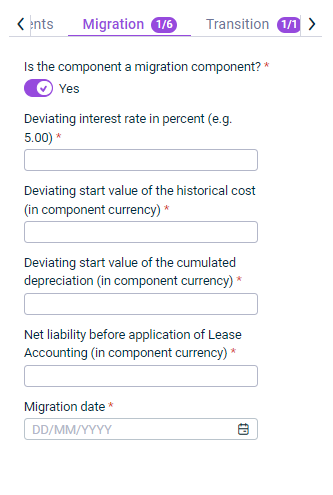
Shows the 'Migration' tab of a contract component in Lucanet Lease Accounting with the 'Is the component a migration component?' toggle set to 'Yes' and the fields 'Deviating interest rate in percent (e.g. 5.00)', 'Deviating start value of the historical cost (in component currency)', 'Deviating start value of the cumulated depreciation (in component currency)', 'Net liability before application of Lease Accounting (in component currency)', and 'Migration date'.
'Migration' tab

The following table describes the options on the Migration tab of a contract component in Lease Accounting:

OptionDescription
Is the component a migration component?Specify whether this is a component that has already been accounted for in accordance with IFRS 16 and is now being migrated to Lucanet Lease Accounting.

If Yes, also specify the following details that will change when migrating to Lucanet Lease Accounting:
• Deviating interest rate in percent
• Deviating start value of the historical cost (in component currency)
• Deviating start value of the cumulated depreciation (in component currency)
• Net liability before application of Lease Accounting (in component currency)
• Migration date
CommentsOptional comments on the details configured on this tab
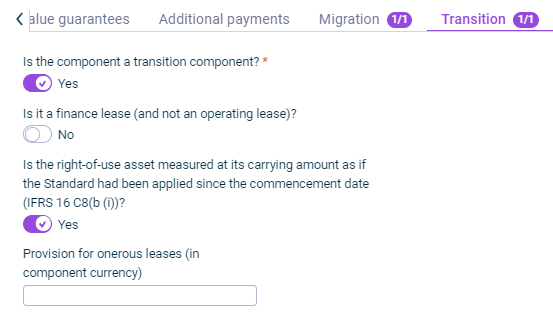
Shows the 'Transition' tab of a contract component in Lucanet Lease Accounting with the 'Is the component a transition component?' toggle set to 'Yes', the 'Is it a finance lease (and not an operating lease)?' toggle set to 'No', the 'Is the right-of-use asset measured at its carrying amount as if the Standard had been applied since the commencement date (IFRS 16 C8(b (i)))?' toggle set to 'Yes', and the 'Provision for onerous leases (in component currency)' field.
'Transition' tab

The following table describes the options on the Transition tab of a contract component in Lease Accounting:

OptionDescription
Is the component a transition component?Specify whether this is a transition component, i.e. a component for which IFRS 16 is being applied for the first time.

If Yes, also differentiate between:
• Whether it is an operating lease or a finance lease
• Whether it is a provision for onerous leases or an impairment

Then configure the fields that are displayed based on the selection made.

Example configuration — finance lease:
• Deviating interest rate in percent (e.g. 5.00)
• Deviating start value of the historical cost (in component currency)
• Deviating start value of the cumulated depreciation (in component currency)
• Net liability according to IAS 17 (in component currency)

Example configuration — operating lease with provision for onerous leases:
• Is the right-of-use asset measured at its carrying amount as if the Standard had been applied since the commencement date (IFRS 16 C8(b(i)))?
• Prepaid payments (in component currency)
• Accrued payments (in component currency)
• Provision for onerous leases (in component currency)
CommentsOptional comments on the details configured on this tab

To edit a component that you have not yet calculated in Lucanet Lease Accounting, click the pencil icon Pencil icon and configure the tabs as described in Configuring Contract Components in Lease Accounting.

If components have already been calculated, the fields of the tabs cannot be edited. Instead, the components must be modified as described in the following steps.

To modify a contract component that has already been calculated in Lucanet Lease Accounting:

1

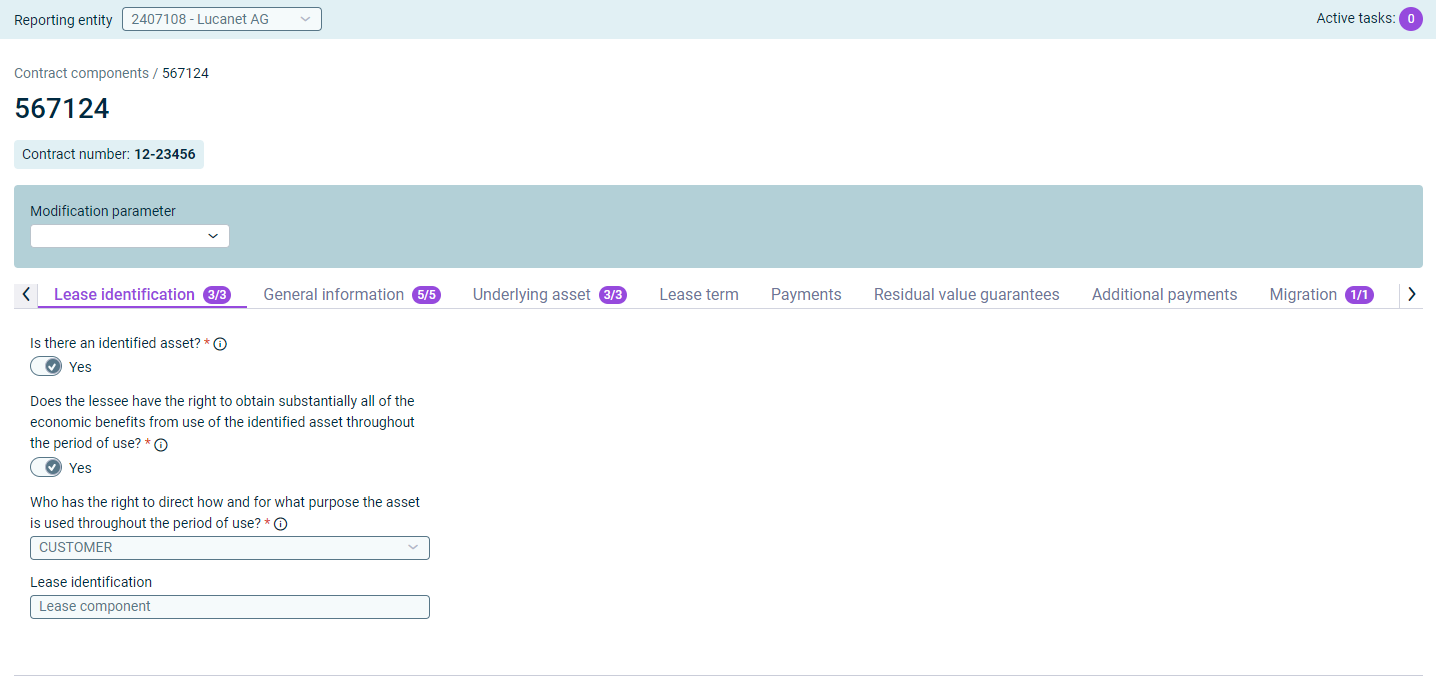
In the overview table, click the brush icon Brush icon in the row of the component. The component details are displayed:

Shows the detail view of the contract component '567124' in Lucanet Lease Accounting with the label 'Contract number: 12-23456', the 'Modification parameter' drop-down list, and the 'Lease identification' tab, on which the questions are answered with 'Yes' and 'CUSTOMER' and the 'Lease identification' field displays 'Lease component'.
Modify component
2

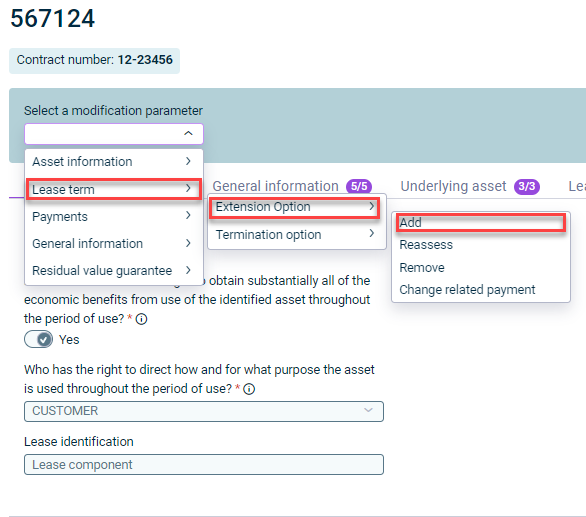
Open the modification parameters and select the change you want to implement by navigating through the displayed drop-down menu. For example, to add an extension option, select Lease Term | Extension Option | Add:

Shows the opened 'Select a modification parameter' drop-down list of the contract component '567124' in Lucanet Lease Accounting with the options 'Asset information', 'Lease term', 'Payments', 'General information', and 'Residual value guarantee', the submenu with 'Extension Option' and 'Termination option', and the submenu with 'Add', 'Reassess', 'Remove', and 'Change related payment'. Highlighted in red are 'Lease term', 'Extension Option', and 'Add'.
Add extension option
3

Configure the data in the displayed configuration dialog. For more information, see Configuring Contract Components in Lease Accounting.

4

In each configuration dialog, specify the effective date from which the modification is to be included in the calculation.

5

Click Save.

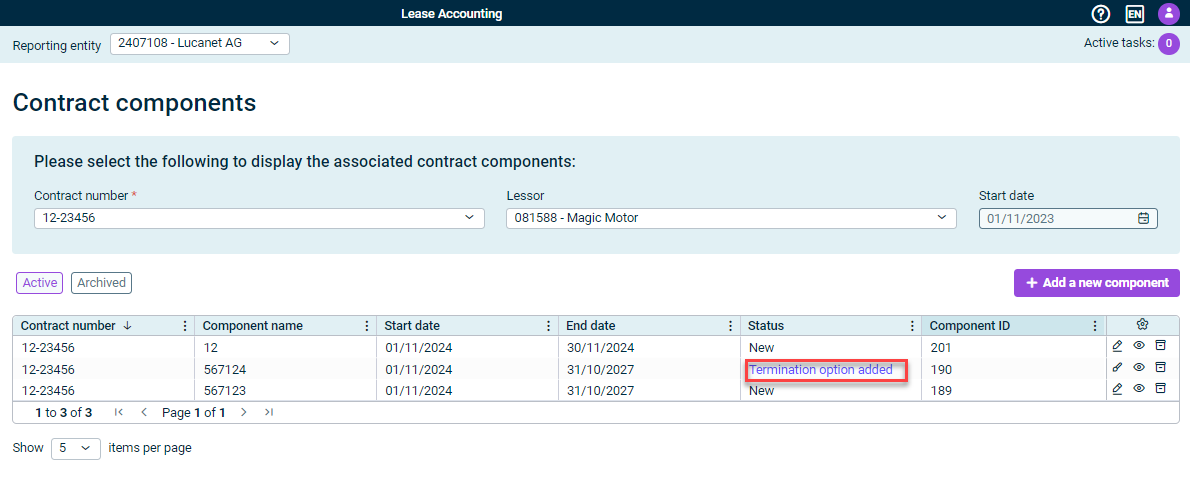
The last modification made is displayed in the overview table in the Status column:

Shows the 'Contract components' workspace in Lucanet Lease Accounting with the 'Contract number' drop-down list set to '12-23456', the 'Lessor' drop-down list set to '081588 - Magic Motor', the 'Add a new component' button, and a table of three components, in which the 'Status' column displays 'New' and 'Termination option added'. Highlighted in red is the status 'Termination option added'.
Modified component
6

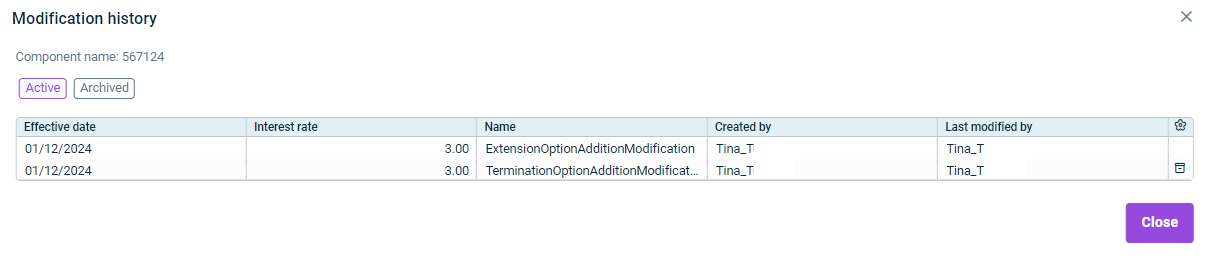
If applicable, click the modification in the Status column to display the modification history of the component:

Shows the 'Modification history' dialog of the component '567124' in Lucanet Lease Accounting with the 'Active' and 'Archived' buttons, a table with the columns 'Effective date', 'Interest rate', 'Name', 'Created by', and 'Last modified by' that lists the modifications 'ExtensionOptionAdditionModification' and 'TerminationOptionAdditionModificat...', and the 'Close' button.
Modification history of a component

For a modified component to be taken into account in postings, you must calculate and save the components as described under Calculating Data.

Components that have been calculated can be modified through modification parameters. The following modification parameters are available in Lease Accounting:

The following modification parameters are available for the underlying asset:

  • Purchase option
  • Change to the useful life of the asset
  • Proportional scope reduction
  • Impairment
  • Add/Edit Asset retirement obligation
  • Change asset class
  • Car fleet modification – only for components whose asset class records car fleet data
  • Real estate modification – only for components whose asset class records real estate data

The following modification parameters are available for the lease term:

  • Extension option
  • Termination option

The following modification parameter is available for payments:

  • Payments

The following modification parameters are available for the general information:

  • Base lease term
  • Modify master data dimension:
    • Change cost center
    • Change profit center
    • Change accounting area
    • Change business unit

In each dialog, the current value is displayed. Select the new value and specify the Effective date (first month). The change creates a new component event: postings from the effective date use the new value, and historical postings remain unchanged. Master data dimension changes are statistical only — they do not affect any calculation, such as the interest rate, the right-of-use asset, or the lease liability.

The following modification parameters are available for the residual value guarantee:

  • Reassess or add a residual value guarantee
  • Reassess or add an expected payment

This content was generated using AI and reviewed by Lucanet subject matter experts before publication.