The calculation process in Lucanet Lease Accounting assesses the contract components and liabilities in accordance with IFRS 16 and calculates the values accordingly.

You can generate a preview of the contract component assessment to check that all the information and calculations are correct.

Once this is done, you can start the final calculation of the contract components. During calculation, the calculated values for the contract components are saved for future postings.

Before saving the assessed and calculated values for the contract components and liabilities in Lease Accounting, you can preview the calculated data for every contract component that has already been categorized.

To generate a preview in Lease Accounting, proceed as follows for each individual component:

1

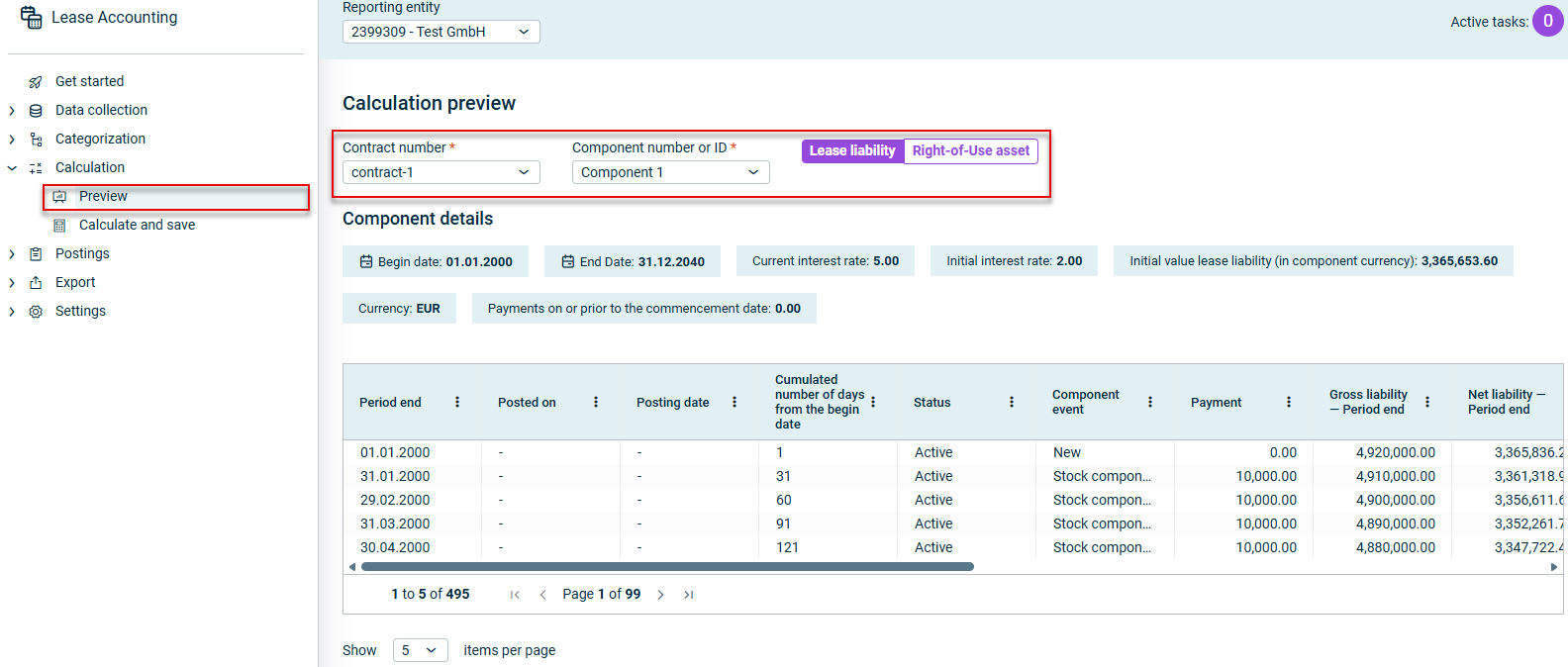
Open the Preview workspace:

Shows the 'Calculation preview' workspace in Lucanet Lease Accounting with the 'Contract number' drop-down list set to 'contract-1', the 'Component number or ID' drop-down list set to 'Component 1', the 'Lease liability' and 'Right-of-Use asset' buttons, the 'Component details' section, and a table of calculated values. Highlighted in red are the 'Preview' item in the 'Calculation' navigation folder and the selection fields and buttons at the top of the workspace.
The ‘Preview’ workspace
2

Select the Contract number and Component number or ID for the components you want to calculate.

Note: The list includes all the contracts and components that have already been categorized, but whose final values have not yet been calculated and saved in Lease Accounting.

3

Select whether you want to calculate the Lease liability or the Right-of-Use asset for the component.

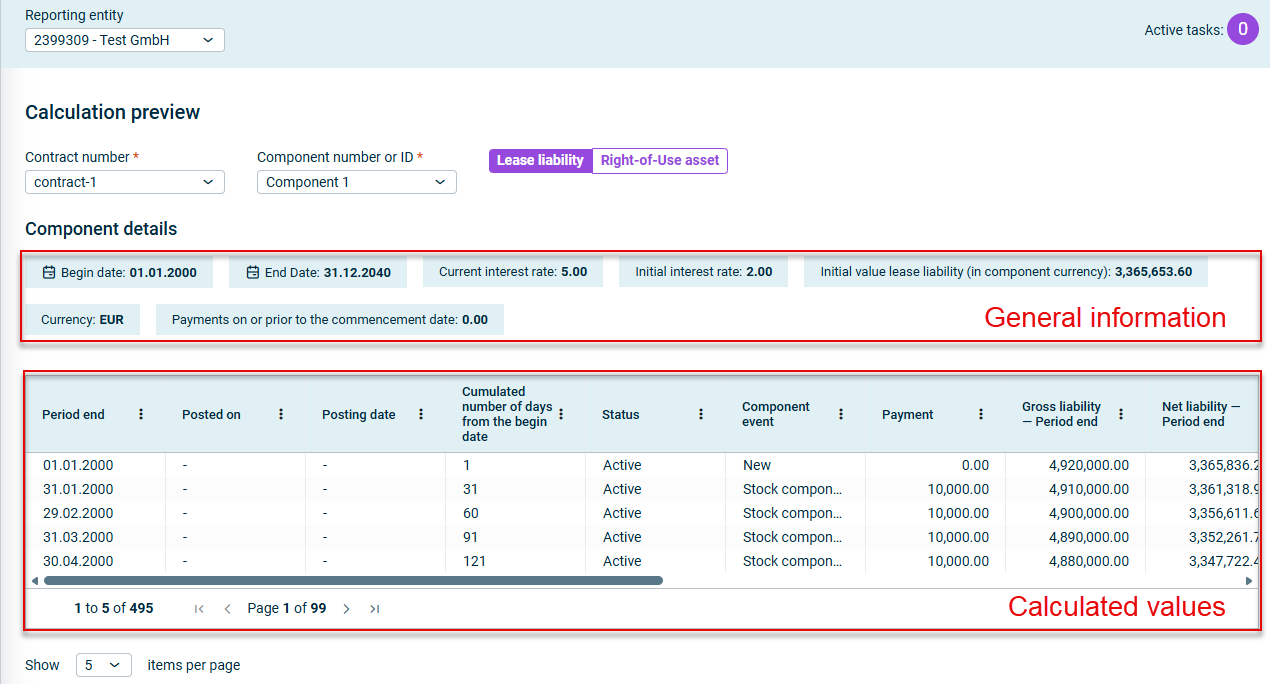
The calculation preview in Lease Accounting contains a summary of the following information:

  • The top section displays the general information used to calculate the components as per your configuration.
  • The table provides details on the calculated values.
Shows an example of a calculation preview in Lucanet Lease Accounting for 'contract-1' and 'Component 1' with the 'Component details' section, which contains 'Begin date', 'End Date', 'Current interest rate', 'Initial interest rate', 'Initial value lease liability (in component currency)', 'Currency', and 'Payments on or prior to the commencement date', and a table with the columns 'Period end', 'Posted on', 'Posting date', 'Cumulated number of days from the begin date', 'Status', 'Component event', 'Payment', 'Gross liability — Period end', and 'Net liability — Period end'. Highlighted in red are the component details, labeled 'General information', and the table, labeled 'Calculated values'.
Example of a calculation preview

Exporting Calculation Preview

You can export the calculated values from the calculation preview table as a CSV or Excel file. To do so, right-click any row and choose Export | CSV export or Excel export.

Once you have used the preview to check the values of all the components, you can perform the final calculation for the calculated values and save them in the Lease Accounting database.

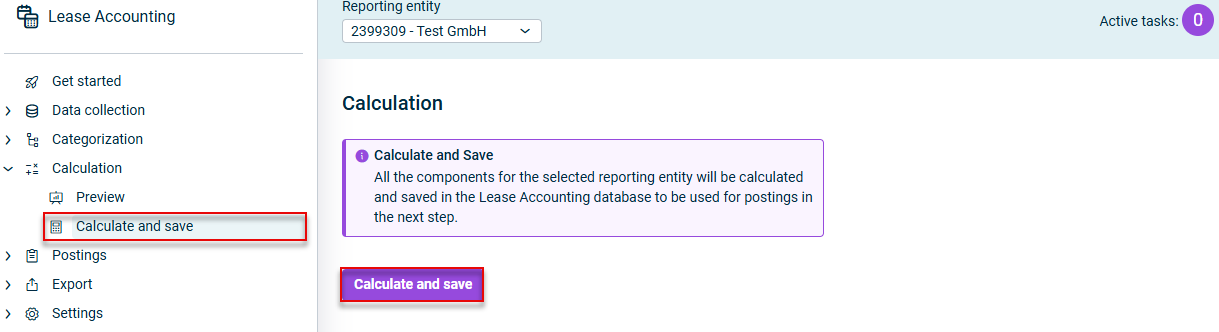
To do this, open the Calculate and save workspace and click Calculate and save.

Shows the 'Calculation' workspace in Lucanet Lease Accounting with the 'Calculate and Save' message 'All the components for the selected reporting entity will be calculated and saved in the Lease Accounting database to be used for postings in the next step.' and the 'Calculate and save' button. Highlighted in red are the 'Calculate and save' item in the 'Calculation' navigation folder and the 'Calculate and save' button.
The 'Calculation' workspace

The Calculate and save button saves all the components for the selected reporting entities in the database that have been categorized but not yet saved.

As such, make sure you check the values for all the components that can be included in the Preview workspace before pressing this button.

This content was generated using AI and reviewed by Lucanet subject matter experts before publication.