In Lucanet Lease Accounting, a lessor is the party that owns the underlying asset and transfers it to another party, the lessee, for a contractually agreed lease term, under certain conditions. Lessors are the contracting parties that provide the basis for lease contracts in Lease Accounting.

Lessors are created and configured in the workspace of the same name.

As an alternative to manual creation, lessors can also be added by importing a CSV file (see Importing Data Automatically).

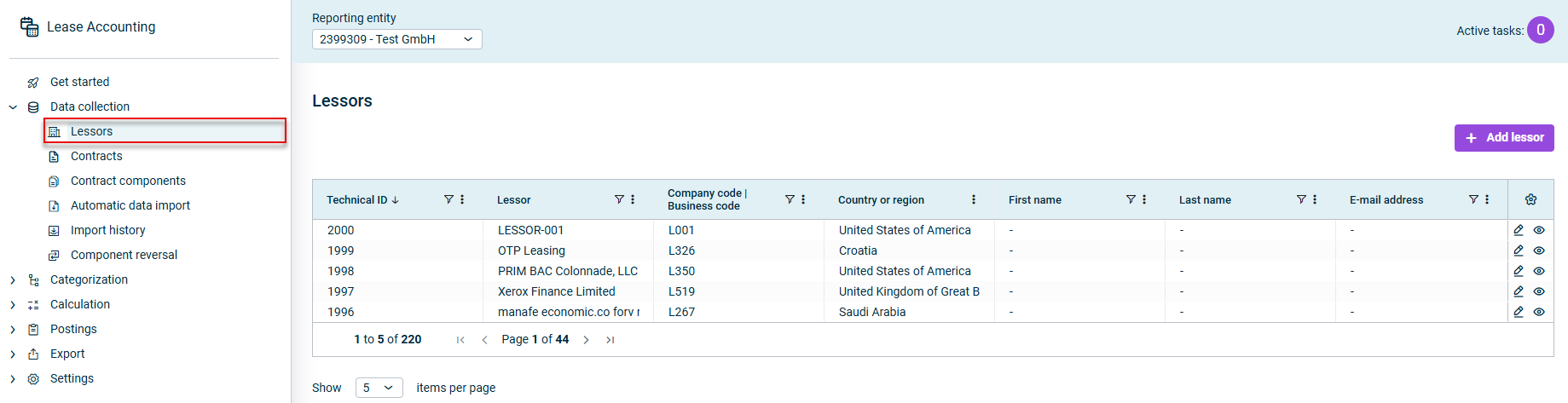
The Lessors workspace in Lease Accounting displays all the lessors that have already been created:

Shows the 'Lessors' workspace in Lucanet Lease Accounting with the 'Reporting entity' drop-down list, the 'Add lessor' button, and a table with the columns 'Technical ID', 'Lessor', 'Company code | Business code', 'Country or region', 'First name', 'Last name', and 'E-mail address'. Highlighted in red is the 'Lessors' workspace in the 'Data collection' navigation.
The 'Lessors' workspace

To create a new lessor in Lease Accounting, click Add lessor.

In the displayed dialog, configure the options for the New lessor as described in Configuring a Lessor in Lease Accounting.

When configuring a lessor in Lease Accounting, the following options are available:

Fields marked with a * are mandatory fields. The number of mandatory fields in each tab and how many have already been filled in is displayed next to the name of the tab:

Shows the 'General information' tab name with the counter '4/4' in Lucanet Lease Accounting. Highlighted in red is the counter of mandatory fields.
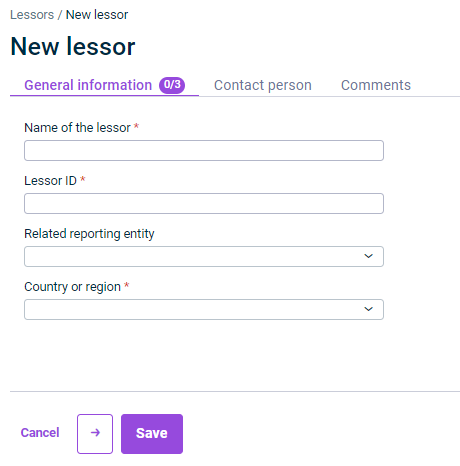
Shows the 'General information' tab of a new lessor in Lucanet Lease Accounting with the fields 'Name of the lessor', 'Lessor ID', 'Related reporting entity', and 'Country or region', the counter '0/3', the 'Contact person' and 'Comments' tabs, and the 'Cancel' and 'Save' buttons.
The 'General information' tab

The following table describes the options on the General information tab of a lessor in Lease Accounting:

OptionDescription
Name of the lessorName of the lessor
Lessor IDCreditor number for the lessor
Related reporting entityThe reporting entity to which the lessor can be assigned as the sole contractual partner (lessee)

Note:
• All reporting entities that have been imported in Lease Accounting are available for selection.
• If the lessor is a contractual partner to several different lessees, this field must be left empty.
Country or regionDisplays the lessor’s country or region

Note: You can select the required entry in the drop-down list or search for it using the Search box.
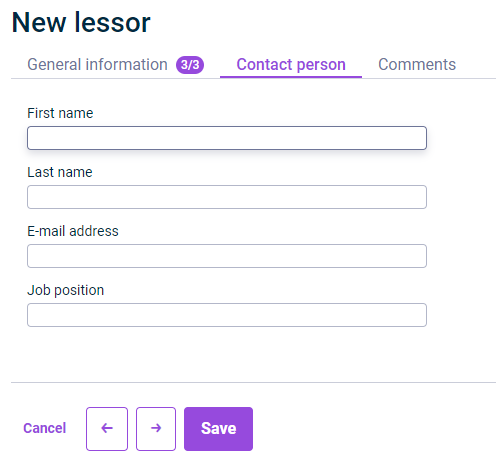
Shows the 'Contact person' tab of a new lessor in Lucanet Lease Accounting with the fields 'First name', 'Last name', 'E-mail address', and 'Job position', and the 'Cancel' and 'Save' buttons.
The 'Contact person' tab

The following table describes the options on the Contact person tab of a lessor in Lease Accounting:

OptionDescription
First nameFirst name of the lessor’s contact person
Last nameSurname of the lessor’s contact person
E-mail addressThe contact person's e-mail address
Job positionThe contact person’s position
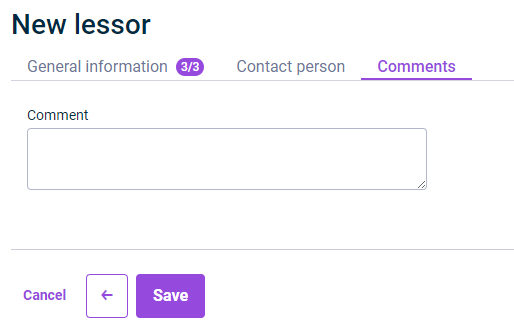
Shows the 'Comments' tab of a new lessor in Lucanet Lease Accounting with the 'Comment' text box and the 'Cancel' and 'Save' buttons.
The 'Comments' tab

Use the Comments tab to add comments on the lessor in a plain text box.

This content was generated using AI and reviewed by Lucanet subject matter experts before publication.