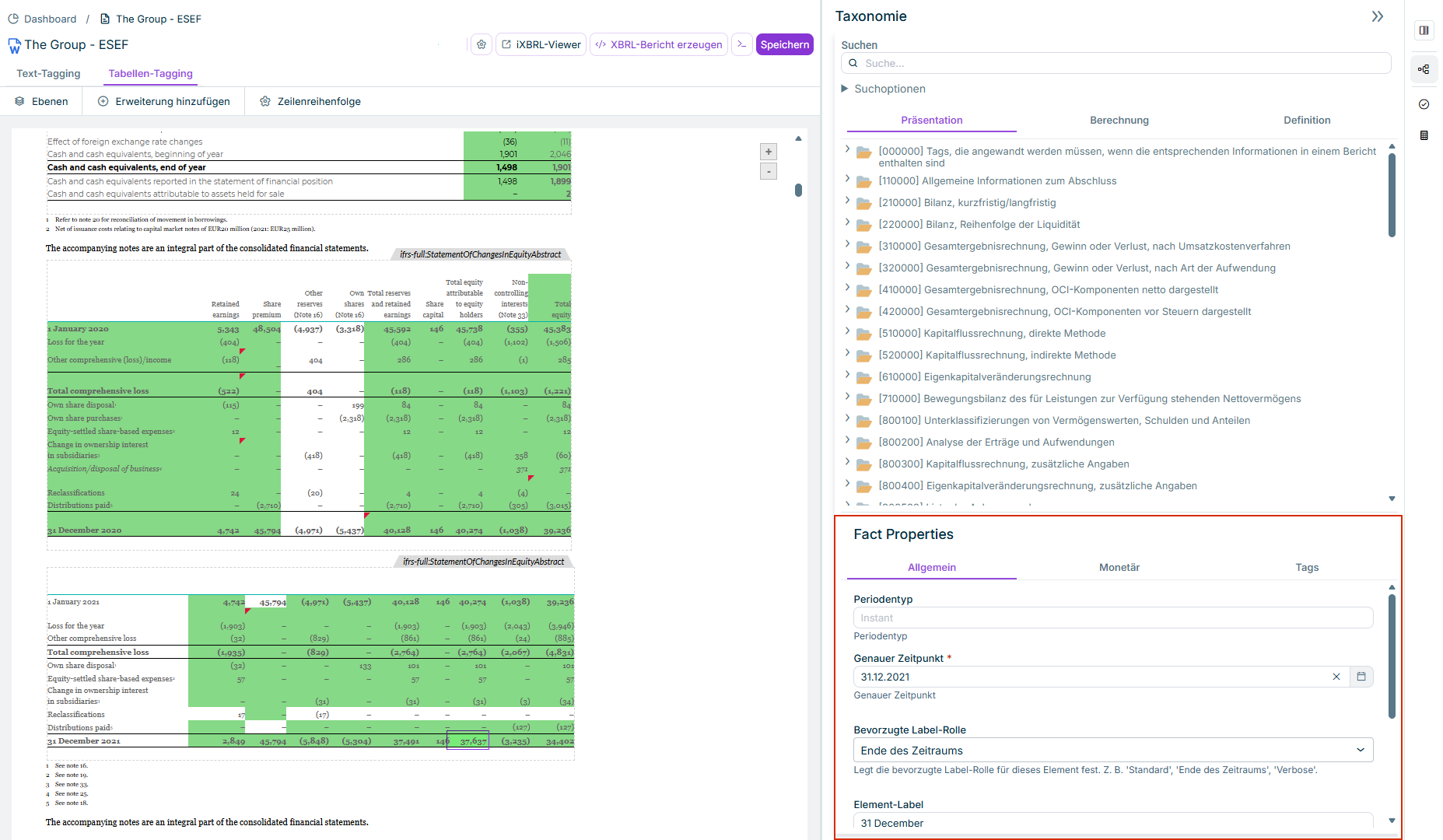
The properties of an XBRL tag can be displayed and edited in the XBRL document workspace.

The properties of a tag can be checked and edited if necessary by clicking on a tagged element in the Fact Properties area.

To change the properties of a tag:

1

Select a tagged element in the Tagging document.

2

Edit the desired setting under Fact Properties.

Part of the 'XBRL document' workspace. The 'Taxonomy' and 'Properties' areas are displayed. A value is selected in a table in the document. The properties of the selected value are displayed.
Display and edit properties of a tag

As soon as you have chosen several values simultaneously in the document, some properties may show the entry Several values are selected in gray. This means the entry cannot be edited. Only the properties that are the same for all selected elements can be edited.

The properties of tags are divided into four areas ( General, Monetary, Tags, and Extension).

The following properties for tags can be displayed and, if necessary, edited:

Default period for the selected value.

  • Instant date: determines the time, e. g. beginning or end of a period.
  • Duration: a period for which the value for the start to end date is specified. As soon as the chosen tag specifies Duration, a start and end date can be entered in the input fields then displayed under Period.

By default, an attempt is made to read out a date from the header of the table for the time or period. If, for example, 2021 is entered there, 31.12.2021 will be inserted as the instant date and 31.12.2020 to 31.12.2021 (i. e. for the entire year 2021) for the duration.

If the header of the table does not contain the year, the current year will be used by default.

Start and, if necessary, end date. A start and end date are displayed only for the Duration period type.

Label used as preferred name. Preferred names are used for the precise specification of items.

Example:

Specification of a balance at the beginning and end of a period: The concept is assigned a period start name and period end name and marked as preferred name at the respective points in the presentation tree.

The default name for the concept is Property, plant, and equipment.

  • Property, plant, and equipment at the beginning of the period (period start label)
  • Increase (decrease) of the property, plant, and equipment
    • Additions, property, plant, and equipment
    • Depreciations, property, plant, and equipment
    • Decrease, property, plant, and equipment
  • Property, plant, and equipment at the end of the period (period end label)

The item name from the table row to which the tagged value belongs. The name is automatically transferred from the Word document into the properties.

Status of the selected tags

Supplementary information on the tag can be entered here.

Specifies what is to be interpreted as value 0 (e. g. a line in a value cell)

Number of decimal places for the accuracy of the reported number. For example, -3 means accuracy in thousands, 2 means accuracy of two decimal places.

Defines the unit of the reported value. E.g.:

  • 6 for millions
  • 3 for thousands
  • -2 for percent

Example: If values are entered in millions, with a scale of 6, 450 would be displayed as 450 000 000.

Defines which character is to be interpreted as decimal separator. The other character is then interpreted as thousands separator.

Examples: 1,000.0 and 1.000,0

Specifies the sign logic

In some cases, the sign logic used in the report will vary from the requirements of the regulatory authority. Like IFRS taxonomies, XBRL taxonomies require in general that certain items, such as Cost of Sales (ifrs-full: Cost Of Sales), are reported as positive numbers. If the item is disclosed as a negative number on the balance sheet, it may be necessary to reverse the value in the XBRL report, but still disclose it as "negative." In some accounting systems (like SAP) all credit notes in the report have a negative sign, whereas the regulatory authority expects these values to be reported with a positive sign.

It is possible to change the sign logic for an individual cell. The following settings are available:

  • None: No specific sign logic is applied.
  • As reported: The value is added always with the same sign as in the report for the iXBRL document.
  • Reverse: The sign is reversed. Negative values are reported as positive values in the iXBRL document and reversed.
  • Always positive: The value is entered always with a positive sign.
  • Always negative: The value is entered always with a negative sign.

Specifies the currency of the selected values

Used to specify the unit of the denominator of a fraction.

Example: euros/m². As soon as the Unit denominator check box is activated, the unit can be chosen from the displayed dropdown list.

Line items tags are the basic tags of the taxonomy. They are used to mark numeric accounting information and qualitative (non-numeric) specifications.

Every tag always only has one line item. A tag can be deleted by deleting the line item.

Line items can be extended by dimensions and abstracts.

Displays the dimensions contained in the tag.

With the ESEF, there is usually no more than one dimension. However, with the ESRS, there is often more than one dimension.

Dimensions are qualifying features required for the unambiguous identification of an issue. For example, a dimension could be used to specify that an issue applies to a specific geographic region.

In the XBRL taxonomy, dimensions are provided as a pre-defined list of elements (also referred to as dimension members), such as country, gender,

type of greenhouse gas.

There are also dimensions that are specific to certain units and must be reported in this context, such as geographic region, strategies, objectives, business segments.

If the tag is a table tag, an abstract is always displayed in the properties of the tag.

Example: A table that displays a cash flow statement is tagged with the tag ifrs-full:Statementof-CashFlows-Abstract.

Specifies whether the values are debit or credit values

Technical name of the element

Technical data type of the extension element

Extensions must be linked to the base taxonomy. What are referred to as anchors are created for this purpose (see Creating a Taxonomy Extension).

The item name from the table row to which the tagged value belongs. The name is automatically transferred from the Word document into the properties and can be changed user specifically.

You can enter here optional reasons for why no standard taxonomy concept can be used.

Default period for the selected value.

  • Instant date: determines the time, e. g. beginning or end of a period
  • Duration: a period for which the value for the start to end date is specified. As soon as the chosen tag specifies Duration, a start and end date can be entered in the input fields then displayed under Period.

By default, an attempt is made to read out a date from the header of the table for the time or period. If, for example, 2021 is entered there, 31.12.2021 will be inserted as the exact time and 31.12.2020 to 31.12.2021 (i. e. for the entire year 2021) for the duration.

If the header of the table does not contain the year, the current year will be used by default.

In-tool validations: In addition to the properties of tags, the results of in-tool validations–validations performed while editing a document – are displayed in the Properties area. This feature allows you to respond and correct any tagging errors immediately.

More information can be found under Validations.