A document can be checked for errors, validity and completeness by means of validations. The XBRL Tagger has two types of validation:

  • Validations executed while editing the document, referred to as in-tool validations. The currently tagged areas are checked for inconsistencies and errors.
  • Validations that are automatically carried out when creating an iXBRL document.
1

Click on the icon in the right sidebar to display the validations..

2

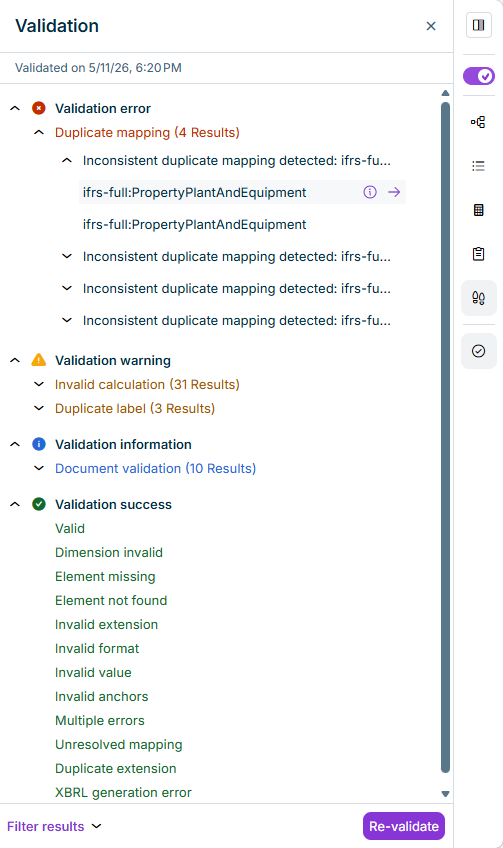
The results of the validations are displayed as follows, for example:

Part of the 'XBRL document' workspace. Example validation results are displayed in the 'Properties' area.
Display of validation results

The validation results are divided into the following types:

TypeDescription
Validation errorShows errors detected during the validation process. The listed errors must be rectified.
Validation warningShows warnings that may have to be edited. The listed warnings should be checked.
Validation informationShows general information, for example on non-tagged values in a table.
Validation successShows the validation areas in which no errors were found.

The following options are available for validation results:

OptionDescription
Click the icon to show details on the message.
Click the icon to display the tag and its properties.
Filter resultsShows options for filtering the validation results:
Re-validateCarries out all validation processes again.

When creating an iXBRL report, a complete XBRL validation is conducted, covering the following specifications:

  • XBRL Specification 2.1
  • XBRL Dimensions 1.0
  • XBRL Formula 1.0
  • Table Linkbase 1.0
  • Extensible Enumerations 1.0 and 2.0
  • Inline XBRL 1.1 incl. XHTML and Transformation Registries 1-4
  • Unit Registry
  • Additionally, a so-called filing rule validation is performed. For example, an ESEF report is checked against the ESEF Reporting Manual and the rules it contains.

An iXBRL report is created in the XBRL document workspace by clicking Generate iXBRL report package.