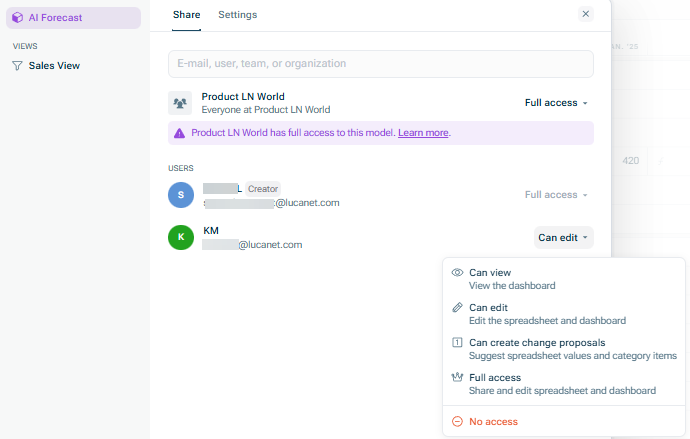
Full access Can edit proposals Can create change proposals: suggest Can view
Apply the sharing settings for all Only apply the sharing settings to the current
If a user is a Viewer If a user is an Editor Creating and Editing Users for the Lucanet CFO Solution Platform
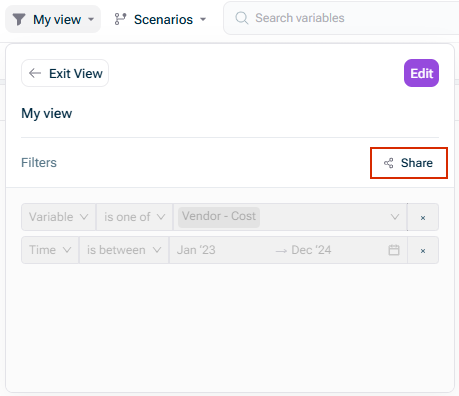
When you share a view with someone else with If you have a view that filters a certain dimension to only include some items, users you share that view with can only update those items. They can: • Rename the items (e.g. rename "Engineering" to "AI") • Update the formulas for those items (e.g. change Projected Equipment Costs from $100,000 to $200,000 for the Sales department) These permissions also account for mappings. For example, if you have a dimension called Employees, where each employee is mapped to a Department, and you share a view including the Engineering department, then the person you share with can: • Add Engineering employees • Remove Engineering employees currently mapped to the Engineering department • Rename Engineering employees • Update formulas for Engineering employees (e.g. change Base Salary from $100,000 to $120,000 for a certain employee) If the person you share with tries to make a change they're not allowed to make, xP&A will block the change and notify them. If you have a view that filters a certain dimension to only include some items, users you share that view with can only update those items. They can: • Rename the items (e.g. rename "Engineering" to "AI") • Update the formulas for those items (e.g. change Projected Equipment Costs from $100,000 to $200,000 for the Sales department) These permissions also account for mappings. For example, if you have a dimension called Employees, where each employee is mapped to a Department, and you share a view including the Engineering department, then the person you share with can: • Add Engineering employees • Remove Engineering employees currently mapped to the Engineering department • Rename Engineering employees • Update formulas for Engineering employees (e.g. change Base Salary from $100,000 to $120,000 for a certain employee) If the person you share with tries to make a change they're not allowed to make, xP&A will block the change and notify them. If the view you share filters out certain scenarios, then users will neither be able to see nor update those hidden scenarios. | |
If someone has access to a model and to a view within that model, they will be able to see both. See | |
Public Private Privately linked same private link When sharing via public or private link, you can give viewers the ability to clone templates
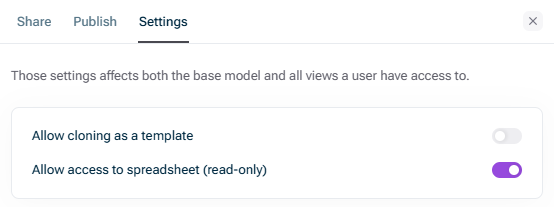
Allow cloning as a template Cloning a model Allow access to spreadsheet (read-only)
This content was generated using AI and reviewed by Lucanet subject matter experts before publication.