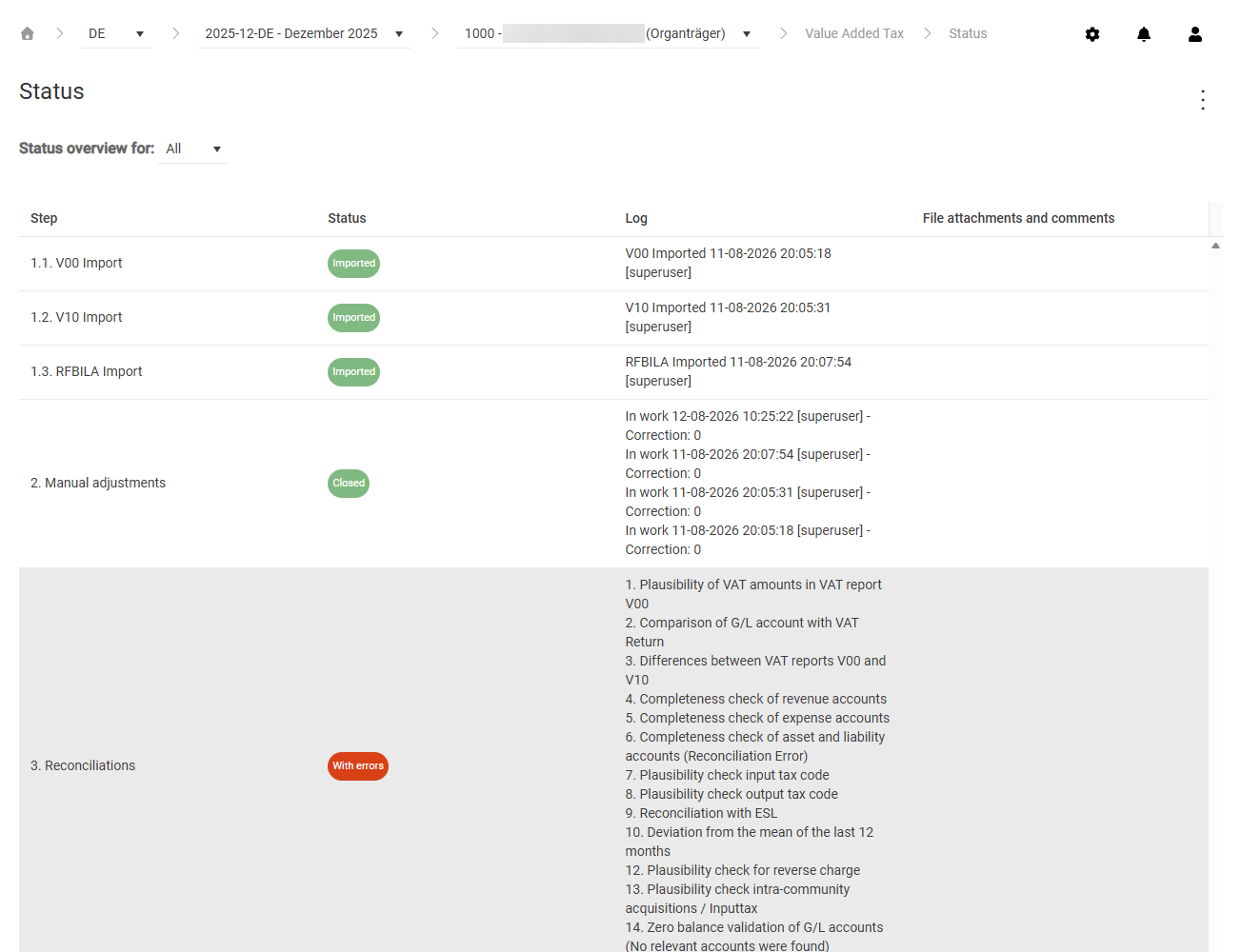
The Status workspace is the starting point for the Value Added Tax functional area in Lucanet VAT (Value Added Tax) and provides information about the current status of the reporting process of the chosen company.
Depending on the chosen kind of period – preliminary return, annual return, or special prepayment –, the steps that the Status workspace displays change. For an overview of the entire reporting process, see the All Steps at a Glance page.
The Status workspace in VAT shows the progress of the reporting process in a table with the following columns:
Column
Description
Step
Number and name of the process step. The following steps are possible: • Import (V00 Import, V10 Import, RFBILA Import) • Manual adjustments • Reconciliations • Declaration • Review • Transmission
For representative VAT group members and consolidated VAT group members, the table also shows the Declaration and Transmission steps as additional group rows for the consolidated declaration, for example VAT Group return and Group Transmission.
For more information about the individual steps, see the following sections.
Status
Current status of the step as a colored status indicator. The possible statuses differ from step to step and are described in the following sections.
Log
Compliance entries with date, time, and user for each step performed
File attachments and comments
Uploaded documents and review files for the respective step
The steps displayed in the Status workspace in VAT depend on the company type, the kind of period, and the country configuration. Each section links to the workspace in which you perform the step.
Availability: This step is only present if the ERP import is configured for the company. If the declaration is created manually and in special prepayment periods, this step does not apply.
The import step is divided into three substeps: V00 Import (RFUMSV00), V10 Import (RFUMSV10), and RFBILA Import (RFBILA00). In the Status workspace in VAT, each substep shows the import status of the respective report:
Status
Meaning
Not started
The report has not been imported yet.
Imported
The report was imported successfully.
The log contains a compliance entry with action, date, time, and user for each import. If a report is imported several times, each import is recorded separately.
For VAT group members with company codes, the single step Data transfer replaces the three import steps. The step shows whether the declaration data has been transferred from the subordinate units.
You perform this step in the Declaration workspace.
Availability: This step is always present.
The Manual adjustments step in VAT shows whether the declaration has been opened for editing, for example for manual adjustments of the imported values:
Status
Meaning
Not started
The declaration has not yet been opened for editing.
Started
The declaration has been opened and can be edited.
Closed
Editing is complete, and the declaration has been closed.
The log contains a compliance entry each time editing starts and each time the declaration is reopened after it was finalized. If the declaration is created manually, VAT creates an entry when the first declaration value is entered.
You perform this step in the Declaration workspace and, for VAT groups, also in the VAT Group Return workspace.
Availability: This step is always present. For representative VAT group members and consolidated VAT group members, the table shows an additional VAT Group return row that shows the status of the consolidated declaration.
The Declaration step in VAT can have the following statuses:
Status
Meaning
Not closed
The declaration has not been finalized yet.
Closed
The declaration has been finalized.
The log contains a compliance entry each time the declaration is finalized, with date, time, user, and the correction version.
For more information about the review, see the Month Overview page.
Availability: This step is displayed if the review step is activated in the country settings. It can be performed once before and once after the transmission.
You configure the review step under Settings | Countries. Click a country to open the edit view, and activate the required review option in the System Settings section.
The Review step in VAT can have the following statuses:
Status
Meaning
Not performed
No review has been performed yet.
Review removed
A previously added review has been reset.
Review added
The review has been performed successfully.
The log contains a compliance entry for each review performed or reset, including the correction version.
Availability: This step is present if electronic transmission is configured. For representative VAT group members, the table also shows the Group Transmission step, which shows the transmission status of the consolidated declaration of the VAT group.
The Transmission step in VAT can have the following statuses:
Status
Meaning
Not sent
The declaration has not been transmitted yet.
Sending
The transmission is currently running.
Sent
The declaration was transmitted successfully.
Transmission error
The transmission failed.
The log contains a compliance entry for each transmission attempt with date, time, user, and the result of the transmission.
This content was generated using AI and reviewed by Lucanet subject matter experts before publication.