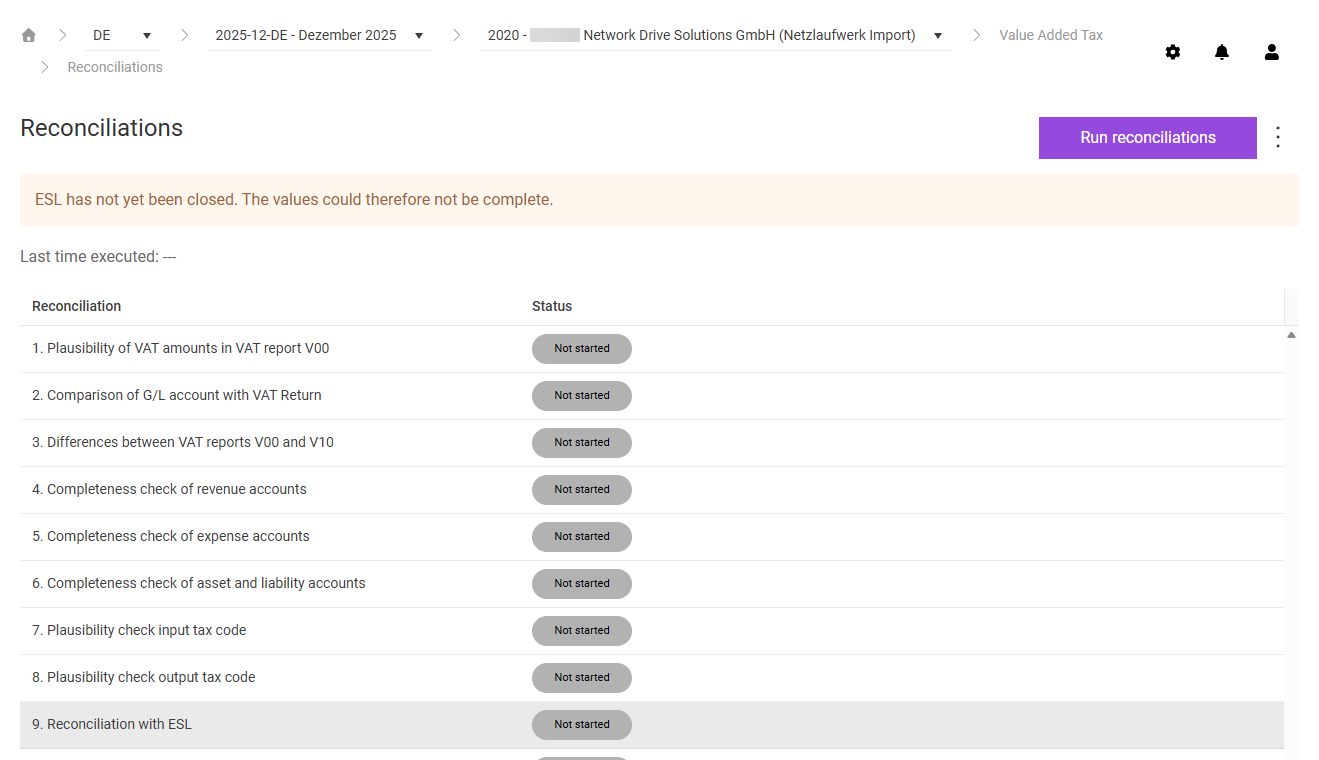
In the Reconciliations workspace in Lucanet VAT (Value Added Tax), you perform the configured plausibility and completeness checks of the preliminary VAT return. Based on the imported ERP reports, VAT checks the correctness of the declaration in up to 13 different reconciliations. The displayed reconciliations depend on the settings in the master data: only reconciliations that were previously activated for the respective company are visible.
You can only perform the reconciliations while the declaration is open. If you import a report again in the Import workspace after the reconciliations have been performed, VAT resets the reconciliation results.
The overview table of the Reconciliations workspace in VAT lists all reconciliations configured for the company:
Column
Description
Reconciliation
Name of the reconciliation
Status
Result status after the last run. The following status values are possible: • Plausible: All reconciliation items are free of errors. • In tolerance: All differences are within the configured tolerance limit. • With warnings: At least one reconciliation item has a warning. • Error: At least one reconciliation item has an error. The number displayed indicates the number of incorrect items. • Not started: The reconciliation has not been performed yet.
Click a row in the table to open the detail view of the respective reconciliation.
To start the reconciliations in VAT, click Run reconciliations in the top right corner.
VAT performs all reconciliations configured for the company and displays the results in the overview table. If reconciliations have already been performed before, VAT displays the date, time, and user name of the person who last performed them after Last time executed:.
Close the European Sales List (ESL) of the current period before you perform the reconciliations. As long as the ESL is open, the values of the ESL reconciliation may not be complete; in this case, VAT indicates this with a message.
In the detail view of each reconciliation in VAT, the individual reconciliation items are listed in a table. Each item contains the following status information:
Reconciliation result (Rec. result)
VAT displays the following reconciliation results for a reconciliation item:
Result
Meaning
Check mark (✓)
The reconciliation item has no difference.
Exclamation mark (!)
The reconciliation item has a difference that is within the configured tolerance limit. No action is required, for example for rounding differences.
In tolerance (green)
The difference is within the tolerance limit and is considered plausible.
Red X
There is a difference that exceeds the tolerance limit. The item is considered incorrect and must be processed.
Processing status
VAT displays the following processing statuses for a reconciliation item:
Status
Meaning
(no icon)
The reconciliation item is correct and does not need to be processed.
Open
The reconciliation item is incorrect and should be processed.
In work
Processing of the item has started. Clicking this status resets the item to Open.
Done
The reconciliation item has been processed. Clicking this status resets the item to Open.
VAT offers reconciliations 1 to 14. Which of them are performed for a company depends on the configuration in the master data.
Under Editing Reconciliations 1 to 14, you will find the individual reconciliations that VAT performs for a company. For each reconciliation, you learn what is checked, how a difference arises, and how to process an incorrect item.
In addition to the general functions, the following function is available in the three-dot menu (⋮) in the top right corner of the Reconciliations workspace in VAT:
Function
Description
Change log
Shows all changes made to the reconciliations. You can upload a file attachment for each change there.
This content was generated using AI and reviewed by Lucanet subject matter experts before publication.