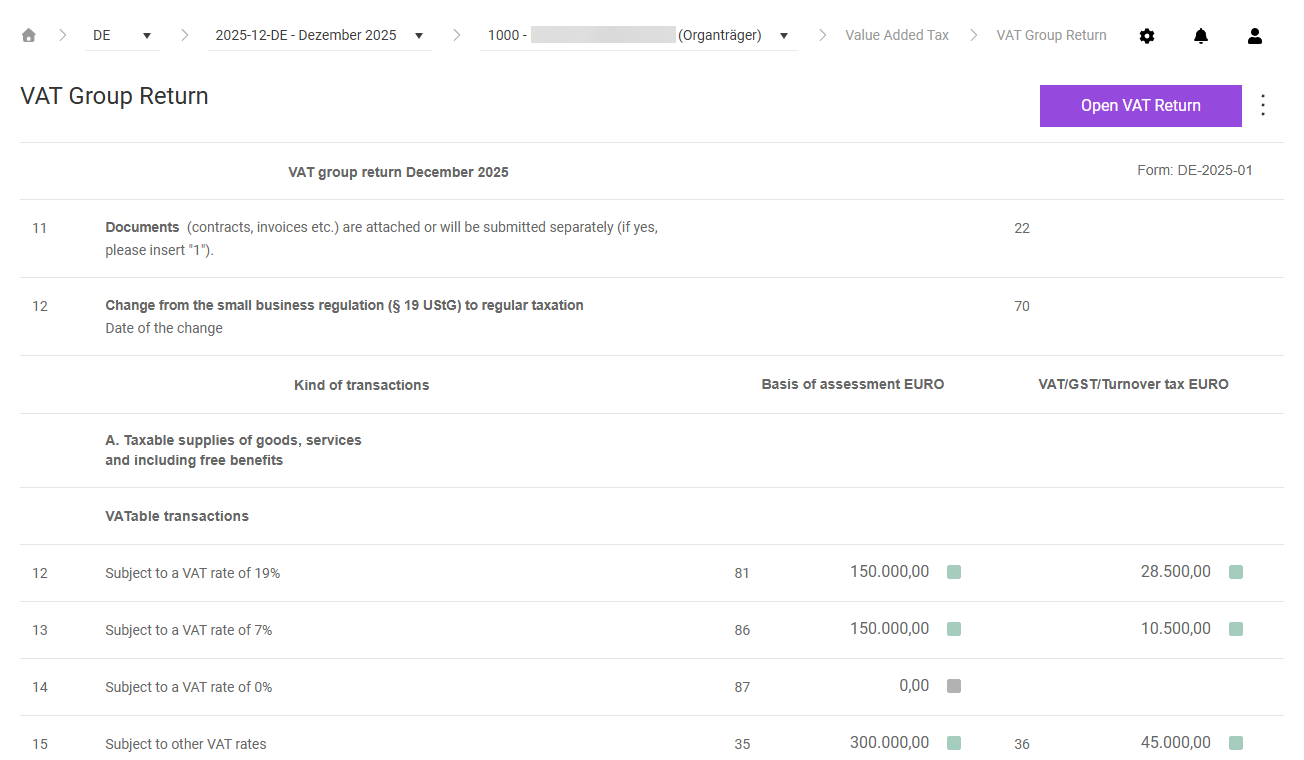
The VAT Group Return workspace in Lucanet VAT (Value Added Tax) shows the consolidated preliminary VAT return for the entire VAT group of a company. The workspace is only visible for companies with the VAT group member type Representative VAT group member or Consolidated VAT group member.
The field values of the VAT group return in VAT are made up of the declaration data of the chosen company itself and of all VAT group members directly below it, provided that the VAT group members have already finalized their declaration for the current period. Whether a VAT group member entered the values of its declaration manually or via a report import does not matter for the transfer.
The structure of the VAT Group Return workspace in VAT is identical to the Declaration workspace. The form shows the following columns:
Column
Description
Kind of transactions
Row number and name of the declaration field according to the official form
Basis of assessment EURO
Consolidated value of the base of the respective VAT matter
VAT/GST/Turnover tax EURO
Consolidated value of the related tax amount
If not all declarations of the VAT group members have been finalized when you open the workspace, the displayed values are provisional. In this case, VAT indicates this with a message.
Unlike in the regular declaration, you cannot add entries or create offsetting entries in the VAT group return in VAT. Adjustments are only possible in the respective company declarations.
Colored indicators can appear behind the field amounts in the VAT group return in VAT. They provide information about the origin of the values:
Indicator
Meaning
Green box
VAT transferred values from the declarations of the VAT group members. Move the mouse pointer over the box to see which companies the amounts come from. VAT only shows the level directly below.
Gray box
VAT did not find any entries for this field in the VAT group members. In this case, the displayed amount is always 0,00 EUR.
Click Finalise in the top right corner to close the declaration of the VAT group in VAT. The button is grayed out as long as not all VAT group members directly below have finalized their declaration.
If you still need to make adjustments before finalizing the VAT group return, reopen the declaration of the company concerned and make the changes there.
Use the Open VAT Return button in the top right corner to reopen a finalized VAT group return. You continue to make adjustments to the individual declarations of the VAT group members in the respective company declarations.
If the chosen company is a Consolidated VAT group member, VAT automatically transmits the declaration of the intermediate VAT group to the parent company – a representative VAT group member or another consolidated VAT group member – after finalization and takes the values into account there in the VAT Group Return.
Only the representative VAT group member at the top of the VAT group can finally transmit the declaration to the tax office.
In addition to the general functions, the following functions are available in the three-dot menu (⋮) in the top right corner of the VAT Group Return workspace in VAT:
Function
Description
Info view
Shows technical details for each field, for example the field type, the mapping ID, and the calculation formula
Declaration export (Pdf)
Exports the VAT group return as a PDF file
Declaration export (Excel)
Exports the VAT group return as an Excel file
Form language: DE/Form language: EN
Switches the display language of the declaration form, independently of the system language
This content was generated using AI and reviewed by Lucanet subject matter experts before publication.