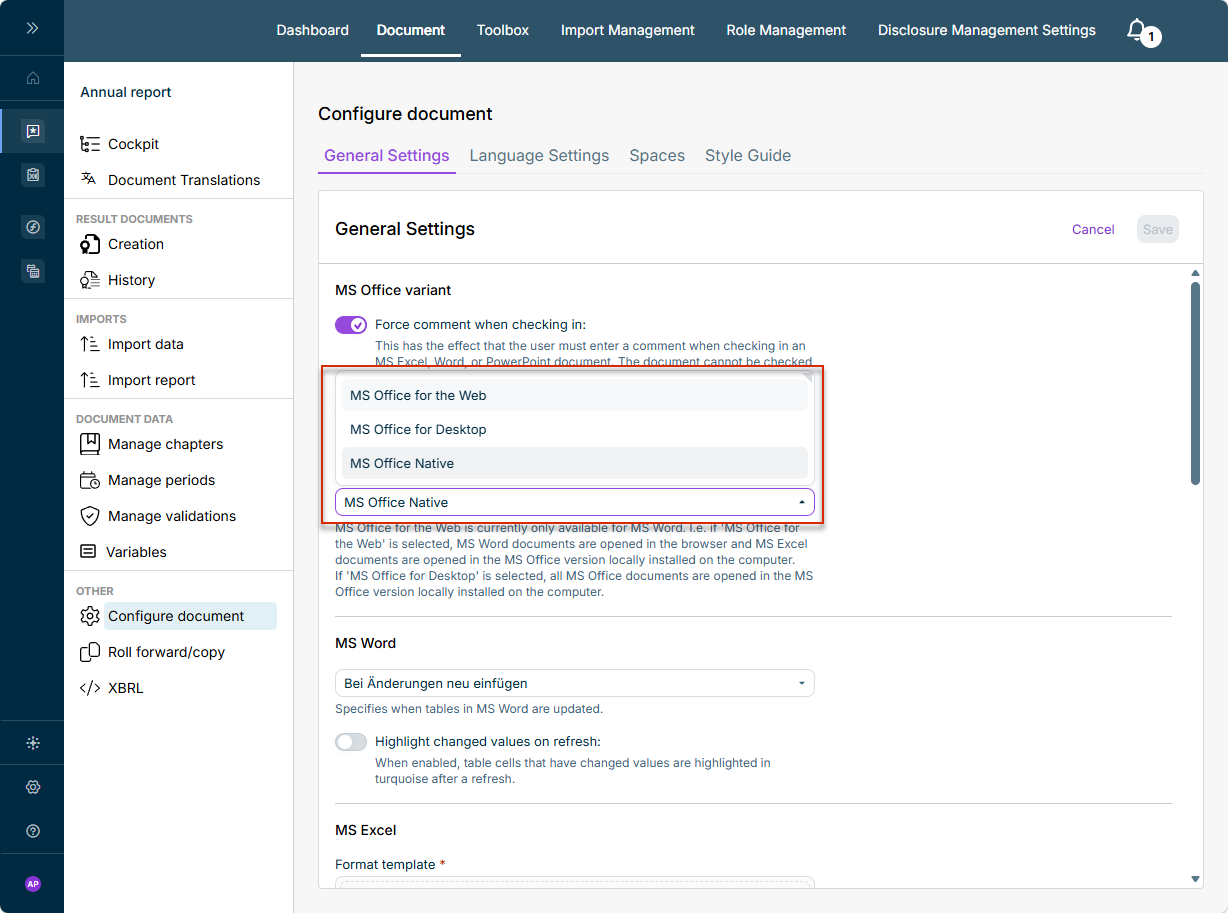
In Lucanet Disclosure Management, three different variants are available for working with MS Word and MS Excel: MS Office for the Web, MS Office for Desktop, and MS Office Native. The selected variant determines where MS Office documents are opened and edited – in the browser or in the version of MS Office installed locally on the computer – and which ribbons you work with in MS Word or MS Excel.

You set the variant per document under Configuring a Document in the General Settings area, using the MS Office Variant selection. For more information on the settings, see Configuring a Document.

The MS Office Variant selection under 'General Settings', showing the options 'MS Office for the Web', 'MS Office for Desktop', and 'MS Office Native'
Selecting the MS Office variant under Configuring a Document | General Settings

The following table shows how the three variants differ in terms of the MS Word and MS Excel version used:

VariantMS Word opens …MS Excel opens …
MS Office for the Webin the browserin the browser
MS Office for Desktopin the locally installed Office versionin the locally installed Office version
MS Office Nativein the locally installed Office version (as an add-in)in the locally installed Office version (as an add-in)

When MS Office for the Web is selected:

  • MS Word documents open in the browser (Office for the Web).
  • MS Excel documents open in the browser (Office for the Web).

This lets authors edit Word and Excel files directly in the browser without a local Office installation.

When MS Office for Desktop is selected, all MS Office documents – Word and Excel – open in the version of MS Office installed locally on the computer.

With MS Office Native, you use the Office for the Web ribbons together with the locally installed Office programs (MS Word and MS Excel). In this variant, Disclosure Management runs directly in the locally installed Word desktop application as an add-in – in contrast to Office for the Web, which runs in the browser.

VariantAdvantagesDisadvantagesInstallation
MS Office for the WebCollaborative work by several authors directly in the browser; no local Office installation required; always up to dateLimited by the Microsoft web platform: no custom fonts, no multi-column layout, no advanced typography; some Disclosure Management functions are not yet availableOnly upload the Office Online Manifest – no Dispatcher
MS Office NativeWork in the locally installed Office application with the full range of MS Word/Excel functions (custom fonts, multi-column layout, typography); modern ribbons (DM-Content/DM-Layout); no Dispatcher required; successor to MS Office for DesktopLocal Office installation required; individual functions from Office for Desktop are being added gradually (currently only minor differences)Two manifest files (Content + Layout) – no Dispatcher
MS Office for DesktopWork in the locally installed Office application; currently the largest range of functions (e.g. XBRL, Copilot, ESG text value, advanced table and layout configuration)Phase-out model; complex installation (Dispatcher + Word ribbon + Excel ribbon); the Dispatcher and ribbons have to be updated frequentlyDispatcher + Word ribbon + Excel ribbon
Your use caseRecommended variant
Several people are to work on a document together/collaboratively, without a local Office installationMS Office for the Web
Local work with the full range of MS Word/Excel functions (custom fonts, multi-column layout, typography) – in the modern variant without a DispatcherMS Office Native
You need functions that are currently only available in MS Office for Desktop (e.g. XBRL, Copilot, ESG text value, advanced table/layout configuration)MS Office for Desktop (interim solution)

MS Office Native is the recommended variant for local work and is the successor to MS Office for Desktop. The function differences that currently still exist between MS Office for the Web/MS Office Native and MS Office for Desktop will be aligned soon – after that, there will be no reason to keep using MS Office for Desktop. For a detailed comparison of the functions, see Ribbons for Disclosure Management.

Disclosure Management provides the components needed for each variant in the Toolbox – in the Dispatcher, Ribbons, and Add-in for Office for the Web areas:

  • MS Office for the Web: Download the Office Online Manifest and upload it to Office for the Web to activate the Disclosure Management ribbon in the browser.

  • MS Office for Desktop: Install the Dispatcher and the Ribbons (MS Word ribbon and MS Excel ribbon).

    Only in Office for the Web: The Dispatcher is the basic prerequisite for using MS Office for Desktop on a computer: without it, MS Office for Desktop does not work. The Dispatcher handles the communication between Disclosure Management in the browser and the locally installed MS Office programs.

    For detailed installation instructions for the Dispatcher and ribbons, see Installing and Updating the MS Office Components.

  • MS Office Native: Add the two desktop manifest files as add-ins – the Word und Excel Desktop Content Manifest and the Word Desktop Layout Manifest.

    For MS Office Native, two separate manifest files – one for Content and one for Layout – are available in the Toolbox. For more information on the ribbons, see Ribbons for Disclosure Management.

To activate the MS Office variant you want:

1

Open Configuring a Document and switch to General Settings.

2

In the MS Office Variant area, select the entry you want.

3

Save the setting.